Search the Community
Showing results for tags 'limiter'.
Found 3 results
-

Version 1.5.0
42 downloads
TC Stack Limiter lets you set custom stack limits for items inside the Tool Cupboard (TC). It’s a great way to control how much stuff players can store in the TC and help keep the game balanced. Can this plugin do that? Server operators can manage game balance by adjusting the number of items that can be stored in a TC. Key Future * Change the global stack size of items: by setting a global stack multiplier, you can change the stack size of a particular item. * Item Stack Limit in Tool Cabinet: Apply a specific maximum stack number to wood, stone, Metal Fragments, and HQMs set in the Cabinet Stack Override. (e.g. if wood: 1000 is set, only a maximum of 1000 pieces of wood can be stacked in the tool cabinet). * Notification: If enable notification is set to true, items that exceed the stack limit will be automatically returned to the player's inventory and the player will be notified. * Handling of items exceeding stack limit: If a player attempts to place an item in the tool cabinet that exceeds the limit, the excess will be returned to the player's inventory. If the player's inventory is full, the item will be dropped to the floor. Compatibility * StackSizeController * Loot Table & Stacksize GUI Although this plugin is compatible with StackSizeController, an error is triggered every time an item is placed into a Tool Cupboard due to an issue on StackSizeController's side. For this reason, we recommend using Loot Table & Stacksize GUI instead. Admin Commands /tcstack list - Displays the current configuration. /tcstack set <item shortname> <amount> - Sets the TC stack limit for the specified item to <amount>. /tcstack remove <item shortname> - Removes the stack limit (reverts to the normal stack size in the TC). /tcstack reload - Reloads the configuration. Config { "Cupboard Stack Overrides": { "wood": 1000, "stones": 1000, "metal.ore": 1000, "metal.fragments": 1000, "hq.metal.ore": 100, "metal.refined": 100, "lowgradefuel": 500, "crude.oil": 500 "fat.animal": 1000, "cloth": 1000, "bone.fragments": 1000, "charcoal": 1000, "horsedung": 500, "fertilizer": 1000, "scrap": 1000 }, "Enable Notifications": true, // Toggle whether players receive a message when an item exceeds the stack limit. "Priority Mode (TCFirst or InventoryFirst)": "TCFirst", // "TCFirst": Try placing excess items in other TC slots first, then. "InventoryFirst": Try returning to player's inventory first, then TC. "Enforce TC Limits": true, // Whether to actually apply stack limits in the TC. If disabled, limits are only visual. "Split Excess Stacks": true, // If enabled, automatically split items into valid stack sizes when inserting into the TC. "Override Other Plugins for TC": true // "true": Prioritize TCStackLimiter values inside the TC. "false": Use the minimum stack size between TCStackLimiter and other plugins. }$2.99 -
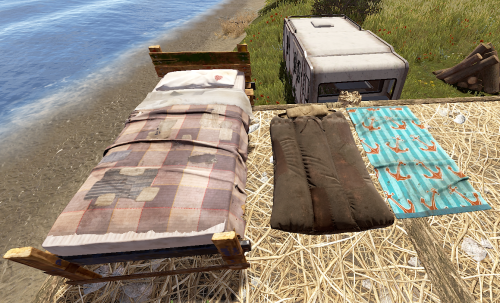
Version 1.0.8
71 downloads
Allows complete individual settings of Beds, Towels, Bags & Campers using Permissions or Global setters with radius, limits Unlock Time, Respawn Cooldown! Improves server/client performance by auto-managing players bag limits & radius! You can assign a bed to a friend on your friends list in game & when they join it will give them the invite to join your team to get the bed/bag/towel/etc! Notes: Better Vanish ( the paid version ) has known bugs with chat commands not working while in vanish. To resolve the problem leave vanish mode. Permissions You can add or remove as many permissions as you'd like in the config! Player Chat Commands /bag <Shows just the limits & how many of what you have placed.> /bag bags | towels | beds | campers <Selects & shows how many of the specific bag you have placed down.> /bag towels clear | rename | limits /bag towels clear <Clears all of the selected bag type from the player that ran the command> /bag towels rename dingus <Renames all of the selected bag type to the new name> Configuration { "Toggle Offline Team Invite System through bag gifting. Default: Off": false, "# of players that can place a spawn point in a zone radius": 16, "Player Respawn Zone Radius Check": 35, "Sets Global Defaults": { "True Only Owner can set name | False Allows team members": false, "Sets Total Max Limit within a radius": 12, "Sets Limit radius": 35, "Sleeping Bags": { "DefaultTextName": "Unnamed Bag", "SecondsBetweenReuses": 300.0, "UnlockTime": 30.0 }, "Towel Bags": { "DefaultTextName": "Unnamed Towel", "SecondsBetweenReuses": 300.0, "UnlockTime": 30.0 }, "Beds": { "DefaultTextName": "Bed", "SecondsBetweenReuses": 120.0, "UnlockTime": 30.0 }, "Camper Bags": { "DefaultTextName": "Unnamed Camper Seat", "SecondsBetweenReuses": 120.0, "UnlockTime": 30.0 } }, "Player Permissions": { "vip1": { "True Only Owner can set name | False Allows team members": false, "Sets Total Max Limit within a radius": 12, "Sets Limit radius": 35, "Sleeping Bags": { "DefaultTextName": "Unnamed Bag", "SecondsBetweenReuses": 150.0, "UnlockTime": 20.0 }, "Towel Bags": { "DefaultTextName": "Unnamed Towel", "SecondsBetweenReuses": 150.0, "UnlockTime": 20.0 }, "Beds": { "DefaultTextName": "Bed", "SecondsBetweenReuses": 60.0, "UnlockTime": 20.0 }, "Camper Bags": { "DefaultTextName": "Unnamed Camper Seat", "SecondsBetweenReuses": 150.0, "UnlockTime": 20.0 } }, "vip2": { "True Only Owner can set name | False Allows team members": false, "Sets Total Max Limit within a radius": 12, "Sets Limit radius": 35, "Sleeping Bags": { "DefaultTextName": "Unnamed Bag", "SecondsBetweenReuses": 75.0, "UnlockTime": 15.0 }, "Towel Bags": { "DefaultTextName": "Unnamed Towel", "SecondsBetweenReuses": 75.0, "UnlockTime": 15.0 }, "Beds": { "DefaultTextName": "Bed", "SecondsBetweenReuses": 30.0, "UnlockTime": 15.0 }, "Camper Bags": { "DefaultTextName": "Unnamed Camper Seat", "SecondsBetweenReuses": 75.0, "UnlockTime": 15.0 } } } }$9.99 -

Version 1.1.7
482 downloads
Multi permission based entity limit system Limit number of entities per player/group/team/clan UI config setup options Auto updating player permissions Chat Commands: /limits: Opens the user interface (UI) for managing entity limits Console Commands: ael.createnew <advancedentitylimit.NAME> <optional: copy from advancedentitylimit.NAME>: Adds new permissions for entities. Optionally, you can copy permissions from an existing entity limit. Player Permissions: advancedentitylimit.ui: Allows players to seethe UI. advancedentitylimit.default: Applies the default entity limits advancedentitylimit.vip: Applies the vip entity limits You can create custom permission groups to have various limits per group. Admin Permissions: advancedentitylimit.setlimit: Grants permission to set limits for entities. advancedentitylimit.createperm: Allows the creation of new permissions for entities. advancedentitylimit.admin: Provides full access. { "Auto-fill missing entities?": true, "Chat prefix": "<color=red>[Limits]</color>: ", "A message when the player reaches the maximum limit of objects": "You have <color=red>reached</color> the limit of this object ({0})", "Use teams for sum them constructions": false, "Use clans?": false, "Clans plugin for sum player constructions (Mevent, k1lly0u)": "Mevent" } Credit to @MuB-Studios the original author of this plugin$15.99- 80 comments
- 14 reviews
-
- 5
-

-

-
- #limit
- #advanceentitylimit
- (and 21 more)