
Search the Community
Showing results for tags 'ore'.
Found 10 results
-
Version 1.0.6
128 downloads
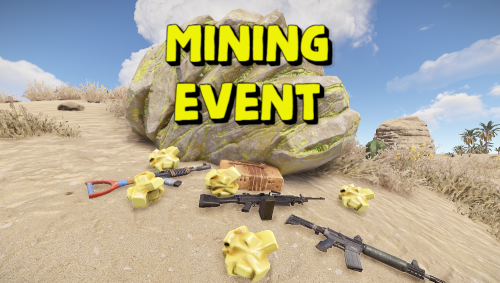
Adds an exciting event for players to your server. Once the event starts, players will be able to get more loot by mining ore and finding small stashes with loot underneath it. The event has an interface with a table. The event is easily configured and can be triggered automatically or by command. You can reward the winners with special prizes, for example, an item with a unique name and skin (only for items with stacks of size 1). Commands (admin only): /mie_start - starts an event /mie_stop - starts an event /mie_forcestart - force the event to start Config: { "Autostart event(disable if you want to trigger the event only manually)": true, "Minimum time to event start(in seconds)": 900, "Maximum time to event start(in seconds)": 10800, "Minimum event duration(in seconds)": 300, "Maximum event duration(in seconds)": 900, "Minimum number of online players to trigger an event": 1, "Pre-event message": "Mining event will start in a minute", "Pre-event message time(in seconds)": 60, "Event message": "Mining event has started, go and get all the ore!", "End event message": "Mining event ended", "Display a table with player names": true, "Resource multiplier during the event": 2.0, "Spawn a small stash under the ore": true, "Small stash items list": [ { "prefabName": "scrap", "dropChance": 100, "min": 4, "max": 8, "skinID": 0, "displayName": "" }, { "prefabName": "metal.fragments", "dropChance": 100, "min": 100, "max": 200, "skinID": 0, "displayName": "" } ], "Small stash removal time(in seconds)": 60, "First place prize(items list)": [ { "prefabName": "scrap", "dropChance": 100, "min": 200, "max": 400, "skinID": 0, "displayName": "" }, { "prefabName": "metal.fragments", "dropChance": 100, "min": 1000, "max": 2000, "skinID": 0, "displayName": "" }, { "prefabName": "rifle.ak", "dropChance": 10, "min": 1, "max": 1, "skinID": 809190373, "displayName": "AK" } ], "Second place prize(items list)": [ { "prefabName": "scrap", "dropChance": 100, "min": 100, "max": 200, "skinID": 0, "displayName": "" }, { "prefabName": "metal.fragments", "dropChance": 100, "min": 500, "max": 1000, "skinID": 0, "displayName": "" } ], "Third place prize(items list)": [ { "prefabName": "scrap", "dropChance": 100, "min": 50, "max": 100, "skinID": 0, "displayName": "" }, { "prefabName": "metal.fragments", "dropChance": 100, "min": 250, "max": 500, "skinID": 0, "displayName": "" } ] }$9.99 -
Version 1.0.4
21 downloads
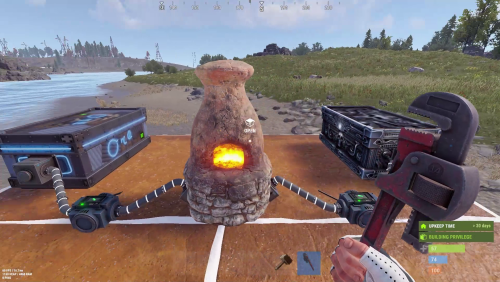
INTRODUCING INDUSTRIAL FURNACE – TRANSFORM YOUR RUST SMELTING! Elevate your Rust server with this high-performance, automated smelting system designed for efficient resource processing and server management. KEY FEATURES: • Automated Attachments & Custom Layouts: Integrates storage containers and adapters in both visible and hidden configurations. • Adjustable Smelting Speed & Fuel Efficiency: Customize smelting speeds for Standard, VIP, and Admin users. Advanced cooking logic minimizes fuel use and even produces bonus charcoal. • Cooking & Fuel Management: Manages cooking cycles, fuel consumption, and item transfers for optimal performance. • Robust Access & Pickup Control: Secure your furnace with owner-based permissions plus optional team and friend access via the Friends plugin. Easily pick up placed furnaces to reclaim resources. • Intuitive Purchase & User Interfaces: Buy your furnace with in-game commands and manage input/output storage through user-friendly UIs. • Smart Item Management: Automatically transfer items between the furnace, input, and output storages. • Comprehensive Configuration: Fine-tune every aspect including purchase costs, smelting speeds, player limits, and multi-tier permission settings. • Multi-Language Localization: Fully localized in English, Portuguese, German, Spanish, and Russian. ESSENTIAL PERMISSIONS & COMMANDS: • industrialfurnace.admin: Grants admin access for unlimited furnace placements. • industrialfurnace.give: Enables the /givefurnace command to award furnace items. • industrialfurnace.pickup: Allows authorized players to pick up placed furnaces. • Group-Specific Permissions: Automatic registration (e.g., industrialfurnace.vip1, vip2, etc.) controls enhanced limits and faster smelting for VIP players. USAGE & SETUP: • Purchasing: Use /buyfurnace to open the purchase UI. Costs are configurable (typically scrap, sheet metal, refined metal, and metal fragments). • Placing & Interacting: Place the furnace using standard building mechanics and manage storage via intuitive UI panels. • Configuration Updates: The versioned config auto-updates with settings for furnace skin ID, storage visibility, and access options (owner-only, team, or friend). • Enhanced Cooking & Transfer: Enjoy efficient smelting and smart item transfers based on VIP settings, ensuring smooth operations during high demand. Upgrade your Rust server today with Industrial Furnace and experience the future of efficient, automated resource management! Plugin configuration:$15.00 -
.thumb.gif.c307d70618c13c911fe1d652a2c179f1.gif)
Version 1.1.0
187 downloads
Introduce some new ore to your server for your players to Mine for, Smelt or Recycle. ***DISCLAIMER*** I CANNOT GUARANTEE COMPATIBILITY WITH OTHER FURNACE PLUGINS EX. SPLITTERS, FURNACE UPGRADES ETC. REFRAIN FROM PURCHASE IF YOU USE ANY OF THESE. REASON FOR SPLITTERS, ON CUSTOM ORE INSERTION, SINCE OUR "ORE" ISNT REALLY ORE, IT DOESNT GET DETECTED AS REGULAR ORE DOES. REASON FOR FURNACE UPGRADES, API WILL MOST LIKELY NEED TO BE IN PLACE IN ORDER TO GET THINGS TO WORK RIGHT. ***DISCLAIMER*** ***NOTES*** I RECOMMEND USING COAL AS THE ITEM SHORTNAME - IF YOU NEED TO CHANGE IT DO NOT USE ORE ITEMS. ORE GATHER CAN BE LOCKED BEHIND PERMISSION - IF YOU NEED TO ADD A PERMISSION USE - customore.yourpermissionname ***NOTES*** The Plugin comes preset with 7 Custom Ore items & 2 output possibilities for each, depending on if its smelted or recycled. Recycling is optional for each ore. Smelting time is configurable per each ore. Make Rare ore longer to smelt if using it as an ingredient in a currency item ex. using it as an item needed to craft gold bars etc. Set tools needed to mine for custom ore, and set what ore types can give which ore, set stone metal and sulfur to give or one type if needed. Works with Skill Tree for Ore Yield. COMMANDS /C.GI - REQUIRES CUSTOMORE.ADMIN - GIVES ALL INPUT ITEMS TO INVENTORY /C.GO - REQUIRES CUSTOMORE.ADMIN - GIVES ALL OUTPUT ITEMS TO INVENTORY /SmeltTime- Will message the player if they have a custom ore item highlighted in hotbar, that ores smelt time, and output item. { "Global Settings": { "Tools Allowed to Gather Custom Ore": [ "stone.pickaxe", "concretepickaxe" ], "Allow Stack Handling?": false, "Ore Shortname": "coal", "If using Stack Handling - Max Stackable for Ore Shortname": 1000, "Enable Skill Tree Yield Boost": true, "Enable Message on Regular Gather": true, "Enable Message on Bonus Gather": true }, "Ore Items": [ { "Ore Setup": { "Input CustomName": "Jade Ore", "Input SkinID": 3422508408, "Input Cook Time In Seconds": 5.0, "Gather Options": { "Able to be Mined for?": true, "Requires Permission to find while Mining?": true, "Permission Name": "CustomOre.Jade", "Nodes to Find this Ore? 1 - Stone, 2 - Metal, 3 - Sulfur": [ 1 ], "Gather Min": 1, "Gather Max": 1, "Gather Bonus Multiplier On Bonus Hit": 2, "Probability - 1.0 is 100%": 0.5 } }, "Output Setup": { "Smelting Output ShortName": "coal", "Smelting Output CustomName": "Refined Jade", "Smelting Output SkinID": 3422508525, "Smelting Output Amount Min": 1, "Smelting Output Amount Max": 1, "Can Be Recycled?": false, "Recycler Output ShortName": "coal", "Recycler Output CustomName": "Jade Shard", "Recycler Output Amount Min": 1, "Recycler Output Amount Max": 1, "Recycler Output SkinID": 3424669338 } }, { "Ore Setup": { "Input CustomName": "Ocean Ore", "Input SkinID": 3422508784, "Input Cook Time In Seconds": 425.0, "Gather Options": { "Able to be Mined for?": false, "Requires Permission to find while Mining?": false, "Permission Name": "", "Nodes to Find this Ore? 1 - Stone, 2 - Metal, 3 - Sulfur": [ 1, 2, 3 ], "Gather Min": 1, "Gather Max": 1, "Gather Bonus Multiplier On Bonus Hit": 2, "Probability - 1.0 is 100%": 0.5 } }, "Output Setup": { "Smelting Output ShortName": "coal", "Smelting Output CustomName": "Refined Ocean Gem", "Smelting Output SkinID": 3422508907, "Smelting Output Amount Min": 1, "Smelting Output Amount Max": 1, "Can Be Recycled?": false, "Recycler Output ShortName": "coal", "Recycler Output CustomName": "Ocean Shard", "Recycler Output Amount Min": 1, "Recycler Output Amount Max": 1, "Recycler Output SkinID": 3424669283 } }, { "Ore Setup": { "Input CustomName": "Lightning Ore", "Input SkinID": 3422508998, "Input Cook Time In Seconds": 525.0, "Gather Options": { "Able to be Mined for?": false, "Requires Permission to find while Mining?": false, "Permission Name": "", "Nodes to Find this Ore? 1 - Stone, 2 - Metal, 3 - Sulfur": [ 1, 2, 3 ], "Gather Min": 1, "Gather Max": 1, "Gather Bonus Multiplier On Bonus Hit": 2, "Probability - 1.0 is 100%": 0.5 } }, "Output Setup": { "Smelting Output ShortName": "coal", "Smelting Output CustomName": "Refined Lightning Gem", "Smelting Output SkinID": 3422509109, "Smelting Output Amount Min": 1, "Smelting Output Amount Max": 1, "Can Be Recycled?": false, "Recycler Output ShortName": "coal", "Recycler Output CustomName": "Lightning Shard", "Recycler Output Amount Min": 1, "Recycler Output Amount Max": 1, "Recycler Output SkinID": 3424669228 } }, { "Ore Setup": { "Input CustomName": "Firestone Ore", "Input SkinID": 3422509169, "Input Cook Time In Seconds": 700.0, "Gather Options": { "Able to be Mined for?": false, "Requires Permission to find while Mining?": false, "Permission Name": "", "Nodes to Find this Ore? 1 - Stone, 2 - Metal, 3 - Sulfur": [ 1, 2, 3 ], "Gather Min": 1, "Gather Max": 1, "Gather Bonus Multiplier On Bonus Hit": 2, "Probability - 1.0 is 100%": 0.5 } }, "Output Setup": { "Smelting Output ShortName": "coal", "Smelting Output CustomName": "Refined Firestone Gem", "Smelting Output SkinID": 3422509268, "Smelting Output Amount Min": 1, "Smelting Output Amount Max": 1, "Can Be Recycled?": false, "Recycler Output ShortName": "coal", "Recycler Output CustomName": "Firestone Shard", "Recycler Output Amount Min": 1, "Recycler Output Amount Max": 1, "Recycler Output SkinID": 3424669152 } }, { "Ore Setup": { "Input CustomName": "Copper Ore", "Input SkinID": 3423923076, "Input Cook Time In Seconds": 30.0, "Gather Options": { "Able to be Mined for?": false, "Requires Permission to find while Mining?": false, "Permission Name": "", "Nodes to Find this Ore? 1 - Stone, 2 - Metal, 3 - Sulfur": [ 1, 2, 3 ], "Gather Min": 1, "Gather Max": 1, "Gather Bonus Multiplier On Bonus Hit": 2, "Probability - 1.0 is 100%": 0.5 } }, "Output Setup": { "Smelting Output ShortName": "coal", "Smelting Output CustomName": "Copper Chunk", "Smelting Output SkinID": 3423923167, "Smelting Output Amount Min": 1, "Smelting Output Amount Max": 1, "Can Be Recycled?": false, "Recycler Output ShortName": "coal", "Recycler Output CustomName": "Copper Dust", "Recycler Output Amount Min": 1, "Recycler Output Amount Max": 1, "Recycler Output SkinID": 3424669038 } }, { "Ore Setup": { "Input CustomName": "Silver Ore", "Input SkinID": 3423923258, "Input Cook Time In Seconds": 60.0, "Gather Options": { "Able to be Mined for?": false, "Requires Permission to find while Mining?": false, "Permission Name": "", "Nodes to Find this Ore? 1 - Stone, 2 - Metal, 3 - Sulfur": [ 1, 2, 3 ], "Gather Min": 1, "Gather Max": 1, "Gather Bonus Multiplier On Bonus Hit": 2, "Probability - 1.0 is 100%": 0.5 } }, "Output Setup": { "Smelting Output ShortName": "coal", "Smelting Output CustomName": "Silver Chunk", "Smelting Output SkinID": 3423923356, "Smelting Output Amount Min": 1, "Smelting Output Amount Max": 1, "Can Be Recycled?": false, "Recycler Output ShortName": "coal", "Recycler Output CustomName": "Silver Dust", "Recycler Output Amount Min": 1, "Recycler Output Amount Max": 1, "Recycler Output SkinID": 3424668983 } }, { "Ore Setup": { "Input CustomName": "Gold Ore", "Input SkinID": 3423923435, "Input Cook Time In Seconds": 90.0, "Gather Options": { "Able to be Mined for?": false, "Requires Permission to find while Mining?": false, "Permission Name": "", "Nodes to Find this Ore? 1 - Stone, 2 - Metal, 3 - Sulfur": [ 1, 2, 3 ], "Gather Min": 1, "Gather Max": 1, "Gather Bonus Multiplier On Bonus Hit": 2, "Probability - 1.0 is 100%": 0.5 } }, "Output Setup": { "Smelting Output ShortName": "coal", "Smelting Output CustomName": "Gold Chunk", "Smelting Output SkinID": 3423923558, "Smelting Output Amount Min": 1, "Smelting Output Amount Max": 1, "Can Be Recycled?": false, "Recycler Output ShortName": "coal", "Recycler Output CustomName": "Gold Dust", "Recycler Output Amount Min": 1, "Recycler Output Amount Max": 1, "Recycler Output SkinID": 3424668919 } } ] } Video Demo$20.00 -
Version 1.2.2
27 downloads
Allows you to restrict specific actions in TC areas to authorized players only. Permissions tczonerestriction.use - Use the plugin. tczonerestriction.bypass - bypass the restrictions Configuration { "Blocked Actions in Building Blocked Zone": { "Farming Trees": false, "Mining Ores": false, "Building": false, "Looting": false, "Crafting": false, "Collectible Pickup": false, "Dropped Items/Entities Pickup": false, "Damaging Entities": false, "Damaging Players": false, "Vehicles Interaction": false }, "Extended TC Radius (0 to use default TC range)": 0.0, "Deal Damage to Intruder": 0.0, "Notify TC Owner on Intrusion": false, "Notify Player When Blocked": true }$11.99 -

Version 1.0.0
75 downloads
AutoCooking.cs Description : - This plugin allows you to farm already cooked ores, it also works on animal feed. You can configure the elements you want it to cook instantly or not. No more furnace needed Settings : - Meats cooking (true/fasle) - Fishs cooking (true/fasle) - Ores cooking (true/fasle) - Charcoal bonus (true/fasle) Permissions : - oxide.grant user <steamID/user> autocooking.use WuyZar's Discord : https://discord.gg/NVwRcQwGwhFree -

Version 3.0.0
55 downloads
Ore Spawn Scaler is a professional, high-performance ore generation system designed to give server administrators complete control over the ore population. Replace Rust's unpredictable default spawns with a fully customizable, grid-based engine that ensures balanced and optimized resource distribution across your entire map. Main Features Interactive UI: A sleek, modern, and intuitive in-game UI allows administrators to modify all core spawning parameters in real-time without needing to edit configuration files. Grid-Based Spawning: Distributes ore nodes across the map using a fully configurable grid system for even and predictable placement, with options to add random offsets for a more natural look. Biome-Specific Probabilities: Define unique spawn probabilities for Stone, Metal, and Sulfur in each of Rust's four biomes (Temperate, Arid, Tundra, Arctic), giving you unparalleled control over your server's resource landscape. Advanced Spawn Control: Intelligently prevents ore from spawning in unwanted areas, including in water, near player buildings, inside monuments, on roads, or on excessively steep slopes. High-Performance Engine: Utilizes a highly optimized, queue-based batch spawning system to generate thousands of nodes with minimal impact on server performance, ensuring a smooth experience for your players. In-Game Map Visualization: Administrators can instantly view all spawned ore nodes directly on the in-game map. Nodes are represented by color-coded markers, making it easy to verify spawn densities and patterns at a glance. Full Customization: Control everything from spawn density (grid size) and batch sizes to minimum distances from players and buildings. Permissions orespawnscaler.use: Grants administrative access to the main configuration UI (/oregen) and allows usage of the UI buttons to save, reload, and reset the ore spawns. orespawnscaler.show: Grants access to commands for displaying and hiding the ore node markers on the in-game map. Chat Commands /oregen: Opens the main configuration UI. /oreshow: Displays all custom-spawned ore nodes on the player's map for 30 seconds. /orehide: Clears the ore node markers from the player's map. /orehelp: Shows a list of available commands in chat. Config { "Stone Settings": { "Grid Size": 150.0, "Prefab Path": "assets/bundled/prefabs/autospawn/resource/ores/stone-ore.prefab", "Biome Probabilities": { "Arid Biome": 0.3, "Temperate Biome": 0.4, "Arctic Biome": 0.2, "Tundra Biome": 0.35 }, "Enabled": true }, "Metal Settings": { "Grid Size": 200.0, "Prefab Path": "assets/bundled/prefabs/autospawn/resource/ores/metal-ore.prefab", "Biome Probabilities": { "Arid Biome": 0.25, "Temperate Biome": 0.3, "Arctic Biome": 0.35, "Tundra Biome": 0.25 }, "Enabled": true }, "Sulfur Settings": { "Grid Size": 180.0, "Prefab Path": "assets/bundled/prefabs/autospawn/resource/ores/sulfur-ore.prefab", "Biome Probabilities": { "Arid Biome": 0.4, "Temperate Biome": 0.25, "Arctic Biome": 0.15, "Tundra Biome": 0.3 }, "Enabled": true }, "Debug Mode": false, "Spawn Delay (seconds)": 1.0, "Min Distance From Players": 175.0, "Min Distance From Buildings": 28.0, "Water Buffer Height": 1.5, "Max Slope Angle": 35.0, "Batch Size": 10 }$9.99 -
Version 1.0.8
111 downloads
This plugin will allow your players, based on permission, to either instantly collect the ore/wood resource or always hit the x-marker. This plugin provides two functionalities: Players with the "geespot.instant" permission will instant gather Ore and Wood at first hit. Players with the "geespot.xmarker" permission will always trigger the X marker mini-game no matter where they hit on the model.$3.99 -
Version 1.0.2
36 downloads
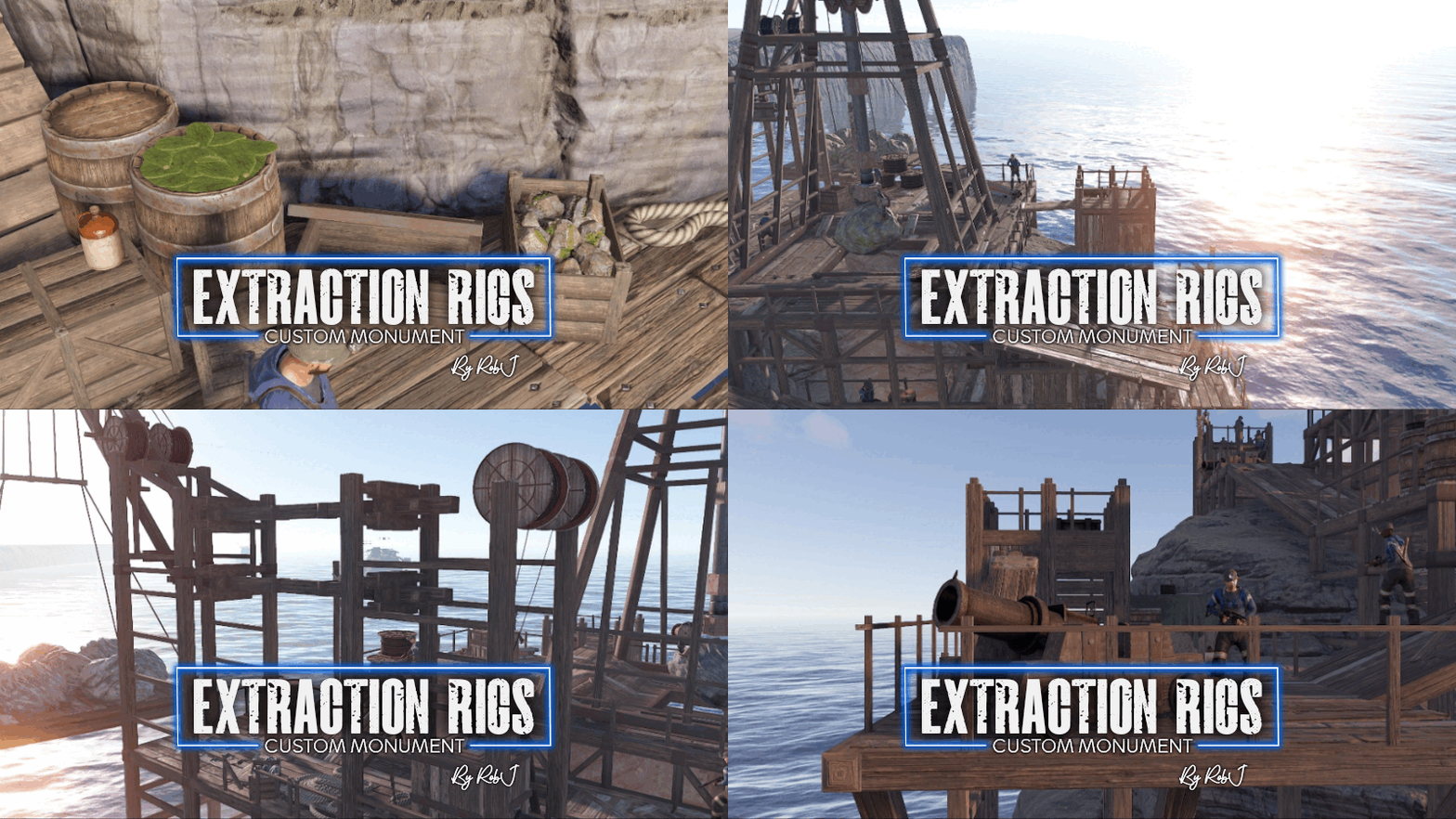
This monument is a great medieval replacement for an oil rig with a twist! Ore rigs, as their name implies, are mining platforms that represent a combination of an oil rig and a sulfur quarry from the mainland replacements. This can be placed on any map! The process is very simple! And in the pack you will find 3 types of rigs representing the 3 ore types Stone, Metal/HQM and Sulfur NPC’s This monument has built-in NPC’s powered by an included plug-in. If you do not wish to use the built-in bots simply do not install the plug-in and add your own bots at your leisure. For Medieval Guards use included RobSpawnMedieval.cs Or Modern Scientists use RobSpawn.cs Quick Start Extract the zip file into your RustEdit install folder. Start Rust Edit. Click on Prefabs at the top & open up your Prefab List. Under the Custom category, you will now find RobJs Premium Prefabs. Double-click on the prefab file, which will spawn it into the map for you. Drag it to the general area you want to place it and line up with the water line Apply the Height Mask, Topology Mask, and Splat Mask. Credits Designed by Cobalt & RobJ In collaboration and featured in Timelines & Clockworks Maps. Contact And Help If you need to contact me discord is best: RobJ2210#2553 For help/support my discord group is best: Join Rust Maps By RobJ Discord$21.99 -
Version 1.1.5
166 downloads
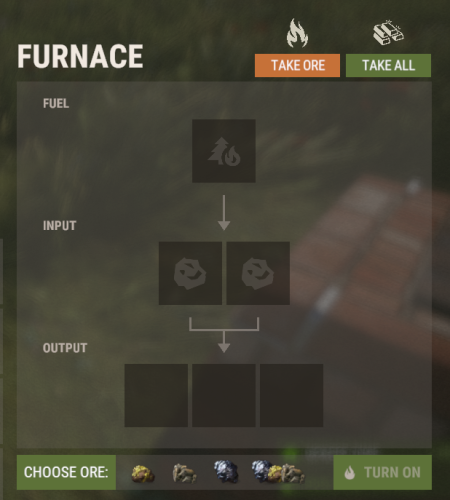
AutoAdd is a QoL plugin that makes the player not have to spend much time filling up their furnaces, campfires, etc. With this plugin, players can click an icon of what they want to smelt and it will pull the required resources into the burning machine to begin smelting. This plugin works with all Furnaces, and Campfires/Barbeques,. Required permissions to use this plugin: autoadd.allow It comes with multiple buttons with each different type of "oven": Green button - deposit all items including wood into oven and start cooking Resource Icons - Deposit that resource and wood and start cooking (No resource icons were needed for Refinery, BBQ, or campfire.) Red button - Take all items (Just the charcoal and smelted resource) out of furnace f you are having trouble with the images loading please refer here and try the following console command refreshallimages This plugin also has support for FurnaceSplitter, If this plugin is loaded and the player has the permissions from FurnaceSplitter then once any button is pressed it will automatically split the items into the furnace slots. If the player doesnt have permissions, or the plugin is not on the server then all the items will be put into the first few slots and not automatically split. This plugin also has support for SimpleSplitter If this plugin is loaded and the player has the permissions from SimpleSplitter then once any button is pressed it will automatically split the items into the furnace slots. If the player doesnt have permissions, or the plugin is not on the server then all the items will be put into the first few slots and not automatically split.$7.99 -
.thumb.png.a3d3e339fba405c49dc8ac0ef3ac6446.png)
Version 1.0.0
30 downloads
Plugin shows the locations of mines in the Rust game to players on leave for a certain period of time. This helps players pool resources around them more quickly and efficiently. Properties Players can see the mines for a certain period of time. Marking of mines with different colors according to their location (Sulfur, Metal and Stone). The configuration file allows server owners to customize the plugin's features. Players will not be able to reuse the command during the specified cool-down period. Multilingual support of the plug-in and availability of language files. Permissions orelocations.show - authorization to use the plugin Configuration you can set the the configuration file { "CooldownTime": 300.0, "DisplayDuration": 30.0, "MaxDistance": 500.0 }$2.00








.thumb.gif.b68fcc45abe70ab7d7235dffc8a0c770.gif)

.thumb.jpg.7a35071bd372a1c2c6329cfd476cab3f.jpg)
