Search the Community
Showing results for tags 'playtime'.
Found 5 results
-
Version 1.1.7
114 downloads
WelcomePlus is a lightweight, community-driven plugin developed to make your server feel welcoming with personalised greeting messages that actually matter. Features Rank-Based Welcome Messages - Customisable messages based on player permissions Playtime Tracking - Track total playtime and current session time Interactive GUI - Modern interface accessible via /wp or /welcomeplus Multi-Language Support - English and Spanish included, easy to add more Admin Tools - Player lookup, statistics, and data management Opt-Out System - Players can disable automatic welcome messages Command Aliases - Fully configurable command aliases External Language Files - Easy translation management via JSON files Separate Welcome Messages File - Edit welcome messages independently from language files Permissions welcomeplus.use - Required to receive welcome messages (if enabled in config) welcomeplus.vip - VIP rank permission welcomeplus.admin - Admin rank permission welcomeplus.owner - Owner rank permission Custom Rank Permissions: Define your own ranks and permissions via the config file's `CustomRankPermissions` block. Installation & Setup 1. Download and drop WelcomePlus.cs into your oxide/plugins/ folder 2. Download and place the lang/ folder in oxide/lang/WelcomePlus/ 3. (Optional) Place WelcomePlus_WelcomeMessages.json in oxide/data/ for custom welcome messages 4. Restart your server or run oxide.reload WelcomePlus 5. Configure ranks and permissions in the generated config file (optional) 6. Customise welcome messages in WelcomePlus_WelcomeMessages.json (optional) That's all - the plugin works out of the box with sensible defaults! Quick Start Commands Players: /wp - Open main menu /playtime or /pt - View your playtime /session - View current session /playtimeleaderboard or /ptl - View top 10 players Admins: /wp stats - Plugin statistics /wp reset <player> - Reset player data /wp defaults or /wp resetconfig - Reset config and welcome messages to defaults /playtime <player> - View any player's stats Configuration The plugin generates a config file at oxide/config/WelcomePlus.json with all settings. Key options: Custom Rank Permissions - Define rank labels and their permissions UI/Text Toggle - Choose between GUI panels or chat messages Welcome Settings - Enable/disable first-time and returning player messages Command Aliases - Customise all command aliases Welcome Messages File - Edit welcome messages in `oxide/data/WelcomePlus_WelcomeMessages.json` Reset to Defaults - `/wp defaults` command resets config and welcome messages to defaults Welcome Messages File Welcome messages are stored in oxide/data/WelcomePlus_WelcomeMessages.json (automatically created on first run). This file contains all rank-specific welcome messages and is separate from language files for easier editing. File Structure: FirstTime - Messages for first-time players (by rank) WelcomeBack - Messages for returning players (by rank) Supports multiple messages per rank (randomly selected) Supports placeholders: {name}, {rank}, {total}, {session} Language Files Language files are in oxide/lang/WelcomePlus/: en.json - English (default) es.json - Spanish To add more languages, create new JSON files (e.g., fr.json) following the same structure. Note: Language files contain UI text and system messages. Welcome messages are primarily stored in the welcome messages file, with language files as fallback. Custom Ranks Define custom ranks in the config: "CustomRankPermissions": { "default": "", "vip": "welcomeplus.vip", "mod": "welcomeplus.mod", "batman": "welcomeplus.batman", "admin": "welcomeplus.admin", "owner": "welcomeplus.owner" } Priority System: Rank priority is determined by config order (first entry = highest priority) If a player has multiple permissions, the rank appearing first in config wins Example: If "staff" appears before "mod" and player has both, "staff" messages are used Automatic Permission Registration: Permissions from CustomRankPermissions are automatically registered No code changes needed - just add to config and reload Then add rank-specific messages to WelcomePlus_WelcomeMessages.json: Add rank key to FirstTime section for first-time messages Add rank key to WelcomeBack section for returning player messages Messages fall back to language files if not found in welcome messages file Support Discord: @olvrdncnsctt For detailed documentation, see README.txt. For version history, see WelcomePlusChangelog.txt. README.txt WelcomePlusChangelog.txt$8.99 -
.thumb.png.6f2cc3c36f104ea6f3afb9b0e5827ff5.png)
Version 1.0.1
478 downloads
The "PlaytimeCommands" plugin for Rust allows server administrators to automate the execution of commands when players achieve specific playtime milestones. Upon initialization, it checks players' playtime at regular intervals and triggers configured commands when certain hour goals are reached. (This plugin requires PlaytimeTracker or PlayTimeRewards plugin to work.) Features Easy config, add unlimited playtime goals and their rewards Light plugin, no performance issues Saved PlayerData to ensure they don't get repeat rewards Reset PlayerData when editing config values Commands /prc reset - Reset all player data(Requires 'PlaytimeCommands.admin' permission to use this command in chat.) Console Commands prc reset - Reset all player data. Config { "Check how often it checks for playtime and execute commands?(In Seconds)": 1800, //Timer interval, set a higer value for timer check "Execute command upon playtime hour completation": { "20": [ //Playtime Minute number "oxide.usergroup add {UserID} chads", //commands - Placeholders are {UserID} & {Name} which will replace with SteamID and Player Name "chat user add {UserID} chads" //commands ], "30": [ //Playtime Minute number "sr add {Name} 1000", //commands "sr take {UserID} 100", "oxide.usergroup add {UserID} veteran" ] } }Free -

Version 0.5.3
547 downloads
Loyalty Rewards is a plugin for Rust that automatically promotes and demotes players based on their activity on the server. Players can earn promotions to new permission groups after a certain number of active days, while inactivity may result in demotion. The plugin works seamlessly with the server's wipe cycle or customizable periods, making it an essential tool for rewarding loyal players. Features Automated promotions and demotions based on player activity. Supports Rust wipe cycle or configurable periods. Multiple promotion levels (e.g., endurer, veteran, legend). Permission group management without affecting non-managed groups. Customizable promotion thresholds and inactivity demotion thresholds. Player notifications for both online and offline promotions. Manual promotion/demotion commands with added admin control. Data cleanup for inactive players not in any promotion group. Keeppromotioneligibility: Allows promoting players without making them ineligible for future promotions in the current period. Configuration Variables Explanation UseWipeCycle: Toggle between using the Rust wipe cycle or a custom period (true/false). Period: Length of the period in days before resetting active days and promotion flags. RequiredDays: Number of active days required for promotion within the period. DemotionThreshold: Fraction of active days required to avoid demotion. MinimumPeriod: Number of days before demotions are possible. PromoteImmediately: Set to true if you want promotions to occur as soon as players meet the required days. PermissionRequired: Set to true if players must belong to a specific permission group to be eligible for promotions. RequiredPermissionGroup: Name of the group required for promotion eligibility. PromotionGroups: List of groups a player can be promoted to (e.g., endurer, veteran, legend). Configuration Example { "UseWipeCycle": true, "Period": 30, "RequiredDays": 7, "DemotionThreshold": 0.5, "MinimumPeriod": 2, "PromoteImmediately": false, "PermissionRequired": false, "RequiredPermissionGroup": "linked", "PromotionGroups": [ "endurer", "veteran", "legend" ] } Commented Configuration Example { // --------------------------------------------------------------------------- // Determines whether the plugin uses the server’s wipe cycle to handle // promotions/demotions instead of a fixed period of days. "UseWipeCycle": true, // --------------------------------------------------------------------------- // The number of days in a period if not using wipe cycles. If UseWipeCycle // is false, the plugin will base promotions and demotions on this period // length instead. "Period": 30, // --------------------------------------------------------------------------- // The minimum number of active days (recorded by the plugin) needed // for a player to be eligible for promotion within one period. "RequiredDays": 7, // --------------------------------------------------------------------------- // A fraction (0–1) representing how low a player’s active days can be // (relative to RequiredDays) before they risk demotion at the end // of the period or wipe. For example, 0.5 means "below 50% of the required // days they get demoted.” "DemotionThreshold": 0.5, // --------------------------------------------------------------------------- // The minimum number of days that must pass in the current period before // any demotions can happen. If the server hasn’t reached this threshold, // demotions won’t occur even if the player is under the threshold. "MinimumPeriod": 2, // --------------------------------------------------------------------------- // If true, the plugin will run its promotion logic as soon as a player // connects — rather than waiting for a daily cycle or the next period // checkpoint. "PromoteImmediately": true, // --------------------------------------------------------------------------- // If true, the plugin will only promote (or even consider promoting) players // who belong to a certain permission group (specified below). "PermissionRequired": false, // --------------------------------------------------------------------------- // If PermissionRequired is true, the user must be in this permission group // to qualify for promotions. For example, if set to "linked", then only // players in the "linked" group can be promoted. "RequiredPermissionGroup": "linked", // --------------------------------------------------------------------------- // The ordered list of groups that players will progress through. // Players start at no group (or a base group you manage externally), // then get promoted to 'endurer', then 'veteran', then 'legend', etc. "PromotionGroups": [ "endurer", "veteran", "legend" ] } Permissions loyaltyrewards.admin: Allows use of admin commands to manually promote, demote, and reset the period for players. Admin Commands /lr.promote <player> [levels] [keeppromotioneligibility]: Manually promote a player by specified levels. Use keeppromotioneligibility to allow further promotions in the current period. /lr.demote <player>: Manually demote a player to the previous group. /lr.resetperiod <withpromotions|withoutpromotions>: Resets the current period. Use withpromotions to process promotions/demotions or withoutpromotions to reset without processing. /lr.cleanup ihaveabackup: Cleans up inactive players not in any promotion groups. Player Commands /lr.playtime: Allows players to check how many active days they have and whether they are eligible for promotion or at risk of demotion. Operation Overview Players gain an "active day" for each calendar day they connect to the server. After a certain number of active days (set in the configuration), they are promoted to the next permission group. If players meet the promotion criteria during the period, they are promoted to the next group, and their old group is removed. Inactivity during the period below the demotion threshold results in players being demoted. The plugin handles promotions immediately if configured or during wipes, ensuring that players are rewarded based on their activity. Admins can manually promote, demote, or reset periods for all players.Free -
Version 2.0.2
1,641 downloads
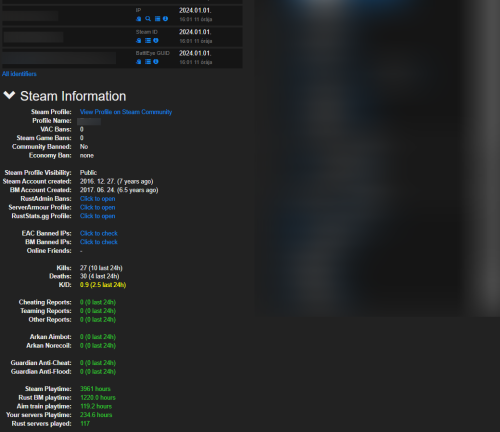
Features: This chrome extension collects and shows additional information about players in battlemetrics rcon. Such as: Steam profile, Battlemetrics profile creation date EAC Ban, EAC Banned Friends, EAC Banned Identifiers (IPs), BM Banned Identifiers (IPs) (if player with an ip can be found on your ban list) Temp ban counts Kills, Deaths, KD Reports, Arkan and Guardian violations (optional) Rust servers played, playtime on: rust servers, aim train servers, your servers Global rust stats (optional) Steam profile picture and the current server's name in battlemetrics Link for ServerArmour, RustAdmin and RustBanned profile (optional) What you receive: By purchasing the product you receive: The source code of this extension Lifetime access Detailed setup guide Support If you need help or If you have any issues or suggestions you can contact me by joining my discord server: https://discord.gg/efVKDG6z6F or by adding me on discord: Farkas#6006$9.90- 12 comments
- 6 reviews
-
- 10
-

-

-
- #battlemetrics
- #bm
- (and 15 more)
-

Version 1.0.0
547 downloads
/!\ THIS PLUGIN RECQUIRES CUSTOM REWARDS PLUGIN /!\ Playtime Reward is an extension of the CustomRewards plugin. This plugin allows your players to earn points at certain time intervals. The points earned can be used to claim rewards (see CustomRewards plugin). Configuration: CustomRewardsType: The type of rewards (the name that identifies the reward template, more information in the CustomRewards documentation) Count Afk Time: Count the time when the player is AFK Added points: Number of points to add Add point every (in seconds): Interval in seconds when points are added /!\ THIS PLUGIN RECQUIRES CUSTOM REWARDS PLUGIN /!\Free

.thumb.jpg.f2f378cbb4943d7036c8a674f8a23b40.jpg)