Search the Community
Showing results for tags 'pumpjack'.
Found 4 results
-
Version 1.6.6
690 downloads
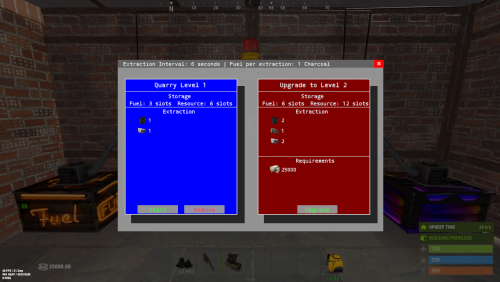
Quarries have evolved into personal computers that can be placed within player bases, providing full customization. Everything, from fuel types to unlimited upgrades, is configurable, including upgrade requirements, mined items, and fuel. Seamlessly integrating with the industrial system. FEATURES Intuitive UI: Simulates old DOS programs for easy use Full Customization: Item output, fuel, and upgrade requirements can be adjusted Unlimited Upgrades: Use items, Economics, and ServerRewards for upgrades Base Placement: Quarry Computers can be placed inside bases Industrial Automation-Ready: With permissions for seamless integration Screen Activation: Easily see if the computer is on, with percentage displays Multi-Language Support: Fully translatable Player Permissions: Control how many quarries a player can own and upgrade Persistent Data: Upgrades and item levels are saved across restarts VIDEO SHOWCASE Here’s how to add the recycler to your shop: Use the Command: gq %steamID% PERMISSIONS "quarrycomputer.give" Grants the player the ability to use the customizable command (/gq <User>) to give themselves or other players a Quarry Computer. "quarrycomputer.industrialinput" AND "quarrycomputer.industrialoutput" Allows players to connect industrial storage adaptors to their quarries, enabling automated resource handling. "quarrycomputer.vip" Provides players with additional benefits or features, such as having a higher limit on the number of quarries they can deploy. "quarrycomputer.norequirements" Allows players to upgrade their quarries without needing to meet the usual item or resource requirements. "quarrycomputer.admin" Provides administrative control over players' quarries, such as the ability to manage or interact with any quarry regardless of ownership. CONFIGURATION You can have as many upgrade levels as you want. Use Economics and ServerRewards on the item shortnames to use currency. Any in-game item can be used. Requirements can utilize Economics and ServerRewards based on the item shortname. Item shortnames are validated when the plugin loads, with a warning issued if they need to be fixed.$15.00 -

Version 2.0.3
770 downloads
This plugin will add variable custom quarries and pumpjacks to your server. You can create any amount of different quarries and pumpjacks! You can get the fastest support in our Discord: Alias™ dev. Features Prefab substitution You can avoid using survey charges for installing quarries. Static quarries All 4 type of statics (pumpjack, stone, sulfur, HQM) can be configured separately. Toggle & Loot protection Each quarry have their own protection settings. There is also protection system by permissions for static quarries. Built-in remove You can configure different remove and refund settings per quarry. Repair It is very similar to the standard system with all the sounds and effects. It also supports custom items. Build limits Built in options to set limits for quarries and pumpjacks separately. Custom Items You can use any normal and/or skinned items (custom items) as fuel and/or resource production. Fuel system You can set up several different fuel types with different production settings per fuel type. Production system You can set up min/max amount of items and probability chances per item. Permissions You can set up build limits and/or gather rates by permissions and also sum all permission parameters (or not). Upgrade system You can upgrade from one quarry to another using different skin id. UI Adaptive and informative interface made in modern rust-style design so it may seem like part of the game. It will automatically change its size and screen location depending on your quarry settings. Langs You can translate any phrase in the plugin. Performance The plugin completely has its own mechanics, which ensures the best performance even compared to the standard system. This also fixes all of the default quarry bugs. Optimization You can completely disable some of the plugin's functions in the main config. Configuration Main config (oxide/config/aQuarry.json) Static quarries config (oxide/data/aQuarry/StaticQuarries/) Personal quarries config (oxide/data/aQuarry/PersonalQuarries/) Commands quarry.give «SteamID » «SkinID » => give to player the quarry with specified skin from config quarry.giveme => give all quarries from config to self Permissions: aQuarry.admin => allows to use «quarry.give » and «quarry.giveme » commands from in-game console API bool CanBuildCustomQuarry(Planner plan, BasePlayer builder, bool IsQuarryOrPumpjack) // Called right before other built-in checks. // Returning false will cancel the construction. void OnCustomQuarryBuilded(MiningQuarry quarry, BasePlayer builder, bool IsQuarryOrPumpjack) // Called right after player has built custom quarry or pumpjack.$24.00 -

Version 1.0.4
126 downloads
Change the speed, fuel time and resource gained from all quarries and the giant excavator with a simple config. Works with GatherManager. Console commands (admin only): qc.data - Displays in chat the values for each of the quarries qc.reload - Reloads all quarries Config: You can easily configure each quarry type separately: Fuel time - How long does a diesel last (in seconds) Resource tickrate - How often resources are added to the output container (in seconds) Amount of resources - Total amount of resources from each diesel. A value of 1000 means it makes the same amount as vanilla. Changing this value to 2000 means it makes 2 times as much as vanilla, or 500 means half as much as vanilla. (example: in vanilla 1 diesel = 50 hqm at the HQM quarry. Setting the value to 2000 gives you 100 hqm for each diesel, and a value of 500 gives 25 hqm for each diesel. Note: Any GatherManager multipliers are multiplied on top of this setting Excavator fuel time - How long a diesel last for the giant excavator (in seconds) Excavator resource tickrate - How often resources are added to the output container for the giant excavator (in seconds) Excavator resource multiplier - Multiplies the output resource with this value. Note: This multiplier and GatherManager multiplier will stack (if "Use excavator settings if GatherManager exists" is set to true) Use excavator settings if GatherManager exists - If GatherManager is loaded (or reloaded) and this setting is true, it will override GatherManager excavator settings. Note: GatherManager still modifies the output as normal Default config (vanilla values): { "Stone Quarry": { "Fuel time per diesel (seconds)": 120.0, "Resource tickrate (seconds)": 5.0, "Amount of resources per diesel (1000 = vanilla)": 1000.0 }, "Sulfur Quarry": { "Fuel time per diesel (seconds)": 120.0, "Resource tickrate (seconds)": 5.0, "Amount of resources per diesel (1000 = vanilla)": 1000.0 }, "High quality metal Quarry": { "Fuel time per diesel (seconds)": 120.0, "Resource tickrate (seconds)": 5.0, "Amount of resources per diesel (1000 = vanilla)": 1000.0 }, "Pumpjack": { "Fuel time per diesel (seconds)": 120.0, "Resource tickrate (seconds)": 5.0, "Amount of resources per diesel (1000 = vanilla)": 1000.0 }, "Excavator": { "Excavator fuel time per diesel (seconds)": 120.0, "Excavator resource tickrate": 3.0, "Excavator resource multiplier": { "Stone": 1.0, "Sulfur": 1.0, "Metal fragments": 1.0, "High quality metal": 1.0 } }, "Personal Quarry": { "Enabled": false, "Fuel time per diesel (seconds)": 120.0, "Resource tickrate (seconds)": 5.0 }, "Use excavator settings if GatherManager exists": true } Useful convar: excavatorsignalcomputer.chargeneededforsupplies - Time until it's possible to call a supplydrop at the excavator. Default value 600 (seconds)$7.99- 14 comments
- 2 reviews
-
- 1
-

-
- #quarry
- #controller
- (and 7 more)
-

Version 1.0.0
515 downloads
Fixes the player placed Quarys and PumpJacks from kicking players for flyhack violation.Free