
Search the Community
Showing results for tags 'rust ui'.
Found 6 results
-
Version 1.0.4
17 downloads
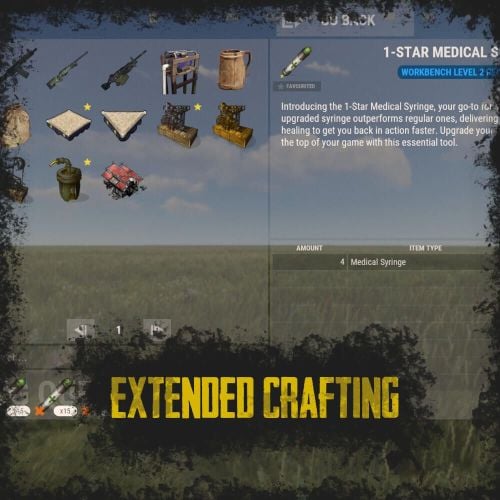
RUST Plugin Test Server TEST MY PLUGINS THERE! connect play.thepitereq.ovh:28050 Extended Crafting creates another look-like RUST Crafting menu where you can create an infinite amount of custom crafting recipes. It fully supports custom item creation and a few additional systems like daily crafts, cooldowns and support for crafting plugins. Almost exact RUST UI design with few required add-ons (new features, rust UI limitations) Fully customizable layout, categories and items. Written with performance in mind. Mark your favorite crafts. Sectional UI updates and live UI updates (crafting queue, time, etc.) Support for crafting speed-up plugins. (ZLevelsRemastered, SkillTree) Ability to enable Status display. (Requires Simple Status Plugin) Crafting cooldowns, daily limits, and per-wipe limits. Huge possibilities with permission configuration for VIP players. extendedcrafting.admin - Gives admin options. Few options still need to be enabled in config in order to use them, like GIVE option. There are more permissions possible, but they are modified and created by user, so won't list them here. All user commands are configurable on top of the config. By default, it's /craft. Run Commands On Craft You can create crafts that run the CONSOLE command when they are finished. Here you can find a full list of variables that can be added there. {userId} - Will be replaced with steamId of user. {userName} - Will be replaced with nickname of user. {userPosX} - Coordinate X of user. {userPosY} - Coordinate Y of user. {userPosZ} - Coordinate Z of user. void OnCustomItemCraft(BasePlayer player, string category, string itemKey, int craftAmount) Configuration from the video preview. Contains many craft recipes that require plugins that are paid, or unavailable. Recommend using only the test/preview configuration. ExtendedCrafting.json { "Commands": [ "c", "craft" ], "UI And Command Delay Between Actions (performance option, in seconds)": 0.1, "Clear Wipe Cooldowns On Wipe": true, "Enable Crafting Statistics": true, "Drop Queued Crafting Items To Ground On Death": true, "Format Crafting Time To Minutes (will round values)": false, "Enable Admin Give (click recipe with SPRINT button, required permission extendedcrafting.admin)": true, "Enable Logging": true, "Enable Crafting Status Indicator (Requires SimpleStatus Plugin)": false, "New Day Check Interval (in seconds, used for per-day limits, 0 to disable)": 600, "Max Queued Craftings": 10, "Workbench Bonus Higher By 1 Than Required Time Multiplier (0 to disable)": 0.5, "Workbench Bonus Higher By 2 Than Required Time Multiplier (0 to disable)": 0.25, "Workbench Bonus Higher By 3 Than Required Time Multiplier (0 to disable)": 0.0, "Used Craft Time Divider Plugin (see website documentation for plugin IDs, 0 to disable)": 0, "Skill Tree Bonuses - Enable Craft Speed": false, "Skill Tree Bonuses - Enable Craft Duplicate": false, "Crafting Time Multiplier Modify Permissions (for all craftings, from best to worst)": { "extendedcrafting.crafttime.admin": 0.1, "extendedcrafting.crafttime.vip": 0.5 }, "Max Craft Amount Per Task": 100000, "WARNING! Categories can't have spaces in their names!": "Each category name have their translation in language file in /lang/en/ExtendedCrafting.json!", "Craftings - Categories and Items": { "FirstTestCat": { "Icon - Item Shortname or URL or Sprite Directory": "", "Icon - Use Normalized Colour And Style (For Shortname and URL)": true, "Required Permission": "", "Crafting Time Multiplier Modify Permissions (for whole category, from best to worst)": { "extendedcrafting.crafttime.test.1": 0.25, "extendedcrafting.crafttime.test.2": 0.75 }, "Display Blacklist Permissions (need to have all)": [ "extendedcrafting.hideme.test.1", "extendedcrafting.hideme.test.2" ], "WARNING! Item recipe key values must be unique and have no spaces!": "They are only key values for config and better performance. They are not visible anywhere!", "Item Recipes": { "TestItem_1": { "Item Details": { "Shortname": "metal.refined", "Skin ID": 0, "Amount": 2, "Custom Name": "" }, "Commands Ran On Craft": [ "say Player {userName} crafted test item!", "say Player {userName} crafted item and his ID is {userId}." ], "Craft Requirements": { "Disable Craft Plugin Time Bonus": false, "Workbench Level Required": 1, "Crafting Time (in seconds, 0 - insta-craft)": 5, "Crafting Cooldown (in seconds, 0 - disable cooldown)": 0.0, "Max Craft Amount Per Task Override (0 to disable)": 0, "Crafting Time Modify Permissions (per crafting recipe, from best to worst)": {}, "Max Daily Crafts (0 to disable)": 0, "Max Daily Crafts Permissions (per crafting recipe, from best to worst)": {}, "Max Per-Wipe Crafts (0 to disable)": 0, "Max Per-Wipe Crafts Permissions (per crafting recipe, from best to worst)": {}, "Required Items (max 8 visible)": [ { "Shortname": "gunpowder", "Skin ID": 0, "Amount": 10, "Custom Name": "" }, { "Shortname": "wood", "Skin ID": 0, "Amount": 1, "Custom Name": "" }, { "Shortname": "metal.fragments", "Skin ID": 0, "Amount": 1, "Custom Name": "" }, { "Shortname": "sulfur.ore", "Skin ID": 0, "Amount": 5, "Custom Name": "" } ] }, "Custom Icon URL": "", "Required Permission": "", "Blacklist Permission": "", "Display As Locked With Missing Permission": true }, "TestItem_2": { "Item Details": { "Shortname": "halloween.lootbag.large", "Skin ID": 0, "Amount": 1, "Custom Name": "Ultra Lootbag" }, "Commands Ran On Craft": [], "Craft Requirements": { "Disable Craft Plugin Time Bonus": false, "Workbench Level Required": 1, "Crafting Time (in seconds, 0 - insta-craft)": 5, "Crafting Cooldown (in seconds, 0 - disable cooldown)": 0.0, "Max Craft Amount Per Task Override (0 to disable)": 0, "Crafting Time Modify Permissions (per crafting recipe, from best to worst)": {}, "Max Daily Crafts (0 to disable)": 0, "Max Daily Crafts Permissions (per crafting recipe, from best to worst)": {}, "Max Per-Wipe Crafts (0 to disable)": 0, "Max Per-Wipe Crafts Permissions (per crafting recipe, from best to worst)": {}, "Required Items (max 8 visible)": [ { "Shortname": "metal.refined", "Skin ID": 0, "Amount": 50, "Custom Name": "" }, { "Shortname": "techparts", "Skin ID": 0, "Amount": 3, "Custom Name": "" }, { "Shortname": "cloth", "Skin ID": 0, "Amount": 100, "Custom Name": "" } ] }, "Custom Icon URL": "", "Required Permission": "", "Blacklist Permission": "", "Display As Locked With Missing Permission": true } } }, "SecondTestCat": { "Icon - Item Shortname or URL or Sprite Directory": "", "Icon - Use Normalized Colour And Style (For Shortname and URL)": true, "Required Permission": "", "Crafting Time Multiplier Modify Permissions (for whole category, from best to worst)": {}, "Display Blacklist Permissions (need to have all)": [], "WARNING! Item recipe key values must be unique and have no spaces!": "They are only key values for config and better performance. They are not visible anywhere!", "Item Recipes": { "AnotherItem_1": { "Item Details": { "Shortname": "wood", "Skin ID": 0, "Amount": 1000, "Custom Name": "" }, "Commands Ran On Craft": [], "Craft Requirements": { "Disable Craft Plugin Time Bonus": false, "Workbench Level Required": 3, "Crafting Time (in seconds, 0 - insta-craft)": 60, "Crafting Cooldown (in seconds, 0 - disable cooldown)": 0.0, "Max Craft Amount Per Task Override (0 to disable)": 0, "Crafting Time Modify Permissions (per crafting recipe, from best to worst)": {}, "Max Daily Crafts (0 to disable)": 0, "Max Daily Crafts Permissions (per crafting recipe, from best to worst)": {}, "Max Per-Wipe Crafts (0 to disable)": 0, "Max Per-Wipe Crafts Permissions (per crafting recipe, from best to worst)": {}, "Required Items (max 8 visible)": [ { "Shortname": "charcoal", "Skin ID": 0, "Amount": 1000, "Custom Name": "" } ] }, "Custom Icon URL": "", "Required Permission": "", "Blacklist Permission": "", "Display As Locked With Missing Permission": true }, "AnotherItem_2": { "Item Details": { "Shortname": "lmg.m249", "Skin ID": 0, "Amount": 1, "Custom Name": "" }, "Commands Ran On Craft": [], "Craft Requirements": { "Disable Craft Plugin Time Bonus": false, "Workbench Level Required": 3, "Crafting Time (in seconds, 0 - insta-craft)": 180, "Crafting Cooldown (in seconds, 0 - disable cooldown)": 0.0, "Max Craft Amount Per Task Override (0 to disable)": 0, "Crafting Time Modify Permissions (per crafting recipe, from best to worst)": {}, "Max Daily Crafts (0 to disable)": 0, "Max Daily Crafts Permissions (per crafting recipe, from best to worst)": {}, "Max Per-Wipe Crafts (0 to disable)": 0, "Max Per-Wipe Crafts Permissions (per crafting recipe, from best to worst)": {}, "Required Items (max 8 visible)": [ { "Shortname": "metal.refined", "Skin ID": 0, "Amount": 500, "Custom Name": "" }, { "Shortname": "techparts", "Skin ID": 0, "Amount": 20, "Custom Name": "" }, { "Shortname": "scrap", "Skin ID": 0, "Amount": 5000, "Custom Name": "" } ] }, "Custom Icon URL": "", "Required Permission": "", "Blacklist Permission": "", "Display As Locked With Missing Permission": true } } } } }$25.00 -

Version 1.0.0
1 download
"Hello! This is my Full Pack. Attention: If you already own the previous packs of 38 or 52 bases, do not purchase this! This collection includes all my bases in one place, plus the configuration for normal and balanced loot within the bases. By purchasing this file, you are paying for my hard work—and quality work costs money! If you are wondering if it’s worth it, try building a series of bases yourself, editing them, perfecting them, and then working on the configuration. This is the path I’ve chosen, and the price reflects how much I value my effort. Thank you to those who appreciate and support my projects! As I’ve said before, this is not my last project; there is more to come. Setup Guide for Your New Bases To ensure a clean installation, start by disabling the current plugin. Enter the following command into your server console: o.unload RaidableBases. If you have used this plugin before, it is essential to clear out any old settings. Please delete the following: The configuration file: oxide/config/RaidableBases.json The entire data directory: oxide/data/RaidableBases/ Now, access your server files via FTP and locate the main /oxide/ directory. Inside this download, you will see two folders: config and data. Simply drag and drop these into your server's /oxide/ folder. When prompted by your FTP client, choose "Overwrite" or "Merge" to ensure the new files are correctly placed. Once the transfer is complete, reactivate the plugin by typing: o.reload RaidableBases. You should see the updated loot tables appearing in the console logs. To verify that the bases have been recognized, use the command: rb.config list. This will display all the new schematic files now located in oxide/data/copypaste/. If the list appears empty, please double-check your file paths and try the process again. In the future, we will continue to increase the number of bases and perfect every single one.$35.99 -
Version 1.0.0
5 downloads
Hello everyone! This is already my second project, and I’ve put a lot of heart into it. My team and I have worked hard to make it as interesting as possible and to include even more bases. Inside, you’ll find very cool features and lifehacks, so I can guarantee that once you purchase this package, you’ll truly enjoy using it. We have focused on creating more level 4, 5, and 6 bases, as these are the most popular choices! As mentioned before, this package also includes the acquisition and configuration for the level 6 pack—something brand new that hasn't been seen before. That’s why we highly recommend it! Setup Guide for Your New Bases To ensure a clean installation, start by disabling the current plugin. Enter the following command into your server console: o.unload RaidableBases. If you have used this plugin before, it is essential to clear out any old settings. Please delete the following: The configuration file: oxide/config/RaidableBases.json The entire data directory: oxide/data/RaidableBases/ Now, access your server files via FTP and locate the main /oxide/ directory. Inside this download, you will see two folders: config and data. Simply drag and drop these into your server's /oxide/ folder. When prompted by your FTP client, choose "Overwrite" or "Merge" to ensure the new files are correctly placed. Once the transfer is complete, reactivate the plugin by typing: o.reload RaidableBases. You should see the updated loot tables appearing in the console logs. To verify that the bases have been recognized, use the command: rb.config list. This will display all the new schematic files now located in oxide/data/copypaste/. If the list appears empty, please double-check your file paths and try the process again. Thank you for appreciating our work and for standing by us!$25.99 -
Version 1.0.4
117 downloads
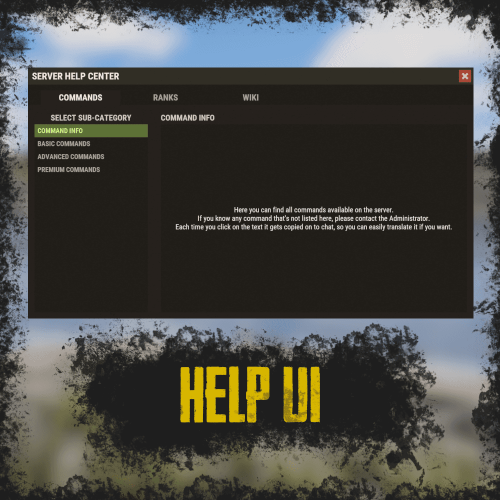
RUST Plugin Test Server TEST MY PLUGINS THERE! connect play.thepitereq.ovh:28050 Help UI lets you create unlimited help pages with ease, allowing players to navigate them effortlessly. All wrapped in a sleek RUST-themed interface with smooth, seamless UI updates. High quality RUST-themed UI. Up to 5 main categories. Almost infinite sub-category limit. Scrollable informations, when clicked printed on chat for easy copy-paste. Full language support. The Commands section values, are the redirect values of the page configurations below. So for example if default config contains "wiki": "wikipedia Page1" it means, that plugin will register command /wiki that will open an Page1 page on wikipedia category. All commands are configured in main config by default you have command like /help, but every command can be edited! { "Commands": { "help": "", "helppage": "", "wiki": "wikipedia Page1" }, "Pages": { "commands": { "Page1": { "Font Size": 15, "Center": false, "Increase Height Value": 0 } }, "ranks": { "Page1": { "Font Size": 15, "Center": false, "Increase Height Value": 0 } }, "wikipedia": { "Page1": { "Font Size": 15, "Center": false, "Increase Height Value": 0 }, "Page2": { "Font Size": 15, "Center": false, "Increase Height Value": 0 } } } }$9.99 -
Version 1.0.0
2 downloads
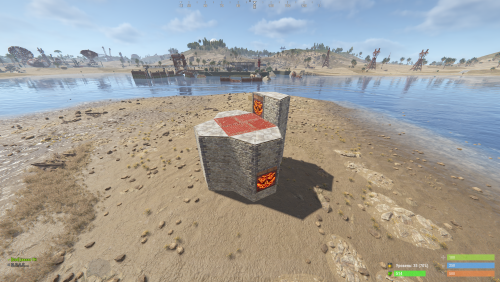
Custom Raid Base Pack: Medium to Hard Difficulty (12 Bases) Hello Rust Community! I'm JaaaaaThomas I'm excited to present my latest base pack: an exclusive collection of 12 custom raid bases specifically designed to challenge experienced players on your server! If you are looking for raids that require planning, resources, and skill, this pack is the right choice for your community. What You Get with This Package This package is a Content Extension that adds 12 challenging, handcrafted Raid Bases directly to your server's rotation. Key Features: 12 Highly Challenging Bases: Each base is manually designed and optimized for Medium to Hard difficulty, featuring complex layouts, clever traps, and demanding defense setups. Intense Planning Required: These bases are meant to test resource management and raiding strategy, pushing players beyond standard easy raids. Premium Builds: All structures are ready to use and compatible with the necessary plugins (Raidable Bases and Copy Paste). Attention: Required Dependencies For this base pack to function, your server MUST have the following two plugins installed and working: [Oxide/uMod Plugin] Raidable Bases (The main event plugin). [Oxide/uMod Plugin] Copy Paste (Required to correctly import the base structures). Without these two plugins, the base pack will NOT work. Important Note for Buyers: THIS 12-BASE PACK IS PART OF MY PREVIOUS 37-BASE COLLECTION. IF YOU HAVE ALREADY PURCHASED THE FULL 37-BASE PACK, PLEASE DO NOT PURCHASE THIS FILE, AS YOU ALREADY OWN THESE BUILDS. Thank you for your support, and good luck mastering these challenging builds!$9.99 -
Version 1.0.8
600 downloads
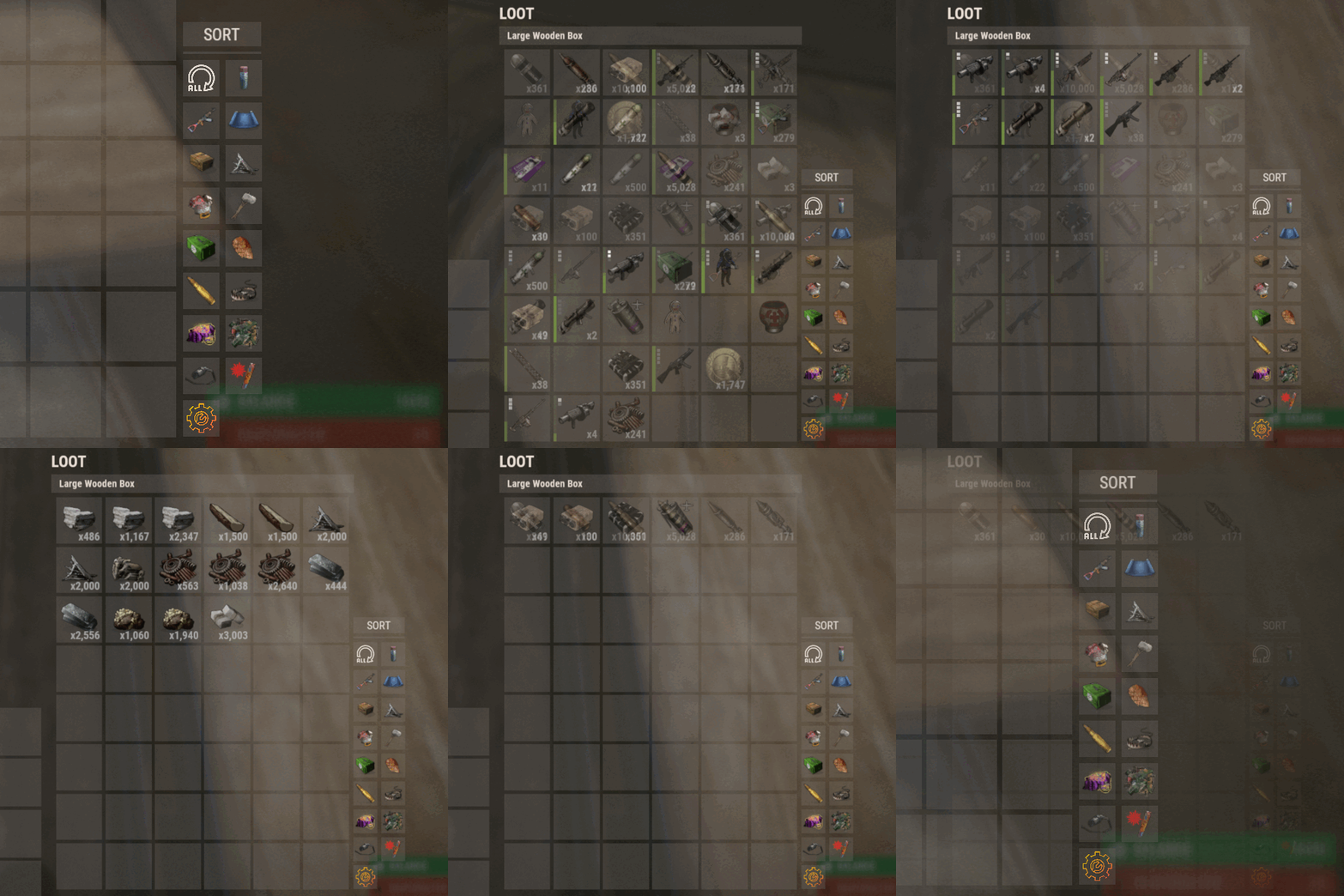
Introducing Sortify, the best plugin for making it easy to sort and filter boxes and containers from various plugins, all without the need for complex integrations. Sortify offers an intuitive solution to easily categorize your items, all within an elegant and efficient Rust-style user interface. Key Features: Custom Categories: With Sortify, you can create and customize your own categories to suit your unique needs. Rust style user interface: The plugin has a minimalistic and aesthetic Rust style user interface. Ease of Use: Sortify is designed with ease of use in mind. Whether you're a beginner or an experienced user, you'll find Sortify incredibly easy to use. It does not require complex training or any action on the part of the player, which allows the player to immediately begin organizing elements effectively. Permissions: sortify.allow - permission to use the plugin Video at moment version 1.0.0 (after the sorting scheme was changed, see gif):$15.00- 27 comments
- 3 reviews
-
- 3
-

-
- #sorting
- #filtering
- (and 6 more)


.thumb.png.ccf8a947948c9eb1445ad21a7931247b.png)
