Search the Community
Showing results for tags 'rustskinner'.
Found 1 result
-
Version 1.2.4
303 downloads
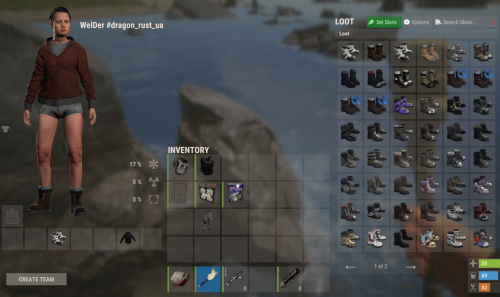
Important: This is NOT a plugin! This is only a data file for the Skinner plugin! You need to have the Skinner plugin installed and properly set up for this data file to work! Facepunch have changed their TOS regarding DLC/paid content As of August 7th 2025, it is not allowed to grant users access to paid DLC that they do not own. That includes all Rust DLC and any paid skins. If you continue to grant users access after that date it can result in your server being delisted or worse. You can still use Skinner using the Player DLC API plugin, which filters skins based on what the player is allowed to use. This file is a ready-to-use list of skin data for Skinner* (2023–2025), containing the most popular and requested skins for Rust servers It is very easy to install, unload the plugin, replace the Data file and load the plugin! Correct Installation Sequence: 1. In the console, stop the plugin: oxide.unload Skinner 2. Open the oxide/data/Skinner folder, delete the old file and upload the new file named ImportedSkins.json 3. In the console, start the plugin again: oxide.load Skinner Inside this file you will get approximately ~10346 Rust skins, already organized and optimized for Skinner, saving you countless hours of manual browsing and collection. The first time you load custom skins, the plugin may take a while to open the SkinBox. This is normal as the plugin needs to retrieve and cache workshop data. Once loaded, the plugin will start working. Please note: Unfortunately, unlike official skins, which are already built into the Rust client and load instantly, custom skins from the workshop are downloaded separately by the client to your PC when you log in to the server and open the Skinner... Of course it takes some time** before they become visible, and this process is repeated every time you log out of the server, restart the game or reboot your computer.... **The download speed depends on your internet connection and the number of skins in the Skinner. If you have a very slow loading, we recommend reducing the number of skins for comfortable use. You can use a free tool called Editor for Skins Plugins, available on CodefLink, and remove unnecessary skins. Please note: That after conversion you will still need to manually add skins to your plugin according to its documentation and usage instructions because the tool only gives a list of skins for some plugins and not the entire configuration file!$7.50- 32 comments
- 1 review
-
- 1
-

-
- #skins2024
- #skinworkshop
- (and 10 more)