Search the Community
Showing results for tags 'spam'.
Found 7 results
-

Version 1.1.8
1,038 downloads
Drop Bags tracks items dropped into the rust world. When there are high-volume drops, they are combined into a single "drop bag.” This method enhances performance by streamlining the handling of item drops and reducing item physics. Stop server stalls and freezing from item spam Works on craft spam, dropped item spam, gutted shark spam and horse dung! Light weight and easy to use Easy config DropBags uses one light weight hook to track dropped items. Dependent on how many items are dropped in a given radius those items get placed into a drop bag. This stops mass item spam effecting your server performance. { "Area Size - How far away items can be moved into a container": 7, "Max drops before moving items to container": 36, "Time to wait before moving items": 5.0, "Vischeck - checks items are visable before moving to container": true, "Calculate despawntime from drop bag items": true, "Reset dropbag despawn time on loot": false, "Override drop bag despawn time (seconds), 0 = false": 0.0 }$14.99- 17 comments
- 7 reviews
-
- 2
-

-

-
- #dropbags
- #drop bags
- (and 26 more)
-

Version 2.0.5
1,001 downloads
Removes 99% of Face Punches Debug Code/Spam & Removes Borked NPC/Animals From NavMesh Custom Built Log Manager Patch that Ties Into FacePunche's Log-Handler to fix Oxides system breaking it resulting in more spam then normal. Note Remove the: 'NavMeshErrorFix' plugin from umod if you use it! 'NoSunGlare' plugin from umod if you use it! 'PersonalNPC' <causes duplication msg's> disable this in config "Clear console of ‘ownerPlayer is not player’ spam" To stop the double output of logs in console for 'PersonalNPC' Patched the Following Methods 1. Base Navigator Place On Nav Mesh ( Fixed Default logic not killing the npcs/animals resulting in repeated spam ) 2. Base Navigator Validate Next Position ( Logic works fine by default but now no longer spams console each time they Delete an NPC/Animal.. ) 3. Base Entity On Invalid Position ( Logic works fine by default but now no longer spams console ) 4. Base Networkable Send Network Group Change ( Fixed it's Spam ) HOW TO UPDATE: 1. in console type': o.unload ConsoleSpamCleaner 2. Delete cs file 3. Add New cs file 4. in console type': o.load ConsoleSpamCleaner The following spam should no longer be an issue: ( Some Additional Ones Not On List Have Also Been Patched Out ) "Invalid NavAgent Position: prefab entity pos destroying", "failed to sample navmesh at position ", "changed its network group to null", "Bone error in SkeletonProperties.BuildDictionary for ", "HandleD3DDeviceLost", "ResetD3DDevice", "dev->Reset", "D3Dwindow device not lost anymore", "D3D device reset", "group < 0xfff", "Mesh can not have more than 65000 vert", "Trying to add (Layout Rebuilder for)", "Coroutine continue failure", "No texture data available to upload", "Trying to reload asset from disk that is not", "Unable to find shaders used for the terrain engine.", "Canvas element contains more than 65535 vertices", "RectTransform.set_anchorMin", "FMOD failed to initialize the output device", "Cannot create FMOD::Sound", "invalid utf-16 sequence", "missing surrogate tail", "Failed to create agent because it is not close enough to the Nav", "user-provided triangle mesh descriptor is invalid", "Releasing render texture that is set as", "AngryAnt Behave version", "alphamapResolution is clamped to the range of", "api.facepunch.com/api/public/manifest/", "Checking for new Steam Item Definitions..", "Floating point textures aren't supported on this device", "HDR Render Texture not supported, disabling HDR on reflection probe", "Image Effects are not supported on this platform", "Loading Prefab Bundle", "Missing shader in", "Missing projectileID", "Motion vectors not supported on a platform that does not support", "SwitchParent Missed", "saddletest", "The image effect Main Camera", "The image effect effect -", "The referenced script", "Unsupported encoding: 'utf8'", "Warning, null renderer for ScaleRenderer!", "[AmplifyColor]", "[AmplifyOcclusion]", "[CoverageQueries] Disabled due to unsupported", "[CustomProbe]", "[Manifest] URI IS", "[SpawnHandler] populationCounts", ", disk("$15.00- 17 comments
- 2 reviews
-
- 1
-
-
- #console
- #spam cleaner
- (and 9 more)
-
Version 1.0.2
13 downloads
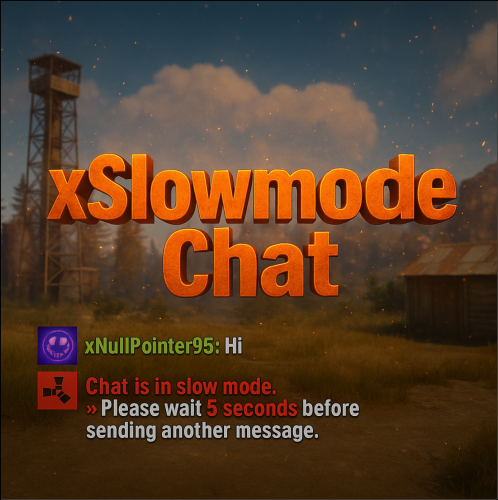
xSlowmodeChat xSlowmodeChat is a configurable chat-rate-limiting plugin for Rust servers. It allows server owners to control how frequently players can send messages, helping reduce spam, toxicity, and chat Flooding. Doesn't affect chat commands, only chat messages. Fully Configurable Slowmode Set custom cooldown between messages for normal- and vip players. Optional cumulative penalties for repeated spamming attempts. Adjustable penalty length for both, normal and VIP players. VIP Support Grant VIP players a separate cooldown & penalty system. VIP permission (xslowmodechat.vip). Lower intervals or completely remove slowmode for VIPs. Admin & Exclusion Options Easily toggle slowmode bypass for admins. Exclude specific SteamIDs from slowmode entirely. Informative Feedback Show a customizable slowmode warning message in chat. Optional on-screen UI timer showing remaining cooldown Console Commands xslowmode.enable - Enable slowmode xslowmode.disable - Disable slowmode xslowmode.setinterval <seconds> - Set default player cooldown xslowmode.setvipinterval <seconds> - Set VIP cooldown xslowmode.reloadconfig - Reload config from file Permission xslowmodechat.active - Only players with this permission will be affected by the slowmode chat if 'GlobalSlowmodeChat' is false. xslowmodechat.vip - Grants players the VIP slowmode settings. Config { "GlobalSlowmodeChat": true, "DisabledForAdmins": false, "ShowMessage": true, "MessageText": "<color=#e63939>Chat is in slow mode.\n»</color> Please wait <color=#e63939>{time} seconds</color> before sending another message.", "ShowSlowdownUi": true, "CumulativePenalty": true, "ChatMessageCooldown": 5.0, "CooldownPenalty": 5.0, "VipPermission": "xslowmodechat.vip", "VipChatMessageCooldown": 2.0, "VipCooldownPenalty": 2.0, "ExcludedSteamIds": [] }$8.99 -
Version 1.0.0
323 downloads
Prevents spamming of chat & console commands perfect for players abusing plugins excessively! Includes Debugging issues for any configuration mishaps! Example of adding GUIShop: "Add commands to block ( Must be lowercased do not add the slash! / ) ( 3 = Block Both | 1 = Block Chat | 2 = Block Console )": { "shop": 3, "shop.buy": 2, "shop.sell": 2, }, ## Configuration { "Add commands to block ( Must be lowercased do not add the slash! / ) ( 3 = Block Both | 1 = Block Chat | 2 = Block Console )": { "command": 3 }, "Sets the time between command usage": 3.0, "Sets the max accumulated cooldown time limit before kicking the player if they keep trying to spam": 120.0, "Exclude players from being blocked ( Add their steam 64 id's to the list )": [ 4678678647, 4678678678 ], "Message Responses": { "( Chat Icon ) Just insert a valid steam 64 ID to set": 0, "CommandBlocked": "You are on command cooldown, try again in {0} seconds", "KickReason": "Kicked for excessive command spam!" } }Free -
Version 1.0.1
6 downloads
Prompt AFK players that use bots that use vending machines with captcha checkboxes to prevent them from holding the vending machine. Key Features Dynamic Positions: The checkbox location is randomized, making it harder to automate bypasses. Lightweight: No significant impact on server performance. Complete Customization: Change any text or threshold via the config file. API: Any other plugin can call the "captcha" command to prompt a player with a captcha checkbox. Command and Permission captcha - Creates the captcha checkbox UI. Must be used through the F1 Console. captcha.bypass - Makes the user bypass automated captcha popups. Config { "Captcha bypass permission": "captcha.bypass", "Purchase Time Frame (seconds)": 60.0, "Purchase Count Threshold Per Time Frame": 5, "Captcha UI title": "Quick Check", "Captcha UI description": "Please confirm you’re human:", "Captcha UI button text": "I’m not a bot", "Captcha UI checkbox text": "☐" } Support and More Checkout my discord server here. Showcase Video$4.99 -

Version 1.0.8
382 downloads
Temporarily or permanently restrict players to sending one message per configured interval. Permissions slowmodechat.exclude - Excludes granted players/groups from slowmode Console Commands slowmode enable - Enable slowmode slowmode disable - Disable slowmode slowmode interval <seconds> - Adjust the interval between messages slowmode reload - Load new config values without reloading the entire plugin Configuration Enabled - Enables slowmode Rcon_Only - Forces console commands to be ran via rcon Permission_Enabled - Enables slowmodechat.exclude permission Interval - Adjust the interval between messages Icon by @SawyerWDFree -

Version 1.0.1
1,611 downloads
Automatically kills the npc who causes this console spam. ""SetDestination" can only be called on an active agent that has been placed on a NavMesh" No permissions, commands, or instructions. Just install.Free


.thumb.png.f676fcb4237b0d630285499251bcf88e.png)