Search the Community
Showing results for tags 'temperature'.
Found 5 results
-
Version 1.8.0
33 downloads
════════════════════════════════════════════════ BEEHIVE STORAGE ADAPTOR Industrial Automation for Beehives v1.8.0 by romzar.games ════════════════════════════════════════════════ DESCRIPTION ----------- Beehive Storage Adaptor allows players to connect industrial storage adaptors to beehives, enabling full automation of honey and honeycomb collection through Rust's industrial system. Players can now integrate beehives into their conveyor belt systems, electrical grids, and automated factories! COMPATIBLE WITH BOTH OXIDE/uMOD AND CARBON FRAMEWORKS KEY FEATURES ------------ ✓ Automatic Storage Adaptor Attachment - Automatically attaches a storage adaptor to every beehive placed by authorized players - No player interaction required - completely automatic ✓ Full Industrial System Integration - Connect conveyors directly to beehives - Use electrical switches and power to control honey collection - Build complex automated honey farms ✓ Ideal Conditions System - Force ideal temperature for beehives (per-player permission) - Bypass outside placement requirement - Bypass rain penalty - Each condition has its own permission for granular control - Configurable ideal temperature value ✓ Disable Bee Swarms (Optional) - Option to remove the visual bee swarms around active beehives - Reduces visual clutter on large honey farms - Removes both passive and angry bee effects ✓ Permission-Based System - Control who can have automated beehives - Perfect for VIP perks or donation rewards - Separate admin permissions for management commands ✓ Group-Based Limits System - Configure different beehive limits per permission group - Perfect for VIP tiers and donation rewards - Unlimited permission available for admins/special players - Players get helpful upgrade messages when limit reached - Data persistence - limits maintained across restarts ✓ Per-Player Reset Command - Reset and recreate adaptors for a specific player - Automatically cleans up orphaned data entries - Does not affect other players' beehives - Search by SteamID or player name ✓ Server-Wide Sync Command - Reconcile data files with actual server state - Remove orphaned entries from all players - Recreate missing adaptors on tracked beehives - Add tracking for untracked beehives with adaptors ✓ Admin Global Reset Command - Reposition all adaptors with a single command - Perfect for config adjustments - Works on all existing beehives ✓ Smart Duplicate Prevention - Never creates duplicate adaptors - Safe to reload the plugin anytime - Automatically detects existing adaptors ✓ Dirty Bit Data System - Data only saves to disk when actually changed - Randomized auto-save timer (270-330s) to avoid I/O spikes - Player data removed from memory on disconnect to save RAM - Proper wipe detection clears all data ✓ Automatic Cleanup - Removes adaptors when beehives are destroyed - No orphaned entities - Clean and optimized performance ✓ Multi-Language Support - Full English and Portuguese (pt-BR) translations - All player messages localized automatically - Easy to add more languages INSTALLATION ------------ 1. Upload BeehiveStorageAdaptor.cs to your plugins folder 2. The plugin will auto-generate its config file on first load 3. Grant permissions to players/groups (see PERMISSIONS section) 4. Reload the plugin if needed PERMISSIONS ----------- beehivestorageadaptor.use - Required for players to have storage adaptors on their beehives - Without this permission, beehives work normally (no adaptor) beehivestorageadaptor.admin - Required to use admin commands (/beehive.reset, /beehive.resetplayer, /beehive.sync) - For server administrators only beehivestorageadaptor.unlimited - Bypass all beehive limits - Perfect for admins or special players - No maximum beehive count beehivestorageadaptor.idealtemp - Forces ideal temperature on the player's beehives - Temperature value configured in config (default: 20°C) beehivestorageadaptor.bypassoutside - Beehives always count as "outside" for the player - Allows indoor beehive placement without production penalty beehivestorageadaptor.bypassrain - Removes rain penalty from the player's beehives - Beehives produce at full rate regardless of weather beehivestorageadaptor.{group} - Group-specific limits configured in config file - Examples: beehivestorageadaptor.default, beehivestorageadaptor.vip, beehivestorageadaptor.premium - Players with multiple group permissions get the highest limit PERMISSION EXAMPLES ------------------- Grant to all players with default limit (5 beehives): o.grant group default beehivestorageadaptor.use o.grant group default beehivestorageadaptor.default Grant to VIP group with higher limit (10 beehives): o.grant group vip beehivestorageadaptor.use o.grant group vip beehivestorageadaptor.vip Grant to premium group with highest limit (20 beehives): o.grant group premium beehivestorageadaptor.use o.grant group premium beehivestorageadaptor.premium Grant unlimited beehives to admins: o.grant group admin beehivestorageadaptor.use o.grant group admin beehivestorageadaptor.unlimited Grant ideal conditions to VIP: o.grant group vip beehivestorageadaptor.idealtemp o.grant group vip beehivestorageadaptor.bypassoutside o.grant group vip beehivestorageadaptor.bypassrain Grant admin permissions: o.grant group admin beehivestorageadaptor.admin COMMANDS -------- /beehive.limit (Chat) - Check your current beehive limit and usage - Shows how many beehives you have vs your limit - Available to all players with .use permission - Example output: "Beehive Adaptors: 3/10" /beehive.reset (Chat) or beehive.reset (Console) - Requires: beehivestorageadaptor.admin - Removes all old adaptors and recreates them with current config settings - Useful when adjusting adaptor position/rotation or limits - Shows statistics: beehives found, adaptors removed /beehive.resetplayer <steamid or name> (Chat) or beehive.resetplayer (Console) - Requires: beehivestorageadaptor.admin - Resets adaptors for a specific player only - Cleans up orphaned data entries (registered IDs that no longer exist) - Removes old adaptors and recreates them respecting permissions and limits - Does NOT affect other players' beehives - Accepts SteamID or partial player name - Shows: beehives found, adaptors removed, adaptors recreated, orphans removed /beehive.sync (Chat) or beehive.sync (Console) - Requires: beehivestorageadaptor.admin - Synchronizes data files with actual server state - Removes orphaned entries from all loaded player data - Adds tracking for untracked beehives that already have adaptors - Creates missing adaptors on tracked beehives - Processes all beehives on the map grouped by owner - Shows: players scanned, orphans removed, missing added, adaptors created CONFIGURATION ------------- File Location: config/BeehiveStorageAdaptor.json Default Configuration: { "Enabled": true, "DisableBeeSwarms": false, "GroupLimits": { "default": 5, "vip": 10, "premium": 20 }, "AlwaysIdealConditions": { "Enabled (master switch for ideal conditions patches)": false, "IdealTemperature (16-28 is optimal range, 20 recommended)": 20.0 }, "AdaptorPosition": { "x": 0.0, "y": 1.5, "z": 0.0 }, "AdaptorRotation": { "x": 0.0, "y": 0.0, "z": 0.0 } } Configuration Options: - Enabled: Set to false to disable the plugin without unloading - DisableBeeSwarms: Set to true to remove the visual bee swarms around active beehives. Removes both passive and angry bee effects. - GroupLimits: Dictionary of group names and their beehive limits * "default": 5 = Players with beehivestorageadaptor.default get 5 beehives * "vip": 10 = Players with beehivestorageadaptor.vip get 10 beehives * "premium": 20 = Players with beehivestorageadaptor.premium get 20 beehives * Add as many custom groups as you want * Players with multiple group permissions get the highest limit * Permissions are automatically registered from this config - AlwaysIdealConditions: Harmony patch system for beehive conditions * Enabled: Master switch - must be true for any ideal condition patches to work * IdealTemperature: Temperature value forced on beehives (16-28 optimal, 20 rec.) * Each condition requires its own player permission (see PERMISSIONS) * Patches are applied on load and removed on unload - AdaptorPosition: Position offset relative to the beehive (X, Y, Z) * Y: 1.5 = on top of beehive (default) * Y: -0.4 = below beehive - AdaptorRotation: Rotation of the adaptor in degrees (X, Y, Z) HOW IT WORKS ------------ 1. Player with 'use' permission places a beehive 2. Plugin checks if player has reached their group limit 3. If within limit, plugin automatically attaches a storage adaptor 4. If limit reached, player receives a message with upgrade information 5. Player can now connect industrial components: - Conveyors to transport honey/honeycomb - Power switches to control automation - Electrical circuits for advanced setups 6. When beehive is destroyed, adaptor is removed and count updated 7. Player data is saved persistently across server restarts 8. On player disconnect, data saves and is removed from memory ADMIN WORKFLOW -------------- 1. Configure GroupLimits in config file for your server tiers 2. Grant 'use' permission and group limit permissions to players/groups 3. Enable AlwaysIdealConditions and grant condition permissions if desired 4. Adjust position/rotation in config if needed 5. Use /beehive.reset to apply config changes to all existing beehives 6. Use /beehive.resetplayer <name> to fix a specific player's beehives 7. Use /beehive.sync to reconcile data with server state after issues COMMON SCENARIOS FOR NEW COMMANDS ---------------------------------- Player reports beehive lost its adaptor: -> /beehive.resetplayer PlayerName Recreates all adaptors for that player, cleans orphaned data. Player removed adaptor manually and data is out of sync: -> /beehive.resetplayer PlayerName Removes stale entries, re-processes all their beehives. Server crash or unexpected restart caused data inconsistencies: -> /beehive.sync Scans entire map, fixes all mismatches for all players. Migrated from older plugin version: -> /beehive.sync Picks up existing adaptors and adds missing tracking entries. DATA FILES ---------- Player data is automatically saved to: data/BeehiveStorageAdaptor/{steamid}.json Each player's file contains: - Steam ID - List of beehive network IDs with adaptors - Last update timestamp Example data file (76561198012345678.json): { "SteamID": 76561198012345678, "BeehiveIDs": [12345678, 87654321, 11223344], "LastUpdated": "2025-10-17T10:30:00.0000000Z" } Data Features: - Dirty bit tracking - only writes to disk when data actually changes - Randomized auto-save interval (270-330s) to prevent I/O spikes - Player data unloaded from memory on disconnect - Proper wipe detection via OnNewSave - Individual files per player for easy management PERFORMANCE ----------- - Dirty bit system prevents unnecessary disk writes - Randomized save timers avoid multiple plugins saving simultaneously - Player data removed from RAM on disconnect - Efficient reverse lookup map (beehive ID -> player ID) - Only processes when beehives are placed or destroyed - Harmony patches are lightweight prefix overrides - Safe to use on high-population servers COMPATIBILITY ------------- - Works with vanilla Rust - Compatible with all industrial system items - No conflicts with other plugins - Standalone - no dependencies required - Works with building plugins (CopyPaste, etc.) - Oxide/uMod Framework - Fully Compatible - Carbon Framework - Fully Compatible - Single plugin file works on both frameworks automatically TROUBLESHOOTING --------------- Q: Adaptors aren't appearing on beehives A: Check that players have the 'beehivestorageadaptor.use' permission Q: Multiple adaptors on one beehive A: Use /beehive.reset command to clean up and recreate all adaptors Q: Want to change adaptor position A: Edit the config file, reload plugin, then use /beehive.reset Q: Players without permission have adaptors A: Existing beehives keep adaptors. Remove permission and use /beehive.reset Q: Want to remove bee swarms from beehives A: Set "DisableBeeSwarms": true in config and reload the plugin Q: Player can't place more beehives A: They've reached their group limit. Check with /beehive.limit command. Grant them a higher tier permission or .unlimited permission. Q: Player says beehive came back without adaptor A: Use /beehive.resetplayer <name> to fix that specific player's beehives Q: Data seems out of sync after server issues A: Use /beehive.sync to reconcile all data with actual server state Q: Ideal conditions not working A: Check that AlwaysIdealConditions.Enabled is true in config AND the player has the specific permission (idealtemp, bypassoutside, bypassrain) Q: How to add custom group limits? A: Edit config file GroupLimits section, add your group and limit: "elite": 50 Then grant permission: o.grant group elite beehivestorageadaptor.elite SUPPORT ------- For support, questions, or feature requests, please contact: Discord: romzar LICENSE ------- This plugin is provided for use on Rust game servers. Redistribution or resale of this plugin is prohibited. © 2025 romzar.games - All rights reserved. ═══════════════════════════════════════════════ Thank you for using Beehive Storage Adaptor! Enhance your server with industrial automation! ═══════════════════════════════════════════════$9.99 -
Version 1.0.4
1,409 downloads
Disables cold and heat damage. Usage - Copy the downloaded DLL file into server/HarmonyMods folder Support - If you need help or If you have any issues or suggestions you can contact me by joining my discord server: https://discord.gg/efVKDG6z6F or by adding me on discord: Farkas#6006Free -
Version 1.0.0
9 downloads
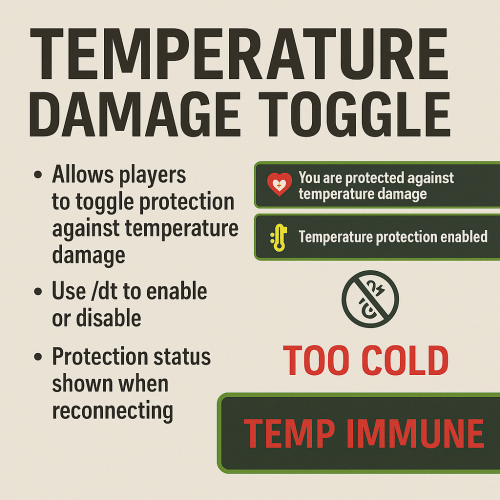
The temperature damage toggle allows you to disable cold and heat damage. You can control the damage dealt to Cold Hot Chat Commands /dt Permissions temperaturedamagetoggle.use -- Allows the player to use chat commands$1.99 -

Version 1.0.1
273 downloads
THIS IS NO LONGER UPDATED The Comfortable Temperature plugin is designed to enhance player experience in Rust by automatically regulating players' body temperatures. This plugin ensures that players with the appropriate permissions are kept at a comfortable temperature level, preventing them from being affected by extreme cold or heat in the game environment. Key Features: Temperature Regulation: Automatically adjusts players' body temperatures to a comfortable level, preventing the adverse effects of being too cold (below 10 °C) or too hot (above 30 °C). Permission-Based: The plugin works for players who have been granted the specific permission (comfortabletemperature.use). This allows server admins to control who benefits from this feature. Seamless Integration: Operates silently in the background without sending console messages, ensuring an uninterrupted and immersive gameplay experience. No need to edit Configs or Language files just drag and drop and you're sorted! Customizable Thresholds: While default thresholds are set for cold (10 °C) and hot (30 °C) conditions, these can be adjusted in the plugin file itself as needed to fit different server environments or gameplay styles. No need to reload: Unlike some plugins where you have to reload the plugin every time you wipe or restart to get the features going, ComfortableTemperature Works almost instantly and does not require any reloading or config changing! Usage: To enable temperature regulation for a player, grant them the comfortabletemperature.use permission. The plugin requires no commands or additional interaction from players; it works automatically once the permission is granted. Ideal for: Servers looking to provide a more controlled and comfortable survival experience. Admins who want to offer temperature regulation as a perk or privilege. Support Contact me on Discord if you need assistance: stylesttsFree -
Hi, I was wondering if its possible to make changes to the temperature effect a biome produced on the player, as an example, making the arid biome hotter, or making the arctic biome very hot. As well as this, is it possible to change the ambient sounds a biome produces? If any of this is possible, I'm willing to pay for work done. And if this isn't possible, it would still be useful to know! Thanks in advance!