Recent Content

CXL IP User Guide redirect to intel.com and access denied.
Hey, guys, I am interested in CXL IP inside Agilex7 device. Before I purchase the DK-DEV-AGI027-RA-B board, I want to read the User Guide and the Example Design User Guide to try the CXL demo. But the documents link listed on the webpage below: Compute Express Link (CXL) IP | Altera https://www.intel.com/content/www/us/en/secure/content-details/862292/agilex-7-r-tile-compute-express-link-cxl-1-1-2-0-fpga-ip-user-guide.html?wapkw=cxl%20ip%20user%20guide https://www.intel.com/content/www/us/en/secure/content-details/862293/agilex-7-r-tile-compute-express-link-cxl-fpga-ip-design-example-user-guide.html?wapkw=cxl%20ip%20user%20guide redirect me to intel.com and after I registered and login in, I can only see access denied. So how can I get access to these 2 documents. Thanks. Joseph9Views0likes1Comment
R-Tile Avalon Streaming PIPE Direct x16: Locks COM(K28.5) Symbols correctly but some lanes do not.
Hello, I am implementing a custom soft PCIe/CXL link layer and LTSSM using R-Tile Avalon Streaming IP in PIPE Direct mode, configured as x16. At the moment, link training does not reliably move forward because some lanes receive valid COM/K-code alignment, but the following ordered-set symbols are corrupted. Environment Device / board: AGIB027R29A IP: R-Tile Avalon Streaming FPGA IP for PCI Express Mode: PIPE Direct Link width: x16 Current focus: Gen1 training / Polling / Configuration Custom implementation: custom LTSSM custom symbol lock using COM (K28.5) custom TS1/TS2 decode logic Symptom In Polling.Active and Polling.Configuration , I can see that some lanes captures/decodes TS1/TS2 correctly, but some lanes do not. For example, in the attached SignalTap screenshot: Lane 9 appears to decode the TS2 sequence correctly. Lane 8 shows COM (K28.5) and PAD (K23.7) correctly, but the symbols after that are unstable / corrupted. From the screenshot: Lane 9 example: K28.5, K23.7, K23.7, D24.0, D30.0 D00.0, repeated Lane 8 example: K28.5, K23.7 are visible, but the following TS2 fields fluctuate and do not remain valid/stable. So it looks like: COM-based symbol lock is working at least partially but after COM/PAD, the ordered-set contents on some lanes(random) are corrupted before my soft IP can decode them correctly To verify whether this was caused by my own logic, I captured the affected lanes directly in SignalTap using the first raw 10-bit RX data from the PIPE Direct IP (`ln*_pipe_direct_pipe_rxdata_o`), before any symbol lock/decoding stage in my soft IP. I searched for the COM symbol directly in this raw 10-bit stream and confirmed that the corruption is already present at the PIPE Direct IP output. So this does not appear to be caused by my combinational decode logic; the raw RX data delivered by the IP is already corrupted on those lanes. What I already checked I already checked the following items carefully: Gen1 rxdata interpretation I only decode valid 10-bit portions for Gen1 I do not interpret the don't-care bits in rxdata[31:10] and rxdata[63:42] rxdatavalid qualification TS decode / symbol shift only happens when rxdatavalid0/1 are valid Sampling clock SignalTap capture is done in the corresponding lane RX clock domain not with a shared TX/fabric clock Reset sequence pld_pcs_rst_n_i release is gated after per-lane tx_transfer_en_o I also reviewed cdrlock2data, reset_status_n, phystatus, powerdown sequencing Deskew-related status active channels are detected Current question At this point, I suspect one of the following: lane-specific analog/RX quality issue inside or before PIPE Direct output lane-specific reset/power-up timing issue internal alignment / deskew behavior that I am misunderstanding some required PIPE Direct control/sideband setting that I am missing What I would like to ask In PIPE Direct x16 Gen1, if one lane shows valid K28.5 / K23.7 but the following TS2 symbols are corrupted, what should I check first on the R-Tile side? Are there any lane-specific PMA / RX / PIPE Direct controls that should be reviewed for this symptom? Is there any recommended way to determine whether this is: a true lane analog/RX problem, a deskew/alignment issue, or a reset/bring-up sequence issue? Are there any known recommendations for validating lane integrity directly at the PIPE Direct output during Polling.Configuration?
Why does the Single Floating Point Variable Streaming Reverse FFT IP produce an incorrect output when the input order is set to Natural?
Description Due to a problem in the Quartus® Prime Software version 25.3.1 and earlier, the "Natural" option for setting "Input Order" is incorrectly available for selection and unsupported when generating the FFT IP. This option is available when using the following parameters: Direction: "Reverse", Data Flow: "Variable Streaming", Representation: "Single Floating Point". Resolution This problem is scheduled to be fixed in release 26.1 of the Quartus® Prime Software with the removal of the unsupported “Natural” option. Additional Information This problem affects the FFT IP in Quartus® Prime Software versions 17.0 to 25.3.1.Why does Ashling* RiscFree* IDE for Altera FPGAs software version 25.4.1 turns compiler warnings into errors?
Description In the Ashling* RiscFree* IDE for Altera FPGAs software version 25.4.1 (31 st Oct 2025) and later, you might see compilation error related to the following errors: Implicit int types (-Werror=implicit-int) Implicit function declarations (-Werror=implicit-function-declaration) Typos in function prototypes (-Werror=declaration-missing-parameter-type) Incorrect uses of the return statement (-Werror=return-mismatch) Using pointers as integers and vice versa (-Werror=int-conversion) Type checking on pointer types (-Werror=incompatible-pointer-types) This is due to an update in GCC 14 – GNU: Certain warnings are now errors, which affects future GCC versions. For more information, Ashling* RiscFree* IDE for Altera FPGAs software version 25.3.1 (1 st August 2025) is using GCC 13.2. Ashling* RiscFree* IDE for Altera FPGAs software version 25.4.1 (31 st Oct 2025) is using GCC 15.2. Thus, Ashling* RiscFree* IDE for Altera FPGAs software version 25.4.1 (31 st Oct 2025) and future versions are affected. Note that Ashling* RiscFree* IDE for Altera FPGAs software version 25.4.1 (31 st Oct 2025) is paired with Quartus ® Prime Pro Edition software version 26.1. Resolution GNU recommends resolving all the new errors for better code quality. If necessary, you may refer to the workaround – GNU: Turning errors back into warnings. In Board Support Package Editor, add "-fpermissive" in hal.make.cflags_user_flags.Why does simulation elaboration fail with port width mismatch for the F-tile Ethernet Hard IP 400GE-8 DR example design generated with VHDL when using QuestaSim* or Riviera-PRO* simulator?
Description Due to a problem in the Quartus® Prime Pro Edition Software version 26.1, when running simulation for the F-Tile Ethernet Hard IP 400GE-8 Dynamic Reconfiguration (DR) Example Design generated with VHDL and using Questa* Sim or Riviera-PRO* simulator, you may observe the following port width mismatch error during elaboration: # Time: 0 fs Iteration: 0 Instance: /basic_avl_tb_top/eth_f_hw/IP_INST[0]/hw_ip_top/dut File: ./eth_f_hw_ip_top_400g.sv Line: 707 # ** Fatal: (vsim-3363) The array length (4) of VHDL port 'anlt_link' does not match the width (8) of its Verilog connection (1st connection). # Time: 0 fs Iteration: 0 Instance: /basic_avl_tb_top/eth_f_hw/IP_INST[0]/hw_ip_top/dut File: ./eth_f_hw_ip_top_400g.sv Line: 707 # FATAL ERROR while loading design # Error loading design Error loading design This occurs due to a mismatch between the array length of the VHDL port and the width of its Verilog connection in the generated design. Resolution To work around this problem, you may use one of the following methods: Update the MAX_ETHPORT parameter in the eth_f_hw_ip_top module to 4: parameter MAX_ETHPORT = 4; (Change the value to 4 as shown above.) Use the following suppress switch in the vsim do file: elab -suppress 3363 This problem is scheduled to be fixed in a future release of the Quartus® Prime Pro Edition software.4Views0likes0Comments
Discover What’s New in Quartus® Prime Pro 26.1
3 MIN READ Quartus Prime Pro 26.1 improves FPGA development with faster performance, a new drag-and-drop design tool (Visual Designer Studio), better power/thermal analysis, and expanded IP support and debugging—making design workflows simpler and more efficient.58Views0likes0CommentsMCDMA IP D2H Queue Reset Failure during Channel Re-allocation
After successfully loading the binary and launching D2H (Device-to-Host) operations on my FPGA, the first channel is allocated successfully and transfers data without issue. However, when I try to allocate another channel, it fails with a "queue reset failed" error. Initially, during the initialization phase, all 512 channels were checked and appeared available. Environment: Device Family: [Agilex 7] Quartus Version: [24.1] Driver/Software: VFIO based IP Config: MCDMA configured with 512 channels Why is this happening? How to rectify the same ?35Views0likes5CommentsArrow AXE5 Eagle Board JTAG issue
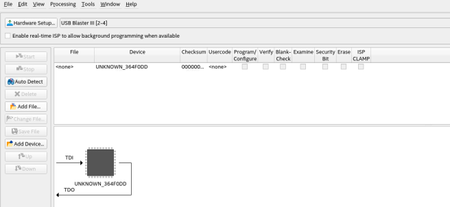
Hi, I have an AXE5 eagle board. The Quartus Programmer on Auto-Detect does show the usb blaster3 but the device is named UNKNOWN_364F0DD instead of A5ED065BB32AES4. What do you think could be the issue? BTW I am on Linux RHEL 8. I am using Arrow blaster and used FTProg to flash it as USB Blaster 3 as suggested by guide22Views0likes0CommentsKnow-How: Set Up a Floating License (Step-by‑Step Walkthrough)
#sharing #debug #altera #alldevices #license Disclaimer: This article is provided as-is for educational purposes only, without warranty of any kind. Use the information at your own risk. Always verify implementations in your specific environment and consult official Altera documentation for production deployments. Introduction This guide explains how to set up a floating license for Altera® FPGA tools. The instructions and screenshots are based mainly on the Windows* operating system, but the same concepts apply to Linux systems. Overview: What You Need Before Starting Before you begin, make sure you have the following: A valid floating license file (.dat) - For the examples below, this file will be referred to as float.dat. Access to the license server machine The license server’s hostname and NIC ID / Host ID Steps Step 1: Generate the Floating License File (SSLC) i. Log in to the Self Service Licensing Center (SSLC). ii. Select your product entitlement, for example: - Quartus Prime - Questa iii. Choose one of the following: - An existing computer with FLOAT license type - Or select + New Computer, in the Create Computer, choose FLOAT license type, and enter the license server NIC ID / Host ID 4. Generate and download the license file (.dat). Step 2: Edit License File i. Open the downloaded license file and update it based on the instructions provided in the User Guide Section 6.4.4.1: Setting Up a License File in the License Server: Altera Documentation and Resources Center Helpful Tips 1: ----------------------------------------------------- START ----------------------------------------------------- To find the license server hostname - Open a Command Prompt and run: hostname - Install only the latest license daemons. Remove all older versions, and keep only the most recent ones. Required daemons: FlexNet License Daemon for FPGA software (64‑bit) Includes: alterad (Altera daemon), lmgrd, lmtools, lmutil (These are used later in Step 3.) FlexNet License Daemon for Siemens ModelSim / Questa FPGA software (64‑bit) Includes: saltd (Siemens Advanced Licensing Toolkit Daemon) Download link: Flexlm License Daemons for FPGA Software | Altera *If you’re running a floating license server for Siemens licenses, you need to manually change the VENDOR daemon line in the license file from mgcld to saltd. It is optionally to put user-defined port numbers for the alterad and saltd daemons unless you have specific port numbers that allow firewall access. In this case, I left it empty. ------------------------------------------------------ END ------------------------------------------------------ ii. At the end of Step 2, your license should looks similar like below (Windows): Important to note: Use “” if there is space in the path. Step 3. Launching the Licensing Server The requisites to configure a new license server are: System administration (Administrator) privileges. A valid license.dat floating license file. (Linux only) To run the FLEXlm lmgrd license server manager, make sure that the /usr/tmp directory exists. There are two methods to launch the license server: a) Using the Command Line Interface (CLI) i) Open a Command Prompt (Windows) or Terminal (Linux). ii) Change to the directory where the lmgrd executable is located. iii) Start the license server by running command: lmgrd -c <license.dat> Example: lmgrd -c float.dat This command starts the license server using the specified license file. You will see a few windows pop up showing that the daemons are running. Helpful Tips 2: ----------------------------------------------------- START -----------------------------------------------------To make things easier - skipping the a) ii) step, you can add the path directory that contains lmgrd to your system’s Path environment variable. Once it’s added, you can run the lmgrd command directly from any directory in the Command Prompt. ------------------------------------------------------ END ------------------------------------------------------ iv) To verify the license status. Run: lmutil lmstat –c <license.dat> Example: lmutil lmstat –c float.dat How to Read the above info: Line Note License server status: 1234@<hostname> This contains the license server name needed for the license environment variable setup. It is displayed in the form of <port number>@<hostname> License file(s) on <hostname>: <License Path> : This showed which license file is being used. This is where you make sure the license file you are using is correct. <Hostname>: license server UP (MASTER) v11.19.6 This mean the license server is up successfully. Vendor daemon status (on <hostname>): This showed the vendor daemon status and the daemon version you are using. Make sure the version used is the latest version available. v) Stop the license server: lmutil lmdown -c <license.dat> Example: lmutil lmdown –c float.dat Helpful Tips 3: ----------------------------------------------------- START ----------------------------------------------------- The above command just display the overall status of the license. You can add -a option in the command to report out the verbose list of available licenses and its total numbers of seat, example: lmutil lmstat –a –c <license.dat> Example: lmutil lmstat –a –c float.dat To check a specific feature: lmutil lmstat –c <license.dat> -f <feature name> Example to check the Questa Altera FPGA Edition license: lmutil lmstat –c float.dat -f intelqsim View command options: lmutil lmstat -help ------------------------------------------------------ END ------------------------------------------------------ b) Using the Graphic User Interface (GUI) 1. Right‑click lmtools and select Run as Administrator. 2. In the Service / License File tab, select Configuration Using Services. 3. Switch to the Config Services tab and configure the required fields below: 4. Click Save Service. 5. Go to the Start / Stop / Reread tab and click Start Server to launch the service. 6. Click Stop Server to shut it down. Helpful Tips 4: ----------------------------------------------------- START ----------------------------------------------------- The GUI performs the same actions as the command line, but is easier to visualize. For debugging, the CLI provides more detailed output. If something fails, always check: - Server Status - Debug Log Diagnose license or feature issues using CLI: - lmutil lmdiag -c <license.dat> <feature_name> If using GUI, you can run diagnostics from the Server Diags tab. ------------------------------------------------------ END ------------------------------------------------------ Conclusion This guide provides a complete walkthrough for setting up a floating license server for Altera FPGA tools. Following these steps should help ensure a reliable and functional license environment.
PCIe Hard IP - Can 'valid' De-assert Between SOP and EOP During DMA Read Completion?
Product / IP: Intel PCIe Hard IP (Avalon-ST Interface Device Family: Cyclon 10 GX Reference Manual: https://docs.altera.com/r/docs/683647/18.0/arria-10-and-cyclone-10-gx-avalon-streaming-interface-for-pci-express-user-guide/datasheet I am an FPGA Design Engineer currently working on verifying the application layer logic interfacing with Intel's PCIe Hard IP over the Avalon Streaming (Avalon-ST) interface. As part of the verification effort, I have developed an Avalon-ST Bus Functional Model (BFM) that mimics the RX-side behavior of the PCIe Hard IP — specifically, how it presents TLP data (DMA Read Completions) to the downstream application logic. During simulation, my BFM generates scenarios where the 'valid' signal is de-asserted between 'startofpacket (SOP)' and 'endofpacket (EOP)' — i.e., mid-packet gaps or "bubbles" are introduced within a single TLP transfer. When this occurs, the application layer logic does not handle it correctly, causing functional failures. Before proceeding with fixing the application logic to handle this case, I need to confirm from Intel whether this behavior is actually possible on the real PCIe Hard IP hardware Question 1: On the RX Avalon-ST interface, when the PCIe Hard IP is acting as the SOURCE (driving TLP completion data toward user application logic), is it possible for the 'valid' signal to be de-asserted between SOP and EOP within the same TLP packet? Question 2: If yes, under what conditions can this occur? Question 3: Does the Intel PCIe Hard IP Reference Manual explicitly document this behavior anywhere? If so, could you point to the relevant section?40Views0likes6Comments



Featured Places
Community Resources
Check out the support articles on personalizing your community account, contributing to the community, and providing community feedback directly to the admin team!Tags
- troubleshooting10,338 Topics
- fpga dev tools quartus® prime software pro4,227 Topics
- FPGA Dev Tools Quartus II Software3,160 Topics
- stratix® 10 fpgas and socs1,533 Topics
- agilex™ 7 fpgas and socs1,425 Topics
- arria® 10 fpgas and socs1,351 Topics
- stratix® v fpgas1,314 Topics
- arria® v fpgas and socs1,226 Topics
- cyclone® v fpgas and socs1,053 Topics
- Configuration971 Topics
Recent Blogs

Quartus Prime Pro 26.1 improves FPGA development with faster performance, a new drag-and-drop design tool (Visual Designer Studio), better power/thermal analysis, and expanded IP support and debugging—making design workflows simpler and more efficient.
3 hours ago0likes

2 MIN READ
Altera is extending the availability of its Agilex®, MAX® 10, and Cyclone® V FPGA families through 2045 to support long-lifecycle applications like industrial, aerospace, and medical systems. This helps customers avoid costly redesigns and ensures reliable, long-term supply, reinforcing Altera as a trusted partner for decades-long deployments.
12 days ago1like

In a world where technological complexity is rising, standards are evolving, and differentiation is critical, customers need partners who can move fast, stay focused, and innovate without compromise. At Altera™, operating as an independent pure play FPGA solutions provider is more than a corporate structure. It’s a strategic advantage. For more than four decades, Altera has been at the forefront of FPGA innovation, helping customers push the boundaries of what’s possible across the most demanding applications. With our recent operational independence and singular focus on pioneering FPGA innovations, we are uniquely positioned to deliver FPGA solutions that enable customers to differentiate, innovate, and grow in rapidly changing markets. Why Demand for FPGAs is Accelerating The FPGA industry is entering a period of strong, sustained growth, driven by powerful forces across cloud, networking, and edge applications. As enterprises race to process and monetize exploding volumes of data, FPGAs have become a critical enabling technology, uniquely suited for workloads where flexibility, re-programmability, and real-time performance matter most. Over the next five years, the market is expected to grow at roughly 10% CAGR, expanding from an estimated ~$7B in 2025 to more than $13B by 2030¹. Demand is accelerating across data center and networking, telecom, aerospace and government, industrial automation, robotics, medical, and beyond. Growth is being driven by AI infrastructure modernization, 5G-Advanced and early 6G deployments, and the rise of physical AI and real-time, low-latency edge computing. At the same time, escalating development costs for ASIC and ASSPs, longer development cycles, and the need for post-deployment flexibility are pushing more customers toward programmable solutions that reduce risk while maintaining performance and differentiation. Altera is uniquely positioned to help drive this next phase of growth. As the largest independent, pure-play FPGA solutions provider, our agility and focus allow us to move faster, invest deeply in a thriving ecosystem, and deliver differentiated, end-to-end solutions backed by strong customer support. By partnering closely with customers, we enable them to seize opportunities across AI, cloud, networking, and edge applications. While at the same time allowing customers to stay ahead as new technology inflection points emerge. Let’s take a closer look at how Altera’s independence strengthens the five strategic pillars that matter most to our customers: Innovation, Quality, Ecosystem Partnerships, Solutions, and Community Support. Faster Decisions Enable Faster FPGA Innovation Altera’s independence means customers benefit from faster decisions, quicker execution, and a partner that can adapt as requirements evolve. Free from competing priorities or broader corporate agendas, we respond rapidly to market shifts, delivering new capabilities sooner, resolving challenges faster, and helping customers stay on track with demanding development timelines. This momentum is reflected in Altera’s renewed commitment to the broad-based FPGA market and the launch of our power- and cost-optimized Agilex® 3 FPGAs, supported by an expanding ecosystem of partner boards. Altera’s first power- and cost-optimized FPGA since the launch of Cyclone 10, Agilex 3 enables industrial, automotive, and edge AI customers to accelerate differentiation and reduce time-to-market. Our investments are not stopping here. We are advancing a next-generation FPGA roadmap that delivers new levels of performance while introducing the next wave of power- and cost-optimized devices, providing a clear and scalable path forward across the Agilex portfolio. A Relentless Focus on FPGA Quality Because Altera is singularly focused on FPGAs, our priority is to ensure our programmable solutions meet the industry’s most demanding quality and lifecycle requirements. Every investment, engineering decision, and roadmap commitment is dedicated to delivering rigorously validated silicon, dependable software tools, long-term product availability, and sustained support that customers designing mission-critical systems require, including long-term supply commitments extending to 2035 and 2040 for select product families. This unwavering focus allows us to provide the stability, reliability, and multi-decade lifecycle assurance FPGA customers depend on, with no competing agendas and no compromise. Additional information about Altera’s quality and reliability can be found at: https://www.altera.com/quality/overview Accelerating FPGA Innovations Through a Robust Ecosystem FPGA value is unlocked faster through a strong, connected ecosystem. Altera supports a global network of more than 300 validated FPGA partners delivering over 1,400 proven solutions spanning IP, development tools, system integration, and turnkey platforms. By leveraging these pre-validated solutions, customers can reduce development time by up to 50%, lower risk, and accelerate time-to-market. Through deep ecosystem investments, we extend the power and usability of Altera FPGAs, enabling faster system-level innovation and helping customers move from concept to deployment with greater speed and confidence. Learn more about the Altera Solution Acceleration Program at: https://www.altera.com/asap Purpose-built Investments Across the FPGA Stack Every dollar we invest is directed toward advancing FPGA innovation. A recent example includes expanding our MAX® 10 FPGA family with new high-I/O density Variable Pitch BGA (VPBGA) packages, which deliver up to 485 I/Os in a compact 19 x 19 mm footprint, reducing board size by 50% compared to traditional 27 x 27 mm packages and enabling more space-efficient Type III PCB designs. We are also accelerating productivity through tools like Visual Designer Studio, which dramatically reduces development cycles by reducing system creation time from five days to as little as two hours. In parallel, we continue to invest in a broad portfolio of FPGA IP, spanning interfaces, memory, DSP, embedded processing, and connectivity. An extensive portfolio of Altera and parter IP provide pre-validated building blocks that reduce design complexity and speed integration. Together, these investments across silicon, packaging, software, and IP ensure continuous gains in performance, power efficiency, programmability, and ease of use. Customer Support Focused Exclusively on Solving FPGA Challenges Support is another area where independence makes a meaningful difference. Altera’s teams are entirely dedicated to solving the real-world challenges customers face. Our commitment to our customers is reinforced by the recently launched Altera Premier Support (APS) and Altera Community portals. These platforms provide streamlined access to engineering assistance, service request tracking, technical resources, and peer collaboration, ensuring customers have both direct expert support and 24/7 self-service capabilities. This deep specialization enables faster issue resolution, more relevant guidance, and a true partnership mindset. Whether optimizing designs, debugging complex systems, or scaling into production, customers can rely on experts who live and breathe FPGA solutions. Learn more about Altera communities, visit https://community.altera.com/ Enabling Innovators to Shape What’s Next As the largest independent, pure-play FPGA solutions provider, Altera is entering a new era defined by agility, focus, and the freedom to innovate at the pace of change. Our independence allows us to invest with intention, strengthen our ecosystem, and deliver complete solutions backed by deep customer engagement. By working side-by-side with our customers, we’re not just responding to technology inflection points across AI, cloud, networking, security and the edge… We’re helping customers shape what’s next. Visit Altera at www.altera.com (1) Source: Based on Altera and 3rd-party data
20 days ago1like
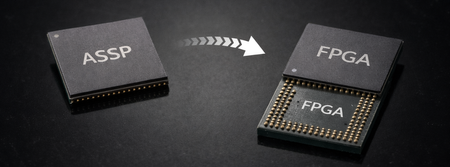
Modern infrastructure systems are facing growing challenges as many legacy ASSPs and ASIC devices reach end-of-life, creating pressure to find scalable and future-ready alternatives. FPGAs are emerging as a powerful replacement platform, offering programmability, lifecycle extension, and adaptability to evolving standards such as DDR5 and post-quantum security. With platforms like Altera’s Agilex family, organizations can replace fixed-function silicon while maintaining high performance, flexibility, and long-term production viability.
21 days ago0likes

Agilex® 7 FPGAs push FPGA fabric performance toward the gigahertz range by combining the HyperFlex® architecture with Quartus® Prime Pro software optimization. In Altera testing, a 32-bit SIMT soft processor implemented on Agilex 7 operated above 950 MHz, demonstrating how high-performance soft logic can be achieved in real designs. Hyper-registers distributed throughout the routing fabric enable deeper pipelining and advanced retiming, while Quartus Prime Pro optimizes synthesis, placement, routing, and timing to reach aggressive clock targets—allowing compute-intensive FPGA workloads to run faster and scale more efficiently.
21 days ago0likes
