What is a Computer Memory? Definition, Examples, History, and Complete Overview
Published: 3 Feb 2025
Have you ever wondered why your computer slows down or freezes at the worst time? It feels frustrating, right? Many users face this issue, but don’t know the real reason behind it. The answer often lies in computer memory.
Computer memory is like the brain of your system. It stores data and helps your device run programs smoothly. But not all memory works the same way. Some memory is fast but temporary. Other types are slower but store data for a long time. If you don’t understand how it works, you may face slow speed, data loss, or poor performance.
The good news? You don’t need to be a tech expert to understand it. In this guide, you will learn what computer memory is, how it works, and why it matters for your daily tasks. You will also discover simple tips to improve your system speed and performance. Ready to make your computer faster and smarter? Let’s break it down in the easiest way possible.
What is Computer Memory? (Clear Definition)
Computer memory stores data and instructions needed for processing tasks, enabling the system to run programs and perform tasks quickly. It includes primary memory (RAM, cache) for fast access and secondary memory (HDD, SSD) for long-term storage. More memory improves performance and allows smoother multitasking.
What are the Best Examples of Computer Memory?
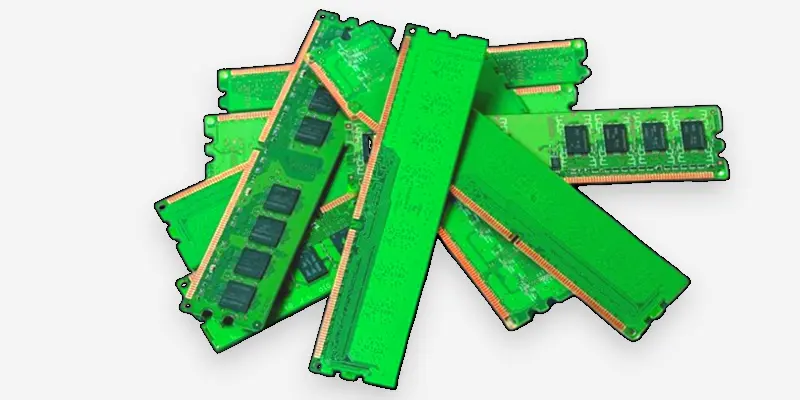
- RAM: Like your desk, it stores active work, making tasks faster.
- Cache Memory: Like a shortcut for quick access to frequently used tools.
- Hard Drive: Like a filing cabinet stores long-term documents and files.
- USB Flash Drive: Like a portable notebook for carrying files.
- SSD: Like a fast, organized library stores data quickly than an HDD.
How Does Computer Memory Work?
- Computer memory stores data temporarily or permanently for quick access.
- When you run a program, memory holds the instructions and data the program needs.
- The CPU fetches data from memory to perform tasks and operations.
- RAM provides fast, temporary storage for active processes.
- Storage devices like HDDs and SSDs store data long-term for future use.
What is the Purpose of Computer Memory?
Computer memory holds the data and instructions the CPU needs to perform tasks, offering quick access to this information and boosting system performance. Memory helps computers run programs, process tasks, and store data temporarily or permanently, ensuring smooth operation and multitasking.
What Does Computer Memory Do?
- Stores data and instructions for the CPU to process.
- Provides quick access to information for running programs.
- Helps the system multitask by holding multiple processes.
- Improves overall computer speed and performance.
- In certain types of memory, data is preserved even when the computer is powered down.
What is the History of Computer Memory?
The history of computer memory dates back to the 1940s with the development of early computers like the ENIAC, which used vacuum tubes for data storage. Over time, memory technology evolved from magnetic drums to RAM and ROM, leading to the fast, reliable memory systems we use today.
- 1940s: Early computers used mechanical memory devices like punched cards and magnetic drums.
- 1950s: Magnetic core memory was introduced, offering faster and more reliable storage.
- 1960s: Semiconductor memory began to replace magnetic core memory, leading to the development of RAM and ROM.
- 1980s: The introduction of DRAM (Dynamic RAM) and SRAM (Static RAM) improved memory speed and efficiency.
- 1990s-2000s: The rise of SSDs (Solid-State Drives) and flash memory revolutionized storage, offering faster speeds and larger capacities.
- Present: Cloud storage and advanced memory technologies like DDR4/DDR5 continue to push the limits of performance and capacity.
Why is Computer Memory Important?
Computer memory is essential because it directly affects a computer’s speed and performance. It holds the data and instructions required by the CPU for processing, enabling the system to operate efficiently. Without sufficient memory, tasks can become slow, and programs may lag or freeze, making the user experience frustrating.
The more memory a computer has, the better it can handle multiple programs at once. It helps in multitasking, faster data retrieval, and improving overall efficiency. Memory plays a key role in determining how well the system performs, whether it’s for gaming, office work, or running complex applications.
What is the Difference Between Computer Memory and Storage?
| Computer Memory | Storage |
|---|---|
| Memory is used to store data that is being processed or accessed. | Storage is used to hold data permanently or for extended periods. |
| RAM, Cache Memory, Registers. | Hard Drive, SSD, USB Flash Drive. |
| Much faster than storage, as it directly supports CPU operations. | Slower than memory, used for holding data over time. |
| Volatile – data is lost when powered off. | Non-volatile – data is retained after shutdown. |
| Smaller capacity, used for immediate tasks. | Larger capacity, used for long-term data storage. |
Final Thoughts
Computer memory plays a key role in your system’s speed and performance. We covered its types, uses, and importance in daily tasks. When you understand RAM, ROM, and storage, you can make better decisions for your device. Want a faster computer? Start by choosing the right memory and managing it well. Keep learning and apply these tips to boost your system performance. Your smarter, faster computer is just one step away.
FAQs
What is the meaning of computer memory?
Computer memory refers to the storage area for data and instructions, either temporarily or permanently, that the CPU uses for fast access to perform tasks.
How can you clean or clear computer memory?
You can clean computer memory by closing unused applications, using system cleanup tools, or restarting the computer.
Which types of computer memory are volatile?
RAM (Random Access Memory) and Cache memory are temporary storage types, which lose their data when the system is powered down.
Which type of computer memory is the fastest?
Cache memory is the fastest, as it provides quick access to frequently used data for the CPU.
What is the biggest unit of computer memory?
The biggest unit of computer memory is usually a terabyte (TB), although larger units such as petabytes are common in data centers.
What is the smallest unit of computer memory?
The smallest unit of computer memory is a bit, representing a binary value of either 0 or 1.




- Be Respectful
- Stay Relevant
- Stay Positive
- True Feedback
- Encourage Discussion
- Avoid Spamming
- No Fake News
- Don't Copy-Paste
- No Personal Attacks
- Be Respectful
- Stay Relevant
- Stay Positive
- True Feedback
- Encourage Discussion
- Avoid Spamming
- No Fake News
- Don't Copy-Paste
- No Personal Attacks

