
Zum Inhalt springen
WordPress.org

Deutsch

  • Themes
  • Plugins
  • News
  • Support
  • Über
    • Learn WordPress
    • Documentation (en)
    • Foren
    • Developers (en)
    • WordPress.tv
  • Meetups
  • Mitmachen
  • FAQ
  • Hol dir WordPress
Hol dir WordPress
WordPress.org

Plugin Directory

Display Post Metadata

  • Ein Plugin einreichen
  • Meine Favoriten
  • Anmelden
  • Ein Plugin einreichen
  • Meine Favoriten
  • Anmelden
Image
Image

Display Post Metadata

Von Fahid Javid
Herunterladen
  • Details
  • Rezensionen
  • Installation
  • Entwicklung
Support

Beschreibung

It is a useful plugin to display the metadata information and custom fields of posts and pages or custom post type. You can either display date, author, comments, views or sticky meta information and custom fields list or maybe if you like then you can display all of them.

Features

You can list the following information:

  • Published Date (The day when the post is published on the website)
  • Author (The Person who created the post or page)
  • Views (Number of people which have seen the post)
  • Sticky (If the post is sticky or not)
  • Comments (Number of comments on the post)
  • Custom Fields (The default custom fields of posts and pages) for more details please consult Custom Fields codex page.

Links

  • GitHub Repository

Please don’t forget to rate my Plugin if you find it useful, thanks.

Screenshots
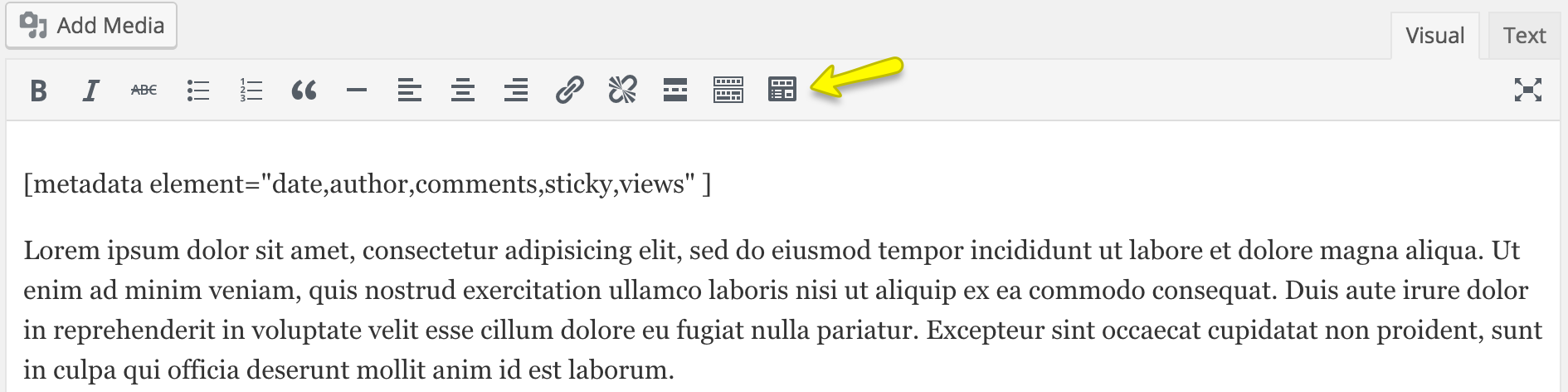
  • Image

    Visual shortcode insert button and shortcode.
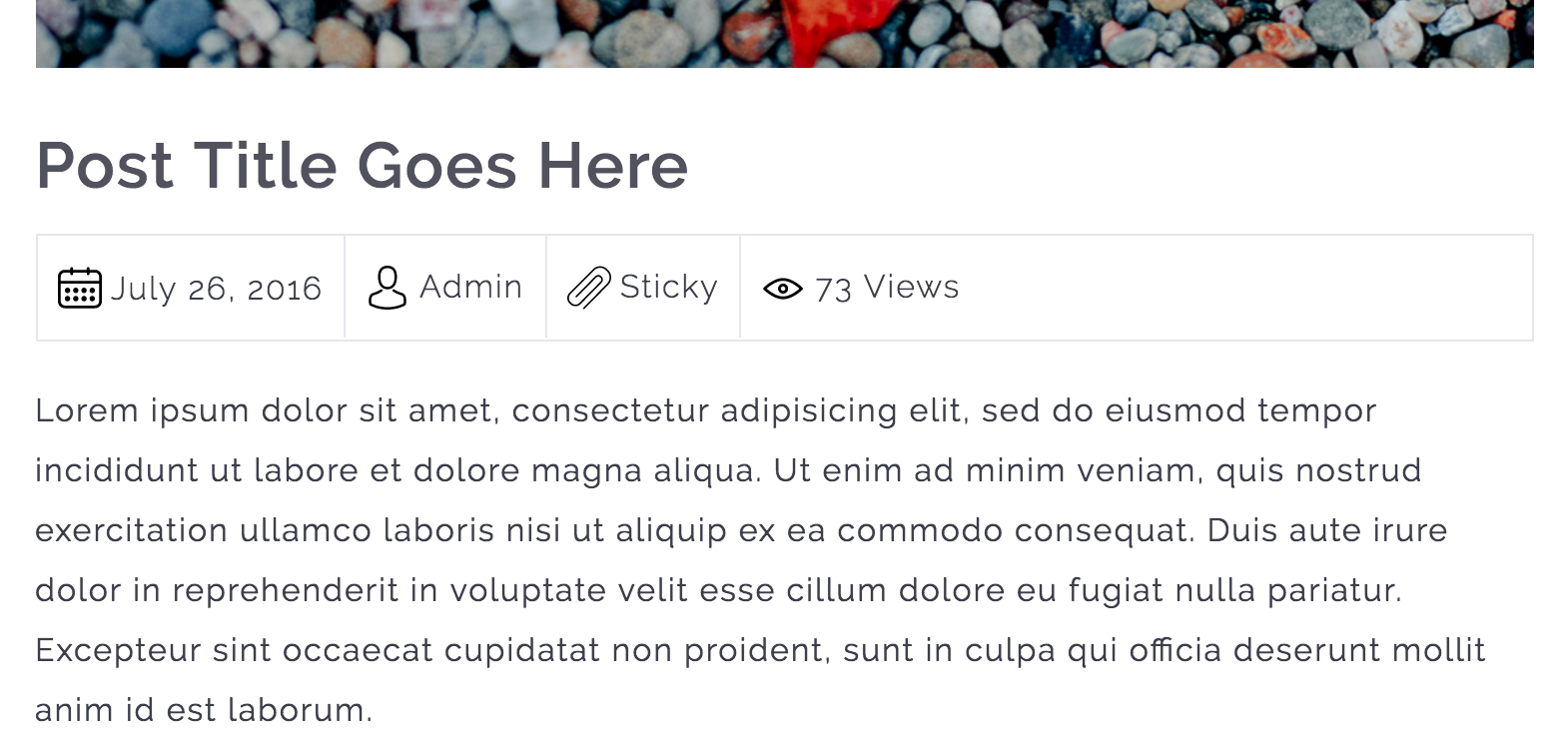
  • Image

    Metadata information is displayed.

  • Image

    Custom Fields list is displayed.

Installation

Instructions for installing the Display Post Metadata Plugin.

  1. In your WordPress admin go to Plugins -> Add New.
  2. Enter Display Post Metadata in the text box and click Search Plugins.
  3. In the list of Plugins click Install Now next to the Display Post Metadata.
  4. Once installed click to activate.
  5. Now go to any page, post or custom post type and edit it.
  6. While editing, you can put the shortcode to display the metadata information. The shortcode is [metadata element=“date,author,comments,sticky,views,custom_fields“]

FAQ

Does this plugin works with all major PHP versions?

Yes, it works with all major PHP versions and I have tested it with PHP version 5.2, 5.3, 5.4, 5.5, 5.6 and 7.0.

Rezensionen

Image

Simple and excellent

qilight 26. Juni 2024 1 Antwort
This plugin is so useful. My theme won’t allow me to place the meta underneath my title within the text block (their suggestion/solution was to manually type it in – ha, what a joke). Then, I found this plugin and it does exactly what I needed. From all those plugins out there, this is the ONLY ONE that offers a simple solution to a common problem (within theme restrictions). Customer support is excellent as well. Any question, just ask and they will respond promptly and help find solutions. 6 stars if I could!
Image

Excellent!

awoob4wporg 30. November 2021 1 Antwort
Good job!
Image

Good Work

M Hassan Raza 3. September 2016
It is very helpful and nicely designed plugin. Hoping for good polishing updated of this one too 😉
Alle 3 Rezensionen lesen

Mitwirkende und Entwickler

„Display Post Metadata“ ist Open-Source-Software. Folgende Menschen haben an diesem Plugin mitgewirkt:

Mitwirkende
  • Image Fahid Javid

Übersetze „Display Post Metadata“ in deine Sprache.

Interessiert an der Entwicklung?

Durchstöbere den Code, sieh dir das SVN-Repository an oder abonniere das Entwicklungsprotokoll per RSS.

Änderungsprotokoll

1.5.5

  • WordPress 6.9 compatibility confirmed
  • Updated minimum WP requirement to 6.0
  • Updated minimum PHP requirement to 8.3 (recommended by WordPress.org)
  • Updated translation files for multilingual support
  • General code improvements

1.5.4

  • Updated language file
  • Tested with WordPress 6.7.1

1.5.3

  • Updated language file
  • Tested with WordPress 6.2

1.5.2

  • Tested with WordPress 6.0.3

1.5.1

  • Tested with WordPress 5.9.1

1.5.0

  • Improved security of the plugin.
  • Tested with WordPress 5.8.2

1.4.0

  • Tested with WordPress 5.7.1

1.3.0

  • Tested with WordPress 5.4.1

1.2.0

  • Added custom fields support for the posts and pages.
  • Improved shodcode execution method.

1.1.0

  • Add a TinyMCE editor button to insert ‚metadata‘ shortcode through a popup which will collect all of the user input for the shortcode attributes.

1.0.1

  • Added Comments Post Metadata support
  • Updated POT file.

1.0.0

  • Initial Release

Meta

  • Version 1.5.5
  • Zuletzt aktualisiert vor 4 Monaten
  • Aktive Installationen 500+
  • WordPress-Version 6.0 oder höher
  • Getestet bis 6.9.4
  • PHP-Version 8.3 oder höher
  • Sprache
    English (US)
  • Schlagwörter
    custom post typemetametadatapagepost
  • Erweiterte Ansicht

Bewertungen

5 von 5 Sternen.
  • 3 5-Sterne-Rezensionen 5 Sterne 3
  • 0 4-Sterne-Rezensionen 4 Sterne 0
  • 0 3-Sterne-Rezensionen 3 Sterne 0
  • 0 2-Sterne-Rezensionen 2 Sterne 0
  • 0 1-Sterne-Rezensionen 1 Stern 0

Your review

Alle Rezensionen anzeigen

Mitwirkende

  • Image Fahid Javid

Support

Möchtest du etwas mitteilen? Brauchst du Unterstützung?

Support-Forum anzeigen

  • Über
  • News
  • Hosting (engl.)
  • Datenschutz
  • Showcase (engl.)
  • Themes
  • Plugins
  • Vorlagen
  • Learn
  • Support
  • Entwicklung (engl.)
  • WordPress.tv ↗
  • Mitwirken (engl.)
  • Veranstaltungen
  • Spenden (engl.) ↗
  • Five for the Future (engl.)
  • WordPress.com ↗
  • Matt (engl.) ↗
  • bbPress (engl.) ↗
  • BuddyPress (engl.) ↗
WordPress.org
WordPress.org

Deutsch

  • Das X-Konto (früher Twitter) von WordPress.org besuchen
  • Das Bluesky-Konto von WordPress.org besuchen
  • Das Mastodon-Konto von WordPress.org besuchen
  • Das Threads-Konto von WordPress.org besuchen
  • Die Facebook-Seite von WordPress.org besuchen
  • Das Instagram-Konto von WordPress.org besuchen
  • Das LinkedIn-Konto von WordPress.org besuchen
  • Das TikTok-Konto von WordPress.org besuchen
  • Den YouTube-Kanal von WordPress.org besuchen
  • Das Tumblr-Konto von WordPress.org besuchen
Code ist Poesie.
The WordPress® trademark is the intellectual property of the WordPress Foundation.
Advertisement