-
-
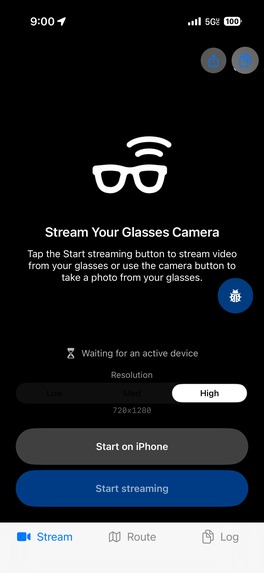
starting page adjusts resolution
-
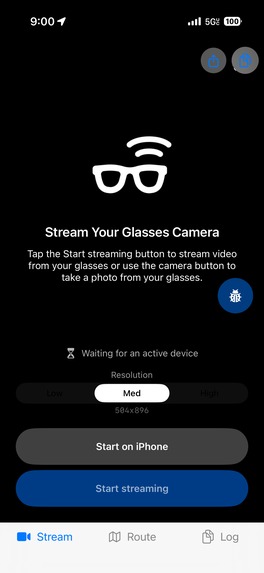
starting page adjusts resolution
-
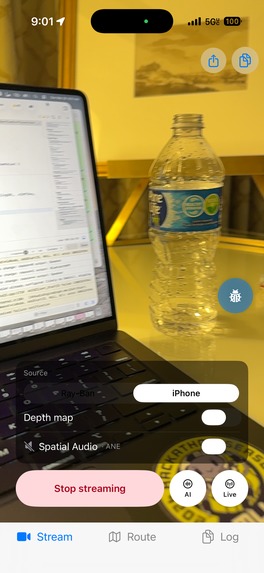
When capabilities aren't turned on yet
-
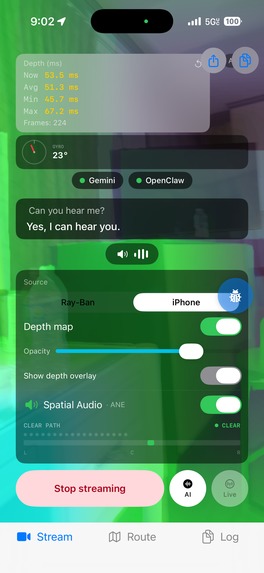
Depth sensor (Depth anything V2) , Ai capabilities (Gemini), Navigation turned on
-
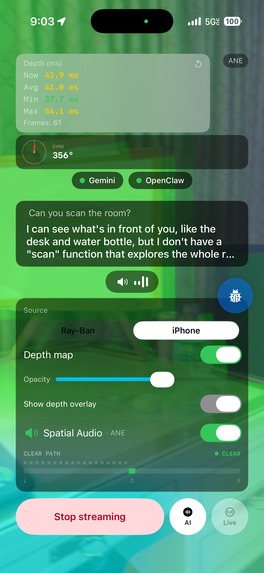
Scans room and forms memory of objects for quick navigation
-
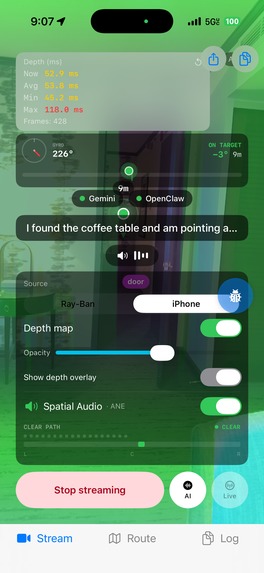
Spatial 8d audio directs user via panning of audio + spatial ping system
-
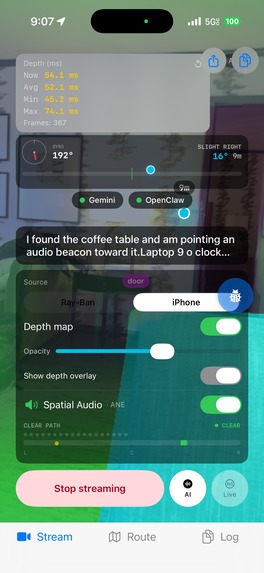
Navigating an Object in a room (User navigates via spatial 8d audio + ping system and obstacle detection)
-
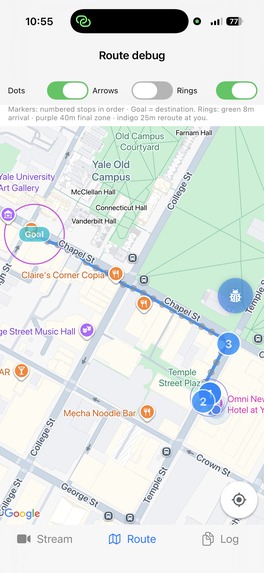
Using a voice command on where you want to go, path will be segmented for optimised audio routes
-
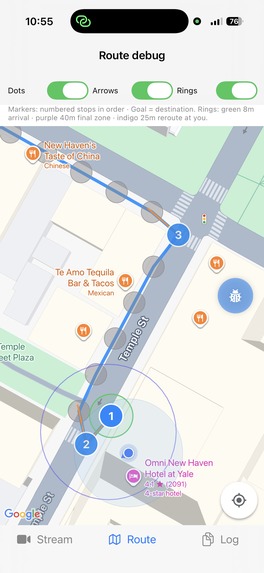
Checkpoints: Zoomed in visual of the map being segmented into a walkable path
-
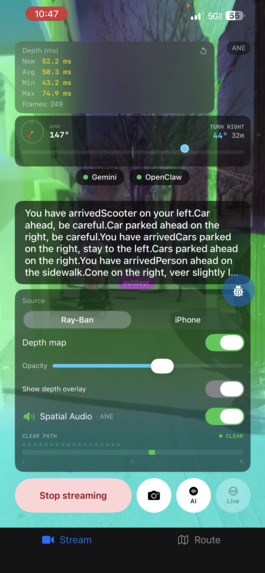
Live obstacle detection with Gemini + Apple Vision Library + Depth Sensor (ML)
-
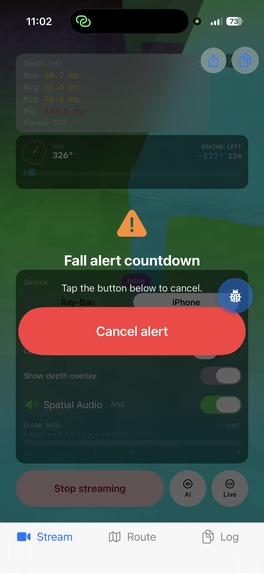
Fall Detection alerts your guardian via SMS after 10 seconds if not cancelled via voice or double tapping on the screen
-
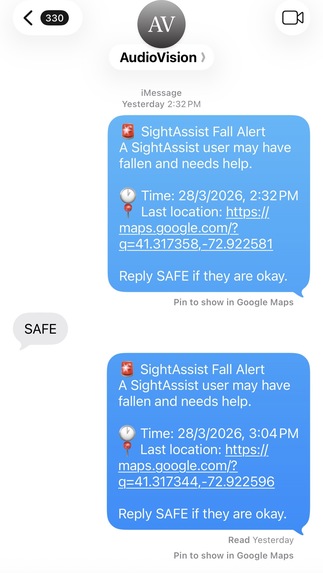
Shows the SMS alert with time, fall location
-
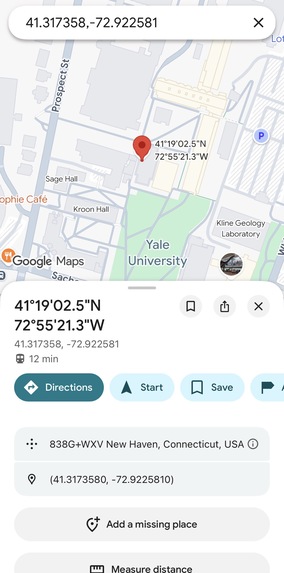
Fall location link opens coordinates in google maps


Inspiration
253 million people worldwide live with visual impairment. Current assistive tools are either passive — a white cane that detects obstacles on contact — or prohibitively expensive ($3,000–$5,000 smart canes limited to basic obstacle buzzing). None provide what sighted people take for granted: spatial awareness.
What if you could hear the world in 3D? Not clumsy beeps, but a spatial audio field where you perceive obstacles, follow routes, and locate objects through sound positioned in real 3D space around your head. AudioSight runs on $300 consumer Ray-Ban Meta glasses and an iPhone. No custom hardware. Just AI-powered spatial hearing.
What it does
8D Spatial Audio Engine AudioSight creates a persistent 3D "audio scene" around the user. Every sound, obstacle warnings, navigation beacons, object locators is positioned in real 3D space using HRTF rendering with front/back/left right and elevation disambiguation. As the user turns their head, sounds stay anchored to their real-world positions. A chair to your left sounds like it's to your left. Turn around, and it's now behind you. This is the foundation everything else builds on. Real-Time Obstacle Awareness The system detects obstacles in real-time at ~50ms latency and alerts the user through two layers: spatial audio pings that give instinctive directional awareness (closer obstacles ping faster and louder), and Gemini Live verbal descriptions that explain what the obstacle is, "bicycle locked to a post on your left." The user gets both reflexive and cognitive understanding of their surroundings.
Outdoor GPS Navigation Speak a destination and AudioSight guides you there with turn-by-turn spatial audio, a beacon sound pulls you toward each waypoint while Gemini Live provides conversational voice guidance. The system fuses GPS routing with live obstacle detection: if the route says "go straight" but there's a barrier ahead, obstacle priority overrides and reroutes you. Near your destination, the system switches to camera-based visual guidance for final-meter navigation, "the entrance is the blue door on your right."
Room Scanning & Object Finding Say "scan the room" and AudioSight builds a spatial map of everything around you. Later, ask "where are my keys?" and a 3D audio beacon guides you to their exact location, updating in real-time as you walk so the sound always comes from the correct direction. The system tracks your movement step-by-step to keep beacon positions accurate even without GPS indoors.
Fall Detection & Emergency Response A 3-stage fall detection system monitors for free-fall, impact, and post-impact stillness. If you fall and don't respond to a voice check within 30 seconds, the system automatically texts your emergency contacts with your GPS location and fall details.
Fully Hands-Free Operation powered by openclaw Every feature: navigation, scanning, object finding, texting, emails, phone calls, is accessible through natural voice commands via the glasses. Blind users never need to touch their phone screen. "Take me to Walgreens." "Text Mom I'm on my way." "Read my latest messages." Point the glasses at anything, a product, sign, document, or medication and identifies it aloud, and can buy it online automatically for you. In a store, it reads labels, prices, and packaging to help you shop independently. "You're holding a box of Cheerios, $4.29, 10 ounces."
How we built it
On-Device Depth Inference & the Latency Breakthrough Depth-Anything-V2 runs as a Core ML model on the iPhone's Neural Engine, the single biggest architectural decision. Early prototypes routed frames to cloud GPUs (Modal A100s) and came back at 250ms+ end-to-end latency. Moving inference on-device eliminated ~100ms of network round-trip per frame. Combined with five additional optimizations, persistent Gemini Live WebSocket (no per-request connection overhead), Swift structured concurrency (depth inference and GPS updates run in parallel via async let), predictive caching (last frame's obstacle data renders audio immediately while fresh inference runs), 5th-percentile depth sampling per column (statistically cheaper than full-frame analysis), and native AVAudioEngine pipeline (zero third-party library overhead), we compounded the gains to bring average latency from 250ms to ~50ms. An 80% reduction that took obstacle avoidance from "dangerously delayed" to faster than human visual reaction time (~150ms). Sensor Fusion Architecture Six concurrent data streams feed the system: Ray-Ban Meta camera (30 fps), accelerometer + gyroscope (CoreMotion, 100 Hz), magnetometer/compass (CoreLocation, 60 Hz heading updates), GPS (1 Hz position fixes), pedometer (CMPedometer step events), and the on-device depth model. The gyroscope and accelerometer drive 60 Hz head-tracking updates, every spatialized sound source is continuously repositioned relative to the user's current facing via AVAudioEnvironmentNode's listener orientation. iOS's Vision framework (VNClassifyImageRequest, VNDetectObjectsRequest) adds on-device scene classification and object segmentation, feeding recognized obstacle types into Gemini Live's context for semantic descriptions without an additional cloud call.
HRTF Spatial Audio Engine Built on AVAudioEngine with AVAudioEnvironmentNode for native HRTF, no third-party audio libraries. Three distinct audio layers: obstacle pings (square wave, 400–1000 Hz, urgency-scaled frequency), navigation beacons (800 Hz sine, gentle pulse), and Gemini voice guidance (non-spatial, positioned at-ear for speech intelligibility). A priority-based ducking system manages layer conflicts: emergency alerts duck everything to 10%, obstacle pings duck beacons to 30% and voice to 20%, voice guidance ducks beacons to 50%. Temporal separation enforces a minimum 150ms gap between spatial sounds, and a hard cap of 2 simultaneous spatial sources prevents auditory overload. The selective ping system uses a Sheikah Sensor-inspired proximity model where ping frequency scales inversely with obstacle distance, critical obstacles (< 1m) trigger rapid bursts, moderate obstacles produce slower tones, and distant obstacles are silent. Geospatial Navigation Pipeline Google Maps Directions API returns a route polyline, which the TurnPointExtractor segments by computing bearing deltas (Δbearing = |bearing[i+1] − bearing[i]|) between consecutive coordinate pairs. Pairs exceeding a configurable angular threshold are flagged as turn points; straight segments collapse into single RouteCheckpoints storing GPS coordinate, bearing-to-next, and cumulative distance. At runtime, relative bearing to the active checkpoint is computed via the Haversine great-circle formula: θ = atan2(sin(Δλ)·cos(φ₂), cos(φ₁)·sin(φ₂) − sin(φ₁)·cos(φ₂)·cos(Δλ)), minus the user's live compass heading, producing the signed angle that drives both spatial beacon placement and Gemini's contextual voice guidance. Cross-track deviation detection computes perpendicular distance from the user to the active polyline segment — exceeding the threshold triggers route recalculation. A VLM handoff geofence at ~20m from destination switches from GPS to Gemini Vision for camera-based final approach.
BeaconAnchor Dead-Reckoning System Object positions are stored in north-aligned world-frame (x, z) Cartesian coordinates, computed from polar inputs via x = d·sin(heading + pixel_bearing), z = d·cos(heading + pixel_bearing), where d is the depth-map center-region median and heading is the compass reading at capture time. As the user moves, CMPedometer step events trigger displacement updates: user.x += stride·sin(heading), user.z += stride·cos(heading). Relative bearing to each active beacon is recomputed every motion tick via atan2(target.x − user.x, target.z − user.z), keeping the spatial audio beacon correctly positioned even through complex movement paths. Beyond ~15m outdoors, the system automatically falls back from pedometer dead-reckoning to GPS-based bearing for drift correction.
Room Scan Pipeline The RoomScanController state machine advances through compass heading thresholds (e.g., 0°, 90°, 180°, 270°), prompting the user to look in each direction. Keyframes are captured every ~2 seconds and dispatched to Gemini Vision REST for open-vocabulary detection. Returned object detections undergo geometric fusion: each detection's pixel coordinates are converted to a world-frame position using the polar-to-Cartesian transform above, anchored by the phone's compass heading and depth map at capture time. A spatial deduplication pass groups detections sharing the same object name within a configurable proximity radius (e.g., 0.5m), averaging their world positions into a single SpatialObjectMap entry.
OpenClaw Tool-Calling Framework OpenClaw extends Gemini Live with structured function dispatch. Every capability, navigate_to, scan_room, find_object, identify_item, send_message, read_messages, is registered as a typed Gemini tool declaration. When the user speaks a command, Gemini emits a structured function call, OpenClaw's ToolCallRouter dispatches to the appropriate subsystem, executes it, and streams results back into Gemini's session context for the voice response. All navigation context (route data, checkpoint state, obstacle status) is injected into Gemini's system prompt, making it the sole voice, no competing TTS. The only exception: a local one-word "Stop" fallback for critical close-range obstacles where cloud latency is unacceptable.
Fall Detection State Machine CoreMotion's accelerometer and gyroscope stream at 100 Hz into a 3-stage verification pipeline. Stage 1 monitors the acceleration magnitude vector |a| = √(ax² + ay² + az²) for free-fall signatures (< 0.5g sustained for 200–800ms, the window is calibrated to exclude sitting down at < 200ms and phone drops at > 800ms). Stage 2 detects the ground-impact spike (> 3g immediately following free-fall). Stage 3 computes rolling variance of acceleration over a 2-second post-impact window. Variance < 0.1 indicates the user is lying still. Gyroscope angular velocity provides supplementary confirmation: genuine falls produce high rotational velocity during descent that controlled sit-downs don't. Three stages must trigger sequentially; any stage failing resets the state machine to NORMAL.
Challenges we ran into
The 250ms Latency Wall Our first architecture routed camera frames to Modal A100 cloud GPUs for depth inference. Network round-trip alone consumed 100ms+ before processing even started. At 250ms end-to-end, obstacle audio lagged so far behind reality that users heard warnings about obstacles they'd already passed, the system was actively misleading rather than helpful. How we solved it: Complete pipeline rearchitecture. We converted Depth-Anything-V2 to Core ML and moved it on-device to the Neural Engine, eliminating the network round-trip entirely. But that alone only got us to ~150ms. We then implemented Swift structured concurrency — async let for parallel depth inference and GPS updates instead of sequential execution. Added predictive caching: the audio system renders from the previous frame's obstacle data immediately (0ms perceived latency) while fresh inference runs in background, updating only if results differ. Replaced per-request Gemini REST calls with a persistent WebSocket that stays open for the session. Switched from full-frame depth statistics to 5th-percentile sampling per angular column. Each optimization shaved 20–40ms; compounded, they brought us from 250ms → ~50ms, faster than human visual reaction time. The Wall of Sound Our first spatial audio prototype spatialized every obstacle detected across all 6 angular columns continuously — each column driving its own always-on ping source. The result was an overwhelming ambient drone where individual obstacles were indistinguishable and voice guidance was completely masked. How we solved it We developed the selective ping system with three key design decisions. First, a Sheikah Sensor-inspired proximity model: obstacles only produce audio within a dynamic distance threshold, with ping frequency scaling inversely with distance (close = rapid bursts, far = silence). Second, a priority-based ducking hierarchy: obstacle pings duck beacons to 30% and voice to 20%; voice guidance ducks beacons to 50%; emergency alerts duck everything to 10%. Third, hard constraints — minimum 150ms temporal separation between spatial sounds and maximum 2 simultaneous spatial sources. We then spent hours doing real-world calibration: adjusting frequency bands (400–1000 Hz for pings vs. 800 Hz for beacons), ducking ratios, and distance thresholds by walking through actual spaces and tuning until layers were distinguishable through the glasses' speakers. The Double-Duck Bug After solving the wall-of-sound problem, obstacle warnings were still nearly inaudible during voice guidance. The ducking system was correct in design but the gain was being applied twice — once in the priority manager and again in the audio render path. A single volume = duckFactor line that should have been removed during refactoring caused safety-critical warnings to be attenuated to ~9% of intended volume (0.3 × 0.3). Hours of audio pipeline tracing to find one misplaced multiplication. _How we solved it: Centralized all gain control into a single AudioMixerController with exclusive ownership of volume state per source. No subsystem can independently modify gain — all volume changes route through one codepath, eliminating the class of bug entirely. **Geospatial Coordinate Calibration* Converting pixel-space object detections to real-world (x, z) coordinates required getting four transforms exactly right in sequence: depth-map median extraction, pixel-to-bearing conversion, compass heading offset, and polar-to-Cartesian projection. Early versions placed BeaconAnchors 30–40° off from where objects actually were. How we solved it: The root cause was an incorrect sign convention in the pixel-bearing calculation — we were adding the pixel offset to heading when it should have been subtracted for objects left of center. We built a calibration test: placed known objects at measured positions, ran the detection pipeline, and compared computed vs. actual world coordinates. Iteratively fixed the heading offset, validated the depth median extraction against tape-measured distances, and confirmed the polar-to-Cartesian output matched ground truth within ±5° bearing and ±0.3m distance. Compass-Only Beacon Failure: Our first BeaconAnchor stored only a compass bearing at placement time. Walk laterally past an object and the stored bearing still points the same direction, the beacon sound doesn't move even though the object is now behind you. How we solved it: Fundamental rearchitecture from bearing-only to world-anchored (x, z) Cartesian coordinates with continuous displacement tracking. CMPedometer provides step events, each multiplied by estimated stride length and decomposed into north-aligned x/z displacement via sin(heading) and cos(heading). Relative bearing is recomputed from the displacement vector on every step, so the beacon correctly tracks through arbitrary movement, forward, backward, lateral, diagonal. For outdoor distances where pedometer drift accumulates, we implemented automatic GPS fallback beyond ~15m. Gemini vs. Local TTS Conflicts: We initially had two voice sources: AVSpeechSynthesizer for navigation instructions and Gemini Live for conversational responses. They fired independently with no mutual awareness, producing overlapping speech that was completely unintelligible. How we solved it: Eliminated AVSpeechSynthesizer entirely. All navigation context — route data, current checkpoint, bearing, distance, obstacle status, is injected into Gemini Live's system prompt via OpenClaw, making Gemini the sole voice for everything. This wasn't just a UX fix, it gave Gemini full context to produce intelligent guidance ("you're drifting right, the turn is coming up in about 20 feet") instead of robotic repetition ("continue straight, continue straight").
Accomplishments that we're proud of
50ms average latency: 80% reduction from 250ms+ through complete pipeline rearchitecture. Faster than human visual reaction time. True HRTF 3D audio with 60 Hz gyroscope head tracking: front/back disambiguation, not just stereo panning. Dead-reckoning BeaconAnchors: "your keys are behind you and to the left" stays correct as you walk. Six integrated features on consumer hardware with no custom sensors. Dual-layer obstacle perception: spatial pings for instinct + Gemini descriptions for understanding. Fully hands-free via OpenClaw: blind users never touch the phone screen.
What we learned
The spatial audio design went through three complete iterations. Version one was continuous ambient sonification — every obstacle always producing sound — which was overwhelming and disorienting. Version two used discrete directional beeps mapped to left/center/right zones, but was too crude to convey real spatial information. The breakthrough came when we realized the problem wasn't volume or frequency — it was information density. The final selective ping system with HRTF spatialization and proximity-scaled frequency works because it delivers fewer, more meaningful sounds rather than a constant wall of audio. We discovered that interpolation and latency reduction are fundamentally different. Frame interpolation fills gaps between past measurements — it's backward-looking and dangerous for safety-critical feedback. The correct answer was just making the actual pipeline faster, which pushed us toward the on-device Core ML architecture that became the backbone of the whole project. The single most impactful decision was killing our second voice. Routing everything through Gemini Live instead of mixing it with AVSpeechSynthesizer transformed AudioSight from a tool that talks at you into a companion that understands your full situation and guides you through it.
What's next for AudioSight
AudioSight is a working prototype, but there's a clear path to a product that could meaningfully change daily life for millions of visually impaired people. Persistent spatial memory: remember object positions across sessions, building a cumulative map of the user's home over time Barcode scanning: instant product lookup without needing to find and point at a label Multi-modal transit navigation: chain walking, bus, and train segments with automatic mode switching for full door-to-door journeys Shared spatial maps: crowdsource obstacle and landmark data for public spaces so the next blind person to walk through benefits from everyone before them
Built With
- avaudioengine-+-avaudioenvironmentnode-(hrtf)
- cmpedometer
- core-location
- coremotion
- depth-anything-v2-(core-ml)
- gemini-live
- gemini-vision-rest
- google-maps-directions-api
- ios-vision-framework
- openclaw
- ray-ban-meta-glasses
- swift
- zed


Log in or sign up for Devpost to join the conversation.