-
-
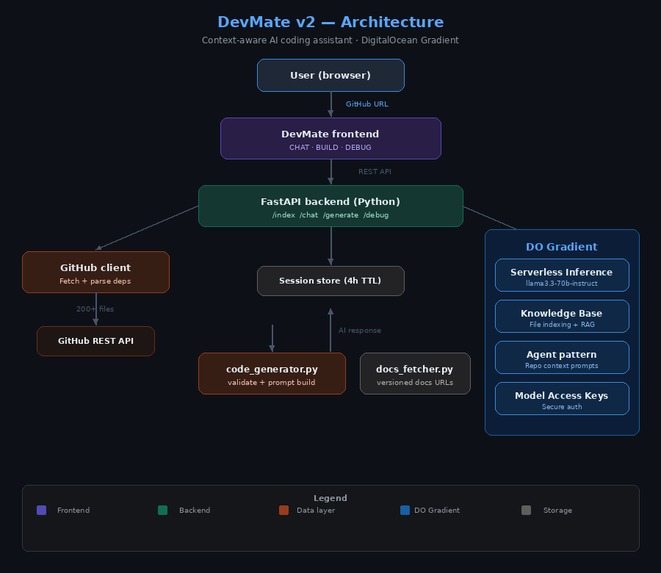
Architecture

Inspiration
Standard AI assistants often provide generic advice that doesn't account for a project's specific architecture, naming conventions, or pinned dependencies. I wanted to build DevMate v2 to bridge that gap—creating a tool that "reads" your entire codebase before offering a single line of code.
What it does
DevMate v2 is an AI-powered developer tool that provides context-aware assistance by indexing your specific GitHub repository. [CHAT] Repo Intelligence: Ask questions like "Where is the auth logic handled?" or "Explain the data flow in this app." It answers based on your actual files, not general theory. [BUILD] Validated Code Generation: Describe a new feature, and DevMate generates code that uses your existing utility functions, matches your naming style, and respects your folder structure. It even validates that the file paths it suggests actually exist. [DEBUG] Deep Trace Analysis: Paste a stack trace, and the assistant uses its repo-wide knowledge to find the exact line causing the crash, taking into account how your different modules interact. Dependency Awareness: It automatically reads your package.json, go.mod, or requirements.txt to ensure the code it suggests is compatible with your current library versions.
How we built it
The project is built as a containerized FastAPI application. It uses a custom GitHub client to fetch source files and parse dependency files (like requirements.txt or package.json). The core "brain" of the app is powered by DigitalOcean Gradient Serverless Inference, specifically the llama3.3-70b-instruct model. The system logic follows a sophisticated pipeline: Index: Fetching and filtering repository files. Analyze: Detecting frameworks and coding patterns. Contextualize: Building a rich system prompt that includes the file tree and dependency versions. Execute: Using Gradient's inference to provide Chat, Build, or Debug responses.
Challenges we ran into
Context Window Limits: Fitting a whole repo into a prompt required smart filtering and prioritized file loading. Rate Limiting: Managing GitHub API limits was solved by implementing token support to jump from 60 to 5,000 requests per hour. Validation: Ensuring the AI didn't hallucinate file paths required a validation layer to check generated code against the actual indexed file tree.
Accomplishments that we're proud of
Zero-Config Repo Intelligence: We successfully built an indexing engine that can ingest a complex GitHub repository and become "expert-level" on that specific codebase in under 30 seconds. Seeing the AI correctly identify a project’s unique architectural patterns without manual tagging was a huge milestone. Deep Integration with DigitalOcean Gradient: We are incredibly proud of how we leveraged the Llama 3.3 70B model via Gradient's Serverless Inference. Achieving low-latency, high-reasoning responses for complex code generation—without the overhead of managing our own GPU clusters—demonstrates the power of the DigitalOcean AI ecosystem. High-Fidelity Context Injection: We developed a proprietary "Context Map" system. Instead of just sending snippets, DevMate v2 injects a full project tree, pinned dependency versions, and detected coding conventions into the system prompt. This ensures the AI never suggests a library you aren't using or a naming convention that doesn't fit your style. The "Debug-to-Root" Engine: We created a debugging mode that doesn't just explain an error—it traces the error through your actual indexed files. Being able to paste a stack trace and have the AI point to the exact file and line in your repo is a feature that truly changes the developer workflow. Containerized Portability: We achieved a "one-command" setup. By containerizing the entire stack with Docker, any developer can clone DevMate v2 and have a private, context-aware AI coding assistant running locally or on DigitalOcean in minutes.
What we learned
I gained deep experience in RAG (Retrieval-Augmented Generation) logic and how to effectively leverage DigitalOcean Gradient for high-performance AI inference without managing complex GPU infrastructure.
What's next for DevMate v2
Deep DigitalOcean Integration One-Click Deploy to App Platform: We plan to create a "Deploy to DigitalOcean" button, allowing users to spin up their own private DevMate instance on the DigitalOcean App Platform with a single click. Native Managed Database Support: Moving from in-memory session storage to DigitalOcean Managed Databases (PostgreSQL) to allow for persistent indexing of massive repositories and user history.
Built With
- digitalocean
- docker
- fastapi
- github
- javascript
- llama
- python
- rest
- vanilla


Log in or sign up for Devpost to join the conversation.