-
-
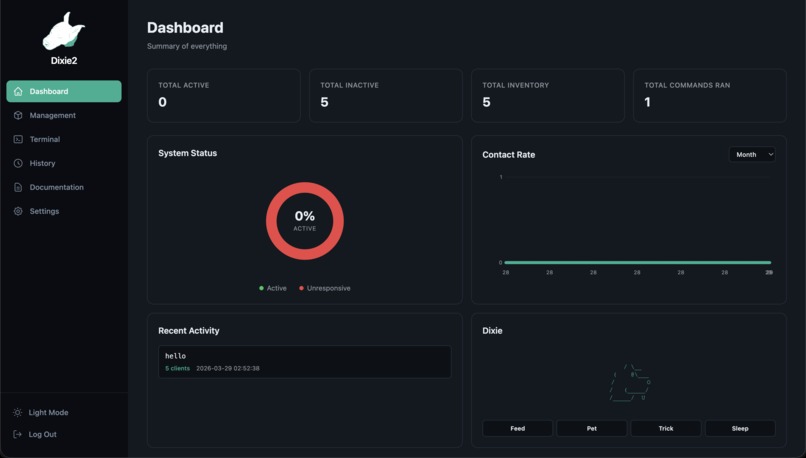
dashboard

Inspiration
We wanted to better our understanding of how offensive security tools work at the lowest level by building one from scratch. By doing so, we are able to develop an understanding of how a c2 framework works, why they are used, how they are used, how we can defend against them, etc.
What it does
Dixie2 is a command-and-control (C2) platform that pairs a Linux kernel rootkit with a web page. You register target machines by IP and port, then the system monitors their health using custom pings that the rootkit answers with a signature payload. From the web page you can dispatch kernel level commands to several machines. These commands travel as raw TCP packets that the rootkit intercepts and hides from the client. You can also drop into a live shell session with any online clients directly from the browser. Everything is visible at a glance: active/inactive counts, contact rate charts over time, command history with client delivery status, and configurable health check intervals.
How we built it
The rootkit is a Linux kernel module written in C. It hooks into Netfilter to intercept ICMP and TCP packets on a designated port. ICMP echo requests with a magic sequence number get answered with a JOLTEON_ALIVE payload, indicating that the rootkit is responsive. TCP packets carrying command keys trigger shell execution via call_usermodehelper() or spawn reverse shells using a mkfifo payload and netcat. The module also supports hooks to sys_kill for privilege escalation and hiding itself from lsmod by unlinking from the kernel's module list.
The backend is Flask with Flask-SocketIO. It sends commands as hand crafted raw TCP packets: we build the IP pseudo-header, calculate the 16-bit checksum, set PSH+ACK flags, and fire them through IPPROTO_TCP raw sockets. Health checks use raw ICMP sockets with batch pinging on a deadline based collection. The terminal feature opens a TCP listener on a random port, triggers the rootkit's reverse shell payload, and bridges the resulting socket connection to the browser over WebSockets with a threaded read loop.
The frontend is SvelteKit 5 with Tailwind CSS. It uses Svelte runes for reactive state, has JWT based auth with token storage, and auto refreshes all data every 15 seconds. The terminal page uses xterm.js for rendering and socket.io client for real time I/O. All API calls go through a Vite proxy to the Flask backend.
SQLite stores clients, ping logs, command history with per client results, and settings.
Challenges we ran into
A big challenge that we had to face creating this project was the fact that kernel level C2 typically has a different behavior pattern than normal C2. Normally the traffic is always outbound from the client to do a sort of check in, but implementing this interactive behavior is difficult in the kernel. So we had to settle on using a ping based health check.
Accomplishments that we're proud of
We reached a lot of our stretch goals, like instead of stopping at returning just a boolean active/inactive, we are able to implement interactive terminals for each active client. We also achieved everything we wanted to in terms of cleannes, completeness, and styling.
What we learned
We learned to leverage off of a basic C2 structure to make a stronger cybersecurity tool
What's next for Dixie2
To make traffic analysis harder we could encrypt our command channels. We could also integrate support for file transfer.


Log in or sign up for Devpost to join the conversation.