-
Our Code

Inspiration
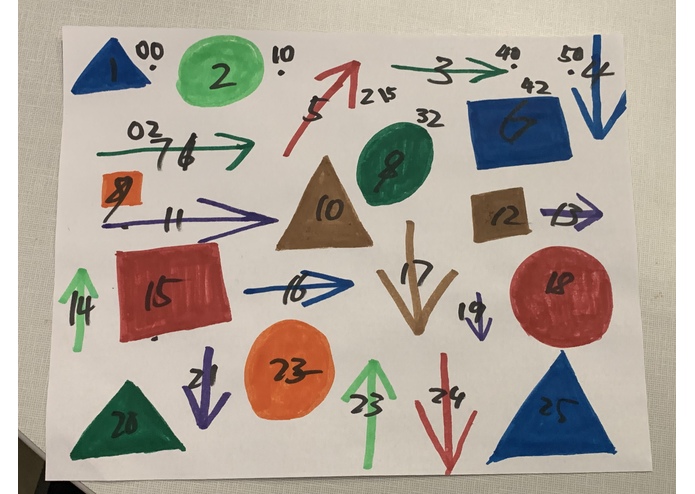
Code your masterpiece? What about turn your masterpiece into code! In the spirit of classics such as Logo, we decided to write a version for the 21st century, one that even children will understand from its symbolic syntax, using shapes, arrows and colors.
What it does
The app takes a picture of the "masterpiece" drawing, and converts the shapes into functions and arrows into inputs, then a program will parse and evaluate the statements and display the result on the screen, (in the future, this could be a pen plotter).
The language also comes in a text-based format, which retains the symbolic appearance:
-- Go forward: ↑
-- Clockwise, anti-clockwise rotation: ↻ ↺
-- Pen up, pen down: ○ ●

right = [ ↻ 90 ]
left  = [ ↺ 90 ]
-- Draw a square
□ n = [ loop 3 [↑ n, right], ↑ n, right]
-- Draw a triangle
△ n = [ ↻ 30, ↑ n, ↻ 120, ↑ n, ↻ 120, ↑ n, right ]
main = [ ●, △ 60, □ 60, right, □ 70, right, □ 80, ↑ 150,
         loop 100 [↑ 50, ↻ 59]]
How we built it
The app takes a photo of the drawing, detects the shapes, and translates what they mean. A parser written in Haskell does the work of parsing (using the Parsec library) and rendering the result to the screen (using the monad transformer and Gloss libraries).
Challenges we ran into
Nobody knew how to use OCR and OpenCV, let alone train it to recognize shapes in a drawing, and we couldn't find or make a physical robot to draw the shapes in time, so we settled for a virtual one.
Accomplishments that we're proud of
- Learning OpenCV and OCR
- Creating a complete parser and interpreter in an evening
- we used our interpreter to create a VandyHacks logo!
What we learned
- How OCR works in python with openCV
- Haskell rocks for writing parsers and interpereters
What's next for DrawCode
Connecting the Image detection to the Haskell interpreter
A physical pen plotter so that one can give the robot instructions to draw another "masterpiece".
Coming up with different ideas for the input language; music notes, physical objects (stones, trees.

Log in or sign up for Devpost to join the conversation.