-
-
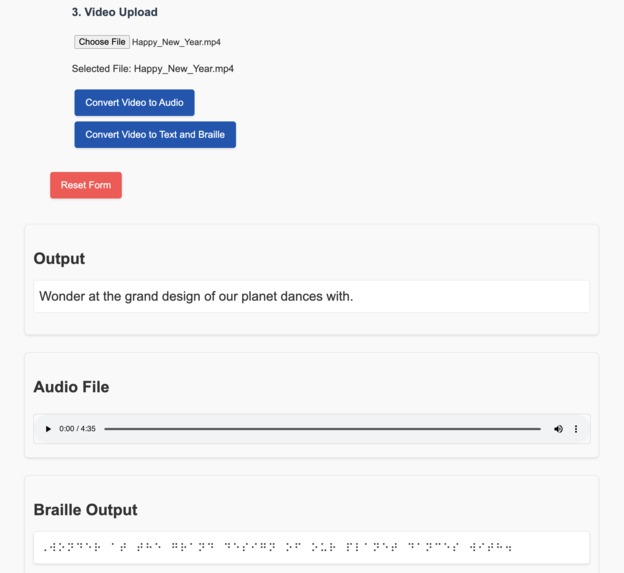
Image Captioning
-
Homepage
-
Text to Braille


Inspiration
The inspiration for EduAccess came from my AH113: Dynamics of Design class at Minerva University. This course taught me how thoughtful, inclusive design can address systemic inequities and bring about meaningful change. During a lecture on inclusive design, I began thinking about the barriers blind and visually impaired individuals face in accessing educational materials.
I imagined the frustration of missing out on vital learning resources and realized how technology could bridge this gap. This realization planted the seed for EduAccess—a platform dedicated to making knowledge accessible and empowering everyone with equal opportunities to learn and grow.
What it does
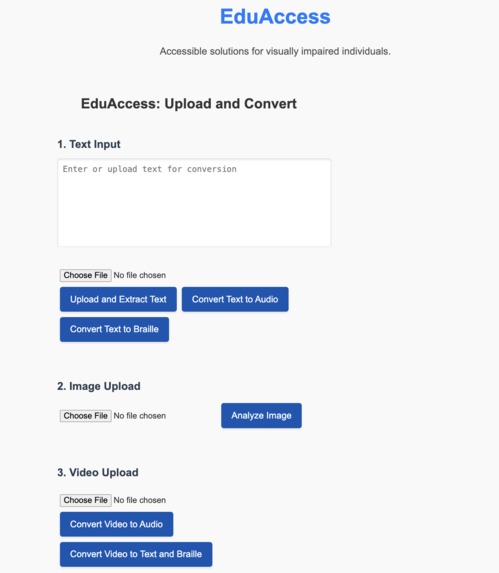
EduAccess is an all-in-one accessibility platform designed to make educational content usable for blind and visually impaired individuals. Key features include:
Text-to-Audio Conversion
Upload text files to generate high-quality audio using Azure Cognitive Services.Video-to-Audio Conversion
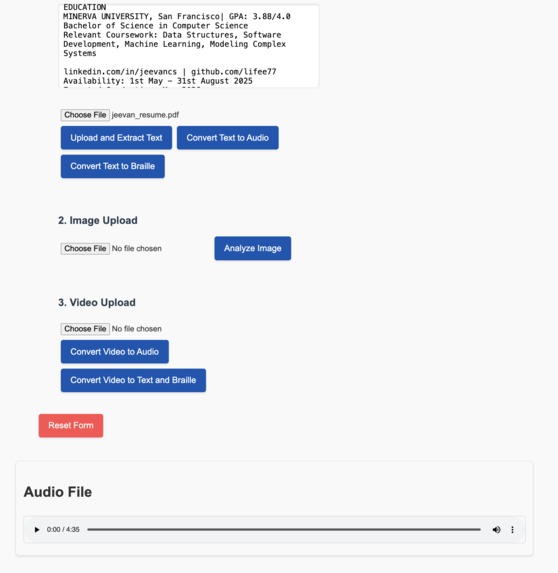
Transform video lessons into audio formats for easy listening.Text-to-Braille Conversion
Convert text into Braille files compatible with Braille displays or printers.Video-to-Text and Braille Conversion
Extract text content from videos (e.g., captions or speech) and convert it into Braille or plain text.Audio-to-Text and Braille Conversion
Convert audio files into text and Braille, ensuring accessibility across formats.Image Captioning
Generate descriptive captions for uploaded images, making visual content more meaningful.Accessible User Interface
An interface optimized for screen readers, keyboard navigation, and visually impaired users.
How I built it
Understanding User Needs
I started by researching the unique challenges faced by visually impaired learners, focusing on their interaction with digital content. I aimed to create a platform that addressed their primary pain points with intuitive solutions.Development
EduAccess was built using:- Flask for the backend to handle file processing and API integration.
- React for the frontend, designed with accessibility-first principles.
- Azure Cognitive Services for text-to-speech, image captioning, and audio-to-text capabilities.
- Liblouis for Braille conversion and MoviePy for video processing.
- Flask for the backend to handle file processing and API integration.
Iterative Refinement
I adopted a design-thinking approach, conducting usability tests and incorporating feedback from visually impaired individuals and accessibility advocates.
Challenges I ran into
Balancing Technical Complexity with Usability
Making a feature-rich platform that remains easy to use was a constant challenge. Every feature had to be optimized for accessibility, not just functionality.Processing Multimedia Files
Integrating tools to process diverse inputs like videos, images, and audio without compromising speed and quality required extensive research and testing.Ensuring Robust Accessibility
Designing a platform that works seamlessly with screen readers and Braille displays required continuous testing and adjustments.
Accomplishments that I'm proud of
- Building a platform that tackles real-world accessibility challenges with a holistic approach.
- Successfully integrating advanced features like image captioning and audio-to-Braille conversion.
- Crafting an interface that prioritizes user independence and usability.
Most importantly, I’m proud of creating something that can genuinely make a difference in people's lives.
What I learned
Accessibility Is a Mindset
Designing for accessibility isn’t a technical add-on; it’s a mindset that requires deep empathy and user-focused problem-solving.Technical Growth
I honed my skills in using Azure Cognitive Services, Flask, React, and other tools, while gaining practical insights into file processing and API integration.The Power of Feedback
Real-world feedback was invaluable in shaping the project into something truly user-centered and impactful.
What's next for EduAccess
Real-Time Audio Streaming
Enable users to stream audio outputs for larger files without downloading them.Multilingual Support
Expand text-to-speech and Braille features to support multiple languages.Enhanced Image Captioning
Incorporate more descriptive AI-generated captions, including scene and context details.Cloud Deployment
Deploy the platform on cloud services like Azure or AWS to ensure scalability and wider accessibility.Mobile App Development
Create a mobile version of EduAccess to make the platform even more accessible.
EduAccess is more than a project; it’s my commitment to creating a world where education is accessible to everyone, regardless of their circumstances.


Log in or sign up for Devpost to join the conversation.