-
-
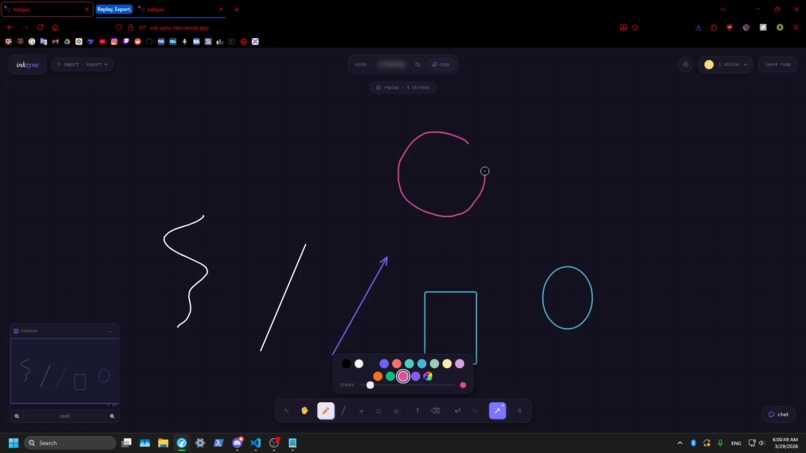
Smart Shapes
-
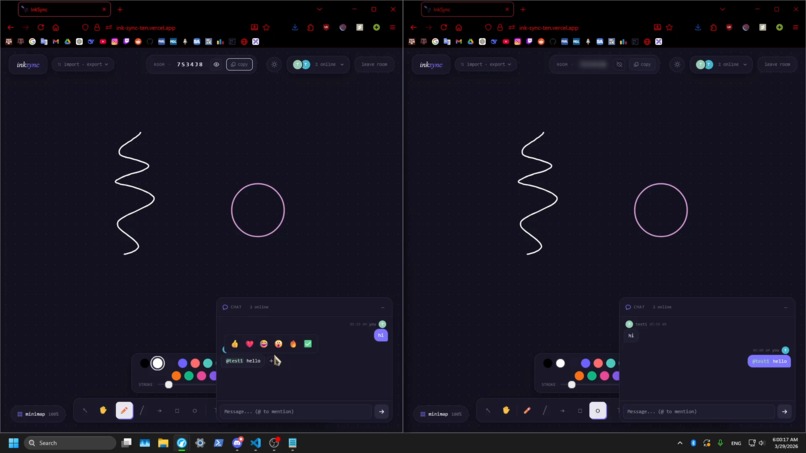
Chat System
-
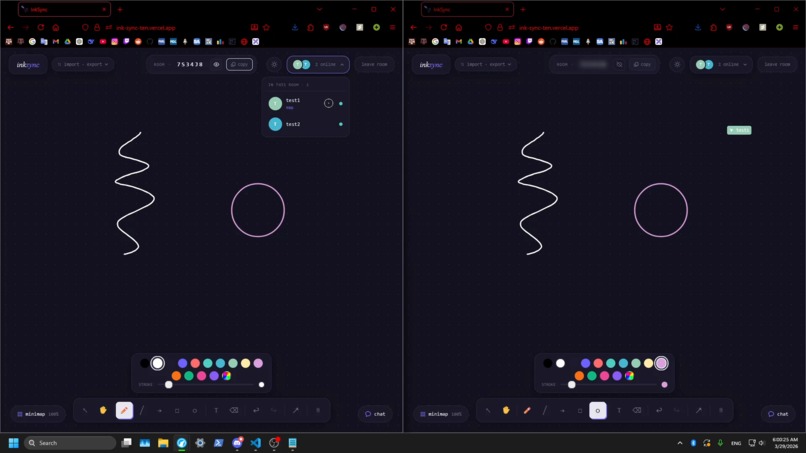
Collaboration
-
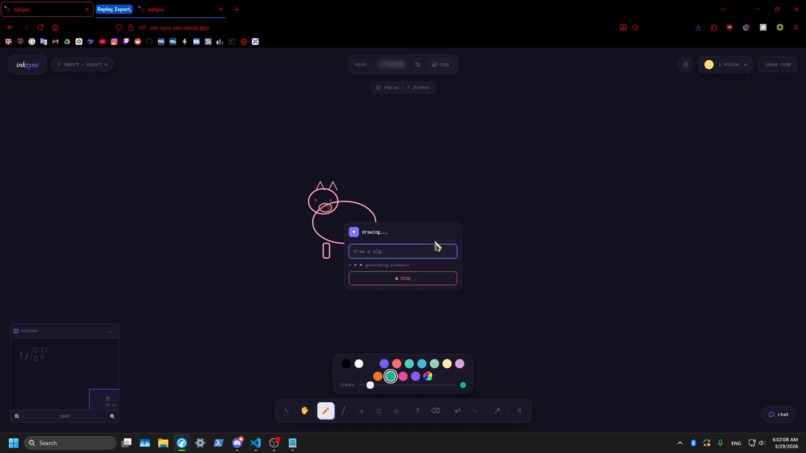
Text/Voice-to-Drawing AI
-
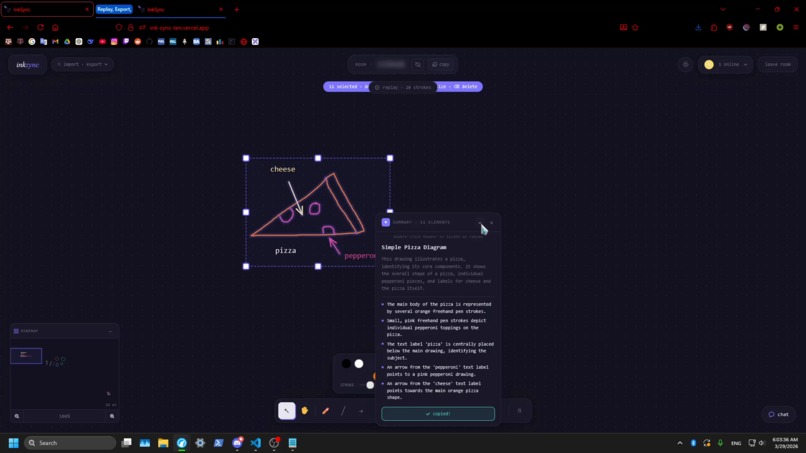
Summary AI
-
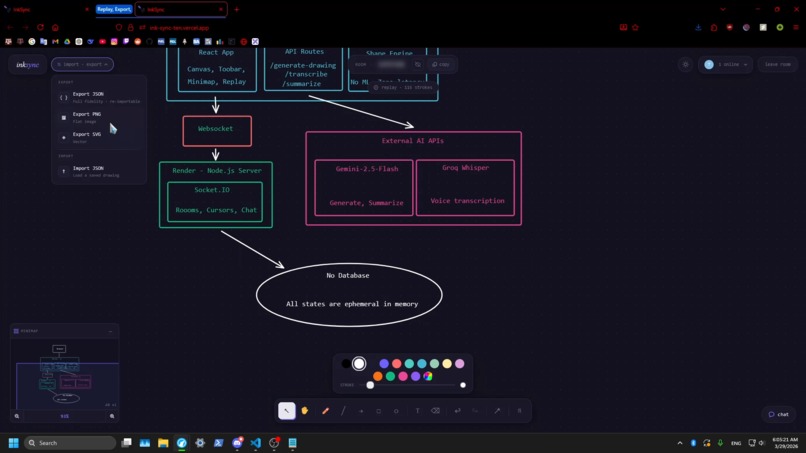
Import and Export System
-
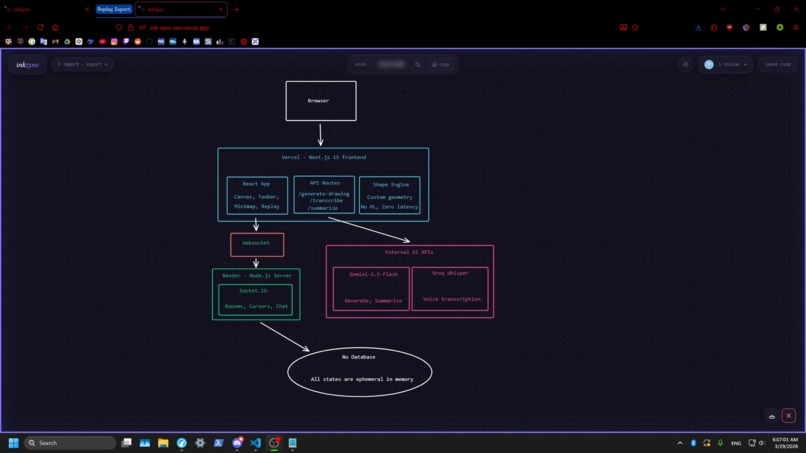
Sample Diagram
-
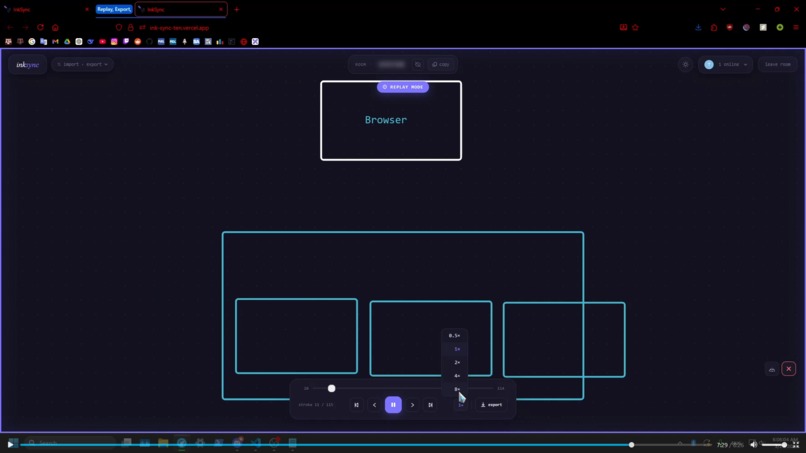
Replay System


Inspiration
Whiteboards are one of those rare tools that have survived the technological revolution almost completely unchanged — and honestly, that makes sense. They work. They're immediate, tactile, frictionless. You don't need to think about the tool, you just think with it.
But even digital whiteboards are fundamentally one-dimensional. They hold what you put there, and if someone else wants to engage, you either crowd them around your screen or send a screenshot into a discord thread and hope the context survives.
Some tools try to fix this, but many feel incomplete — half-baked features, stale interfaces, or the wrong level of abstraction entirely. Hell, some of y'all out here are still using MS Paint! That made me ask: what if we stopped digitizing the whiteboard and started evolving it?
First, collaboration. What if instead of screenshotting your diagram and sending it to a teammate, they were already there? What if they could reach in, edit a node, add a step you'd missed, or scribble a note directly on your thinking in real time? That alone transforms the whiteboard from a recording surface into a shared cognitive space.
Then, intelligence. Not to replace your freehand ideas, but to enhance them: helping you organize your thoughts, remember what matters, refine rough sketches into clean shapes, and even generate new ideas from what you’ve already drawn.
This is the whiteboard that should exist in 2026: not a replacement, but an upgrade that finally matches the way we think and work.
What it does
InkSync is a real-time collaborative whiteboard with a suite of AI-powered tools woven directly into the drawing experience. It follows a "No database. No accounts. No setup. No BS" protocal, reinforcing the "zero friction" philosophy of the project.
Core Drawing Tools
Pen, lines, arrows, rectangles, ellipses, and text behave naturally, with smooth canvas rendering and full undo/redo history.
Smart Shape Recognition
Rough freehand shapes snap into clean forms. Draw a circle → perfect ellipse, rectangle → aligned rectangle. The system evaluates stroke closedness, linearity, corners, and ellipse fit in real time, providing instant, satisfying corrections.
AI Drawing Generation (Text and/or Voice)
Right-click and describe what you want (e.g., “three-step login flowchart” or “neural network diagram”), and elements appear on the canvas in real time via Gemini 2.5 Flash. Voice input with Groq Whisper allows hands-free prompts.
AI Summarization
Select any number of elements and generate a summary: a title, plain-English description, and key observations about your drawing, powered by Gemini 2.5 Flash.
Real-Time Collaboration
Socket.IO syncs all drawing state, live cursors with labels, and a chat panel with @mentions, emoji reactions, and message history.
Session Replay
Every stroke is recorded. Scrub through your session like a video, adjust playback speed, and export as video.
Minimap & Navigation
A live thumbnail shows the full canvas with a viewport indicator, enabling instant navigation of large drawings.
Portability & Export
Drawings can be exported as PNG, SVG, or JSON, and JSON exports can be re-imported for further editing, enabling easy sharing, backup, or collaboration across sessions.
How I built it
Architecture & Tech Stack
InkSync is split across two separately deployed services
The frontend, hosted by Vercel, is powered by Next.js 15 with TypeScript and Tailwind CSS. The drawing engine itself is built on the browser's native Canvas 2D API with no external drawing library — giving us full control over rendering, hit-testing, and coordinate transforms.
The backend, hosted by Render, is a standalone Node.js + Socket.IO server that handles real-time synchronization. It runs as a persistent process to support long-lived WebSocket connections, which serverless platforms like Vercel cannot maintain due to execution limits. The frontend connects via the NEXT_PUBLIC_SOCKET_URL environment variable, allowing the server to be scaled or swapped independently.
There is intentionally no persistent storage anywhere in the stack. Room state lives entirely in the server's memory for the duration of the session — the moment everyone leaves, it's gone.
At a glance:
| Layer | Technology |
|---|---|
| Frontend Framework | Next.js 15 (TypeScript) |
| Frontend Hosting | Vercel |
| Drawing Engine | Canvas 2D API (custom) |
| Real-time Sync | Socket.IO |
| Backend Hosting | Render |
| Text-to-Drawing AI | Google Gemini 2.5 Flash |
| Voice-to-Text | Groq Whisper |
| Shape Recognition | Custom geometry pipeline |
| Database | None |
Shape Recognition
A custom pipeline (shapeRecognition.ts) computes for each stroke:
- Stroke length via point-to-point Euclidean distances
- Closedness as \( 1 - \frac{d(\text{start}, \text{end})}{\text{perimeter}} \)
- Linearity via RMS perpendicular deviation from the chord, normalized
$$ \text{linearity} = \frac{\sqrt{\frac{1}{n}\sum_{i=1}^{n} d(p_i, \overline{p_0 p_n})^2}}{|p_0 - p_n|} $$
- Corner detection using sliding-window angular velocity with deduplication
- Ellipse fit error as mean across all points $$ \text{ellipse fit error} = \frac{1}{n}\sum_{i=1}^{n} \left|\sqrt{\left(\frac{x_i - c_x}{r_x}\right)^2 + \left(\frac{y_i - c_y}{r_y}\right)^2} - 1\right| $$
Then transform the previously drawn shape into an ellips or polygon calculated within our margines.
AI Drawing Generation (Text and/or Voice)
AI drawing functionality is implemented through two Next.js API routes:
/api/generate-drawing— sends a structured system prompt to Gemini 2.5 Flash and streams the JSON response. The frontend incrementally parses complete brace objects from the stream buffer, allowing shapes to appear progressively on the canvas as they are generated./api/transcribe— accepts base64-encoded audio and sends it to Groq's Whisper endpoint for fast, accurate speech-to-text conversion, enabling hands-free prompts and voice-driven drawing.
AI Summarization
AI summarization functionality is implemented through /api/summarize-drawing which converts selected objects into a semantic representation of elements — including shapes, text, connections, and their spatial relationships. This structured format allows the model to reason about diagrams (e.g., flowcharts or grouped ideas) rather than just describing visuals.
Socket.IO Server (server.js)
Runs as a separate Node.js process — deployable to Render — and manages room state, element sync with 30ms debounced broadcasting, cursor positions, and chat with reaction state.
Challenges I ran into
Streaming Structured Data
Gemini streams raw text, not JSON, so I built a stateful brace-depth parser over the stream buffer. It tracks { and } depth to extract complete JSON objects incrementally, without waiting for the full response. Handling edge cases — nested objects, strings containing braces — required multiple iterations to get right.
AI Token Optimization & API Limits
API rate limits and token constraints made naive streaming unfeasible. I had to construct optimized pipelines to reduce token usage and maintain smooth incremental drawing. Voice-to-text processing was moved from Gemini to Groq Whisper for efficiency and cost-effectiveness.
Shape Recognition Calibration
Early versions aggressively snapped strokes into shapes, producing false positives. I tuned closedness thresholds, minimum point counts, perimeter scores, and corner detection ranges until shape snapping felt natural rather than intrusive. Distinguishing rounded rectangles from ellipses was particularly tricky — solved by counting corners: ellipses produce ≤2 detected corners, rectangles produce 3–6.
Pan, Zoom, and UI Consistency
Maintaining consistent positioning across multiple coordinate spaces (canvas, screen, minimap) was unexpectedly complex. Context menus, summary panels, minimap, snap flashes, and remote cursors all live in different spaces. I used imperative refs and transform matrices rather than React state to preserve alignment during simultaneous pan and zoom. Summary panels, for example, track canvas-space positions and are converted to screen-space each render frame via a requestAnimationFrame loop.
Hosting Trade-Offs
Vercel’s serverless environment cannot host long-lived WebSocket connections, while Render’s free plan lacked sufficient memory for all backend processes. Balancing these constraints required a major backend overhaul: I split the real-time sync server (Socket.IO) to run persistently on Render while the frontend and AI API routes run on Vercel, combining the best of both platforms.
Accomplishments that I'm proud of
I am proud that InkSync feels like a cohesive product rather than a collection of features stitched together. The snap-to-shape animation, complete with ring flash and badge labels, turns simple geometric corrections into a tactile, satisfying experience rather than a silent adjustment. The session replay system, which records every committed stroke state and lets you scrub frame by frame with auto-zoom on active elements, was unplanned at the start but became one of the most delightful features to build. Shape recognition is entirely custom, running at 60fps with zero latency — no API calls, no model inference, just precise geometric analysis. Most importantly, the AI integrations are useful without ever feeling like “AI slop”: they don’t force results, clutter the interface, or dictate your workflow, but instead assist your thinking only when you choose to use them, enhancing creativity and productivity rather than replacing it.
What I learned
Builing InkSync really boiled down solving three fundamentally different engineering challenges. First, the shape recognition system forced me to grapple with genuinely complex math: ellipse fitting, corner detection, linearity metrics, and weighted feature combinations had to be tuned empirically against real human strokes to produce natural, reliable snapping. Second, handling multiple coordinate spaces — canvas, minimap, and UI overlays — leaned heavily on skills from my Unity game design days: understanding transforms, pan offsets, and synchronous updates was essential to keep interactions consistent and responsive across all views. Third, constructing human-to-AI pipelines proved just as tricky: input data needed careful cleaning, prompts had to be structured efficiently to optimize token usage, and streamed AI output had to be parsed incrementally so shapes could appear progressively on the canvas without overwhelming the user.
What's next for InkSync
On top of a number of minor bugs that need to be fixed, model enhancements, and UI changes. There are a plethora of features that I still wish to add:
- Persistent rooms – connect the Socket.IO server to a database so rooms survive server restarts and drawing history is saved across sessions. Maybe this can be stored in local browser storage?
- Selection-aware AI editing – select elements and ask Gemini to modify them (“make this flowchart vertical,” “add a decision diamond after step 2”) instead of generating from scratch.
- Freehand text recognition – convert handwritten strokes into typed text elements using the geometric pipeline.
- Mobile support – adapt the canvas for touch, with gesture-based pan/zoom and a condensed toolbar, making InkSync work on tablets and Ipad like a physical whiteboard which could promote drawing and note taking use cases.
Closing Thoughts
Because InkSync is built modularly and lightweight, it requires minimal upkeep — likely just a VPS and a domain — making it feasible to keep running indefinitely cheaply. I want it to be a tool people can rely on, and I’ll be using it almost every day myself. Whether collaborating on Codeforces problems or sketching out ideas, InkSync finally provides the kind of responsive, intelligent whiteboard I’ve been wanting for years.
Built With
- canvas2d
- css
- gemini
- groq
- javascript
- next.js
- react
- render
- socket.io
- tailwind
- typescript
- vercel
- whisper


Log in or sign up for Devpost to join the conversation.