-
-
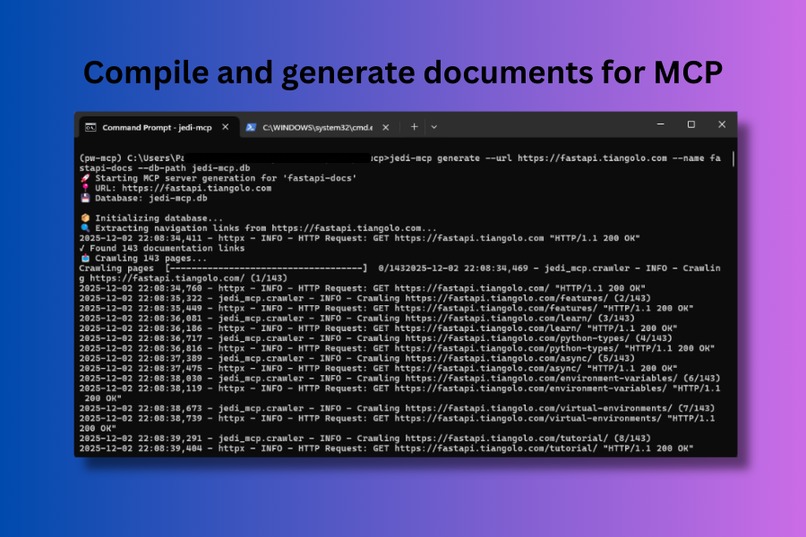
Compile and generate documents for MCP
-
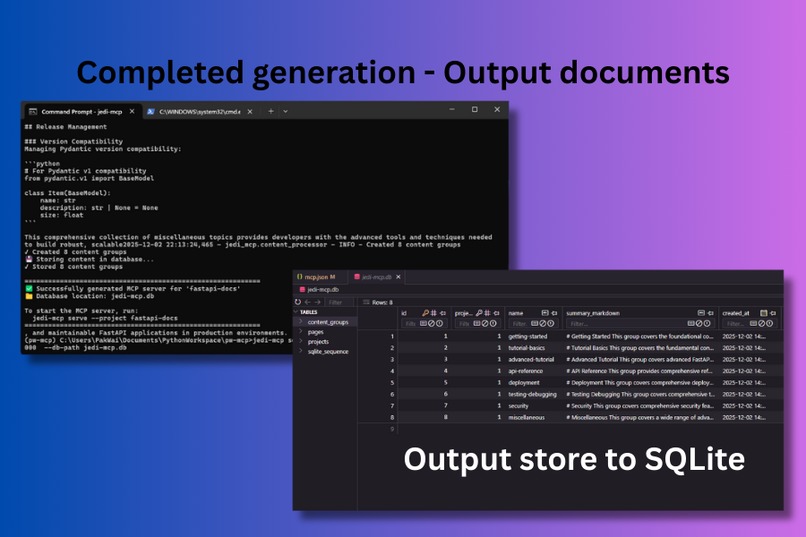
Completed output generation stored in local SQLite
-
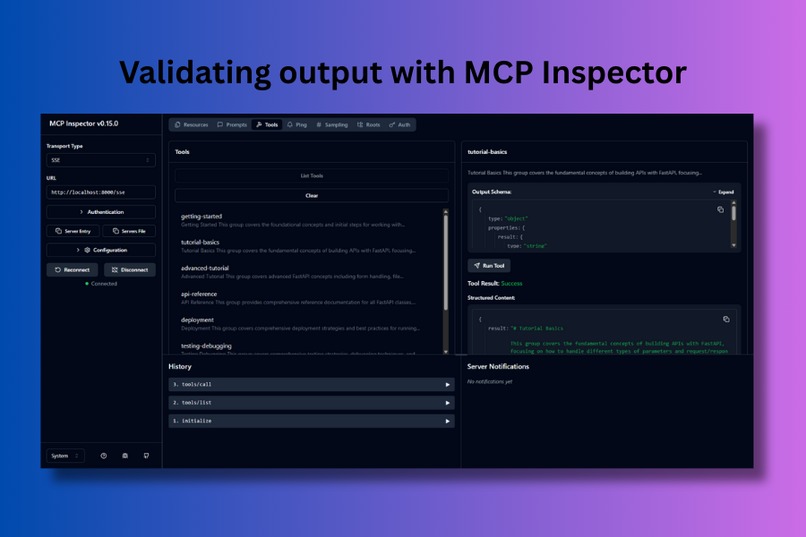
Proof by validating with MCP Inspector
-
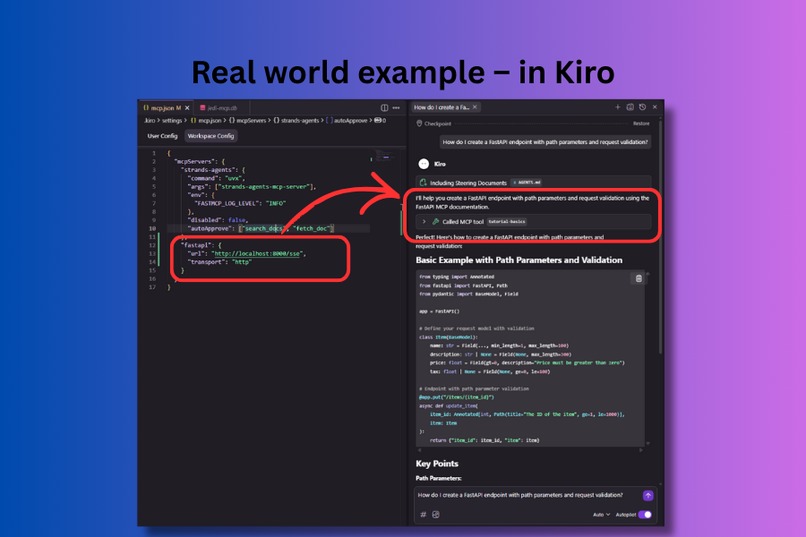
Real world example - Kiro calling MCP for accurate response


Jedi MCP - Project Description
Inspiration
The inspiration for Jedi-MCP came from a breakthrough moment during another hackathon project (here). While working with Kiro, I connected the Atlassian Forge MCP server to my development environment - and the difference was night and day. Suddenly, the AI assistant was giving incredibly concise, accurate responses because it had direct access to the Forge documentation context. The output quality improved dramatically.
This experience made me realize something crucial: developers today juggle countless frameworks, libraries, and APIs. Each project might involve React, FastAPI, PostgreSQL, AWS SDK, and a dozen other technologies. Context engineering through MCP isn't just nice to have - it's a life saver. But here's the problem: not every framework has an MCP server ready to use.
That's when the idea hit me: what if developers could easily connect any documentation site they're working with into MCP as context for their AI development? A generic tool that transforms any technical documentation into an MCP server, making that "Atlassian Forge moment" available for every framework, library, and API out there. Just like a Jedi taps into the Force, developers should be able to tap into any documentation instantly through their AI assistant.
What it does
This is a Resurrection project because it can help to revive all the framework and libraries into AI compatible context for agentic coding. Jedi-MCP transforms any technical documentation website into an MCP server that AI coding assistants can call in real-time. Here's the magic:
- Smart Crawling: Point it at a documentation site (like React, FastAPI, or any framework docs), and it intelligently extracts all documentation links using AI-powered navigation detection
- Intelligent Grouping: Uses Google Gemini (can be expand to other model provider) to analyze and group related documentation pages by topic, creating logical content clusters
- Rich Summaries: Generates comprehensive markdown summaries for each group, preserving code examples and API signatures
- MCP Server: Exposes each documentation group as an MCP tool that AI assistants can invoke
- Universal Access: Works with any MCP-compatible AI assistant (Kiro, Cursor, Windsurf, etc.)
The result? Your AI assistant can now answer questions like "How do I implement authentication in FastAPI?" with context from the actual FastAPI documentation, complete with code examples.
How we built it
It is build with modern Python stack with AI at its core:
- Strands SDK: Powers the Agent's extraction, content grouping, and summary generation using LLM.
- FastMCP: Provides the MCP server framework for exposing documentation as tools
- SQLite Storage: Persistent database for processed documentation with indexed queries
- Click CLI: User-friendly command-line interface for generation and serving
- MCP Inspector: To inspect the output of the generated MCP server
- Kiro: The IDE for us to vibe coding and using spec driven approach to build the app.
The architecture follows a clear pipeline: Extract → Crawl → Process → Store → Serve, with AI strategically placed where intelligence adds the most value.
Challenges we ran into
Getting the Requirements Right: This was the hardest part. I restarted this project twice because the requirements were wrong. It's not easy to articulate what you want to build in a way that AI can understand. I learned that reading and deeply understanding the requirements before implementation is absolutely critical. Each restart taught me to be more precise about what I actually wanted.
Tweaking Requirements and Design: This iterative process took considerable time to get right. I restarted twice because the implementation wasn't what I wanted, even when we were quite far into the progress. The third attempt was the charm - by then I had a much better understanding of what I wanted and was able to articulate it clearly to Kiro.
Testing at Early Stages: The way Kiro works is by generating lots of backend functions upfront, which aren't immediately testable. I had to put trust in the process and proceed until we reached a stage where there was an interface to actually test against. This "leap of faith" period was uncomfortable but necessary.
Navigation Extraction Accuracy: The first attempt at navigation extraction wasn't accurate at all. We spent quite some time providing examples and refining the extraction logic so that the AI could capture the correct links related to the framework documentation for content crawling. This required multiple iterations of prompt engineering and testing against real documentation sites.
Accomplishments that we're proud of
A Tool to Dogfood: This is huge for me personally. Building Jedi-MCP gave me a tool I can actually use in my own development workflow. Now I have much better confidence when building applications with AI assistance in the future. There's nothing like using your own creation to validate its value.
Mastering Strands SDK: I used the Strands SDK - the same agent framework that powers Kiro itself. By applying the same principles to build this app, I hooked it up with the Strands Agent MCP and was able to build the AI agent components following the SDK's best practices. It's meta in the best way: using an AI-powered IDE to build an AI-powered documentation tool using the same underlying framework.
Scalable Design for the Future: I'm really excited about this aspect. The architecture has so much room to grow and improve. As we move into this era of agentic development, tools like Jedi-MCP can help elevate the entire developer community. The foundation is solid, and the possibilities for enhancement are endless - from vector search to collaborative features to community-driven extractors.
What we learned
Reading Requirements and Design is Crucial: We might be tempted to skim through documentation to save time, but it's essential to get the important points correct. Missing key details makes it incredibly hard to backtrack later. My two restarts taught me this lesson the hard way - thorough understanding upfront saves massive amounts of time downstream.
Under the Hood of MCP: Before this project, I only knew MCP as a user - just connecting and using it. Now I understand the internals: there are resources, prompts, and tools. This app specifically uses tools (following the patterns from Forge MCP and Strands MCP). This deeper understanding opens up so many possibilities for future projects.
Spec-Driven Development: I've fallen in love with spec-driven development. The quality of output and the consistency with requirements that it produces is remarkable. When you take the time to properly spec out what you want, the AI can deliver exactly that. It's become my go-to approach for building with AI assistance.
What's next for Jedi MCP
We have exciting plans to expand Jedi-MCP's capabilities:
- Incremental Updates: Re-crawl only changed pages to keep documentation current without full regeneration
- Vector Search: Add semantic search capabilities for more intelligent content retrieval
- Multi-Model Support: Extend beyond Gemini to support Bedrock, Claude, Open AI, and local models
- Custom Extraction Rules: Allow users to define site-specific extraction patterns for better accuracy, or human-in-the-loop before crawling the site.
- Web UI: Build a web interface for managing projects and monitoring crawls
Our ultimate vision is to make every piece of technical documentation instantly accessible to AI coding assistants, creating a seamless development experience where knowledge is always at your fingertips - or rather, at your AI's fingertips.
Built With
- mcp
- python
- strands-sdk


Log in or sign up for Devpost to join the conversation.