-
-
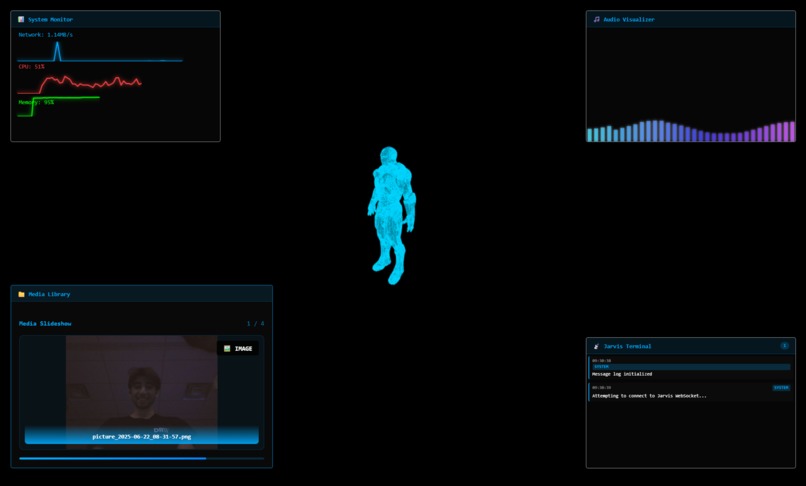
our main ui for jrvs
-
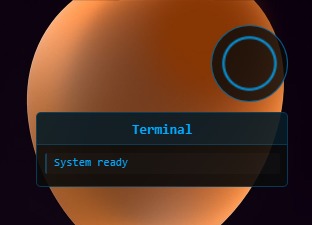
our small overlay


Inspiration
Inspired by Tony Stark's JARVIS from the Iron Man movies, we wanted to create a real-world AI assistant that could actually help gamers and power users with everyday tasks through natural voice commands, complete with a futuristic holographic interface.
What it does
JRVS is a voice-controlled AI assistant that combines speech recognition, natural language processing, and visual feedback to provide an Iron Man-style computing experience. It features:
🎙️ Voice Control: Listens for "Jarvis" wake word and processes natural language commands 🤖 AI Brain: Uses Google Gemini AI to understand context and execute complex multi-step actions 🎮 Gaming Automation: Includes AFK macros, chat automation, game launching, and screen clipping integration with OBS 📸 Media Capture: Takes screenshots, webcam photos, and saves gameplay clips on command 🌐 Web Integration: Opens websites, performs web searches, and controls media playback 💻 System Control: Monitors system resources, opens/closes applications, and manages Windows processes ✨ Holographic UI: Electron-based transparent overlay with animated visualizers, corner widgets, and Iron Man-inspired aesthetics 🎵 Audio Visualization: Real-time microphone-driven circular visualizers with neon effects 📱 Multi-View Interface: Toggleable between full overlay and minimal modes
How we built it
Backend: Python Flask server with Socket.IO for real-time communication, Vosk for offline speech recognition, Google Gemini for AI processing, and ElevenLabs for text-to-speech responses.
Frontend: Electron app creating a transparent always-on-top overlay with HTML5 Canvas animations, Three.js for 3D effects, and WebSocket client for real-time updates.
AI Integration: Custom action mapping system that translates natural language to specific functions, with support for complex gaming macros using PyAutoGUI and pynput for real OS-level input simulation.
Gaming Features: Integration with OBS for clip saving, Steam game detection and launching, CSGO/Valorant chat automation with AI-generated contextual messages.
Challenges we ran into
Speech Recognition Accuracy: Balancing offline processing speed with recognition quality, especially for gaming terms and quick commands during gameplay.
Electron Overlay Complexity: Creating a truly transparent, always-on-top window that doesn't interfere with other applications while maintaining smooth animations and responsiveness.
Cross-Platform Input Simulation: Ensuring reliable keyboard/mouse automation that works across different games and applications without being detected as cheating software.
Real-time Audio Visualization: Synchronizing microphone input with smooth Canvas animations while maintaining 60fps performance in an overlay environment.
AI Context Management: Teaching the AI to understand gaming-specific commands and map them to appropriate macro functions while maintaining conversational flow.
Accomplishments that we're proud of
🏆 Seamless Voice Integration: Achieved natural conversation flow with sub-2-second response times from voice command to action execution
🎨 Stunning Visual Design: Created a production-quality Iron Man interface with smooth animations, particle effects, and responsive audio visualizations
🎮 Advanced Gaming Automation: Built a comprehensive macro system that can handle complex gaming scenarios like AFK prevention, chat automation, and contextual AI responses
🔧 Robust Architecture: Developed a modular system that cleanly separates voice processing, AI logic, UI rendering, and system control
⚡ Performance Optimization: Maintained smooth 60fps overlay performance while running continuous speech recognition and system monitoring
What we learned
Voice AI systems require careful balance between accuracy, speed, and user experience. We discovered the importance of offline processing for privacy and reliability, and learned how to create truly seamless human-computer interaction through natural language.
Building transparent Electron overlays taught us advanced graphics programming and the challenges of creating UI that enhances rather than disrupts the user's workflow.
Working with real-time audio and gaming automation showed us the complexity of creating assistive technology that feels magical rather than intrusive.


Log in or sign up for Devpost to join the conversation.