-
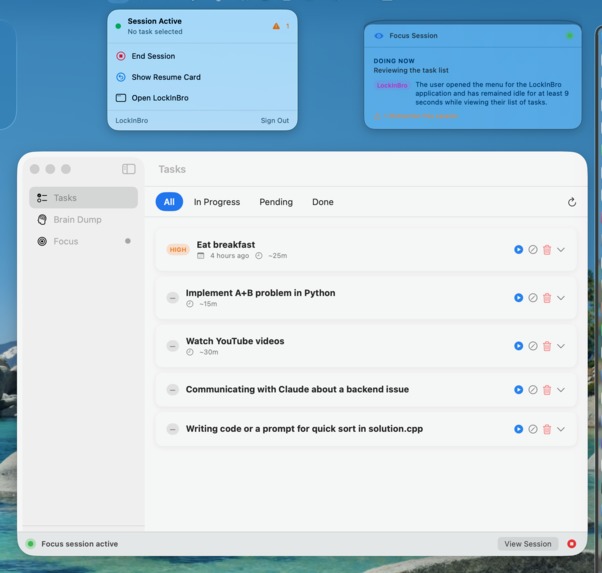
MacOS app
-
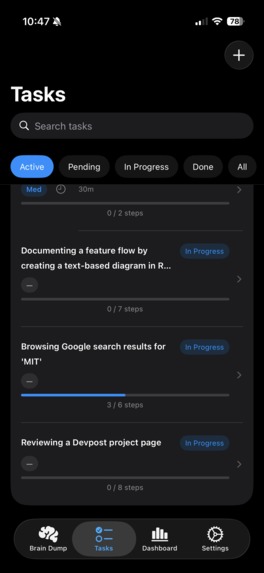
iOS app


Inspiration
We love Instagram Reels as much as anyone else, but as high-performing students soon to join the competitive tech workforce, we realized traditional productivity tools weren't cutting it. Most AI assistants today are reactive—they sit idle until you explicitly type out a prompt and ask for help. We wanted to build a proactive tool that acts as a digital “train of thought.” By actively viewing and responding to your screen context in real-time, LockInBro subtly prompts you exactly when you lose focus or hit a wall, rather than waiting for you to ask for help.
We also recognized that this proactive approach is incredibly powerful for neurodivergent individuals, particularly those with ADHD. When executive dysfunction, distraction, or "task paralysis" kicks in, having an autonomous assistant that gently nudges you back on track without feeling like a clunky app that confines you to your work is very useful!
What it does
LockInBro is a cross-platform application that runs in the background of your desktop, with the Argus agent checking when you seem to be stuck on a task or performing a task that is in your LockInBro to-do list. If you’re detected as stuck on the task, LockInBro provides a possible solution to your problem, and if the task is on your to-do list, LockInBro offers to start “focus mode.” As the user completes task steps, whether in or out of focus mode, these steps update in the task list automatically.
Your to-do list can be formed manually or by using our “Brain Dump” feature, which lets the user ramble about the tasks they have to do and possible steps to complete then, then returns a structured set of tasks with user-mentioned steps as well as suggestions for additional steps (optional). These tasks can be added in bulk to the user’s list.
Focus Mode is the key cross-platform experience for LockInBro, with the macOS, iOS, and iPadOS apps integrating seamlessly using Apple’s Live Activities. Focus mode enabled on one device? After a designated “distraction period” on your “distraction apps,” Apple Screen Time will remind you of your task at hand, what you finished last, and what’s the next step. Otherwise, after a certain time off-task or idle on the task at hand, a notification will be sent to all devices with the current progress, and querying whether the user wants any guidance. This constitutes a “gentle nudge”.
How we built it
Screen Capture understanding: VLM Gemini 3.1 Pro preview Brain Dump Speech-To-Text: WhisperKit on-device ML model, bundled with app. Brain Dump Text-To-Task: LLM Gemini 3.1 Pro preview Cross-Platform Integration: Apple Live Activities, Push Notifications, Screen Time Backend: DigitalOcean Droplet running ubuntu, PostGreSQL 16, Python FastAPI Frontend: Swift UI 6
Challenges we ran into
TWO of our team members’ github account got suspended MULTIPLE TIMES during this hackathon. We literally had to airdrop code to each other. Very dumb.
Other than that, at one point we forgot to kill background processes in the macOS app on app quit, so we had like 50 phantom apps hitting our API, which was very worrisome until we found the culprit.
In addition, we had some initial suspicion regarding whether this application would be truly useful. However, as we continue implementing features and debugging, the product is starting to shine through.
Accomplishments that we're proud of
Getting Apple and Backend infrastructure to play nice together was a nightmare, but seeing Live Activities and Screen Time integration working seamlessly was more than enough reward! It’s truly a miracle seeing all these devices working together.
What we learned
We put a lot of effort into designing an agent that truly understands what you need. We studied the small moments where productivity quietly breaks down and learned what it takes to build something that's genuinely useful, not just another tool.
We also learned swift pretty much from scratch, considering none of us have really done heavy app development in the past. This was certainly an experience (what do you mean “var body: some view”???). Definitely extremely powerful though, having the entire Apple developer kit at your fingertips!
Claude Max is a necessity. We take github for granted too much.
What's next for LockInBro
We recognize that the iPad is a key productivity device, and we intend to expand our screen capture and task analysis capabilities to the iPad as well. Currently, the app functions identically on the iPad and phone, which can be a hassle in workplaces that use iPads for creative work or for students who use iPads for notes, etc.
We also recognize the immense potential of LockInBro to begin learning the user’s preferences regarding which tasks they commonly desire help with. We intend to capitalize on this to make LockInBro more personalized and to help provide more useful insight.
Built With
- digitalocean
- fastapi
- gemini
- postgresql
- python
- swift
- whisperkit


Log in or sign up for Devpost to join the conversation.