-
-
Logo
-
real time meeting queries
-
real time meeting queries
-
post meeting report pdf


Inspiration
We’ve all been there—zoning out during a meeting, missing key points, and then feeling hesitant to ask questions because we don’t want to disrupt the flow. It’s frustrating when we can’t contribute effectively just because we missed a few details. This not only affects individual participation but can also hurt the overall productivity of the meeting. At the same time, people are often concerned about privacy when using meeting assistants, as they’re wary of their data being shared or stored elsewhere. We wanted to solve these issues by creating a tool that helps you stay on track in real-time, ask questions without interrupting the discussion, and, most importantly, keeps all your data private—processed directly on your device.
What it does
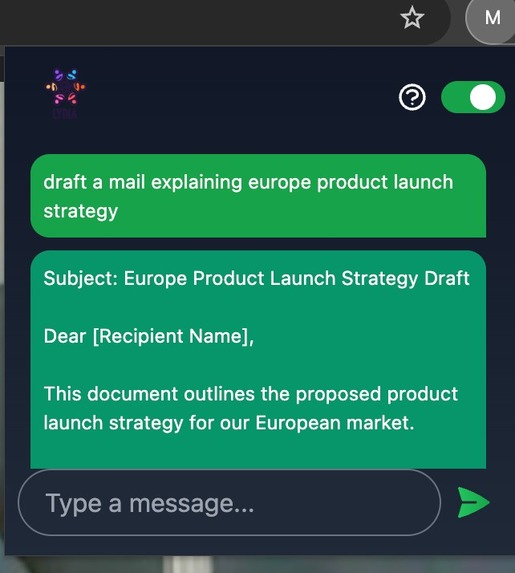
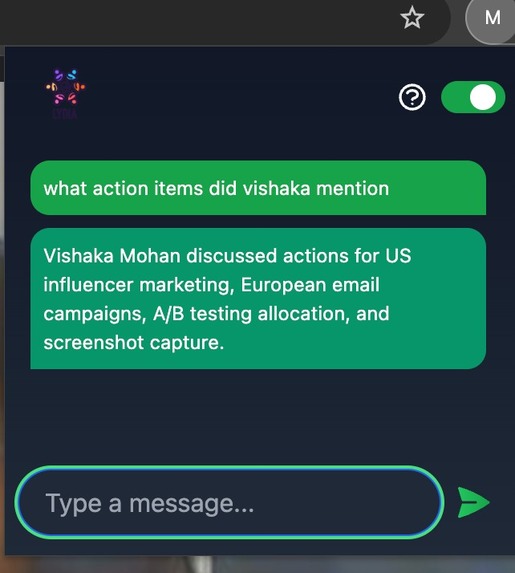
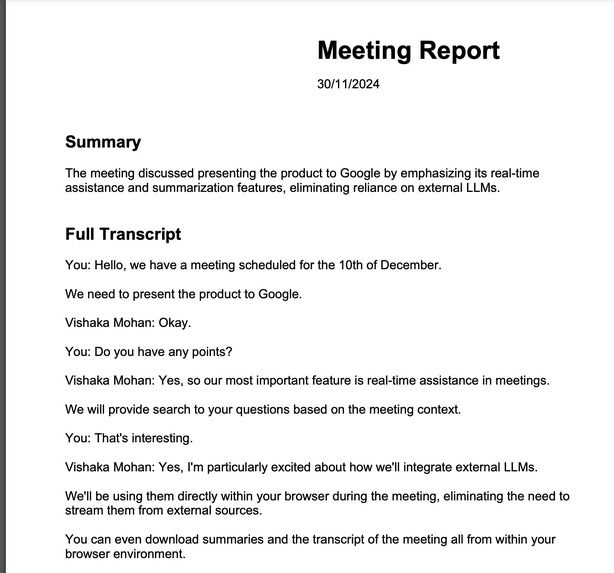
Lydia is a powerful, context-aware assistant that helps you stay engaged during meetings. You can ask real-time, relevant questions about the ongoing discussion without interrupting the flow. It also acts as a generic AI assistant, supporting brainstorming sessions by providing insights, suggestions, and ideas in real-time. After the meeting concludes, Lydia automatically generates a detailed report that includes a summary, action items, and a full transcript. Best of all, everything is processed locally on the user’s device—no data ever leaves your machine—ensuring full privacy and security.
How we built it
We created a lightweight JavaScript utility to generate transcripts in real-time by parsing Google Meet captions. This transcript updates dynamically and locally on the user's browser and serves as the context for answering questions.
Using Gemini Nano model via Chrome AI APIs, we built a Chrome Extension with Q&A chat interface, ensuring accurate, context-aware responses. To handle large transcripts efficiently, we split them into smaller chunks and processed them in parallel using multiple AI sessions.
The Prompt API powered real-time Q&A, while the Summarization API generated meeting summaries, action items, and transcripts.
A DOM listener detects when the meeting ends, triggering an automatic download of all outputs for easy access.
Hence, a comprehensive report is generated without even a single bit of data leaving the user's system.
Challenges we ran into
APIs not behaving as expected: Initially, we faced issues with untested languages in Chrome AI APIs, causing unexpected failures. We resolved this with valuable suggestions from the developer community.
Transcript quality: Generating a clean and accurate transcript from Google Meet captions was challenging due to noise and errors. We addressed this by implementing a robust text-cleaning layer to ensure clarity and consistency.
Limited context size and high latency: Handling large meeting transcripts with limited context windows and slow response times was a significant bottleneck. To solve this, we adopted a stateless design, using multiple parallel sessions to process chunks efficiently and ensure seamless performance.
Accomplishments that we're proud of
Real-time productivity boost: Unlike most assistants that focus only on post-meeting tasks like summaries or action items, we actively enhance meeting productivity by answering context-aware questions in real time.
Overcoming model constraints: Despite challenges like limited token size in AI models, we designed an architecture that seamlessly processes large context windows to meet our use case.
Privacy-first design: Lydia is the only meeting assistant to process all data locally, ensuring user privacy. Even transcription is done without external services, and no login is required, keeping personal data secure.
Simple and hassle-free setup: Lydia is incredibly easy to use—just download the extension and start. No signup or complex setup is needed, making it accessible for everyone.
What we learned
Building Chrome extensions: This was our first experience creating a Chrome extension, and we gained valuable insights into designing lightweight, user-friendly tools for the browser.
Harnessing client-side AI: We learned to utilize on-device AI models effectively, enabling real-time transcript analysis and question answering while maintaining high performance.
Designing privacy-focused solutions: Developing an entirely local processing workflow taught us how to prioritize user privacy without compromising on features or functionality.
Improving usability: Addressing challenges like reducing interruptions and ensuring smooth real-time operation gave us a better understanding of creating seamless, user-centric tools.
What's next for Lydia
Leveraging advanced models: As models improve, Lydia will provide even more accurate and context-aware responses to user queries.
Multilingual support: We aim to introduce support for multiple languages, enabling users to interact seamlessly regardless of the meeting language.
Integration with image and video models: By incorporating visual processing, Lydia will capture content from presentations and visuals in real-time, offering deeper insights and guidance during meetings.
Built With
- chrome
- css
- extension
- gemini
- html
- javascript
- tailwind




Log in or sign up for Devpost to join the conversation.