-
Our Mascot the Mancer
-
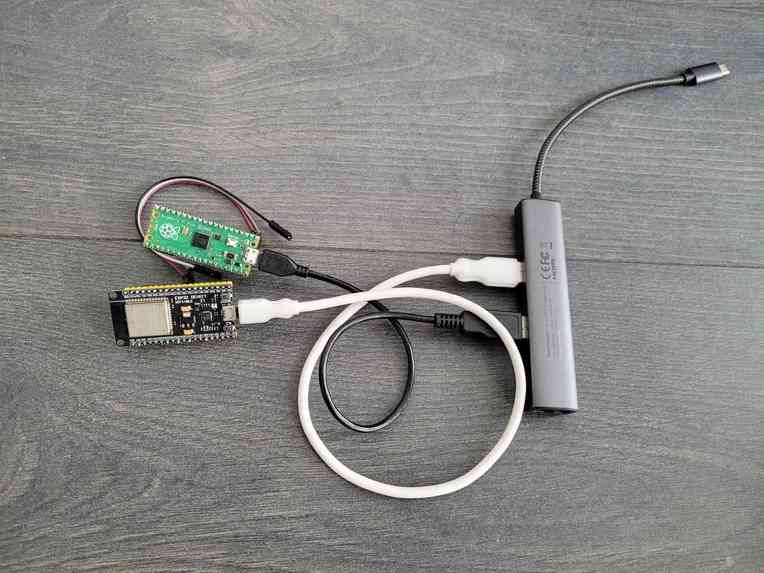
Pico Pi and ESP32 (USB for Power)
-
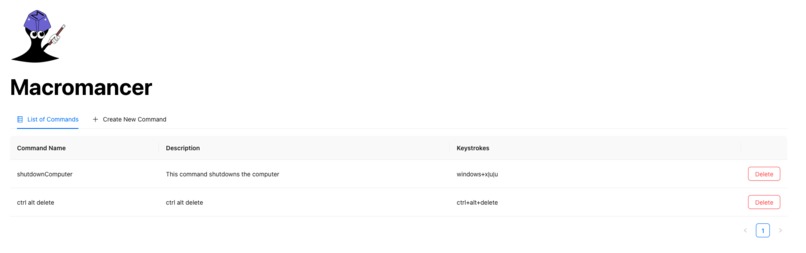
List of Custom Macros
-
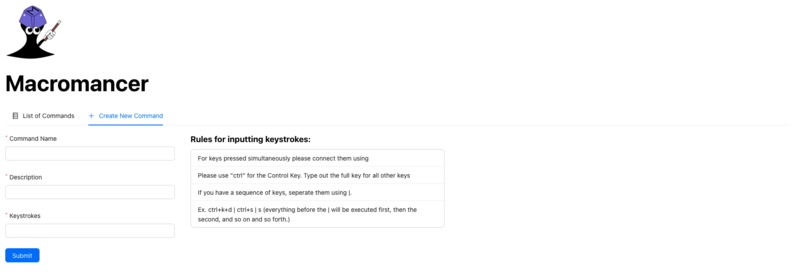
Macro Creation Webpage


Inspiration
The inspiration came from working with integrated BMCs on server motherboards. These devices are able to control servers remotely without the need of an operating system on the server. This is accomplished by streaming the servers' VGA input and attaching a keyboard via USB. The major pain points about BMCs are that they are normally embedded on the servers, the streamed keyboard input is prone to errors and that since the screen is streamed the screen is not interactable. Our prescriptive design was a small portable device that has the same functionality as the BMC while solving these pain points and adding smart home functionality features.
Challenges we ran into
Originally, we planned to use the Raspberry Pi 3 because it had an onboard network module which eliminates one step in the integration process. Unfortunately, the Raspberry Pi 3 cannot emulate USB HID devices such as a keyboard, which made it infeasible to use. Once we switched to the Raspberry Pi Pico, which could emulate a keyboard but didn’t have WIFi, we had to integrate it with a network module ESP8266 or ESP32. We encountered difficulties powering the module through the RPI and later discovered that both require 5v while our RPI only provided 3.3v. Furthermore, the RPI Pico does not have USB ports to support the display capture feature we aimed to implement, instead we added additional features.
What it does
Marcomancer main features are the following:
- Run Macros Remotely via USB Keyboard Emulation
- Programmable Smart Home Voice Activated Macros
- Robust Input Streaming via Web App
- Portable Plug and Play
These features solve two of the major BMC pain points of no portability and error prone input. The system also allows system administrators to reliably program macros to remote servers. Macromancer is not only for tech savvy individuals but also provides smart accessibility to anyone through voice control on their phones to communicate to their PC. As long as you can accomplish a task with just keyboard inputs, you can use Macromancer to send a macro from anywhere.
How we built it
Hardware: The RPI Pico that waits for keycodes transmitted by the ESP32. ESP32 polls our cloud server for commands.
Software: Google Assistant sends predefined user commands to the cloud server webhook via IFTTT applets. Users can also use our Frontend Web App to manually queue command strings and macros for the ESP32 to poll via a GET API.
Accomplishments that we're proud of
- Ability for users to add/delete any new commands
- Integrating with the network modules
- The minimum latency
What we learned
- Flashing firmware on microprocessors
- Emulating keyboard through microprocessors (Adafruit)
- TCP and Checksum error detection
- Activating webhooks with Google Assistant
- How to communicate between microprocessors
What's next for Macromancer
- Better security (encryption)
- RPI 4 (reduce hardware and allow display capture for text editing)
- Wake on LAN
Built With
- circuitpython
- express.js
- javascript
- micropython
- python
- raspberry-pi
- react


Log in or sign up for Devpost to join the conversation.