-
-
maxapply_thumbnail
-
maxapply_session
-
maxapply_submit
-
maxapply_dropdown
-
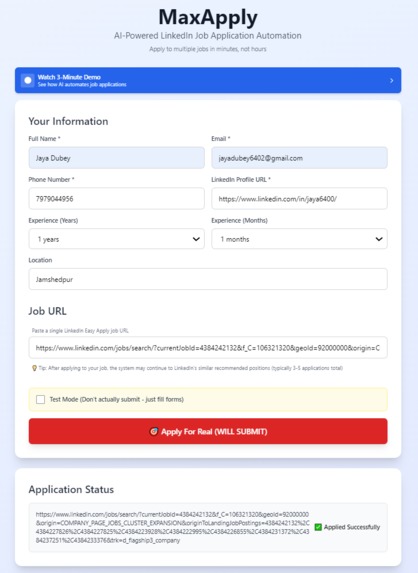
maxapply_frontend


MaxApply: AI-Powered LinkedIn Job Automation
💡 Inspiration
As a job seeker from Jamshedpur, a tier-2 city in India, I found myself spending 2-3 hours on each LinkedIn job application. The process was exhausting: filling out the same information repeatedly across dozens of forms, answering the same questions, selecting from endless dropdown menus.
For someone applying to 50 jobs, that's 100-150 hours of pure repetitive work. I realized this wasn't just my problem—millions of job seekers, especially those from smaller cities competing nationally, face this same barrier. Time became the biggest obstacle to opportunity.
That's when I decided to build MaxApply using Amazon Nova 2 Lite AI to automate what shouldn't require human time in the first place.
🚀 What It Does
MaxApply automates LinkedIn Easy Apply job applications from start to finish:
- Intelligent Form Filling: Uses Amazon Nova 2 Lite to understand form fields and fill them with the correct information
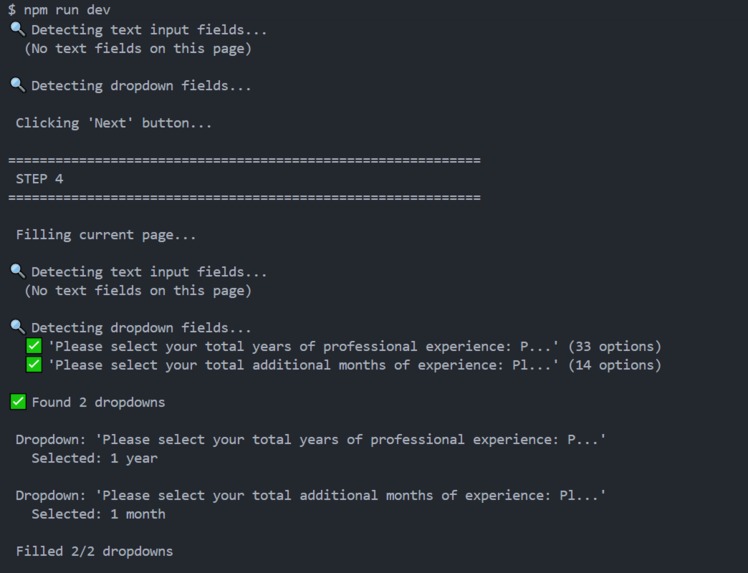
- Smart Dropdown Selection: Analyzes 30+ dropdown options and selects the best match based on your profile
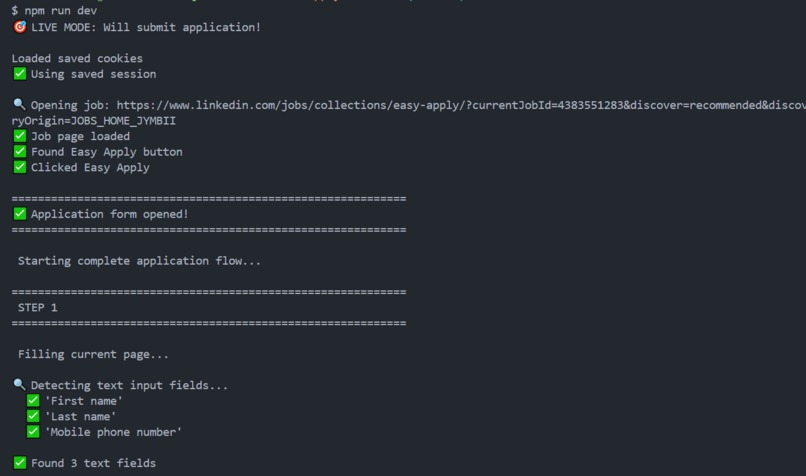
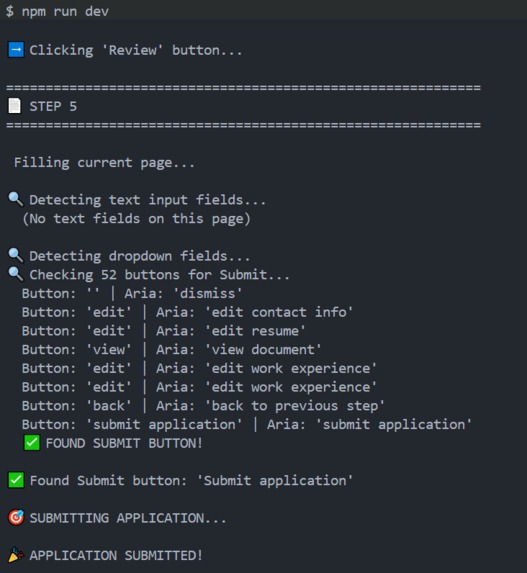
- Multi-Step Navigation: Automatically handles forms with up to 15 pages, clicking Next/Review/Submit buttons
- One-Click Application: What took 2-3 hours now takes 30 seconds
- Test Mode: Practice without submitting to verify everything works correctly
- Session Persistence: Login to LinkedIn once, apply to unlimited jobs
The Result
Time per application: 3 hours → 30 seconds
Cost per application: ~$0.15
ROI: 13,000% (saves $20-30 worth of time per job)
🛠️ How I Built It
Architecture Overview
Frontend (Web Interface)
- Built with Next.js 16, TypeScript, and Tailwind CSS
- Responsive form to collect user profile data (name, email, experience, etc.)
- Single job URL input with test/production mode toggle
- Real-time status updates during automation
Backend (API Layer)
- Node.js API endpoint at
/api/apply - Spawns Python subprocess to execute automation
- Passes user data and job URL to Python script
- Streams automation output back to frontend
Automation Engine (Python + Selenium)
- Selenium WebDriver controls Chrome browser
- Opens LinkedIn job page and clicks "Easy Apply"
- Detects form fields (text inputs, dropdowns, textareas)
- Navigates multi-page forms with intelligent Next/Submit detection
- Cookie-based authentication for session persistence
AI Integration (Amazon Nova 2 Lite)
- Uses AWS Bedrock with cross-region inference profile:
us.amazon.nova-2-lite-v1:0 - Hybrid approach for cost optimization:
- Rule-based matching for simple fields (name, email, phone) → Free
- Nova 2 Lite AI for complex decisions (dropdowns, custom questions) → ~$0.01/call
- Makes 10-15 AI calls per application, costing $0.10-0.15 total
Technical Implementation
Form Field Detection:
# Detect all form inputs
text_fields = driver.find_elements(By.CSS_SELECTOR,
    "input[type='text'], input[type='email'], input[type='tel']")
dropdowns = driver.find_elements(By.TAG_NAME, "select")

# Extract field labels from associated <label> tags
for field in text_fields:
    label = field.find_element(By.XPATH,
        "preceding::label[1] | parent::*/preceding::label[1]")
Smart Field Matching (Rules + AI):
def smart_field_match(field_label, user_data):
    label = field_label.lower()

    # Rule-based for common fields (free)
    if "first name" in label:
        return user_data['name'].split()[0]
    if "email" in label:
        return user_data['email']
    if "phone" in label:
        return user_data['phone']

    # AI-powered for complex fields ($0.01/call)
    return ask_nova_what_to_fill(field_label, user_data)
Amazon Nova 2 Lite Integration:
response = bedrock.invoke_model(
    modelId='us.amazon.nova-2-lite-v1:0',  # Cross-region inference profile
    body=json.dumps({
        "messages": [{
            "role": "user",
            "content": [{
                "text": f"Select from dropdown: '{field_label}'\n"
                        f"Options: {options}\n"
                        f"User experience: {user_data['experience_years']} years\n"
                        f"Choose the exact option text that best matches."
            }]
        }],
        "inferenceConfig": {
            "max_new_tokens": 50,
            "temperature": 0.3
        }
    })
)
Multi-Step Form Navigation:
max_steps = 15
current_step = 1

while current_step <= max_steps:
    # Fill all fields on current page
    fill_form_fields(user_data)

    # Check for Submit button FIRST (priority!)
    submit_button = find_submit_button()
    if submit_button:
        submit_button.click()
        return True  # Done!

    # If no Submit, check for Next button
    next_button = find_next_button()
    if next_button:
        next_button.click()
        current_step += 1
        continue

    # Neither found - form incomplete
    return False
🧗 Challenges I Ran Into
Challenge 1: Multi-Page Form Detection
Problem: LinkedIn forms have 4-6 pages, but the automation kept clicking "Next" on empty pages and hit the 10-step limit without finding Submit.
Root Cause: The logic checked for Next button first, so it kept advancing through pages even when Submit was already available.
Solution: Restructured the logic to check for Submit button FIRST at every step, only looking for Next if no Submit found. Also increased max_steps from 10 to 15 for safety.
Challenge 2: Nova 2 Lite Inference Profile
Problem: Got ValidationException: Invocation of model ID amazon.nova-2-lite-v1:0 with on-demand throughput isn't supported
Root Cause: Nova 2 Lite models cannot be invoked directly like v1 models—they require a cross-region inference profile.
Solution: Changed model ID from amazon.nova-2-lite-v1:0 to us.amazon.nova-2-lite-v1:0 (the inference profile ARN).
Challenge 3: Dropdown Placeholder Selection
Problem: Email dropdown was selecting "Select an option" instead of the actual email address, causing form validation failures.
Root Cause: Placeholder options appeared first in the dropdown list and weren't being filtered out.
Solution: Added logic to skip placeholder options before attempting to match user data:
# Filter out placeholders
real_options = [opt for opt in options
                if opt.lower() not in ['select', 'choose', 'please select']]
Challenge 4: Cryptic LinkedIn Field Labels
Problem: LinkedIn uses IDs like single-line-text-form-component-formElement-urn-li-jobs-appl... instead of readable labels, causing Nova to fill wrong data.
Solution: Enhanced label detection to search for actual <label> tags in parent elements:
label = input.find_element(By.XPATH,
    "ancestor::div//label | preceding::label[1]")
Challenge 5: Frontend Blocking on Python Input
Problem: When Python automation finished, the frontend hung forever showing "Start Automation" because the API never responded.
Root Cause: Python script had input("Press Enter...") which blocked when called from API.
Solution: Check if running in interactive terminal before showing input prompt:
if not args.headless and sys.stdin.isatty():
    input("Press Enter to close browser...")
🏆 Accomplishments That I'm Proud Of
1. Real-World Production Quality This isn't just a proof-of-concept—I've successfully submitted actual job applications through MaxApply and verified them in my LinkedIn "Applied Jobs" section. It handles real LinkedIn complexity: dynamic forms, cryptic labels, multi-page navigation, and varying field types.
2. Cost Optimization Through Hybrid Approach By using rule-based matching for simple fields and AI only for complex decisions, I kept costs at $0.15 per application while maintaining intelligence. This makes it sustainable for job seekers who might apply to 50-100 jobs.
3. Intelligent Multi-Step Navigation The automation doesn't just fill forms—it understands form structure. It checks for Submit at every step, handles Review pages, detects when forms are complete, and has safety limits to prevent infinite loops. This required careful logic design and extensive testing.
4. Amazon Nova 2 Lite Integration Successfully integrated Nova 2 Lite for intelligent dropdown selection from 30+ options. The AI analyzes field labels, user profile data, and available options to make the correct choice—something that would be impossible with simple string matching.
5. Democratizing Job Access Built a tool that levels the playing field for candidates from tier-2 and tier-3 cities who compete nationally but lack the time for hundreds of hours of form filling. The 13,000% ROI makes job hunting accessible to everyone.
📚 What I Learned
Technical Skills
AWS Bedrock & Nova 2 Lite
- How to use cross-region inference profiles for Nova 2 models
- Difference between direct model invocation (v1) vs inference profiles (v2)
- Prompt engineering for form field analysis and dropdown selection
- Cost optimization: when to use AI vs rules
Full-Stack Integration
- Spawning Python subprocesses from Node.js backend
- Streaming subprocess output to frontend
- Managing state across different processes and languages
- Handling async operations with Selenium automation
Browser Automation with Selenium
- Dynamic form detection in modern web apps
- Cookie-based session management for persistent authentication
- Handling JavaScript-rendered content
- XPath queries for complex element selection
Problem-Solving Patterns
- Always check terminal conditions (Submit) before recursive conditions (Next)
- Filter invalid data (placeholders) before processing
- Add safety limits to prevent infinite loops
- Check execution context (CLI vs API) before blocking operations
Broader Insights
When to Use AI vs Rules Not everything needs AI! Simple field matching is faster, cheaper, and more reliable with rules. Save AI for genuinely complex decisions where pattern matching fails—like analyzing 33 dropdown options or understanding ambiguous custom questions.
The Importance of Real-World Testing Synthetic test data can't capture LinkedIn's complexity: varied form structures, cryptic labels, placeholder options, dynamic elements. Testing on actual job postings revealed edge cases I never would have anticipated.
Cost-Conscious AI Design At $0.01 per API call, costs add up quickly. The hybrid approach (5 rule-based + 10 AI calls = $0.10) vs pure AI (15 calls = $0.15) seems small, but across 100 applications that's $10 vs $15—a 50% increase. Every optimization matters at scale.
🔮 What's Next for MaxApply
Short-Term (Post-Hackathon)
- Multi-Platform Support: Extend to Naukri.com (India's largest job portal), Hirist.tech (tech jobs), and Indeed.com
- Batch Processing: Handle multiple job URLs in one session
- Enhanced Field Support: Add handling for salary expectations, notice period, visa sponsorship questions
- Better Error Recovery: Retry logic for network failures, form changes, timeout issues
Medium-Term
- AI-Generated Cover Letters: Use Amazon Nova to create personalized cover letters based on job descriptions
- Application Tracking Dashboard: Track which jobs applied to, response rates, interview schedules
- Chrome Extension: Right-click on LinkedIn job → "Apply with MaxApply" for instant automation
- Email Notifications: Alert users when applications complete or encounter errors
Long-Term Vision
- Mobile App: Apply to jobs from phone using cloud-based automation
- Resume Optimization: Use Nova to tailor resume bullet points to job descriptions
- Interview Preparation: Generate practice questions based on job requirements
- Career Analytics: Track application success rates, suggest improvements, identify patterns
Impact Goal
Make job hunting accessible and efficient for the 60+ million job seekers in India, particularly those from tier-2 and tier-3 cities who face geographic and time barriers when competing for national opportunities.
💰 Cost Analysis
Per Application Breakdown:
- Rule-based fields (name, email, phone, location): $0.00 (5 fields)
- Nova 2 Lite API calls (dropdowns, custom questions): $0.10-0.15 (10-15 calls @ $0.01 each)
- Total per application: ~$0.15
Value Created:
- Time saved: 2-3 hours per application
- Worth (at $10/hour): $20-30
- ROI: 13,000%
Scalability:
- 50 applications: $7.50 cost, 100-150 hours saved
- 100 applications: $15 cost, 200-300 hours saved
- Amazon's $100 hackathon credits: 666 applications
Acknowledgments
Built with Amazon Nova 2 Lite on AWS Bedrock for the Amazon Nova Hackathon 2026.
Special thanks to the Anthropic team for Claude, which helped debug the multi-step navigation logic and Nova 2 Lite inference profile issues.
Contact: jayadubey6402@gmail.com
LinkedIn: linkedin.com/in/jaya6400/
Built with ❤️ to democratize job access for everyone
Built With
- ai
- amazon-nova
- amazon-web-services
- artificial-intelligence
- automation
- aws-bedrock
- chrome
- css
- fullstack
- git
- html
- javascript
- job-automation
- nextjs
- node.js
- python
- python-automation
- react
- selenium
- tailwindcss
- typescript
- ui-automation
- vercel
- web-automation


Log in or sign up for Devpost to join the conversation.