-
-
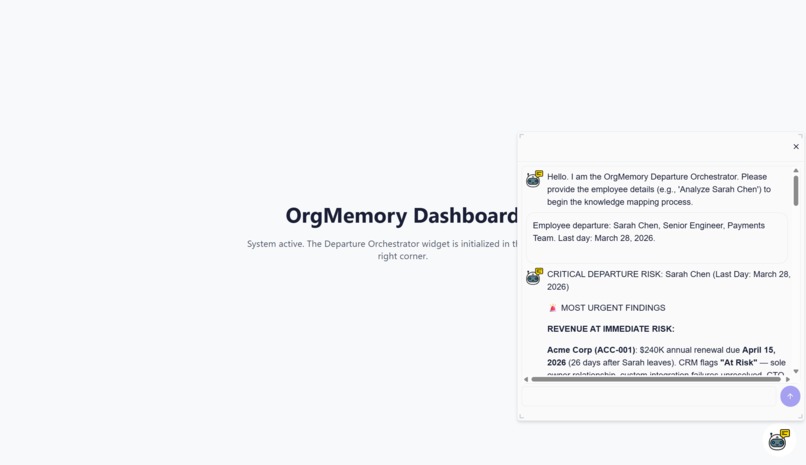
Chat widget for main agent
-
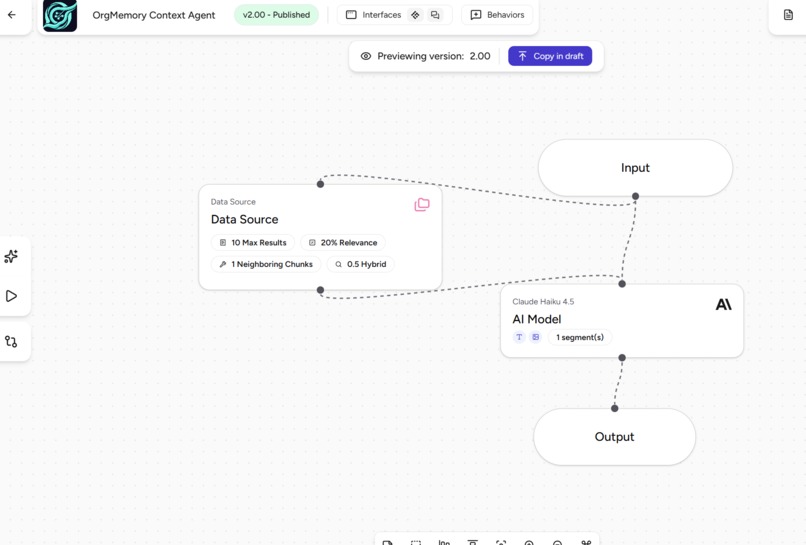
COntext agent
-
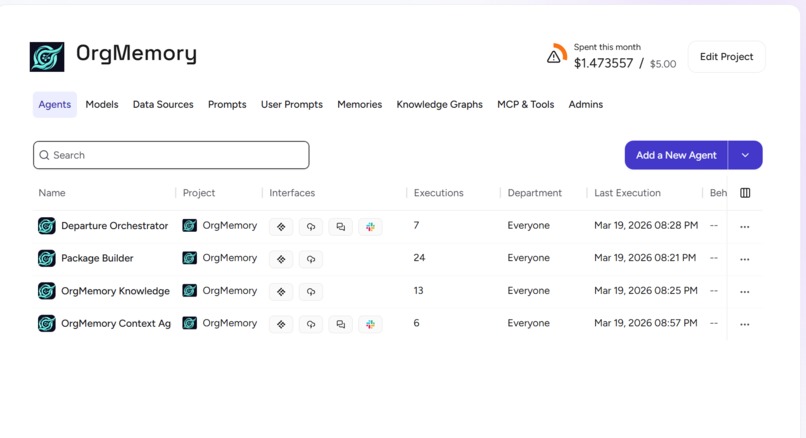
Dashboard of project
-
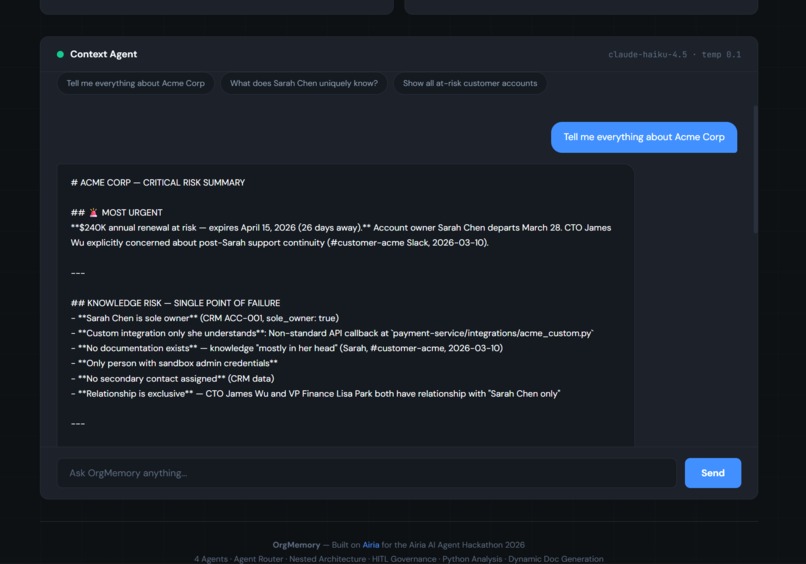
Agent in action_Web
-
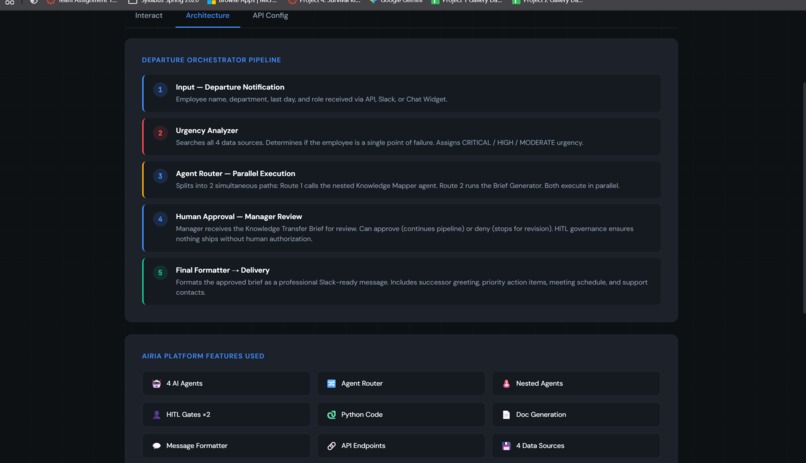
Architecture
-
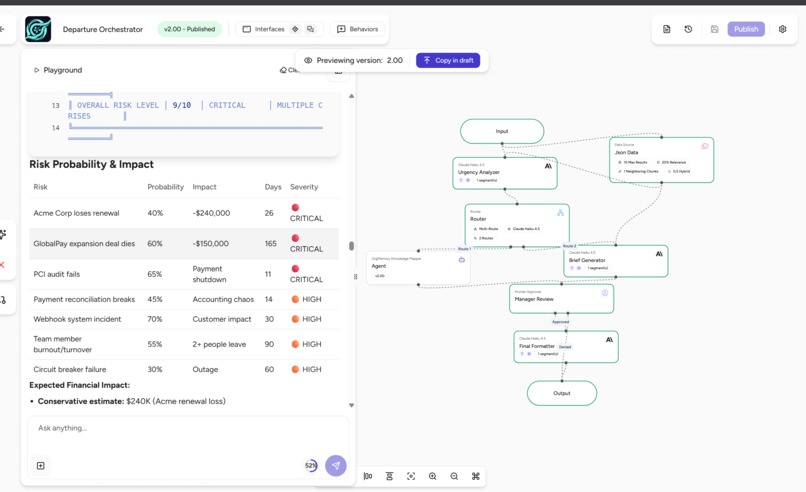
Departure Orchestrator_Main Agent responses
-
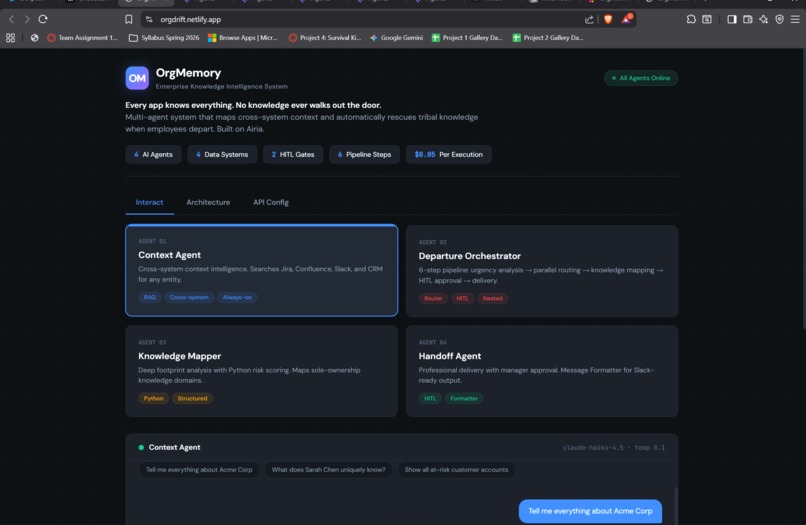
OrgMemory Website
-
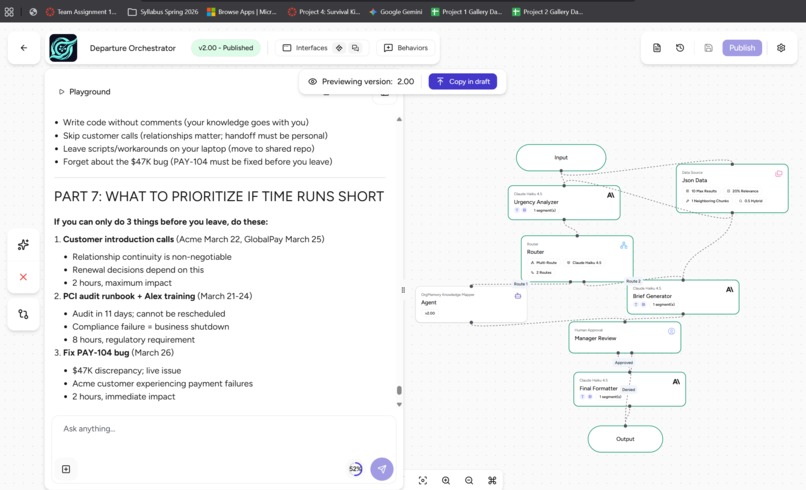
Departure Orchestrator_Main Agent
-
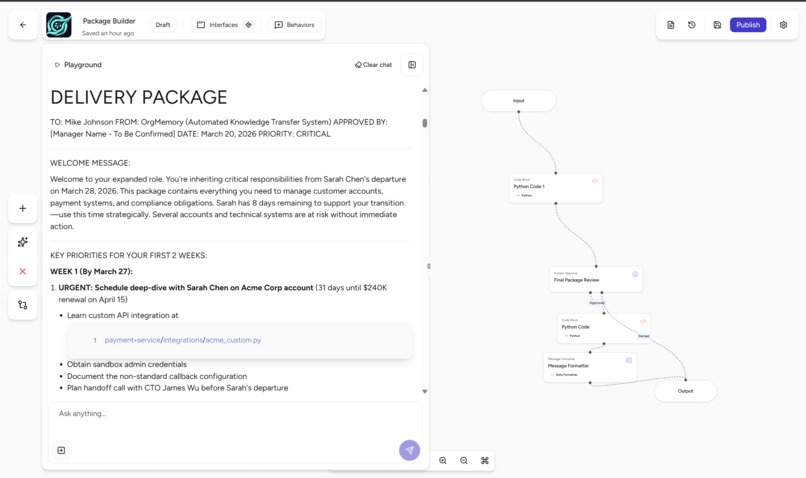
Package Builder Agent in action
-
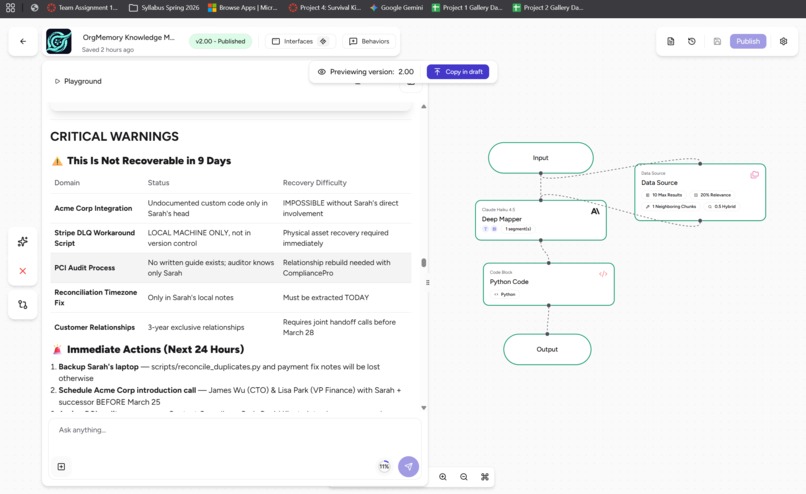
Knowledge Mapper Agent in action


Inspiration
A few months ago I watched a senior engineer at a company announce they were leaving. Within 24 hours, Slack was full of panic. "Who owns the Acme integration?" "Does anyone know the PCI audit process?" "Wait, that script only lives on her laptop?"
Two weeks of meetings followed. An HR template got filled out. Half of what she knew never made it anywhere.
That stuck with me. Not because it was unusual, but because it happens at literally every company and nobody has actually fixed it. All the signals were right there sitting in Jira, Confluence, Slack, the CRM. The timezone bug she fixed locally on March 1st was connected to the open ticket causing payment failures, which was connected to the $240K renewal coming up 18 days after her last day. Nobody connected those dots. Nobody had a tool that even tried.
So I built one.
What it does
You type in an employee's name. In under 60 seconds, OrgMemory reads their entire digital footprint across Jira, Confluence, Slack, and your CRM and tells you exactly what walks out the door when they leave.
For my demo I ran it on a fictional Senior Payments Engineer named Sarah Chen. Here is what it found:
Knowledge Risk Profile: Sarah Chen
| Risk Dimension | Finding |
|---|---|
| Knowledge Concentration Score | 95.9% sole-ownership risk |
| Total Revenue at Risk | $740,000 annual recurring revenue |
| Critical Accounts (sole owner) | Acme Corp ($240K) + GlobalPay Solutions ($320K) |
| Open Critical Jira Ticket | PAY-104: $47K payment reconciliation gap, unresolved |
| Undocumented Script | scripts/reconcile_duplicates.py on her local machine only, not in version control |
| PCI Compliance | Sole audit contact 3 years running, zero backup trained |
| Sandbox Credentials | Only person with Acme Corp admin access |
| Time Remaining | 8 days before departure |
The system flagged that scripts/reconcile_duplicates.py existed only on Sarah's local machine by cross-referencing a Slack thread from March 1st with a Confluence page. No human would have caught that manually. That is the whole point.
Manual Offboarding vs. OrgMemory
| Manual Offboarding | OrgMemory | |
|---|---|---|
| Discovery Time | 2 to 3 weeks of meetings | Under 60 seconds |
| Cost | ~$10,000 in HR and consultant time | ~$0.05 per execution |
| Data Sources | Whatever the employee remembers | Jira, Confluence, Slack, CRM |
| Risk Detection | Reactive, opinion-based | Proactive, data-driven |
| Output | A Word doc with links | Prioritized brief with owners, deadlines, and revenue figures |
How I built it
I built everything on Airia's Agent Studio. The core idea was to break the problem into four specialized agents instead of throwing one giant prompt at a model and hoping it figures it out.
The Pipeline
Input (Employee Name)
      |
      v
[Agent 01: Context Agent]
Cross-system RAG across all 4 data sources
      |
      v
[Agent 02: Departure Orchestrator]
Urgency triage + Agent Router (splits into 2 parallel paths)
      |
    /   \
   v     v
[Agent 03]           [Path B]
Knowledge Mapper     Handoff Brief
Python risk scoring  runs simultaneously
   \     /
    v   v
[HITL Gate]
Manager approval required before anything goes out
      |
      v
[Agent 04: Package Builder]
Slack-ready formatted delivery to successor
Agent 01 (Context Agent) is always on. Ask it about any entity and it searches across all four systems and returns a synthesized summary with only real cited data. Temperature 0.1, Reasoning Effort set to Deep, Structured Output on.
Agent 02 (Departure Orchestrator) is the brain of the whole thing. It triages urgency, then splits into two parallel paths via Airia's Agent Router so the knowledge mapping and the brief generation happen at the same time instead of sequentially.
Agent 03 (Knowledge Mapper) uses Claude 3.5 Sonnet for the heavy reasoning work. It also runs a Python node to calculate the Knowledge Concentration Score dynamically and flag sole-ownership risks.
Agent 04 (Package Builder) uses Claude 3 Haiku for fast structured formatting and only fires after a human approves the analysis. It outputs a clean two-week checklist, a prioritized meeting schedule, and an account-by-account action plan ready to drop into Slack.
The whole thing runs off one consolidated JSON data source connected to all four agents. One source, four agents, no wiring mess.
Challenges I ran into
The hardest part had nothing to do with the routing or the architecture. It was getting the agents to stop making things up.
The first version of the Context Agent hallucinated constantly. It invented Jira ticket IDs that did not exist. It cited Confluence pages that were never in the data. It attributed a customer relationship to the wrong person with complete confidence. In a system making decisions about $740,000 in accounts and someone's job transition, one fabricated data point breaks everything.
I had to rebuild the system prompts from scratch with a different philosophy. Instead of treating hallucination prevention as a footnote, I made it the first and most important constraint everything else was written around. I added a hard ANTI-HALLUCINATION RULES block to every single agent:
"NEVER invent ticket IDs, page titles, customer names, dates, or channel names. If no data found from a system, explicitly say 'No data found in [system].' Only reference artifacts that actually exist in the connected data source."
Getting an agent to say "I don't have that" instead of confidently filling in the blank took more iterations than any other part of the entire build.
The second thing that tripped me up was the live MCP integration. I originally connected live Atlassian and Slack tools because it looked impressive on the canvas. During testing a Jira connection timed out and returned a wall of garbage HTML mid-run. That cascaded into a completely broken Knowledge Transfer Brief with corrupted output fields. I made the call to switch to a clean JSON data source instead. Same architecture, same routing, same HITL flow, but it actually worked every time. I learned something from that: a working demo beats a broken live integration every single time, and the architecture is what matters, not whether the API is live.
The third thing was state management between the parallel paths. When two agents run simultaneously and both need to feed into the same final output, the variable naming and structured output schema have to match exactly or the Package Builder gets confused about what to merge. That took a few debugging cycles to get right.
Accomplishments that I'm proud of
Honestly, the moment the system output this line was when I knew it actually worked:
"$740,000 in annual recurring revenue at risk. 95.9% knowledge concentration risk. scripts/reconcile_duplicates.py exists only on Sarah's local machine and is not in the shared codebase. PCI audit contact for 3 consecutive years with zero trained backup. 8 days remaining. Estimated 140 hours of required knowledge transfer."
None of that came from a form somebody filled out. The agents read Jira tickets, Confluence pages, Slack conversations, and CRM records and connected them to each other. The local-machine script discovery happened because a Slack thread from March 1st mentioned a fix that a Confluence page had no record of. That kind of cross-system connection is exactly what a manual process would miss.
I am also proud that it is a real pipeline, not a single prompt dressed up to look like a product. Agent Router, parallel execution, Python scoring, HITL governance, dedicated formatter. That is a real architecture and it was built by one person over a hackathon weekend.
What I learned
The biggest thing I learned is that agent design is the product. Whether the data comes from a live Jira API or a JSON file does not change what the system actually does. The routing logic, the prompt constraints, the parallel execution pattern, and the governance layer are what make it valuable. That is what I would focus on earlier next time.
I also learned that anti-hallucination work is genuinely hard and genuinely important in enterprise contexts. Consumer AI gets a pass when it is slightly wrong. A system making decisions about $740K in customer accounts and someone's career does not. Getting agents to know when to say "I don't have that" is harder than getting them to always produce an answer, and it matters a lot more.
The HITL gate also changed how I think about AI pipelines in general. Before this project I thought of human approval as friction. Now I think of it as the feature that makes everything else trustworthy. Without it OrgMemory is an analytics tool. With it, it is something a real company could actually use.
What's next for OrgMemory
The most obvious next step is swapping the JSON data source for live MCP connections to Jira, Confluence, Slack, and Salesforce through Airia's gateway. The agent logic does not change at all. It is just a config swap.
After that there are three things I actually want to build:
Proactive risk monitoring. Right now OrgMemory only runs when someone announces they are leaving. But the signals of a flight risk appear weeks or months before that. If OrgMemory ran weekly and tracked knowledge concentration scores over time, HR could get a 30-day early warning instead of a 2-week scramble.
Onboarding mode. The knowledge graph OrgMemory builds for a departing employee is also the perfect onboarding curriculum for whoever replaces them. Same data, different framing.
Inline access via browser extension or Slack bot. Right now you have to go to a separate tool to use it. The most useful version lives inside the tools managers already use, surfacing context while they are reading a ticket or a Slack thread, not after.
The thing that started this project is still true: the knowledge is already in your systems. You just need something smart enough to find it before it walks out the door.
Built With
- agent
- airia
- confluence
- crm
- hitl
- jira
- json
- python
- router
- slack


Log in or sign up for Devpost to join the conversation.