-
-
Live Cashier

About SalesNote Live Cashier
SalesNote Live Cashier is a voice-first AI sales agent for small businesses. Instead of forcing a shop owner to tap through screens, search through menus, and manually build receipts or invoices, the app lets them speak naturally while the agent listens, responds in real time, and performs actual business actions.
The idea came from a simple observation: many small business workflows are repetitive, time-sensitive, and often happen while the seller is already busy with a customer. In those moments, typing is slow and navigating complex UI is distracting. We wanted to move beyond the normal "chatbot in a box" pattern and build something that feels like a real cashier assistant, one that can hear, speak, guide, and act.
What we built
We built a Flutter mobile application backed by a Rust API and a live voice agent powered by Gemini Live.
With SalesNote Live Cashier, a user can:
- speak to the app naturally in real time
- interrupt the agent mid-response
- ask for receipts, invoices, sales reports, item information, and analytics
- create and manage real sales documents through voice
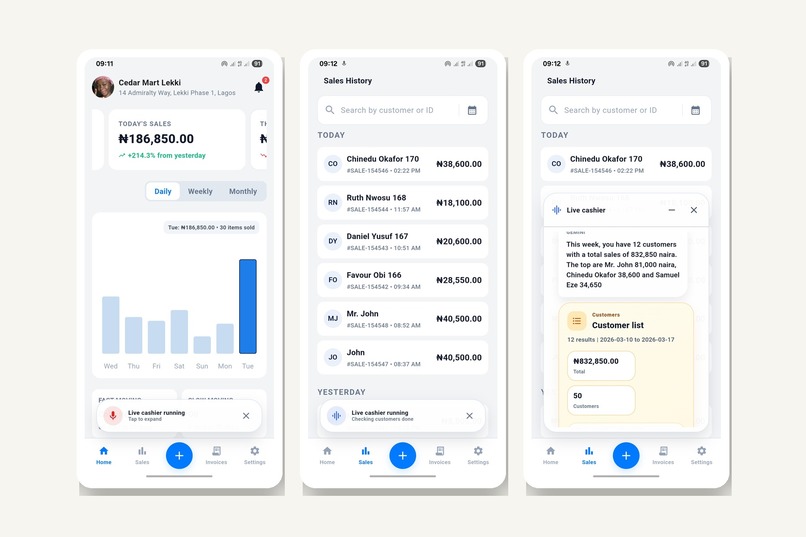
- continue navigating the app while the live cashier remains active as a floating persistent overlay
- reconnect live sessions gracefully when network issues happen
This makes the experience much closer to a real assistant than a turn-based chat interface.
Why this matters
Most business apps still assume the user has time to stop, read, type, and manually complete tasks. That assumption breaks down in fast-moving retail and field environments. We wanted to make sales operations feel conversational and immediate.
The goal was not just to generate text responses, but to build an agent that can actually participate in the workflow:
- it listens
- it responds with audio
- it performs actions
- it stays present during navigation
- it works as part of the product, not as a separate demo
How we built it
Frontend
We used Flutter for the mobile app.
The app includes:
- realtime live cashier UI
- persistent draggable floating overlay
- voice input and audio playback
- receipt and invoice flows
- analytics and sales management
- local caching for faster startup and action history
Backend
We used Rust with Actix Web for the backend.
The backend handles:
- authenticated live session setup
- websocket proxying between mobile clients and Gemini Live
- tool declarations and structured tool execution
- business logic for sales, invoices, receipts, analytics, and reporting
- token/session usage tracking
- reconnect-safe live session behavior
AI and live interaction
We used Gemini Live API for realtime multimodal voice interaction.
The live cashier flow includes:
- continuous audio streaming
- realtime transcription and speech output
- interruption support
- live tool calling for business actions
- grounded actions tied to actual app data and workflows
Cloud
The backend is deployed on Google Cloud, which satisfies the challenge requirement for Google Cloud usage and deployment.
Key product decisions
One of our biggest decisions was to avoid building just another modal chatbot. We moved toward a persistent floating live agent that can stay active while the user continues using the rest of the application.
That design made the agent feel more like an operating layer inside the app rather than a separate screen. It also matched the real-world use case better: a business owner may still need to open sales, invoices, or previews while speaking with the cashier.
We also made the interaction feel more live by supporting:
- interruption during agent speech
- reconnect countdown and recovery
- persistent session behavior
- floating non-blocking interface
Challenges we faced
1. Realtime voice UX on mobile
This was the hardest part.
Getting a live voice agent to feel natural on mobile required solving:
- speaker routing
- echo/self-hearing issues
- interruption behavior
- audio session configuration
- persistent session handling while navigating the app
We had to carefully tune recorder and playback behavior so the agent could speak out loud while still supporting live conversation.
2. Persistent overlay architecture
Turning the live cashier into a persistent floating assistant introduced layout and interaction challenges:
- making it draggable
- preventing it from blocking the whole app
- handling compact vs expanded states
- supporting edge-docking behavior
- keeping navigation usable underneath it
3. Reconnect and session continuity
Realtime systems fail in very visible ways when network quality drops. We had to improve how reconnecting works so the experience remains understandable and usable instead of feeling broken.
4. Avoiding misleading UI states
Because the cashier can create receipts, invoices, and other structured outputs, we had to make sure templates only appear when the data is actually ready. Otherwise the UI could show incomplete cards while the agent was still asking clarifying questions.
What we learned
This project taught us that building a truly live agent is very different from building a chatbot.
We learned that:
- realtime UX depends heavily on audio session behavior, not just model quality
- persistent AI interfaces require strong interaction design, not only backend logic
- interruption handling is a product feature, not just a protocol feature
- grounding and tool design matter more than clever prompting alone
- the best live agent experiences feel embedded in the workflow, not bolted on
We also learned how much small UI details matter in live systems. Drag behavior, reconnect messaging, cue sounds, overlay hit-testing, and transition timing all affect whether the experience feels polished or fragile.
What makes this project strong for the challenge
SalesNote Live Cashier fits the Live Agents category because it goes beyond text input and output. It is a realtime voice agent that:
- hears
- speaks
- handles interruptions
- performs grounded actions
- stays active while the user continues using the product
It is not a mockup and not a simple conversational demo. It is an integrated, working business assistant built into a real product workflow.
Final thought
Our main ambition with SalesNote Live Cashier was to make business software feel less like form-filling and more like collaboration. We wanted the user to feel like they were working with a capable cashier assistant, not operating a static app.
That shift from static UI to live interaction is the core of the project.
Built With
- actix-web
- audio-session
- bash
- dart
- firebase-cloud-messaging
- flutter
- flutter-secure-storage
- flutter-sound
- gemini-live-api
- github-actions
- google-cloud
- hive
- html/css
- nginx
- postgresql
- record
- redis
- rust
- sharedpreferences
- sql
- ssh
- systemd
- websockets
- yaml


Log in or sign up for Devpost to join the conversation.