-
-
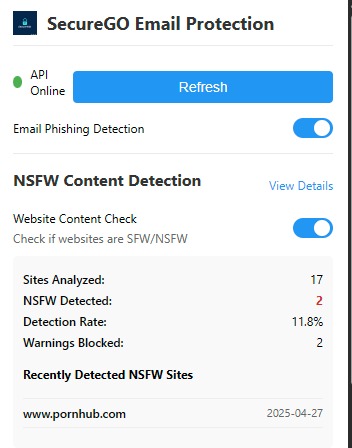
Extension Popup (1)
-
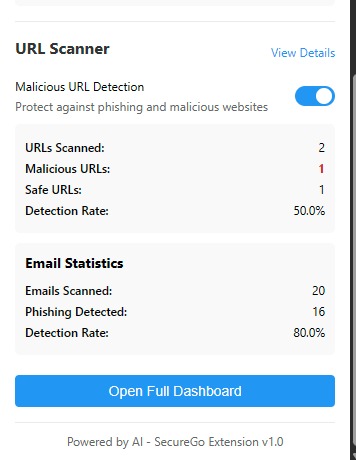
Extension Popup (2)
-

Homepage
-
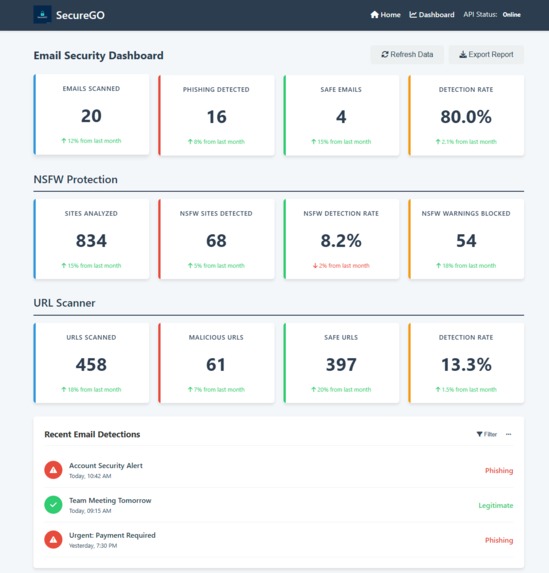
Dashboard (1)
-
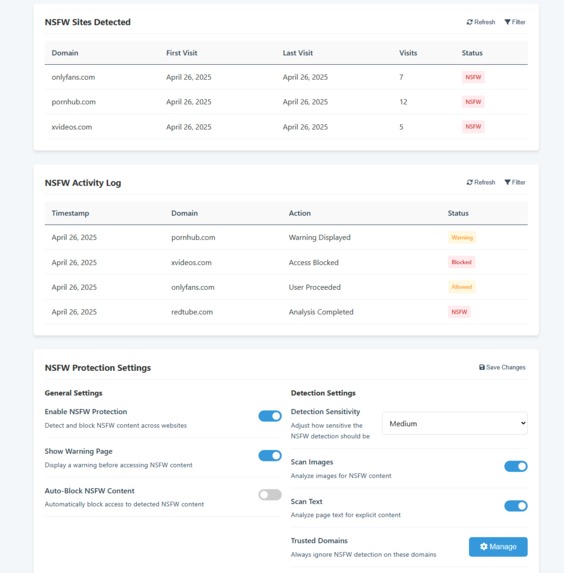
Dashboard (2)


Inspiration
With cyber threats growing every day, we noticed a gap in simple, unified tools that protect users from multiple online dangers at once. Phishing attacks, malicious URLs, and exposure to NSFW content have become common risks — yet most solutions are fragmented or too complex.
We wanted to create a lightweight, fast, and user-friendly extension that empowers everyday users to browse safely and confidently. SecureGO was built to solve a real-world societal need: making internet safety accessible for everyone.
What it does
SecureGO is an all-in-one browser extension that keeps users safe online by:
- Detecting and warning against phishing emails in real time
- Identifying and blocking access to malicious or unsafe URLs
- Blocking NSFW content and warning users before they open inappropriate sites
- Summarizing user protection stats through a dynamic dashboard
- Storing detection stats in a database to track protection over time
It runs seamlessly in the background, providing proactive, lightweight, and instant protection without interrupting the browsing experience.
How we built it
- Backend: Python with Flask for serving models and APIs
- Frontend: JavaScript for building the browser extension
- Database: MongoDB for storing detection stats across sessions
- Phishing email detection: logistic regression ML model trained on two Kaggle datasets, Spam Mails Dataset and Spam Email Dataset
- Malicious URL detection: random forest classifier ML model trained on 100,000 synthetic URLs
- Content Filtering: NSFW content detection using the nsfwjs GitHub API
- Deployment: Local Flask server connected to the browser extension for real-time analysis
Libraries
- Scikit-learn: for training and deploying the random forest classifier and logistic regression models
- Pickle & Joblib: for model serialization and efficient storage
- Pandas & NumPy: for data manipulation, preprocessing, and feature engineering
- NLTK: for text processing in phishing email detection
Challenges we ran into
- Lack of Good Malicious URL Dataset: We couldn't find a high-quality, labeled dataset for malicious URLs, so we generated synthetic data (100,000+ records) to train the model effectively.
- Real-Time Processing: Ensuring that the extension could run in real-time without causing significant delays to the browsing experience was challenging. We optimized by using asynchronous processing for background tasks and minimizing model complexity.
- NSFW Content Detection: Integrating external APIs like nsfwjs was tricky due to the potential for inaccurate results or performance issues. We had to fine-tune the API calls to balance accuracy and speed, ensuring the user experience was seamless.
Accomplishments that we're proud of
- Real-Time Protection: Delivered seamless, real-time detection for phishing emails, malicious URLs, and NSFW content, enhancing user security without interrupting their browsing experience.
- Synthetic Dataset Innovation: Created a synthetic dataset of 100,000 URLs, overcoming the lack of a good malicious URL dataset. This enabled us to build an accurate classifier for URL safety detection.
- User-Centric Dashboard: Built a dynamic dashboard that gives users a clear view of their protection stats, including phishing emails detected, malicious URLs blocked, and NSFW content filtered, helping them stay informed.
- Data Persistence: Implemented a database to track detection stats across multiple sessions, allowing users to see how their protection evolves over time.
What we learned
- Browser Extension Development: Developing a browser extension introduced us to the complexities of building lightweight, cross-browser compatible applications. We learned how to manage browser security restrictions, handle permissions, and ensure consistent functionality across Chrome.
- Importance of Data Quality: We learned that having high-quality, diverse datasets is crucial for training accurate models. The lack of a suitable malicious URL dataset pushed us to create our own synthetic data, which turned out to be an invaluable learning experience.
- Model Optimization for Real-Time Use: Training models for real-time applications required us to optimize both the model's performance and speed. We learned how to balance accuracy with efficiency, ensuring minimal impact on the user’s browsing experience.
- User Experience Matters: Focusing on a lightweight, non-intrusive experience was crucial. The user’s perception of safety is as important as the actual protection, so we prioritized clear alerts, easy-to-understand dashboards, and a smooth overall experience.
What's next for SecureGO
- Expanding to Other Browsers: We plan to extend SecureGO’s protection to Safari, Edge, and other popular browsers, ensuring more users can benefit from enhanced security.
- Built-in Secure VPN Integration: Introducing a secure VPN feature to provide an extra layer of privacy and protection while users browse, ensuring their data remains safe from threats like hackers and trackers.
- SecureGO API: Developing a SecureGO API to allow third-party apps and services to integrate phishing, URL safety, and NSFW content detection into their platforms, broadening the reach of our security technology.


Log in or sign up for Devpost to join the conversation.