-
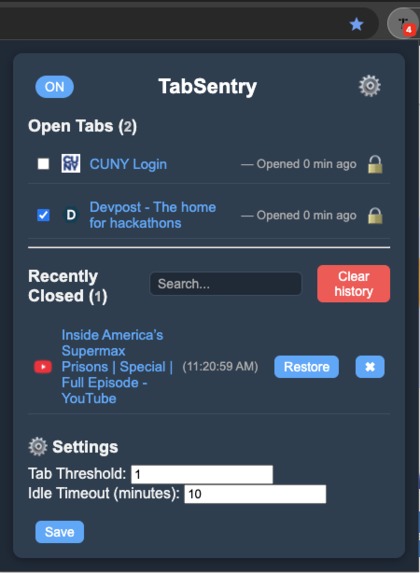
UI of TabSentry Chrome Extension

Inspiration
We have all been there, 15+ Chrome tabs open and we still cant even find the one we actually need. Tab overload wastes time, eats memory, and kills focus. We wanted to build something lightweight that actually helps, without forcing you to change how you browse.
What it does
TabSentry automatically manages your tab in the background. It identifies idle tabs, gently closes them, and saves them in a history list so nothing is lost. Important tabs can be locked to stay safe, and whitelisted sites are never touched. With a single click you are able to restore a tab, pause the extension, or edit settings like idle time and tab count limit.
How we built it
We used the Chrome Extensions API (Manifest v3) with JavaScript, HTML, and CSS. A background service worker tracks tab activity and enforces the rules. Data is all saved using Chrome's local storage so your preferences persist across session.
Challenges we ran into
Different bugs according to logic and fighting Chrome's tab APIs. Tracking state across updates and refreshes was not straightforward. We had a number of double print issues from console.log statements. The tab queue logic is solid, just ran out of time to implement an easy visual depiction of the queue.
Accomplishments that we're proud of
We shipped an extension that works with a plethora of modern day UI/UX features. We made locked/whitelisted tabs to stay safe and a state toggle (on/off) for easy extension management. All of this was made brought together in an easy to use, clean interface that makes sense to use.
What we learned
-How browser extensions juggle background scripts, storage, and UI elements. -Chrome API -The importance of designing around the user and trust -How to collaborate with branches, PR's, and version control safely
What's next for TabSentry
One-click whitelisting Smarter detection for active audio/video Improved queue UI showing whats next to be closed Publish to the Chrome Web Store for easy installs Explore cross-browser support (firefox/edge)


Log in or sign up for Devpost to join the conversation.