
Last updated on Mar 30, 2026
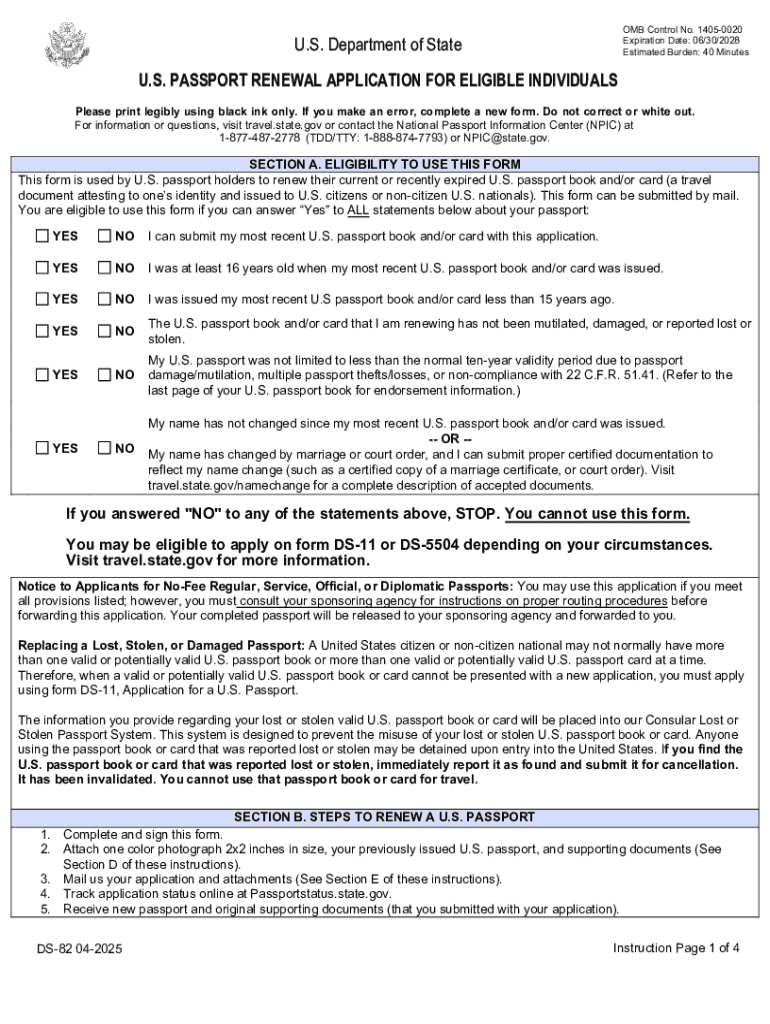
DS-82 free printable template
We are not affiliated with any brand or entity on this form

Fill out
Complete the form online in a simple drag-and-drop editor.

eSign
Add your legally binding signature or send the form for signing.

Share
Share the form via a link, letting anyone fill it out from any device.

Export
Download, print, email, or move the form to your cloud storage.
Why pdfFiller is the best tool for your documents and forms


End-to-end document management
From editing and signing to collaboration and tracking, pdfFiller has everything you need to get your documents done quickly and efficiently.
Accessible from anywhere
pdfFiller is fully cloud-based. This means you can edit, sign, and share documents from anywhere using your computer, smartphone, or tablet.
Secure and compliant
pdfFiller lets you securely manage documents following global laws like ESIGN, CCPA, and GDPR. It's also HIPAA and SOC 2 compliant.
What is DS-82
The US Passport Renewal Application (Form DS-82) is a government document used by eligible U.S. passport holders to renew their current or recently expired passport book and/or card.
pdfFiller scores top ratings on review platforms




What do you like best?
The site is intuitive and everything is organized in a no fuss manner. Scanning in documents and making changes is easy.
What do you dislike?
The printing of documents can be tricky sometimes. Most of the time I save as a PDF and open with Adobe.
Recommendations to others considering the product:
Have the basic Adobe software as well. It makes printing documents, in the proper size, much easier.
What problems are you solving with the product? What benefits have you realized?
We have many documents that have to be changed constantly. Tax Exemption Forms, Charts and Invoices. This makes it very easy.
The site is intuitive and everything is organized in a no fuss manner. Scanning in documents and making changes is easy.
What do you dislike?
The printing of documents can be tricky sometimes. Most of the time I save as a PDF and open with Adobe.
Recommendations to others considering the product:
Have the basic Adobe software as well. It makes printing documents, in the proper size, much easier.
What problems are you solving with the product? What benefits have you realized?
We have many documents that have to be changed constantly. Tax Exemption Forms, Charts and Invoices. This makes it very easy.
What do you like best?
Easy to use and very flexible. Upload and go. Very user friendly.
What do you dislike?
Haven't noticed any downside. Have been even able to access from my smart phone as well.
Recommendations to others considering the product:
Offer tutorials on instructions and examples of usage of the features. Currently going thru trial and error which so far has worked well
What problems are you solving with the product? What benefits have you realized?
Uploading and Filling out documents and signing them then forwarding to whomever...with ease.
Easy to use and very flexible. Upload and go. Very user friendly.
What do you dislike?
Haven't noticed any downside. Have been even able to access from my smart phone as well.
Recommendations to others considering the product:
Offer tutorials on instructions and examples of usage of the features. Currently going thru trial and error which so far has worked well
What problems are you solving with the product? What benefits have you realized?
Uploading and Filling out documents and signing them then forwarding to whomever...with ease.
What do you like best?
I have several forms that need to be filled out and faxed back to companies. I love that I can fill them out online and fax the PDF back, rather than fill in and fax by hand.
What do you dislike?
The home screen can be confusing to find all my documents sometimess
What problems are you solving with the product? What benefits have you realized?
Solving having to do things by hand. Easily reproduced when needed.
I have several forms that need to be filled out and faxed back to companies. I love that I can fill them out online and fax the PDF back, rather than fill in and fax by hand.
What do you dislike?
The home screen can be confusing to find all my documents sometimess
What problems are you solving with the product? What benefits have you realized?
Solving having to do things by hand. Easily reproduced when needed.
What do you like best?
In-line text, change font size, save options to name a few. Being able to quickly fill out insurance applications and having the text line up is amazing. I have been looking for this feature for awhile. PDFfiller is quick, easy, and has boosted my efficiency greatly.
What do you dislike?
The page fails when resizing text, and then you need to reload it. That is really my only issue other than when saving a PDF to my local machine, I don't need the indicator to pop up and tell me where to look.
Recommendations to others considering the product:
Sign up! You won't regret it. PDFfiller is easy to use, extremely helpful, and increases productivity dramatically. Great product.
What problems are you solving with the product? What benefits have you realized?
Easily fill out lengthy forms via pdf vs having to print them out and fill out by hand. We have been able to complete applications and fill pdfs faster and get them to where they need to go much faster.
In-line text, change font size, save options to name a few. Being able to quickly fill out insurance applications and having the text line up is amazing. I have been looking for this feature for awhile. PDFfiller is quick, easy, and has boosted my efficiency greatly.
What do you dislike?
The page fails when resizing text, and then you need to reload it. That is really my only issue other than when saving a PDF to my local machine, I don't need the indicator to pop up and tell me where to look.
Recommendations to others considering the product:
Sign up! You won't regret it. PDFfiller is easy to use, extremely helpful, and increases productivity dramatically. Great product.
What problems are you solving with the product? What benefits have you realized?
Easily fill out lengthy forms via pdf vs having to print them out and fill out by hand. We have been able to complete applications and fill pdfs faster and get them to where they need to go much faster.
What do you like best?
I love how I can get my work done even while traveling. The ability to create and manage forms easily is great, especially with my job's remote workforce.
What do you dislike?
There isn't anything I can think of that I dislike.
What problems are you solving with the product? What benefits have you realized?
My productivity and response time is up.
I love how I can get my work done even while traveling. The ability to create and manage forms easily is great, especially with my job's remote workforce.
What do you dislike?
There isn't anything I can think of that I dislike.
What problems are you solving with the product? What benefits have you realized?
My productivity and response time is up.
What do you like best?
The best feature of PDFFiller is its ease of use, whether it's editing documents, signing documents, and then being able to access your documents anywhere by logging onto the site, as opposed to being constrained if you don't have your computer files with you.
What do you dislike?
Some of the option menus should be improved upon, especially as far as layout and ease of finding what you need, it's a bit counterintuitive though with experience that becomes less of an issue.
What problems are you solving with the product? What benefits have you realized?
Signing PDFs with ease. Being able to access and edit a pdf no matter where I am as long as I have internet access, even if I don't have my computer with me and/or don't have access to my cloud storage.
The best feature of PDFFiller is its ease of use, whether it's editing documents, signing documents, and then being able to access your documents anywhere by logging onto the site, as opposed to being constrained if you don't have your computer files with you.
What do you dislike?
Some of the option menus should be improved upon, especially as far as layout and ease of finding what you need, it's a bit counterintuitive though with experience that becomes less of an issue.
What problems are you solving with the product? What benefits have you realized?
Signing PDFs with ease. Being able to access and edit a pdf no matter where I am as long as I have internet access, even if I don't have my computer with me and/or don't have access to my cloud storage.
Who needs DS-82?
Explore how professionals across industries use pdfFiller.

DS-82 is needed by:
-
U.S. citizens looking to renew their passports
-
Individuals with recently expired passports
-
Parents renewing passports for children
-
Travelers planning international trips
-
People needing updated passport photos
-
Applicants completing renewal by mail
Comprehensive Guide to DS-82
What is the US Passport Renewal Application?
The US Passport Renewal Application, formally known as Form DS-82, is a crucial document for U.S. citizens looking to renew their passports. This form is intended for eligible individuals who possess a passport that is either expiring soon or has expired. To qualify for using this application, certain eligibility requirements must be met, ensuring that only appropriate cases are processed.
The renewal process involves several steps that simplify the procedure for applicants. Completing this form correctly is essential to ensure swift processing by the U.S. Department of State, allowing for hassle-free international travel.
Purpose and Benefits of the US Passport Renewal Application
Renewing your passport is essential for maintaining your ability to travel internationally without complications. The US Passport Renewal Application provides a streamlined way to submit necessary information and documents, making the renewal experience user-friendly.
Utilizing this specific form not only expedites the renewal but also allows individuals to avoid delays associated with not renewing their passports on time. The benefits of timely renewal can significantly enhance travel plans and security abroad.
Who Needs the US Passport Renewal Application?
This application is specifically designed for certain types of passport holders. Individuals can utilize this form if they meet eligibility criteria such as having their passport within certain time frames or if they are undergoing changes such as name updates.
Common scenarios where this form is applicable include expired passports or those needing updates due to legal name changes. However, individuals whose situations demand a completely new application must instead use Form DS-11.
Key Features of the US Passport Renewal Application
Form DS-82 is structured with various sections that guide applicants through the information required. Key components within the form include fields such as name, date of birth, and eligibility checkboxes that determine your qualification for renewal.
Additionally, specific instructions related to photo requirements and submission methods are included to ensure applicants adhere to necessary guidelines effectively.
How to Fill Out the US Passport Renewal Application Online
Filling out the Form DS-82 online simplifies the application process significantly. Follow these step-by-step instructions for accurate completion:
-
Access the online platform where the form is hosted.
-
Enter your personal details in the required fields, ensuring accuracy.
-
Upload your recent color photograph adhering to guidelines.
-
Review each section to avoid common mistakes.
-
Submit the form electronically or print it for mailing.
Catching errors before submission can save time and prevent processing delays.
Required Documents and Supporting Materials
When submitting the US Passport Renewal Application, certain documents are mandatory. Applicants need to provide their existing passport along with recent passport-sized photographs.
Additionally, for specific circumstances such as name changes, additional supporting materials, such as court orders, may be required. Ensuring that all documents are complete is essential to avoid unnecessary delays in processing.
Submission Methods for the US Passport Renewal Application
Applicants have several methods available to submit the completed US Passport Renewal Application. Various mailing options to the Department of State are available, allowing flexibility in submission.
After submission, tracking your application status is possible through designated channels. Additionally, it is crucial to be aware of passport renewal fees and available payment methods to ensure a smooth process.
Common Mistakes and How to Avoid Them
Many applicants encounter frequent errors when completing the US Passport Renewal Application. Common mistakes include inaccurate personal information and improperly formatted photographs.
To minimize these errors, it is advisable to verify your application thoroughly before submission. Also, checking the eligibility criteria can significantly reduce the chances of processing delays.
How pdfFiller Can Simplify Your US Passport Renewal Process
pdfFiller offers valuable solutions for applicants looking to complete their US Passport Renewal Application. With its user-friendly interface, individuals can prepare and submit their forms effortlessly.
Key benefits include the ability to eSign documents securely and manage them through pdfFiller. User testimonials highlight its effectiveness and security features, assuring that sensitive documents are handled with care.
Final Steps After Submission of the US Passport Renewal Application
After submitting your US Passport Renewal Application, several subsequent steps will take place. Typically, applicants can expect to receive updates on their application status, which can be checked through specified channels.
Potential outcomes include approval, rejection, or requests for additional information, which are crucial to anticipate for a seamless renewal process.
How to fill out the DS-82
-
1.Visit pdfFiller and log into your account or create a new one if you don't have one yet.
-
2.Use the search bar to find 'US Passport Renewal Application' or browse under Government Forms.
-
3.Once opened, read through the form to understand the required information.
-
4.Begin filling in your details, such as your name and date of birth, in the designated fields.
-
5.Refer to your current or expired passport for accurate details since you will need to enter your passport number.
-
6.Remember to attach a recent color photograph as per the official specifications.
-
7.After completing all required fields, double-check for accuracy and completeness.
-
8.You can use the pdfFiller in-built tools to edit your entries if needed before finalizing.
-
9.Once you are satisfied with the form, save your progress to prevent data loss.
-
10.To submit, select the appropriate option to download a copy or directly send it via mail as outlined.
-
11.Print the finalized form and ensure you include all required attachments when mailing it to the U.S. Department of State.

Who is eligible to use the US Passport Renewal Application?
Eligible applicants include U.S. citizens whose passports are undamaged, issued when they were age 16 or older, issued within the last 15 years, and issued in their current name or with legal documentation for name changes.
How long does it take to process my passport renewal application?
Processing times for the US Passport Renewal Application typically range from 10 to 12 weeks. Expedited services are available for an additional fee, reducing processing time to about 5 to 7 weeks.
How do I submit the completed passport renewal application?
You must submit your completed US Passport Renewal Application by mail. Ensure you include your most recent passport, the new photograph, and any applicable fees.
What supporting documents do I need to provide with my application?
Submit your most recent passport, a recent passport-sized photo that meets specific requirements, and any legal documentation for a name change, if applicable.
What are the common mistakes to avoid when filling out the US Passport Renewal Application?
Common mistakes include failing to sign the application, providing incorrect personal information, not attaching the required photograph, and omitting fees. Always double-check your form.
Are there fees associated with renewing my US passport?
Yes, there are fees for renewing your US passport, which may vary based on processing type and other services selected. Check the U.S. Department of State's website to confirm current fee amounts.
Can I fill out the US Passport Renewal Application online?
While you can access and fill out the form online via platforms like pdfFiller, the completed form must be printed and mailed to the U.S. Department of State for processing.
DS-82 Form Versions
Related Content
Related Forms





If you believe that this page should be taken down, please follow our DMCA take down process
here
.
This form may include fields for payment information. Data entered in these fields is not covered by PCI DSS compliance.
