
Got questions about your EdgeThatGuy membership? You’re in the right place. This page covers everything from payments and video access to PPV downloads, the Web App, loyalty points, and more. Can’t find what you need? Use the contact form on the homepage and I’ll help you out.
Payments & Account Access
How does the credit card payment process work?
After completing your payment, please allow up to 15–25 minutes for the server to sync your order. Your order status will show as “on hold” until payment is confirmed. Once it clears, you’ll receive an email titled “Your EdgeThatGuy by @Bttmintown order is now complete” — that’s your green light to access your content. You can also track your order status any time under the Account tab.
You’ll receive 2 emails: one when the order is created, and one when payment is confirmed. If you don’t see them, check your spam folder.
I’ve waited over 15–25 minutes but still can’t access my content — what do I do?
If you have a membership but can’t access a specific post, try visiting a different post and see if the full video loads. If it does, you’re dealing with a cookie/cache issue — clear your browser cookies and cache, then try the original post again.
If you can’t access any membership content at all, or you purchased a PPV and it’s still locked, please use the contact form on the homepage and include your order ID.
Streaming & Downloads
The video says “Connection Reset” — what happened?
This is usually caused by antivirus software (like Avast) mistakenly flagging our streaming provider. To fix it, whitelist the stream in Avast: go to Settings → Add Advanced Exception and enter iframe.mediadelivery.net , player.mediadelivery.net in the domain field.
Can I download videos from the site?
Membership videos are available for streaming only as of 2025, following a policy change from our streaming provider. PPV purchases include both streaming and download access.
After purchasing a PPV, your download link(s) will appear in your Account tab under Downloads. Some PPVs also include alternate versions or additional camera angles.
If a download link isn’t working, don’t use the link from your confirmation email. Go directly to Account → Downloads and click the download button from there.
I can’t download the PPV I purchased — help!
Here are the most common causes and fixes:
- Download from your account, not the email link. Go to Account → Orders/Downloads. Download links require a unique session token — the link in your confirmation email won’t work.
- Turn off incognito or private browsing mode. Private mode blocks the session token needed to authenticate your download.
- Mac users: Some Mac browsers behave like private mode by default. Try switching to a standard browser window, or use a Windows device.
- File opens in a video player instead of downloading? Right-click the link and choose “Save As,” or use a download manager like IDM.
Membership & Subscription
What’s the difference between EdgeThatGuy and OnlyFans?
EdgeThatGuy offers faster content updates and significantly higher video quality —up to full 4K available for download, compared to OnlyFans’ cap of 1280×720. Pricing here is also often lower, especially during promotions and discount periods.
And when you purchase a PPV here, it’s instantly available in your account — no waiting for someone to send it via DM.
What’s included in a standard membership?
Your membership gives you access to the full video vault — all scheduled content across these categories: Edging, Muscle Worship, Adventure, BTS, Down the Throat, and Gloryhole. Around 75–85% of all content on the site is included with a standard membership.
Videos labeled “PPV” are sold separately — these are premium releases with pricing agreed upon with creators during filming.
Do I need a subscription to purchase PPV content?
No subscription needed. Just create a free account, purchase the PPV you want, and your download link will appear in the Account tab once payment is confirmed.
How often is new content posted?
New content is added regularly — typically 6 to 8 new videos per month for standard members.
What is the Monthly Bonus perk?
This is an exclusive perk for 6-month and 12-month members. On the 1st of every month, you’ll receive a coupon code to use at early.edgethatguy.com — our early access site. The coupon lets you redeem one video of your choice from a collection of unreleased content. Some of these videos aren’t scheduled to go live for 6 months to a year. Right now, there are around 70–80 unpublished videos waiting in the vault. 🔥
What happens when my subscription ends?
There is no auto-renewal or auto-charge here. As your expiry date approaches, you’ll receive an email asking if you’d like to extend. If you don’t act on it, your membership simply ends — no surprise charges.
Your account remains active. You’ll still have access to your purchase history, account details, and all PPV download links. Your membership status changes from Subscriber to Customer. To regain access to the video vault, just purchase a new membership plan.
Web App
What is the EdgeThatGuy Web App?
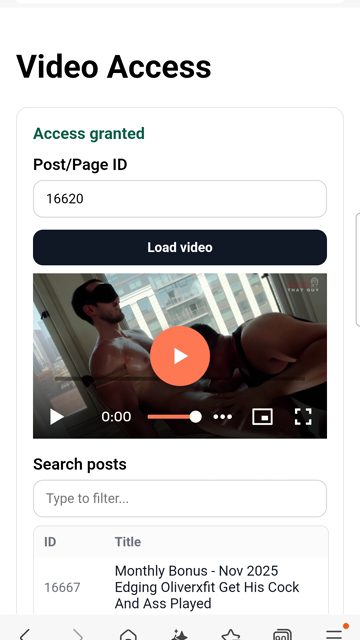
I built a dedicated Web App for members at app.edgethatguy.com. Log in with your account credentials and you can instantly pull up and watch any video with a single tap — no scrolling through pages, no juggling browser tabs, no waiting for anything to load. It’s built for people who just want to hit play. 📱
Use the search function to find videos by video number or title. Fast, clean, and mobile-friendly.
Loyalty Points & Store Credits
What are Loyalty Points and how do I earn them?
Every time you spend on the site or engage with content, you earn loyalty points that convert into store credit at checkout. Here’s how it works:
- Earn 2 points for every $1 spent on memberships or PPV
- Every 60 points = $1 store credit (applied as a discount at checkout)
- Leave a product review or blog comment = 2 bonus points
- Spend more than $100 in a single order = 10 bonus points
Note: You need an active subscription to view and redeem your points in the Account tab. If you’ve only purchased PPV without a membership, your points may not appear right away — they’ll typically be deposited once you have an active membership again.
For the full breakdown, read the loyalty points announcement here.
Account & Settings
Does it cost to open an account?
No, it’s free. If you are only looking to buy premium video, a free account is what you need. But to access the video vaults, a subscription is needed.
My comment or review is showing my email address — how do I fix it?
By default, your username displays publicly — not your email. If your username is your email address, here’s how to update it: go to Account → Account Details → Display Name and change it to whatever you’d like the public to see.
What is the refund policy?
All sales are final. Due to the nature of digital products, no refunds or exchanges can be provided. Please review the full Terms and Conditions for details.
How do I delete my account?
Send us the contact form. Beware, all your data will be deleted, including all the PPV you have purchased.
💳 When the charge appears on your credit card, it will show as TWM or Thaiwithme.
