
Description
WP Maintenance plugin allows the WordPress site administrator to close the website for maintenance, enable « 503 Service temporarily unavailable”, set a temporary page with authorization, which can be edited via the plugin settings. Easy customize the good look on all devices. Add your logo, background image, select the desired color, add text. Maintenance uses Bunny Fonts for EU GDPR compliance.
Need pre-made themes and over 3 million free images to build maintenance, coming soon & landing pages faster? Have a look at WP Maintenance PRO plugin.
Having problems with spam or bots? Try our free Advanced Google ReCaptcha plugin. It’s used on over 200,000 sites and provides great protection!
Fonctionnalités
- over 200 themes in the PRO version
- retina ready HTML/CSS layout
- Full-screen background (Backstretch)
- Blur background effect
- Téléverser le logo
- Configurable colors: fonts, icons, background
- Personnalisation de la balise title, du titre et du texte.
- Connexion utilisateur sur le la page en ligne
- Barre d’état dans l’administration
- erreur 503 on/off
- Support de Google Analytics
- Exclure les pages sélectionnées du mode Maintenance
- Prise en charge de toutes les extensions populaires de mise en cache
- mtnc_load_maintenance_page_for_this_user filter for modifying show sees the maintenance page
Support
If you have any problems, questions or recommendations about WP Maintenance please open a ticket in the official support forum. We answer all questions within hours!
Want to say « thank you »? Please leave a review.
Compatibilité avec la RGPD
We are not lawyers. Please do not take any of the following as legal advice.
If you don’t opt to use Bunny Fonts and don’t use Google Analytics then no resources are loaded or shared with 3rd parties. And nothing is tracked. Opting to use any of those services will result in data sharing/tracking as described in their terms of service.
If you opt to activate your PRO license in the plugin admin, some data will be shared with WebFactory Ltd; that’s clearly noted below the license activation form.
Captures d’écrans
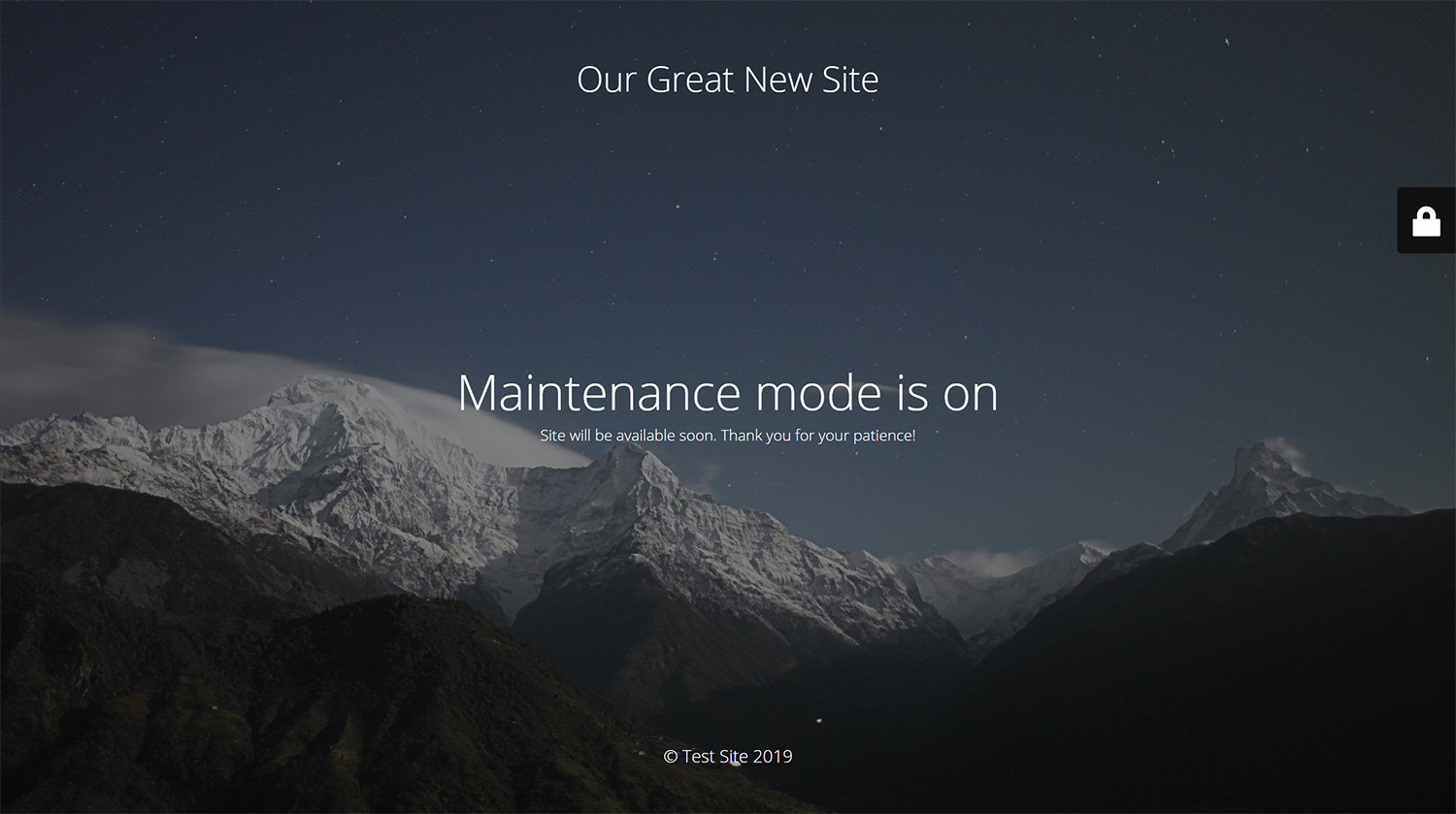
Page de maintenance avec design par défaut 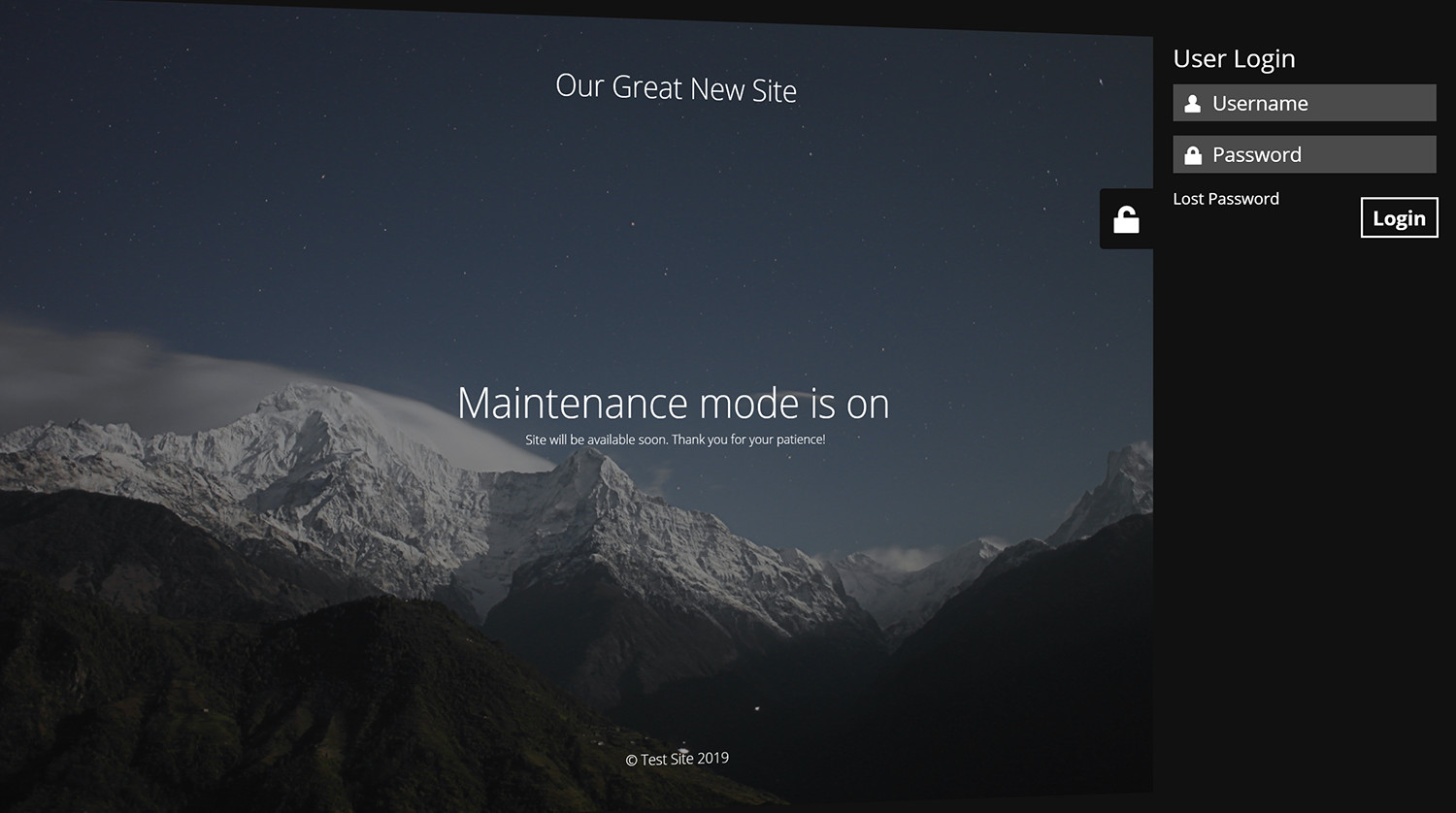
Formulaire de connexion intégré à la page de maintenance 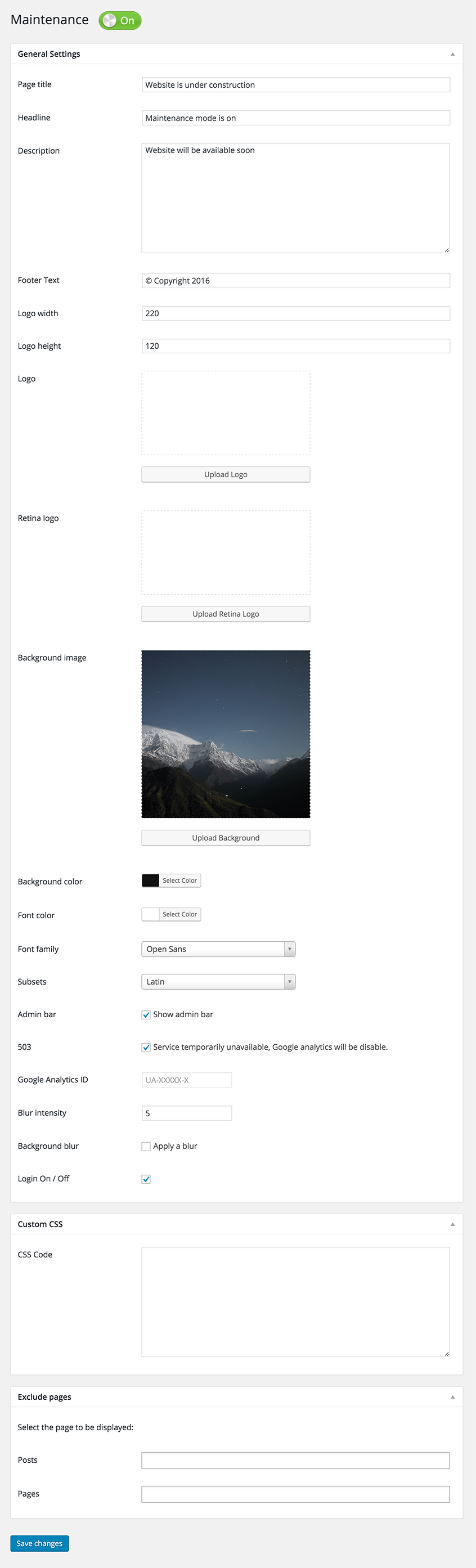
Page des options de maintenance


Installation
Suivez la routine habituelle;
- Ouvrez votre WordPress administrateur, allez sur « Extensions », cliquez sur « Ajouter »
- Enter « maintenance » in search and hit Enter
- Locate the Maintenance plugin by searching for our mascot, click « Install Now »
- Activate & open plugin’s settings page located in the main WP admin menu
Ou si nécessaire, téléverser manuellement;
- Téléchargez l’extension.
- Dézippez et téléversez dans /wp-content/plugins/
- Ouvrez votre WordPress administrateur -> « Extensions » et cliquez sur « Activer » à côté du plugin.
- Activate & open plugin’s settings page located in the main WP admin menu
FAQ
-
I have activated plugin and don’t see any changes, looks like plugin is not working.
-
Essayez de vérifier dans un navigateur différent. Si vous êtes un utilisateur WordPress connecté, vous voyez le site en mode normal.
-
Will my site remain visible to search engines while maintenance mode is on?
-
Le site ne sera pas visible par les moteurs de recherche seulement si l’option « 503 Service temporairement indisponible » est activée.
-
Where can I find out the username and password to get to the site?
-
Vous pouvez utiliser votre accès « normal » administrateur WP ou créer un nouvel utilisateur dans le tableau de bord WordPress – Utilisateurs.
-
If I incorrectly write a login and password I will see the error on the page wp-login?
-
No, it will be display error on current maintenance page, without redirect to wp-login page.
-
Je n’ai pas trouvé de réponse à ma question, que dois-je faire ?
-
Merci de poser votre question sur leforum de support.
-
Comment puis-je signaler des bogues de sécurité ?
-
Vous pouvez signaler des bogues de sécurité par l’intermédiaire du programme de divulgation des vulnérabilités de Patchstack. L’équipe de Patchstack aider à valider, trier et traiter toute faille de sécurité. Signaler une faille de sécurité.
Avis


Contributeurs/contributrices & développeurs/développeuses
« Maintenance » est un logiciel libre. Les personnes suivantes ont contribué à cette extension.
Contributeurs
“Maintenance” a été traduit dans 30 locales. Remerciez l’équipe de traduction pour ses contributions.
Traduisez « Maintenance » dans votre langue.
Le développement vous intéresse ?
Parcourir le code, consulter le SVN dépôt, ou s’inscrire au journal de développement par RSS.
Journal des modifications
v4.21
- 2026/04/02
- Minor fixes
v4.20
- 2026/01/03
- Fixed Bunny Fonts getting loaded even for system fonts
v4.19
- 2025/11/19
- WordPress 6.9 compatibility
v4.18
- 2025/07/31
- improved mobile resposiveness
v4.17
- 2025/01/22
- fixed Show some love option not saving
v4.16
- 2025/01/10
- updated Google Analytics code
- added skip-lazy class to background image to fix Autoptimize compatibility
v4.15
- 2024/10/22
- fixed bug with some options not being saved
v4.14
- 2024/10/17
- excluded posts/pages not saving bug fix
v4.13
- 2024/10/13
- minor security fixes
v4.12
- 2024/06/07
- minor bug fixes
v4.09
- 2024/06/03
- added Weglot support
v4.08
- 2023/08/31
- fixed reset password URL changed if Maintenance is off
v4.07
- 2022/05/06
- replaced Google Fonts with the privacy-oriented and GDPR compliant Bunny Fonts
- minor fix for image field
v4.06
- 2022/05/06
- introduction of the PRO version
v4.05
- 2022/01/04
- bug fix for retina image
- security fixes
- ad for our free WP Force SSL plugin
v4.03
- 2021/07/18
- security fixes
- checked WP 5.8 compatibility
v4.02
- 2021/03/06
- JS fixes on frontend
- Contact Form 7 conflict fix
v4.01
- 2021/02/20
- added support for Cache Enabler plugin
- fixed a bug when background image isn’t defined
- fixed issue on sites with large numbers of posts/pages/CPTs
v4.0
- 2021/01/30
- added flyout menu
- added mtnc_load_maintenance_page_for_this_user filter
v3.99
- 2021/01/13
- minor fixes
- removed promo for WP 301 Redirects
v3.97
- 2020/10/02
- minor fixes
- added promo for WP 301 Redirects
v3.96
- 2020/08/19
- « headers already sent » bug fixed
v3.95
- 2020/08/14
- bug fixes for WP v5.5
v3.90
- 2020/05/30
- Corrections de bogues
- removed integration with Amelia Booking
- added support for WP Rocket Cache plugin
- problème de flou corrigé
v3.85
- 2019/11/28
- Corrections de bogues
- intégration ajoutée avec Amelia Booking
- added support for Hummingbird Cache plugin
v3.80
- 2019/09/25
- numerous bug fixes
- bouton d’aperçu ajouté
- 400,000 installations; 3,790,000 downloads
- for older changelog entries please refer to https://wpmaintenancemode.com/old-changelog.txt
