
Image

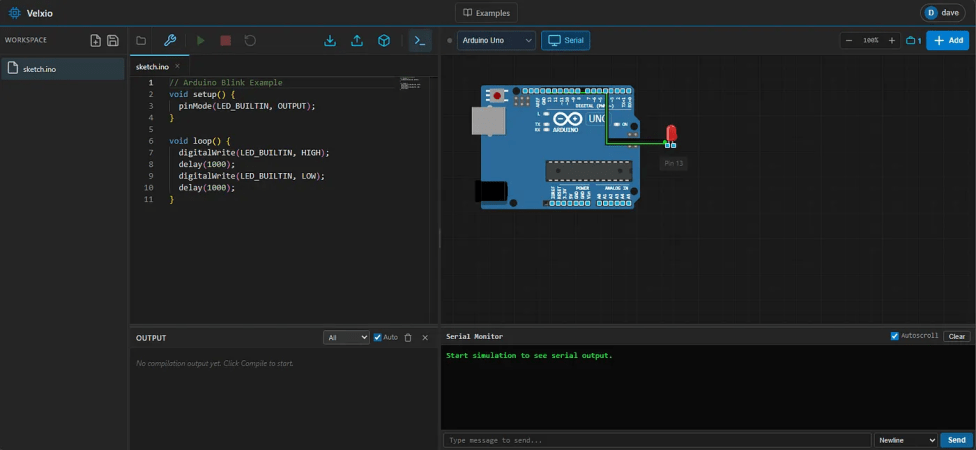
Simulating The AVR8 For A Browser-based Arduino Emulator

It’s always nice to simulate a project before soldering a board together. Tools like QUCS run locally and work quite well for analog circuits, but can fall short with programmable logic. Tools like Wokwi handle the programmable side quite well but may have license issues or require the cloud. The Velxio project by [David Montero Crespo] is quite an excellent example of an (online) circuit simulator with programmable logic and local execution!

It’s built largely around Wowki’s AVR8JS library for Arduino simulation. All CPU simulation occurs on the local computer, while sketch compilation happens on the backend using official Arduino tools. But this was certainly not the most impressive aspect of the project. Likewise, Velxio features RP2040 execution using the rp2040js library. It also features the execution of some ESP32 derivative boards built around the RISC-V architecture using the RiscVCore.ts library.

Continue reading “Simulating The AVR8 For A Browser-based Arduino Emulator”

Image

A Guide To Running Your First Docker Container

While most of us have likely spun up a virtual machine (VM) for one reason or another, venturing into the world of containerization with software like Docker is a little trickier. While the tools Docker provides are powerful, maintain many of the benefits of virtualization, and don’t use as many system resources as a VM, it can be harder to get the hang of setting up and maintaining containers than it generally is to run a few virtual machines. If you’ve been hesitant to try it out, this guide to getting a Docker container up and running is worth a look.

The guide goes over the basics of how Docker works to share system resources between containers, including some discussion on the difference between images and containers, where containers can store files on the host system, and how they use networking resources. From there the guide touches on installing Docker within a Debian Linux system. But where it really shines is demonstrating how to use Docker Compose to configure a container and get it running. Docker Compose is a file that configures a number of containers and their options, making it easy to deploy those containers to other machines fairly straightforward, and understanding it is key to making your experience learning Docker a smooth one.

While the guide goes through setting up a self-hosted document management program called Paperless, it’s pretty easy to expand this to other services you might want to host on your own as well. For example, the DNS-level ad-blocking software Pi-Hole which is generally run on a Raspberry Pi can be containerized and run on a computer or server you might already have in your home, freeing up your Pi to do other things. And although it’s a little more involved you can always build your own containers too as our own [Ben James] discussed back in 2018.









