Image

The Smallest Dialup ISP Is A Raspberry Pi And A Prison Phone

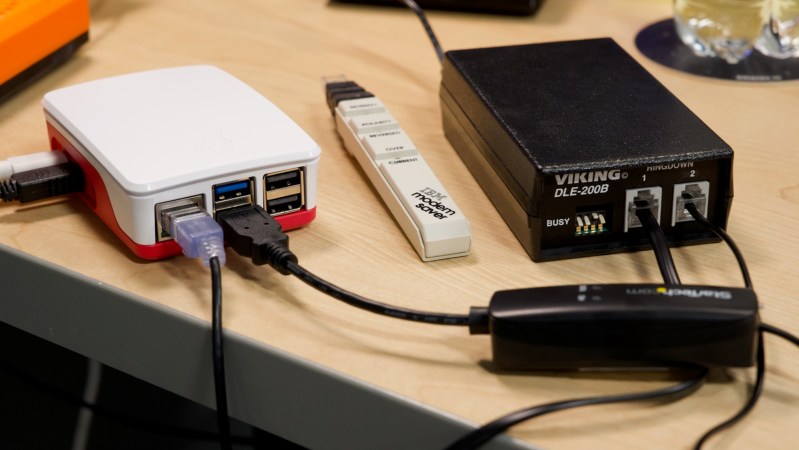
There were a plethora of tiny, local ISPs in the days of dial-up internet. Along with the big providers, many cities would have more than one. Some of those have survived broadband, but none of them were as small as [Jeff Geerling]’s Pi ISP — a tiny dialup ISP built so his Aunt’s old G3 MacBook can get online at 36kbps, as God and [Robert Khan] intended.

Hardware-wise, the Raspberry Pi is at one end of the chain, and your retrocomputer at another. In between, you’ll have a USB modem plugged into the Pi, and a device called a “two-way line simulator” to create a dial tone for that plain-old-telephone goodness. [Jeff] notes that these were commonly used in prisons for the phones that visitors use to talk to inmates.

Of course, since these devices are designed strictly for voice transmissions, which POTS was built for, you’re not going to get over 36 kbps, and that’s even with high-quality gear. The cheaper options might drop you down to 28k… just like with an ISP back in the day. ‘You get what you pay for’ is very rarely false.

Now, you can use this technology to just connect two computers together — as we’ve featured previously — but [Jeff] has gone the extra mile to put together, via Ansible, an easy-to-install software package that will let the Raspberry Pi act just like your ISP’s servers once did, and connect you to that series of tubes once called the World Wide Web. Of course, the World Wide Web isn’t built for dial-up anymore, so you’re going to be waiting… a while. Hackaday’s front page isn’t especially heavy, weighing about 4MB at the time of this writing, but that’s 15 minutes of load time, and you still aren’t reading the articles.

You also won’t be able to access much on old machines that can’t do HTTPS, but [Jeff] thought of that and bundles [rdmark]’s MacProxyClassic to translate the modern web into HTML tags that Netscape can understand and serve them over HTTP. You’ll still be waiting for our modern bloat, but perhaps not quite so long.

If you want the “authentic” dial-up experience, you’ll need to see the lightweight webpages of Yesteryear, and MacProxyClassic contains a Wayback Machine extension for that purpose. We featured a similar project a while back that did that, but without all the joys of dial-up. Now get off the computer, we’re expecting a call!

Continue reading “The Smallest Dialup ISP Is A Raspberry Pi And A Prison Phone”

Hackaday Links Column Banner

Hackaday Links: September 28, 2025

In today’s “News from the Dystopia” segment, we have a story about fighting retail theft with drones. It centers on Flock Safety, a company that provides surveillance technologies, including UAVs, license plate readers, and gunshot location systems, to law enforcement agencies. Their flagship Aerodome product is a rooftop-mounted dock for a UAV that gets dispatched to a call for service and acts as an eye-in-the-sky until units can arrive on scene. Neat idea and all, and while we can see the utility of such a system in a first responder situation, the company is starting to market a similar system to retailers and other private sector industries as a way to contain costs. The retail use case, which the story stresses has not been deployed yet, would be to launch a drone upon a store’s Asset Protection team noticing someone shoplifting. Flock would then remotely pilot the drone, following the alleged thief back to their lair or hideout and coordinating with law enforcement, who then sweep in to make an arrest.

Continue reading “Hackaday Links: September 28, 2025”

Image

Dial-up Internet Using The Viking DLE-200B Telephone Line Simulator

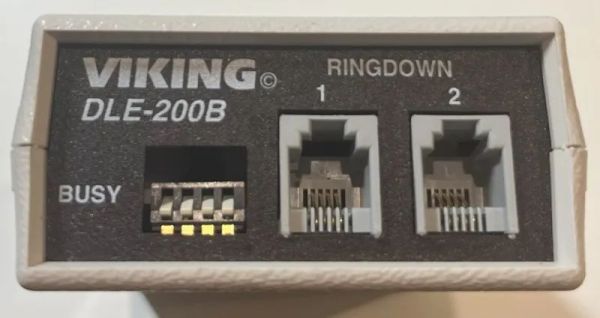
Who doesn’t like dial-up internet? Even if those who survived the dial-up years are happy to be on broadband, and those who are still on dial-up wish that they weren’t, there’s definitely a nostalgic factor to the experience. Yet recreating the experience can be a hassle, with signing up for a dial-up ISP or jumping through many (POTS) hoops to get a dial-up server up and running. An easier way is demonstrated by [Minh Danh] with a Viking DLE-200B telephone line simulator in a recent blog post.

This little device does all the work of making two telephones (or modems) think that they’re communicating via a regular old POTS network. After picking up one of these puppies for a mere $5 at a flea market, [Minh Danh] tested it first with two landline phones to confirm that yes, you can call one phone from the other and hold a conversation. The next step was thus to connect two PCs via their modems, with the other side of the line receiving the ‘call’. In this case a Windows XP system was configured to be the dial-up server, passing through its internet connection via the modem.

With this done, a 33.6 kbps dial-up connection was successfully established on the client Windows XP system, with a blistering 3.8 kB/s download speed. The reason for 33.6 kbps is because the DLE-200B does not support 56K, and according to the manual doesn’t even support higher than 28.8 kbps, so even reaching these speeds was lucky.

Continue reading “Dial-up Internet Using The Viking DLE-200B Telephone Line Simulator”

Image

The Tsushin Booster – A PC Engine Modem Add-on With A Twist

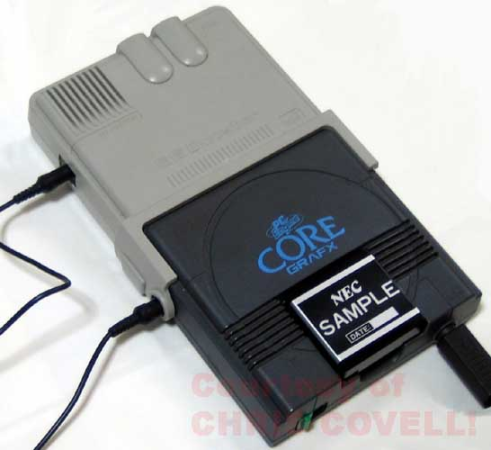
Sometimes, hardware projects get cancelled before they have a chance to make an impact, often due to politics or poor economic judgment. The Tsushin Booster for the PC Engine is one such project, possibly the victim of vicious commercial games between the leading Japanese console manufacturers at the tail end of the 1980s. It seems like a rather unlikely product: a modem attachment for a games console with an added 32 KB of battery-backed SRAM. In addition to the bolt-on unit, a dedicated software suite was provided on an EPROM-basedImage removable cartridge, complete with a BASIC interpreter and a collection of graphical editor tools for game creation.
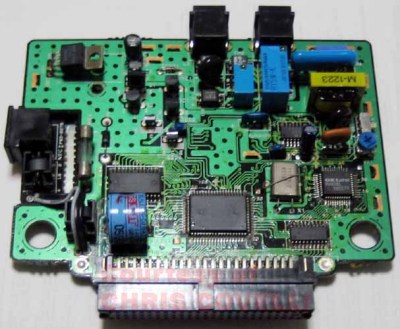
Internally, the Tsushin booster holds no surprises, with the expected POTS interfacing components tied to an OKI M6826L modem chip, the SRAM device, and what looks like a custom ASIC for the bus interfacing.

It was, however, very slow, topping out at only 1200 Baud, which, even for the period, coupled with pay-by-minute telephone charges, would be a hard sell. The provided software was clearly intended to inspire would-be games programmers, with a complete-looking BASIC dialect, a comms program, a basic sprite editor with support for animation and Imageeven a map editor. We think inputting BASIC code via a gamepad would get old fast, but it would work a little better for graphical editing.

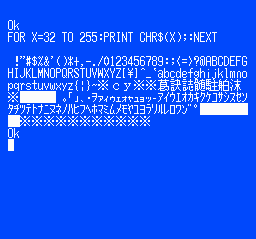
PC Engine hacks are thin pickings around these parts, but to understand a little more about the ‘console wars’ of the early 1990s, look no further than this in-depth architectural study. If you’d like to get into the modem scene but lack original hardware, your needs could be satisfied with openmodem. Of course, once you’ve got the hardware sorted, you need some to connect to. How about creating your very own dial-up ISP?

Image

A Brand New USB Modem In The 2020s

The dulcet tones of a modem handshake may be a thing of the distant past for most of us, but that hasn’t stopped there being a lively hacking scene in the world of analogue telephones. Often that’s achieved using old devices resurrected from a parts bin, but sometimes, as with [Brian]’s USB modem, the devices are entirely new.

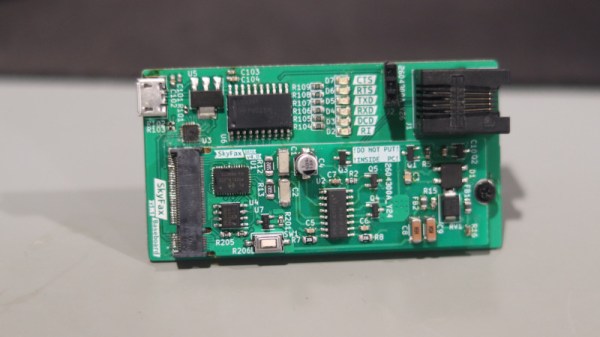
A surprise is that modem chips are still available, in this case the SkyWorks IsoModem chips. It uses an M.2 module format to allow the modem and support circuitry to be separated enough to place it in another project if necessary, along with a clear warning on the PCB not to put it in the identical-looking PC slot. It also comes with tips for experimenting if you don’t have access to a landline too, given that POTS is fast becoming a thing of the past itself in so many places.

If you’ve got nowhere to show off your modem, we’d like to suggest you try a hacker camp. There you’ll often find a copper network you’re positively expected to hack.

Image

The End Of Landlines?

Imagine if, somehow, telephones of all kinds had not been invented. Then, this morning, someone entered a big corporation board room and said, “We’d like to string copper wire to every home and business in the country. We’ll get easements and put the wires on poles mostly. But some of them will go underground where we will dig tunnels. Oh, and we will do it in other countries, too, and connect them with giant undersea cables!” We imagine that executive would be looking for a job by lunchtime. Yet, we built that exact system and with far less tech than we have today. But cell phones have replaced the need for copper wire to go everywhere, and now AT&T is petitioning California to let them off the hook — no pun intended — for servicing landlines.

The use of cell phones has dramatically decreased the demand for the POTS or plain old telephone service. Even if you have wired service now, it is more likely fiber optic or, at least, an IP-based network connection that can handle VOIP.

Continue reading “The End Of Landlines?”

Image

A Crossbar Telephone Switch Explained

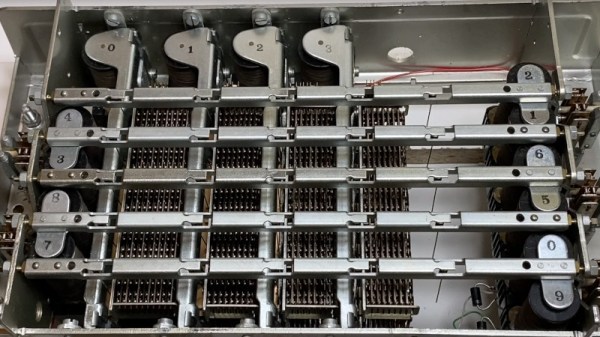
There’s an old adage about waiting hours for a bus only for two to appear at once, and for Hackaday this month we’re pleased to have seen this in a run of analogue telephone projects. Latest among them is the video below the break from [Wim de Kinderen], who is demonstrating the workings of a mechanical crossbar switch with the help of a vintage Ericsson unit and an Arduino replacing the original’s bank of control relays.

It’s possible everyone has a hazy idea of a crossbar array, but it was fascinating from this video to learn that the relays are worked by metal fingers being inserted by the bars into relays with wider than normal gaps between electromagnet and armature. This extra metal provides a path for the magnetic flux to actuate the relay.

The machine itself then is an extremely simple and elegant electromechanical device with many fewer moving parts than its Strowger rotary equivalents, but surprisingly we seem to see less of it than its American competitor. The video below the break is definitely worth a watch, even if you don’t own any analogue phones.

We recently saw a similar exchange implemented electronically.

Continue reading “A Crossbar Telephone Switch Explained”