Integrating Safety Switches and Relay Drivers for Custom Drone Missions

For complex custom missions like a UAV payload dropping system integrated with LoRa or GSM tracking modules—we need physical, reliable control over external hardware. Today, I am going to show you how I integrated Safety Switches and Relay Drivers into my Flight Controller schematic using specific components like the 1N4148W diode, ensuring maximum safety and mission capability.

Part 1: The Safety Switch (Hardware Arming)

image.png

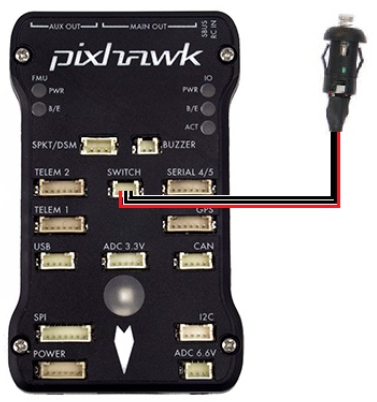
Software arming via your radio transmitter is great, but when you have a large drone carrying a heavy payload, you need a physical, hardware-level interrupt. A hardware safety switch prevents the PWM signals from reaching the motors until you physically press a button on the drone, ensuring the propellers cannot spin while you are handling the aircraft.

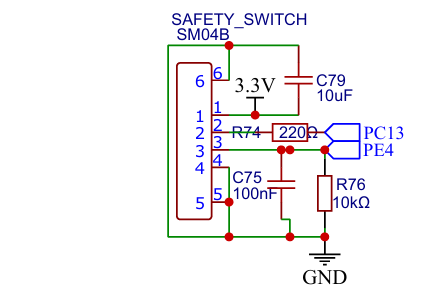
In my Flight Controller schematic, the safety switch circuit is connected via a secure JST-style SM03B connector. To ensure the physical button signal sent to the MCU is perfectly clean, I designed a hardware debouncing circuit. The signal pin is pulled up using a 10kOhm resistor (R51), and we add a 100nF capacitor (C64) in parallel to ground. This simple 100nF capacitor acts as a low-pass filter, ensuring the MCU reads a single clean press instead of a noisy, bouncing electrical signal.

image.png

The image shown of my schematic that I just provided, that showing the SAFETY SWITCH section. This images shown exactly how the debouncing capacitor and pull-up resistor are routed to the SM03B connector

You can check on this website for the exact ArduPilot hardware implementation of this switch: ArduPilot Safety Switch Documentation.

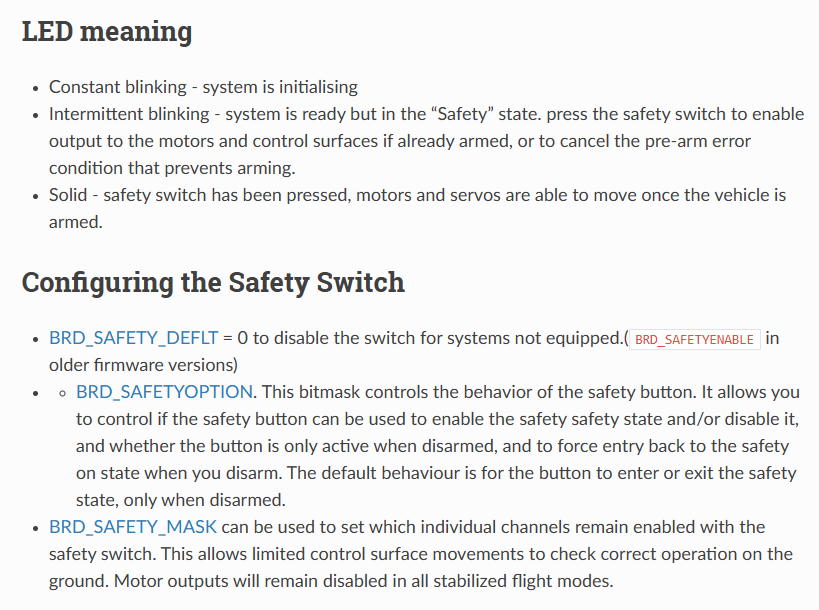
LED Meaning

  • Constant blinking - system is initialising
  • Intermittent blinking - system is ready but in the “Safety” state. press the safety switch to enable output to the motors and control surfaces if already armed, or to cancel the pre-arm error condition that prevents arming.
  • Solid - safety switch has been pressed, motors and servos are able to move once the vehicle is armed.

Configure the Safety Switch

  • BRD_SAFETY_DEFLT = 0 to disable the switch for systems not equipped.(<span class="pre">BRD_SAFETYENABLE</span> in older firmware versions)
    • BRD_SAFETYOPTION. This bitmask controls the behavior of the safety button. It allows you to control if the safety button can be used to enable the safety safety state and/or disable it, and whether the button is only active when disarmed, and to force entry back to the safety on state when you disarm. The default behaviour is for the button to enter or exit the safety state, only when disarmed.
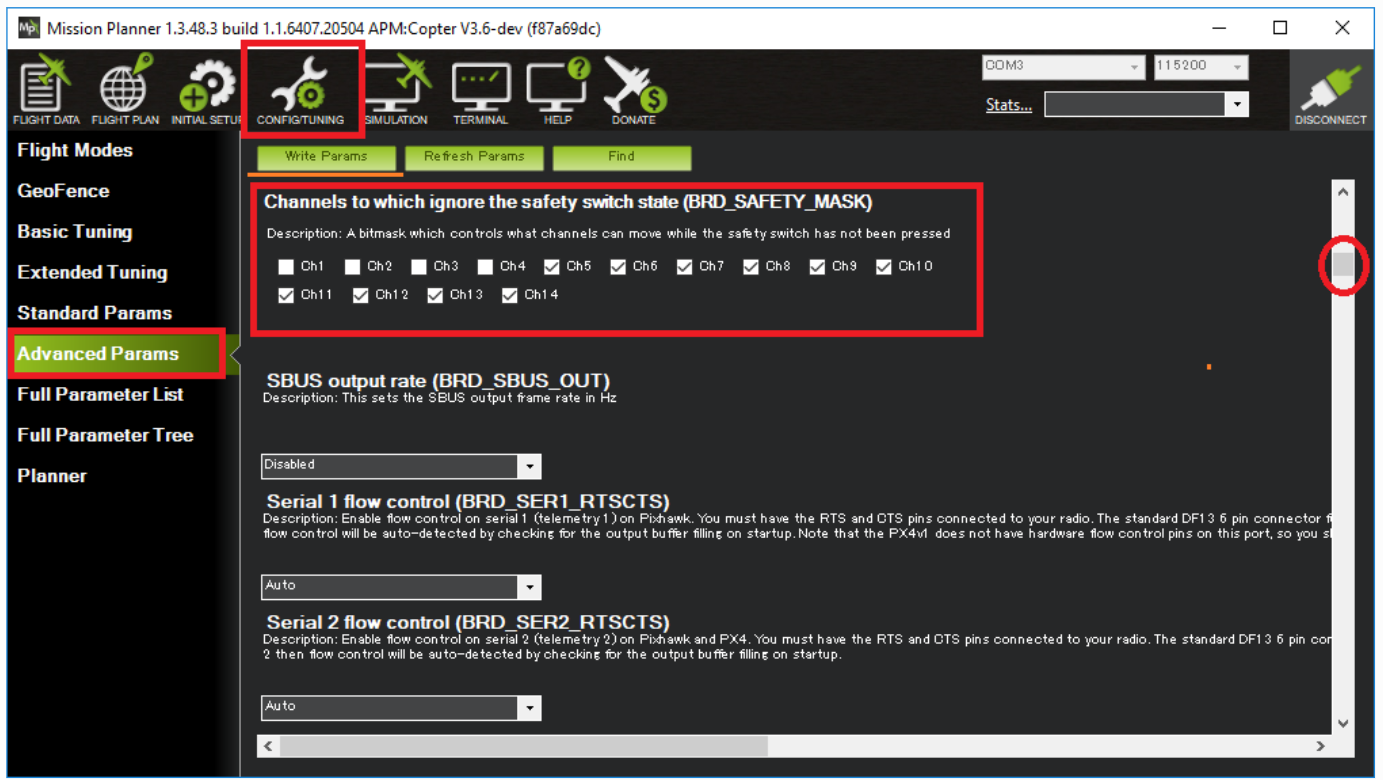
  • BRD_SAFETY_MASK can be used to set which individual channels remain enabled with the safety switch. This allows limited control surface movements to check correct operation on the ground. Motor outputs will remain disabled in all stabilized flight modes.

image.png

image.png

Part 2: The Relay Driver (Actuating the Mission)

If we want to trigger a payload drop mechanism, we need a relay. The main MCU operates at 3.3V and outputs only a few milliamps. It physically cannot drive a mechanical relay coil directly without burning out the pin.

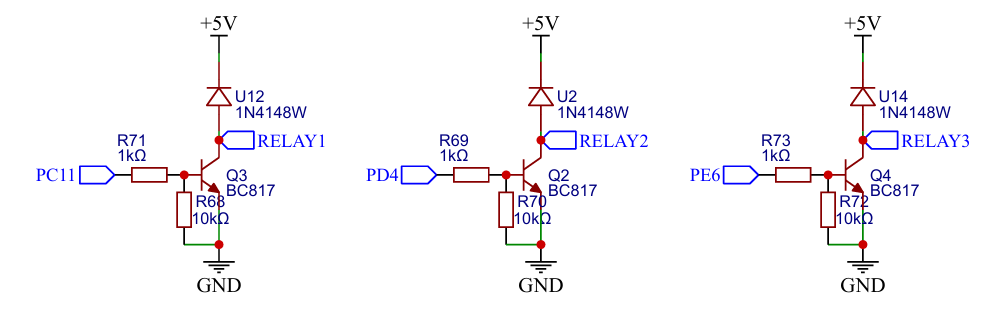
To solve this, I designed an isolated Relay Driver circuit. As seen in my schematic, we use a transistor (Q2 and Q3) as a digital switch. When the MCU sends a HIGH signal to the transistor's gate or base, it turns on, allowing a larger 5V current to flow through the relay coil and activate our payload.

image.png

One absolutely critical component you will see in my schematic is the 1N4148W flyback diode (labeled D2 and D3). When the relay coil turns off, the collapsing magnetic field generates a massive high-voltage spike that will travel backwards and destroy the transistor or MCU. We place the 1N4148W diode in reverse-bias directly across the relay coil.

image.png

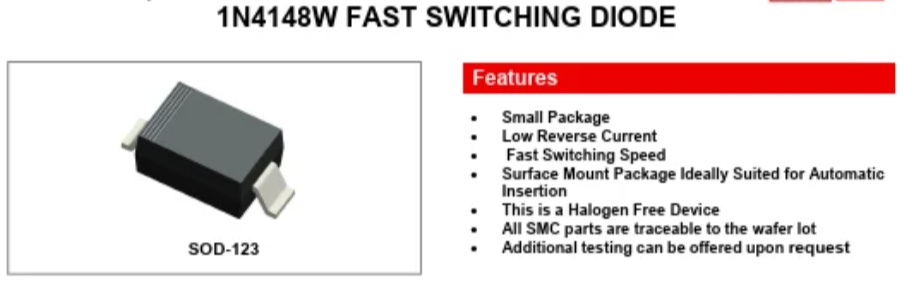
If you check a standard 1N4148W datasheet, you will see it has an ultra-fast reverse recovery time of just 4ns! This means it acts instantly to clamp and safely dissipate the destructive energy before it can damage the system.

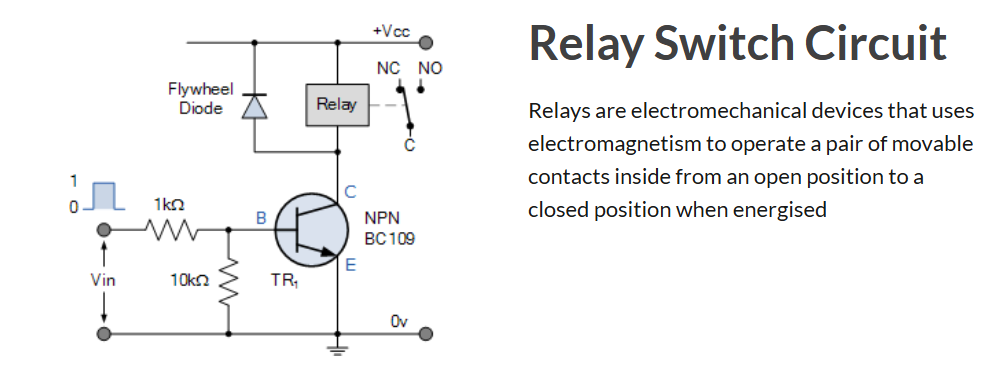
You can check on this website for an amazing, highly trusted breakdown of how this transistor logic works: Electronics Tutorials: Relay Switch Circuit.

image.png

To see exactly what happens to a circuit when you forget this crucial component, you can see in this video from YouTube: Flyback Diodes in Relay Circuits Explained.

Part 3: Software Configuration for Missions

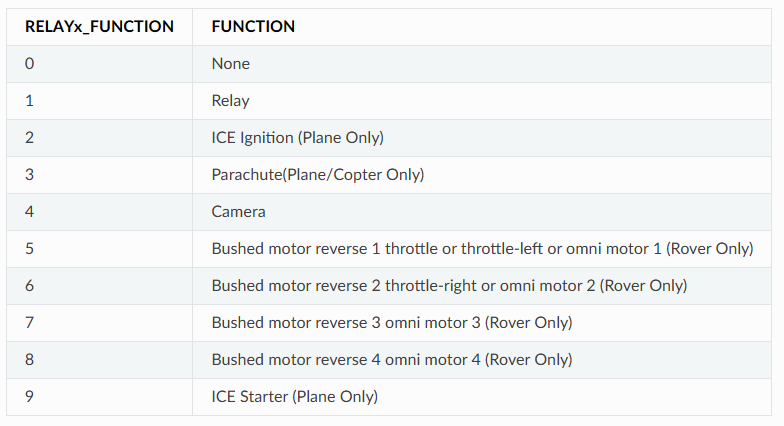
In ArduPilot, we map the MCU pin connected to our transistor as a "Relay Pin." Once mapped, we can assign an RC channel (Auxiliary Switch) on our radio transmitter to trigger this relay in mid-air. Even better, for autonomous payload dropping missions, we can insert a DO_SET_RELAY command directly into our GPS waypoint mission. The drone will fly to the target coordinate and automatically trigger the hardware we just designed!

You can check on this website for the official documentation on setting this up: ArduPilot Relay Switch Documentation.

image.png

Embedded Systems
Power Isolation to Securing the Main MCU with a Dedicated Servo Rail

When designing hardware for custom drones or autonomous vehicles, we often focus on the "brain" of the system, the main Microcontroller Unit (MCU). But no matter how fast your MCU is, it will completely fail if the power supplied to it is dirty or unstable.

Today, we are going to talk about one of the most critical power design rules in drone hardware: physically separating the "thinking" from the "moving" by securing the main MCU with a Dedicated Servo Rail.

Back-EMF and Voltage Spikes

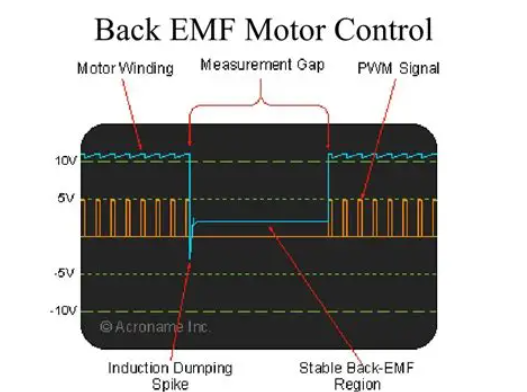
In a drone system, the flight controller must constantly command motors (via ESCs) and physical servos. These are heavy inductive loads. When a servo motor moves rapidly, abruptly stops, or reverses direction, the magnetic coils inside it act like a generator. They shoot a high-voltage surge of current back into the power line. This is known as Back-EMF (Electromotive Force).

image.png

If your delicate 3.3V or 5V MCU power rail is directly connected to the same power line as your servos, these sudden voltage spikes can easily reach 8V or more. When this high-voltage transient hits the MCU, it will either instantly reset (causing a mid-air brownout) or permanently destroy the silicon.

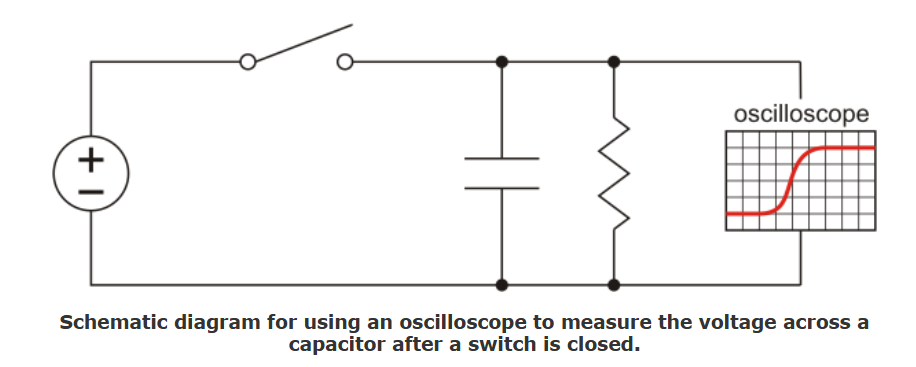
For a deep technical explanation of how motor inductance causes these destructive spikes, you can check on this website from Pololu: Understanding Destructive LC Voltage Spikes.

image.png

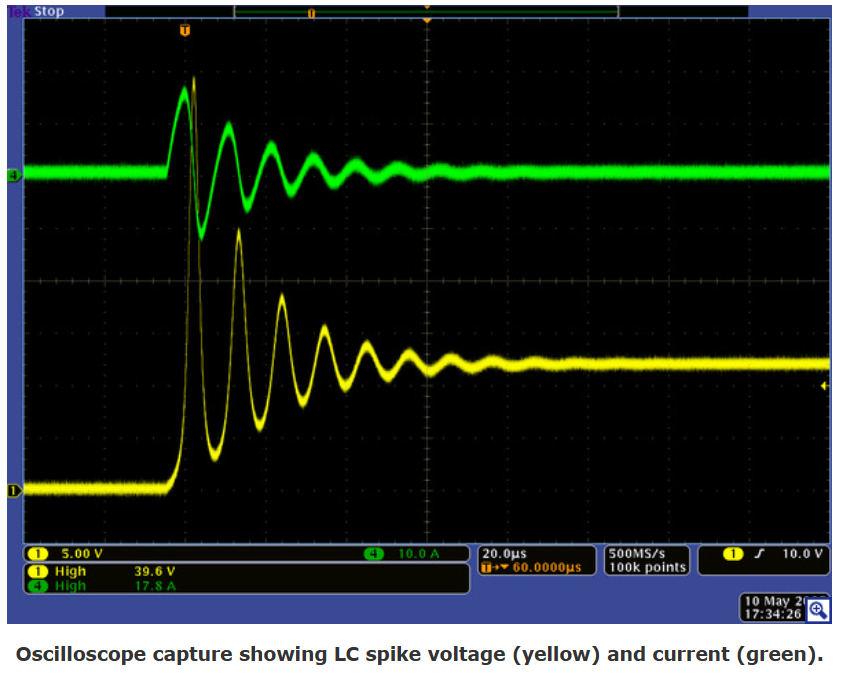
This image shown exactly how a stable 5V line can violently spike up to nearly 12V when an inductive load is connected!

image.png

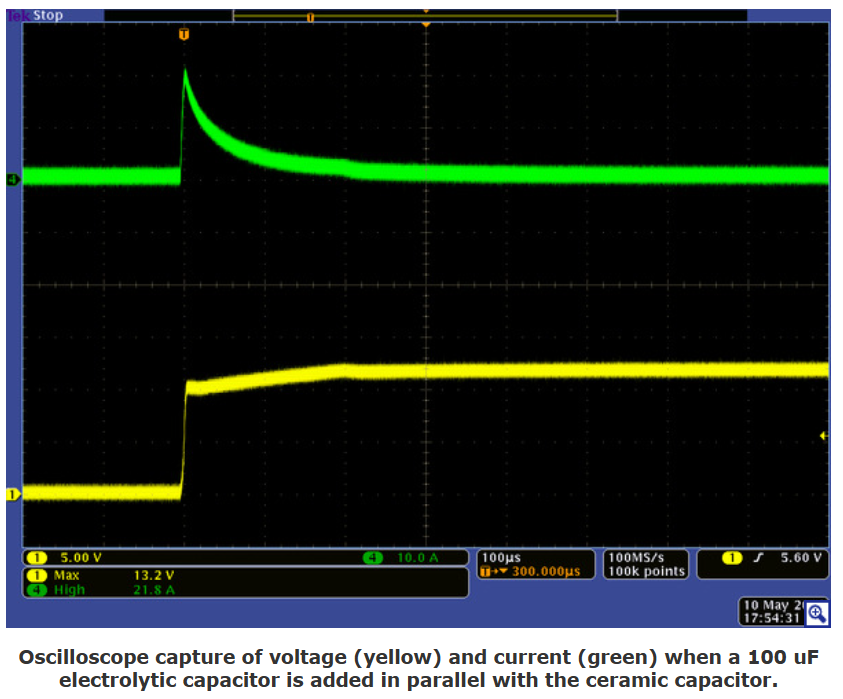
The large capacitor prevents the voltage from changing quite as quickly, yet its high ESR prevents it from drawing as much initial current. Here is the result when we added a 100 uF electrolytic capacitor in parallel with our 10 uF test capacitor:

image.png

The Schematic Solution: The Dedicated Servo Rail

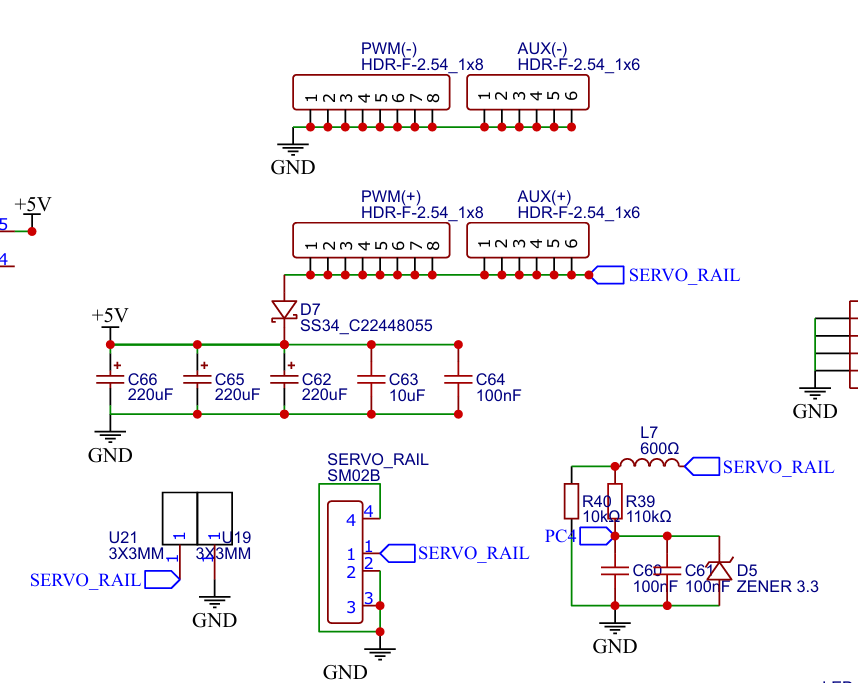
To protect our Flight Controller, we use a strategy called "Power Isolation." If you look at the design of my Flight Controller, the power supply for the MCU (often labeled VCC) and the power supply for the PWM outputs (the Servo Rail) are completely separated.

They do not share a 5V source.

  1. The MCU Power: The brain gets its clean 5V from our heavily filtered, dual-redundant power module inputs.
  2. The Servo Power: The servos get their power from an external BEC (Battery Eliminator Circuit) provided by the ESC or a standalone regulator, which plugs directly into the Servo Rail headers.

image.png

This is a cropping the "SERVO RAIL" and PWM output pin headers from my Flight Controller schematic. The 5V line on these pins is completely isolated from the MCU's 3.3V and 5V logic rails.

By completely separating the positive voltage traces on the PCB, any Back-EMF spikes generated by the servos stay trapped on the Servo Rail. The only things the MCU and the servos share are the PWM signal wires and the Ground Reference (GND).

Managing Spikes

Even though the MCU is isolated, we still don't want massive voltage spikes bouncing around our Servo Rail, as they can damage other connected peripherals.

In professional hardware design, we mitigate this by adding protection components directly to the power rails. For my Flight Controller designs, it is standard practice to place heavy filtering near the power inputs, such as a large electrolytic capacitor combined with smaller ceramic capacitors (like a 10uF and 100nF) placed close to the active components to absorb high-frequency noise.

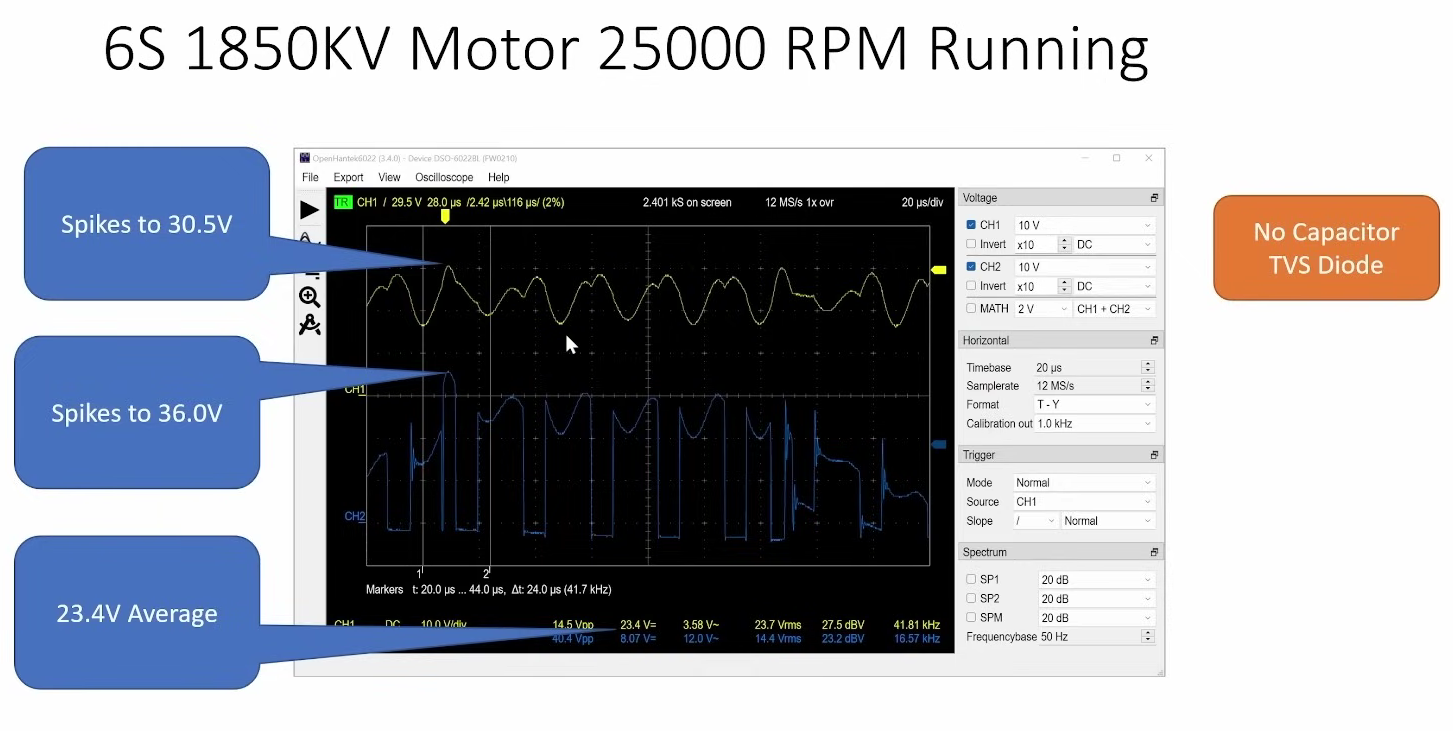
For extreme protection, aerospace and racing drones use TVS (Transient Voltage Suppression) diodes. These diodes act like a pressure relief valve, instantly clamping any voltage spike that exceeds a safe threshold.

You can see an incredibly detailed hardware test of how these components protect your drone in this video from Chris Rosser on YouTube: Protect Yourself from ESC Voltage Spikes: Testing Capacitors and TVS Diodes. He hooks up an oscilloscope to a live drone and proves exactly why we need this hardware!

image.png

Have you ever fried a flight controller because you plugged a servo into the wrong rail? Drop a comment below and share your hardware disaster stories so we can learn from them!

ArduPilot Standards: Wiring It Safely

This hardware isolation strategy is so critical that major firmware platforms like ArduPilot strictly mandate it in their official documentation. ArduPilot software expects the hardware designer to separate these power domains.

You can check on this website for the official ArduPilot hardware wiring guidelines: Powering the Pixhawk.

image.png

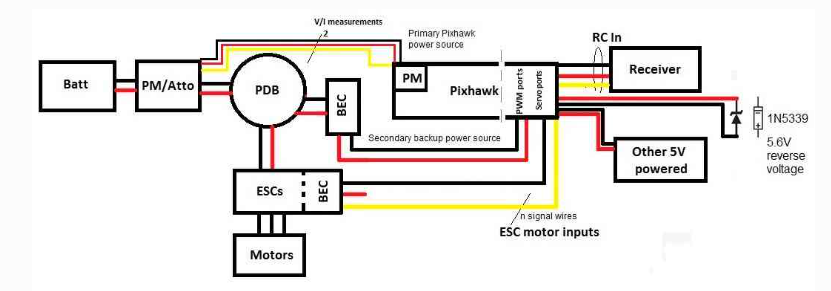
The block diagram below synthesizes an overview of Pixhawk’s power and ESC wiring. In this diagram, a 3DR power module (or equivalent device) powers Pixhawk through its power port (primary source). One power source is enough but obviously not redundant if the power module fails to power this primary source. Therefore the diagram adds a second backup power source via a 5V BEC that wires to Pixhawk’s output servo rail. If the primary source fails, Pixhawk will automatically switch to this second power source.

image.png

Embedded Systems
Implementing FRAM in Flight Controller Architecture

When we design custom hardware for Drone Racing or complex autonomous missions, we often focus heavily on the MCU processing power and the gyro update rates. However, there is a silent workhorse on the board that dictates how fast and reliably we can save critical flight data: the non-volatile memory.

Today, we are going to explore why traditional EEPROM is becoming a bottleneck and how implementing FRAM (Ferroelectric RAM) in my Flight Controller schematic ensures lightning-fast, bulletproof data storage.

The Bottleneck: Why Not EEPROM?

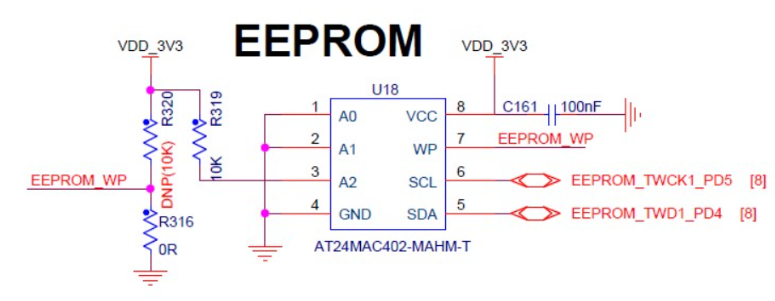
image.png

For years, flight controllers used standard EEPROM chips to save PID settings, calibration data, and waypoint missions. While EEPROM is cheap and widely available, it has a major flaw: write speed. Writing data to an EEPROM requires a physical charge pump mechanism inside the silicon, which introduces a delay of several milliseconds per write cycle.

If you are flying a high-speed drone and need to log blackbox data or save parameters on the fly, an EEPROM simply cannot keep up. Furthermore, EEPROMs typically wear out after 100,000 write cycles. In a heavily tested Flight Controller, you can hit that wear-out limit faster than you think.

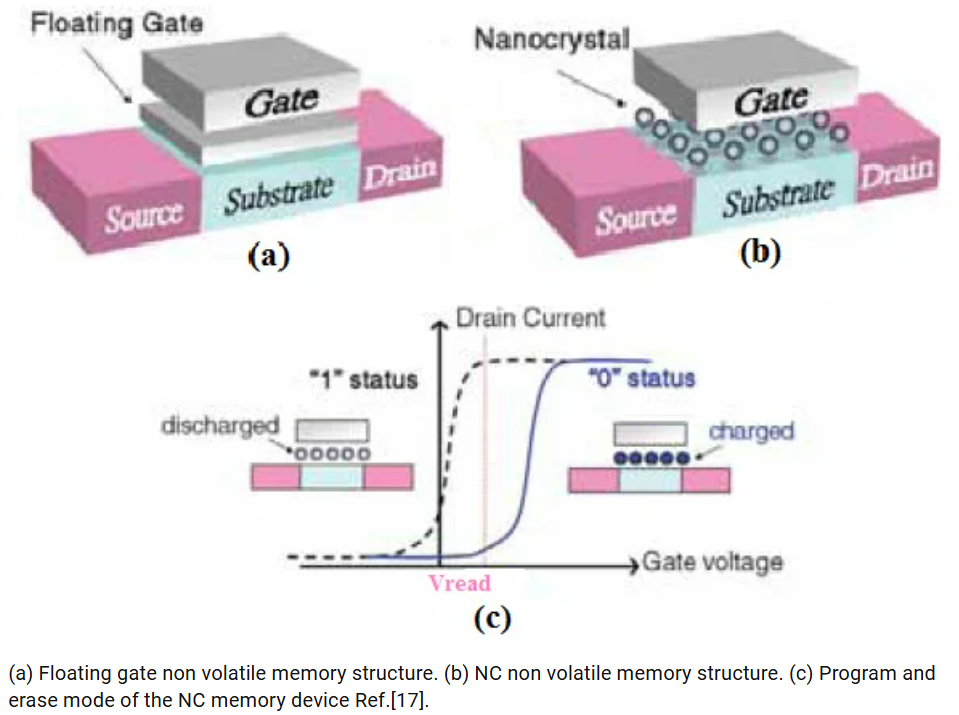
If you want to understand the deep theory of how traditional memory limitations affect embedded systems, you can check on this paper: https://www.researchgate.net/figure/a-Floating-gate-non-volatile-memory-structure-b-NC-non-volatile-memory-structure_fig2_250308372. They have great articles breaking down the physics behind flash and EEPROM wear-out.

image.png

The FRAM Advantage: FM25V02A-GTR

image.png

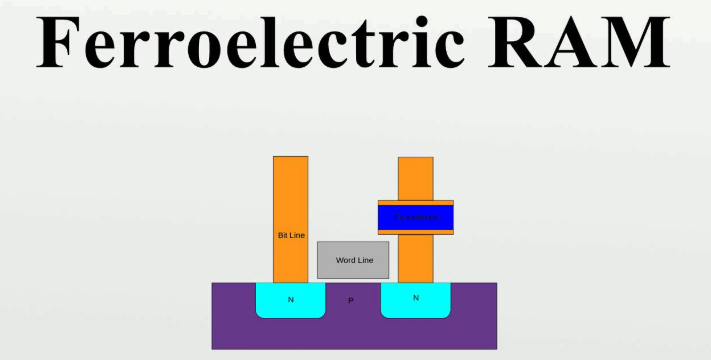
  • <input disabled type="checkbox"> Enter FRAM. Unlike EEPROM, FRAM uses a ferroelectric film to store data. This means it writes data almost instantly as fast as the SPI bus can clock it in.

image.png

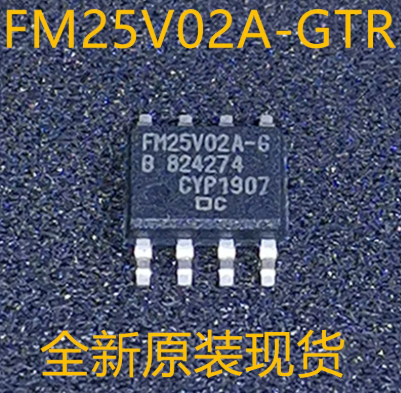
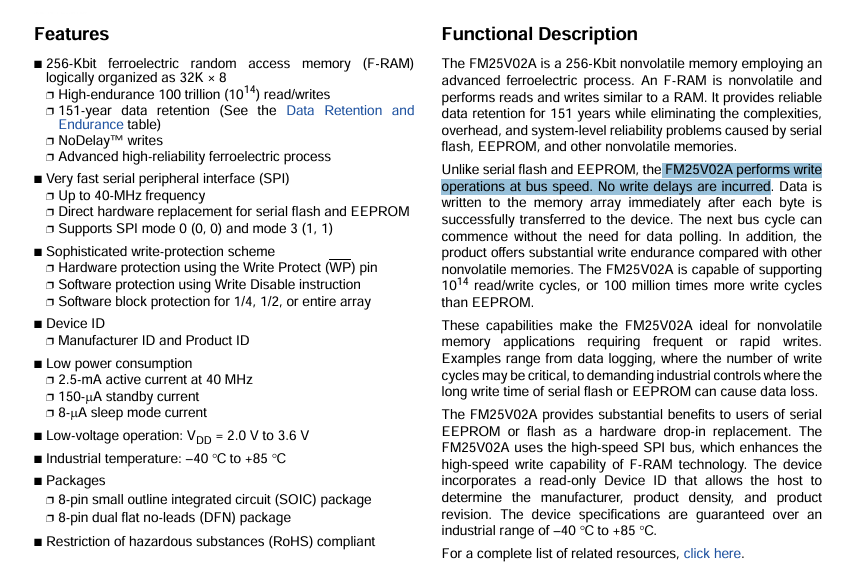
For my Flight Controller, I specifically chose the FM25V02A-GTR, a 256-Kbit F-RAM chip. According to its datasheet, this chip supports NoDelay writes and an astonishing high-endurance of 100 trillion read/write cycles. It is practically infinite for our use case. Furthermore, it operates incredibly fast, supporting SPI clock frequencies up to 34 MHz.

image.png

Take a look at the FM25V02A datasheet. Capture a screenshot of the "Features" section on page 1. This images shown highlights the "NoDelay Writes" and "100-Trillion Read/Write Cycles" bullet points.

Drop a comment if you want me to do a deeper dive into the physics of ferroelectric crystals and how they hold logic states without power!

Wiring the High-Speed SPI Bus

Integrating the FM25V02A into the Flight Controller is straightforward but requires clean, precise PCB routing. Because this FRAM operates at up to 34 MHz, we connect it directly to the fast SPI bus of our MCU.

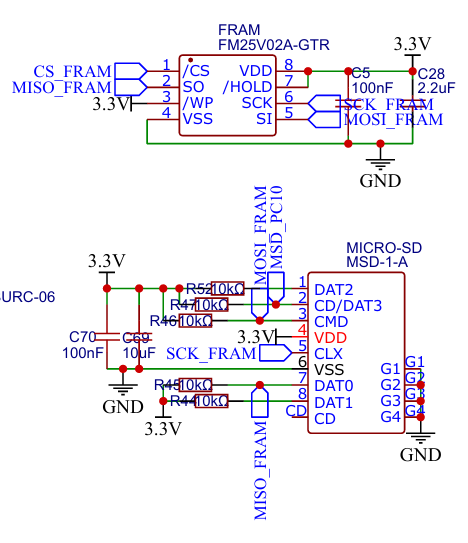
This images shown the exact routing and support components required for the FM25V02A to function stably.

image.png

In my schematic, the FM25V02A chip is connected via the four standard SPI lines: MOSI, MISO, SCK, and M_CS_FRAM (Chip Select). However, there is a lot more going on to ensure stability:

  1. Clean Power: To ensure signal integrity during rapid, high-frequency read/write operations, I placed a 100nF decoupling capacitor (C20) right next to the VDD pin (pin 8) operating at 3.3V.
  2. State Protection: You will notice three 10kOhm resistors (R23, R24, and R25). R25 pulls the Chip Select line high to 3.3V to prevent the FRAM from accidentally activating during the MCU's boot sequence.
  3. Hardware Locking: I also used 10kOhm resistors to pull the WP (Write Protect) on pin 3 and HOLD on pin 7 high to 3.3V. By pulling these high, we tell the chip to always allow writes and never pause communication, ensuring the data stream from the flight controller is never bottlenecked.

Software Integration

Hardware is useless without the right software. When compiling firmware, we must define the storage chip so the MCU knows exactly how to talk to it.

In ArduPilot, FRAM is highly favored for saving parameters and waypoints because the instant write-speed prevents the main flight loop from locking up or hesitating during a write operation. You configure the hardware definitions (hwdef) to map the exact SPI bus and Chip Select pin to the internal FRAM driver.

You can check on this website for the exact ArduPilot developer documentation regarding memory mapping: ArduPilot Storage Allocation.

image.png

Embedded Systems
Designing Dual-Battery Redundancy for High-Reliability Flight Controllers

Hello everyone! Welcome back to another deep dive into my Flight Controller architecture. When we design custom hardware for critical missions or expensive payload-carrying drones, relying on a single power source is a massive risk. A single failed BEC (Battery Eliminator Circuit) or a loose wire can turn a high-tech machine into a falling brick.

Today, we are going to explore the concept of Dual-Battery Redundancy, breaking down the exact components I selected in my Flight Controller schematic to ensure the main MCU never loses power.

The Problem: Single Point of Failure

In a standard setup, your flight controller receives a stable 5V from a single Power Module. The physical connection is usually made via a JST connector. For my design, I selected the SM06B-SRSS-TB(LF)(SN), which is a highly reliable 6-pin SMD connector. It provides a secure locking mechanism that resists the intense high-frequency vibrations of Drone Racing.

But what happens if the regulator supplying that connector overheats and shuts down? The MCU instantly reboots. Mid-air reboots are unrecoverable.

To solve this, professional-grade systems use a concept called "Power OR-ing." This means we provide two separate 5V inputs (Primary and Backup). If the primary fails, the backup takes over instantaneously.

Schottky vs. Ideal Diodes

To safely connect two power supplies together, we need one-way valves so that current doesn't flow backwards from one battery into the other.

1. The Classic Approach: SS34 Schottky Diode

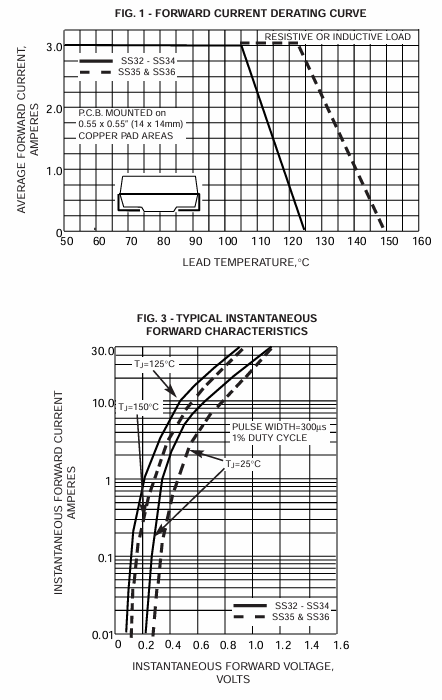
The traditional way to create a redundant supply is using a Schottky diode like the SS34. This diode can handle up to 3A and 40V, making it incredibly robust for raw battery voltage inputs. However, physics has a cost. The SS34 has a typical forward voltage drop of around 0.5V. If your BEC supplies exactly 5.0V, the components downstream will only receive 4.5V.

image.png

This Figure shown the "Typical Forward Characteristics" graph from the SS34 datasheet. This shown exactly how much voltage you lose depending on the current draw!

2. The Modern Approach: MAX40200 Ideal Diode

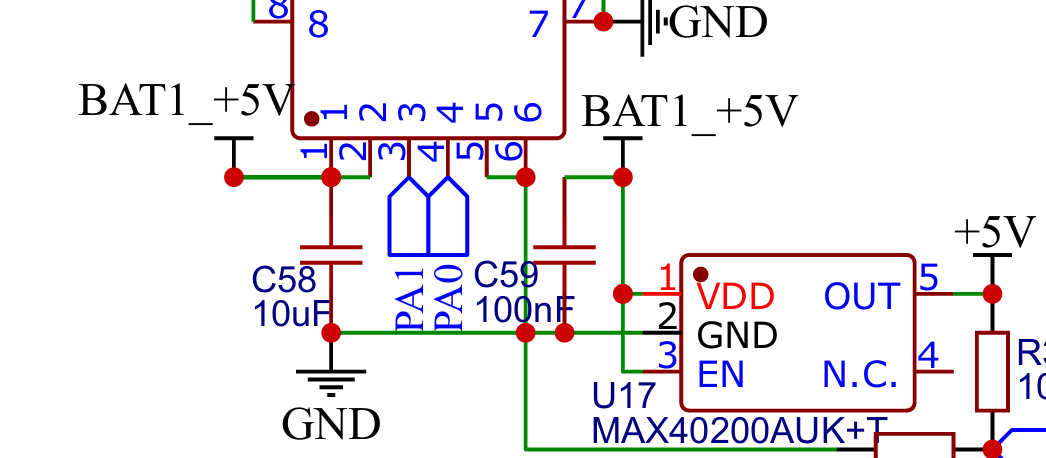
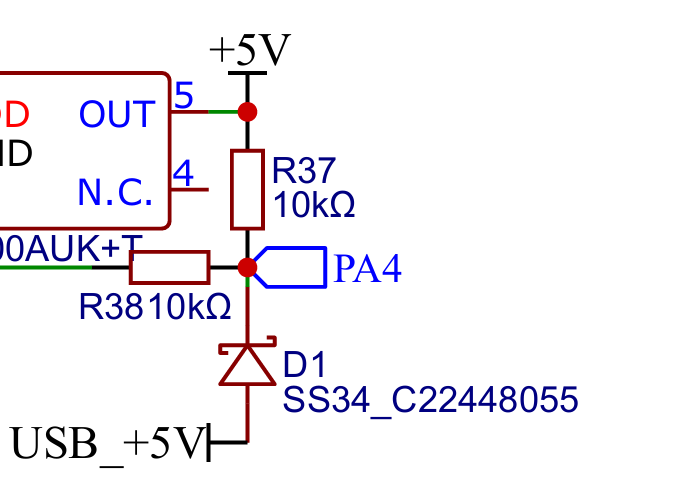
For the critical 5V logic lines where every millivolt matters, I implemented the MAX40200AUK+T. This is an "Ideal Diode." It is not a standard diode, but rather a specialized IC that controls an internal MOSFET.

The result? It acts like a one-way valve but with an ultra-low voltage drop of just 43mV at 500mA! This ensures the MCU gets a clean, full 5V supply without the thermal waste of a traditional diode.

image.png

To ensure this transition between power supplies is smooth and free of voltage spikes, I placed 10uF and 100nF decoupling capacitors as close to the IC output pins as possible.

If you want to understand the deep theory behind combining power supplies and the advantages of Ideal Diodes over Schottkys, you can check on this website: Texas Instruments Application Note on Basics of Power OR-ing.

image.png

Drop a comment below if you want me to do a dedicated tutorial comparing the thermal dissipation of the SS34 versus the MAX40200 under a heavy 2A load!

Software Integration: Monitoring the Backup via PA4

Having redundant power is great, but your Flight Controller also needs to know if the primary battery has failed so you can land immediately.

To do this, we must route the raw voltage into the ADC (Analog-to-Digital Converter) of our MCU. In my schematic, I use a precise 10kOhm sampling resistor to step down the voltage safely, feeding directly into MCU pin PA4.

image.png

Firmware like ArduPilot actively reads the analog value on pin PA4. If the primary power source drops below a safe threshold, the software can trigger an RTL (Return to Launch) failsafe, saving your drone while it runs safely on the backup power routed through our MAX40200.

image.png

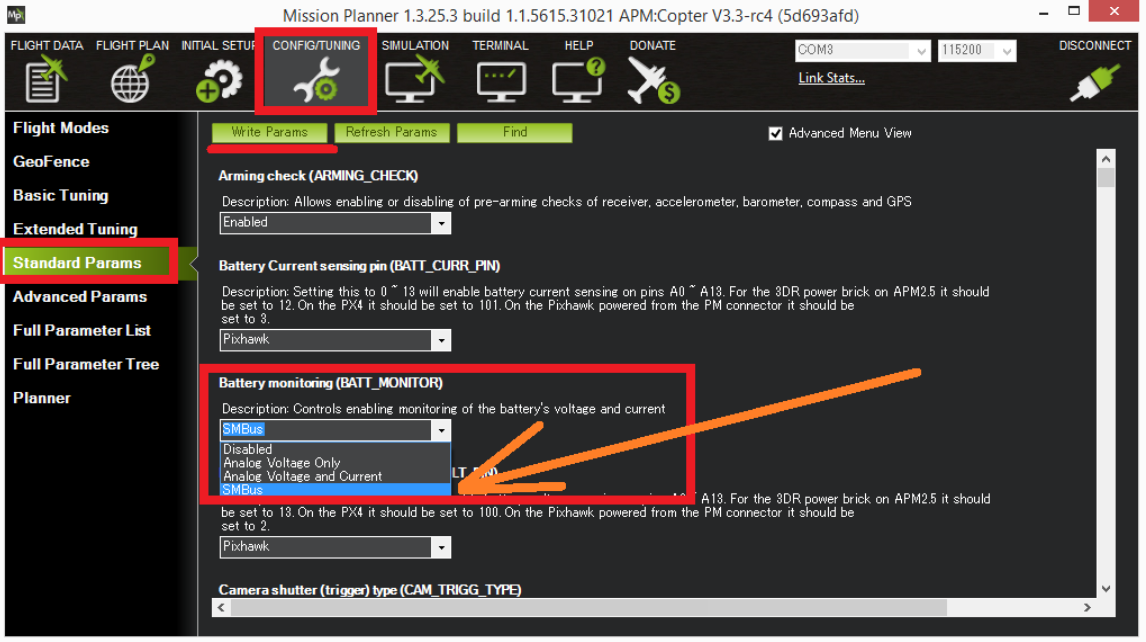
To show how this looks in software, This a screenshot from the ArduPilot wiki, specifically the "Power Module Configuration" page: ArduPilot Dual Battery Setup. You can also see in this discuss VTOL Plane 4+1, Dual Battery setup - ArduPlane / VTOL Plane - ArduPilot Discourse

Conclusion

Integrating dual-battery inputs using a combination of rugged SS34 diodes for high voltage and highly efficient MAX40200 ideal diodes for logic voltage adds a critical layer of safety to your Flight Controller. By adding proper 10uF and 100nF filtering and routing the voltage divider to PA4, we create a complete hardware-software safety net.

Embedded Systems
Deep Dive into On-Board Heater Circuits

Hello everyone! Welcome back to another deep dive into my Flight Controller architecture. When designing hardware for high-performance Drone Racing, we often obsess over MCU clock speeds or gyro update rates. But there is a hidden enemy to stable flight that many designers overlook: Temperature changes.

Today, I am going to walk you through the On-Board Heater Circuit in my schematic, explaining why it exists, how the hardware works, and how the software controls it.

The Invisible Enemy: Thermal Drift

Inside your flight controller's IMU (Inertial Measurement Unit), there are microscopic mechanical structures. As your drone flies, the ambient temperature changes. As the temperature of the silicon changes, these microscopic structures expand or contract, causing the zero-point of your gyro and accelerometer to shift. This is called Thermal Drift.

For the my Flight Controller, I am utilizing high-end IMUs like the ICM-42688-P and the industrial-grade IIM-42652. If you look at the ICM-42688-P datasheet on the Gyroscope Specifications table, you will see that the Gyro Offset Temp Stability is +/- 5 mdps/C. Meanwhile, the IIM-42652 datasheet specifies a wide operating range of -40C to +105C with exceptional temperature stability.

This Figure shown the Gyroscope Specification table from ICM-42688-P to show you the exact "Gyro Offset Temp Stability" row
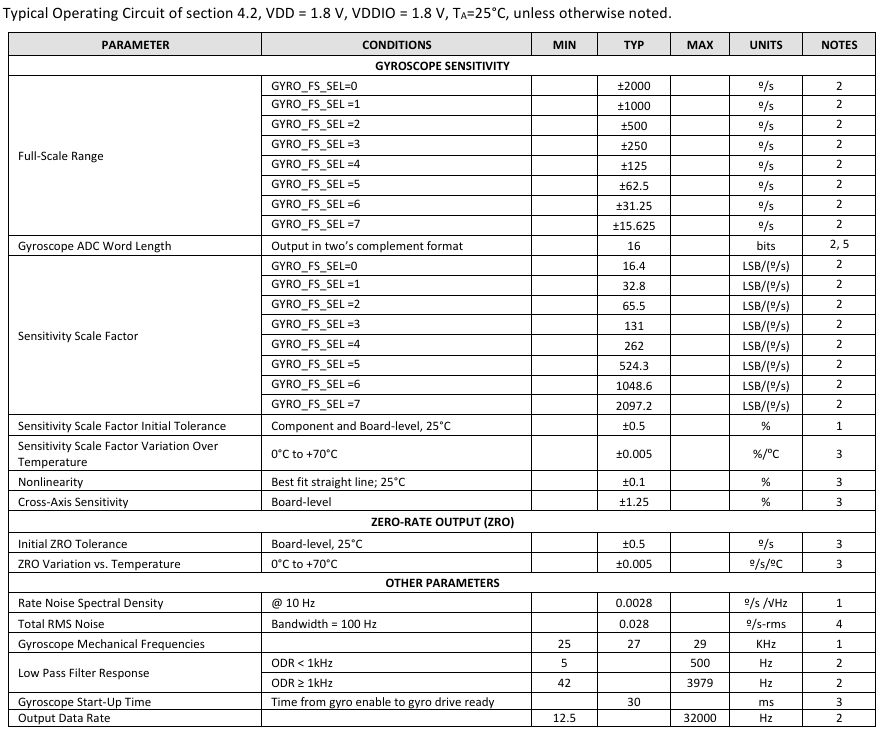
image.png

For the IIM-42652, this image shown on page 11 highlights its robust temperature rating (+105 deg C)
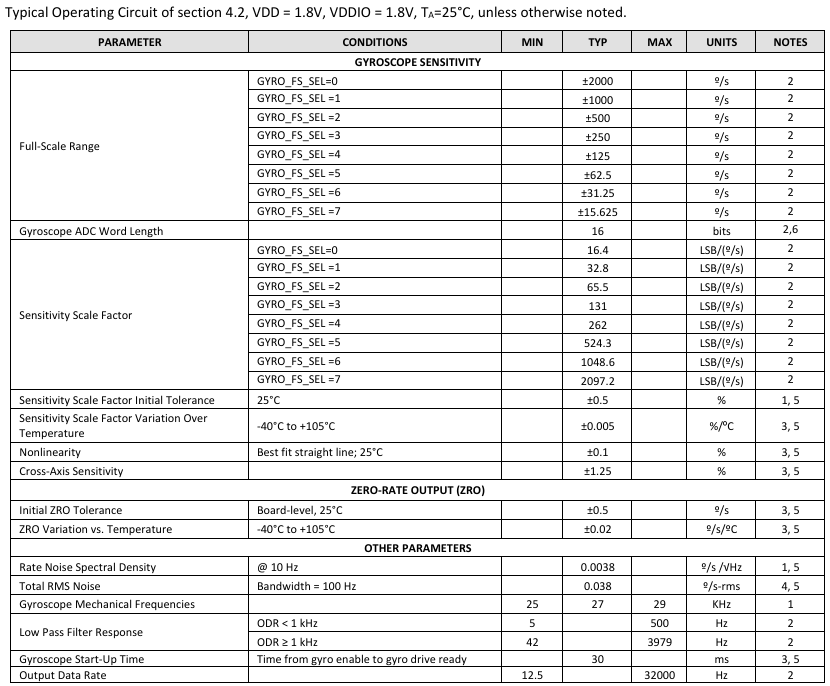
image.png

If your flight controller thinks it is rotating just because the IMU got colder, your drone will drift in the air, ruining your racing line.

HEATER Circuit

To solve this, we artificially heat the IMUs to a constant temperature (usually around 45C to 60C) so that the silicon never experiences temperature swings.
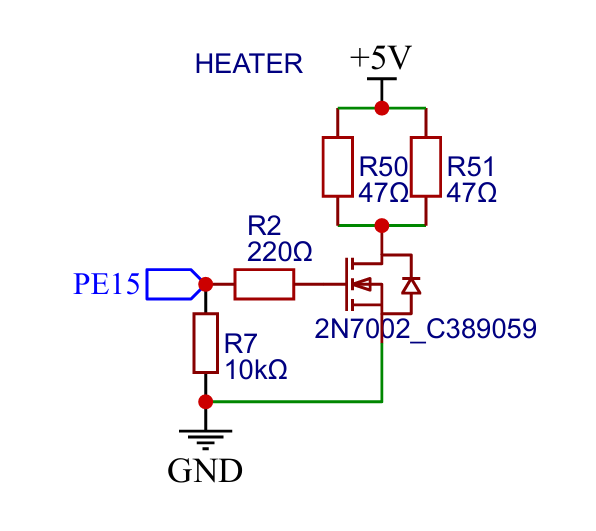
image.png

Here is the "HEATER 5V" section from my Flight Controller schematic. This image shows the MOSFET and the resistor array highlighted).

1. The Heating Elements

To generate heat, I am using standard SMD resistors. When current passes through a resistor, it dissipates power as heat (P = I^2 x R). By placing multiple resistors closely grouped around the ICM-42688-P and IIM-42652 on the PCB, we create a thermal footprint.

2. The Switching Mechanism (MOSFET)

We cannot just hook the resistors directly to the 5V line, or they would heat up continuously. We need a switch. In my schematic, I use an N-Channel MOSFET.

The Gate of this MOSFET is connected to a PWM-capable pin on the Main MCU. When the MCU applies a HIGH signal, the MOSFET turns on, allowing current to flow from the 5V rail, through the resistors, and into GND.

If you want a great refresher on how MOSFETs act as solid-state switches in circuits like this, you can check on this website: SparkFun's Tutorial on Transistors. They have a fantastic interactive diagram in the "Applications: Switches" section.
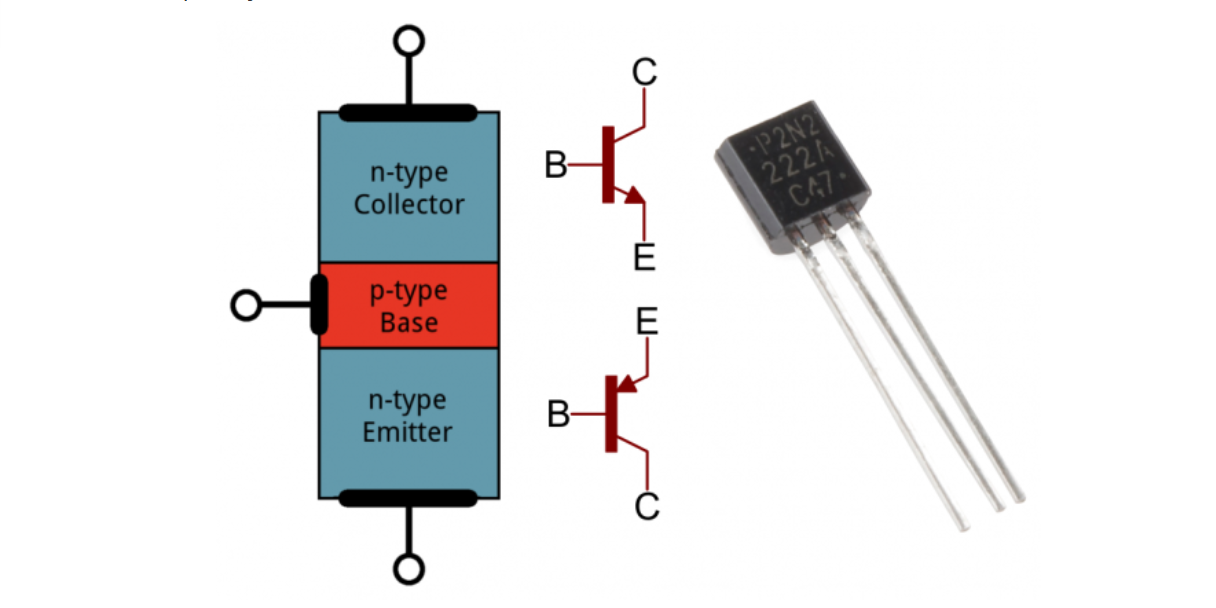
image.png

Drop a comment below if you want me to do a separate post on how to calculate the exact power dissipation and choose the right wattage rating for your SMD heating resistors!

PID Temperature Control

Hardware is only half the battle. How does the flight controller know when to turn the heater on? Both the ICM-42688-P and IIM-42652 have internal temperature sensors. The MCU reads this temperature via the SPI bus. Firmware like ArduPilot or Betaflight takes this temperature reading and feeds it into a dedicated PID loop specifically for the heater.

If the IMU is too cold, the MCU increases the PWM duty cycle to the MOSFET Gate, pushing more current through the resistors. If the IMU reaches the target, the MCU lowers the PWM duty cycle.
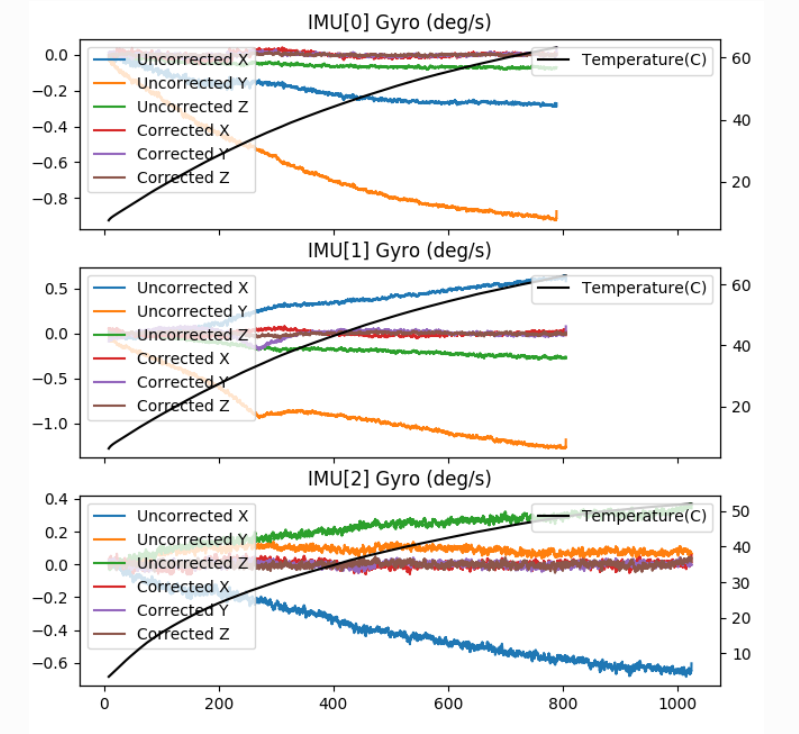
image.png

This Image shown the target temperature configuration parameters directly from Ardupilot IMU Temperature Calibration. This image shows exactly what the user sees when configuring the heater.

Conclusion

By integrating a simple N-Channel MOSFET and a few strategically placed resistors, the flight controller actively fights thermal drift at the hardware level. This ensures that the data from our ICM-42688-P and IIM-42652 is rock-solid.

Embedded Systems
Ground Bounce and Power Plane Noise: Minimizing PDN Impedance

Ground bounce may appear to be harmless; however, if a logic level has ground bounce, it will misbehave.
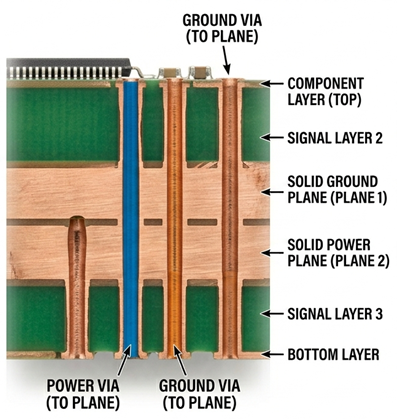
Ground bounce results from multiple outputs being switched off or on at the same time and then causing a current surge through the package and return paths of the PCB.

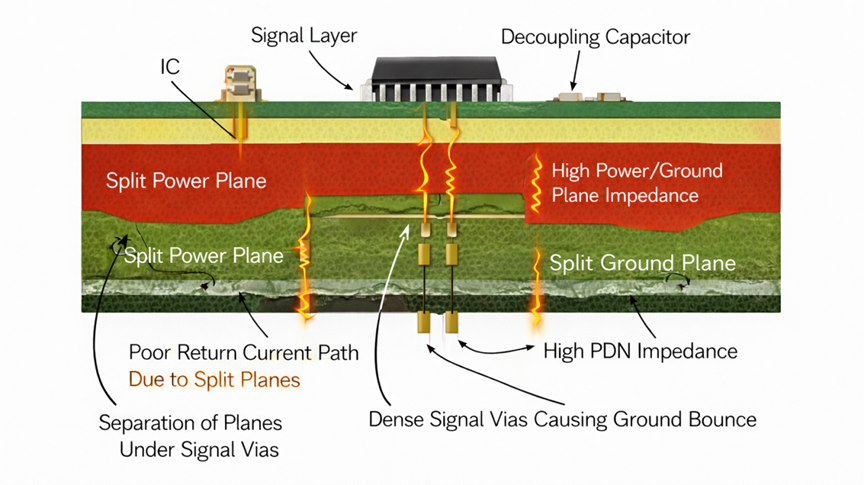
When this occurs, the ground reference at that point will temporarily move, which may lead to false switch and timing errors. In addition, power plane noise adds to the problem by causing the Power Distribution Network (PDN) to perform in a less supportive manner (i.e., as a source of instability).

The root issue is the impedance of the PDN. In other words, the impedance at high speed should not only be "low resistance" but should also be "low impedance" for all frequency ranges. Once the impedance spikes, the voltage fluctuation increases and then results in a direct noise feed into your ICs.

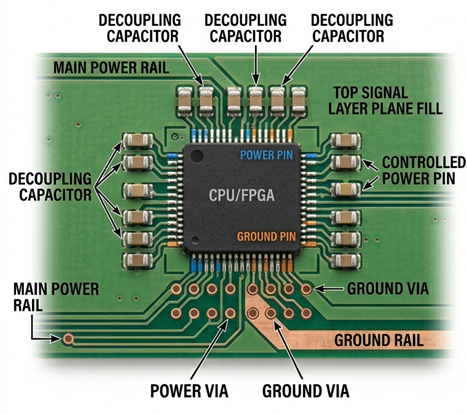
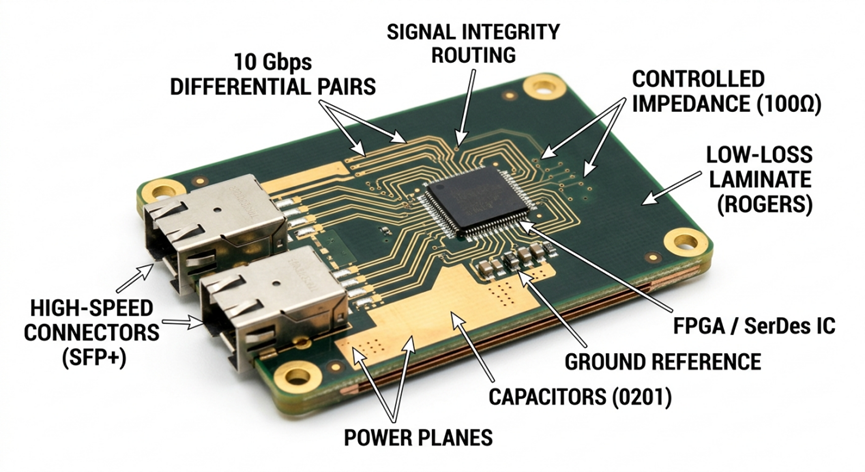
image.png

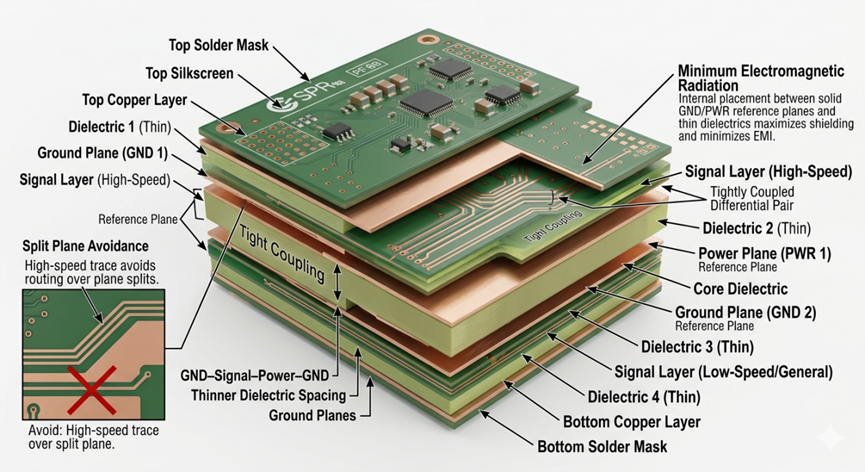
Minimizing PND impedance; PCB top view

image.png

Minimizing PND impedance; PCB side view

Decoupling capacitors are the first line of defence. They should be placed as close as possible to the power pins on the device and should include at least two different values (e.g., 0.1 µF and 1.0µF) to provide decoupling for multiple frequency ranges. The small capacitors will decouple high frequency noise and the larger capacitors will provide decoupling for low frequency noise. The leads to the decoupling capacitors should be as short as possible and should use a wide trace or plane to provide a low inductance connection.

Ensure there are good, continuous power and ground planes. Avoid using splits in the power or ground planes underneath high speed signal lines, since this will interrupt the return path and increase ground bounce. Use a thin dielectric material between the power and ground planes to increase capacitance between the two, allowing for noise reduction.

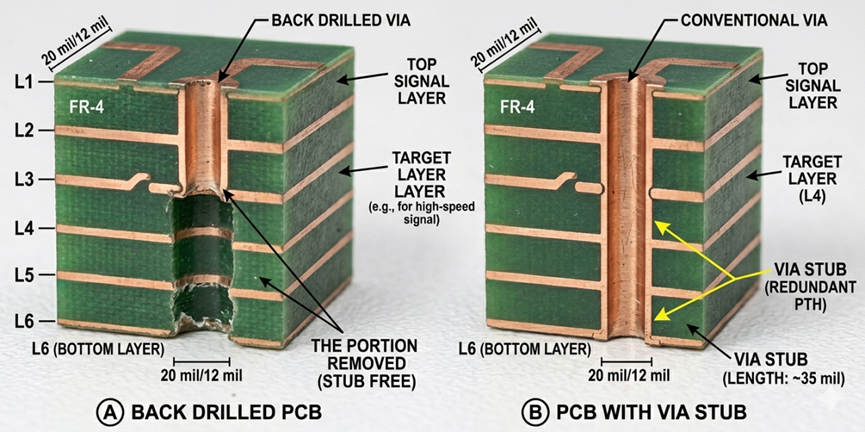
Using multiple vias for power and ground connections will reduce inductive effects that can create bottlenecks. At higher frequencies, the single via will provide additional inductance that contributes to signal degradation.

Simulating your PDN prior to fabrication with specialized software will identify impedance peaks and provide proper capacitor placement as a starting point.

Ground is not a perfect ground; always treat the ground as a dynamic reference with appropriate design considerations.

image.png

High PND impedance PCB structure

Minimizing PDN impedance is not as exciting; however, it is a necessity. Get it right, and your board will remain stable. If you get it wrong, No amount of routing will save you!

PCB
CAN Bus (Part 2)

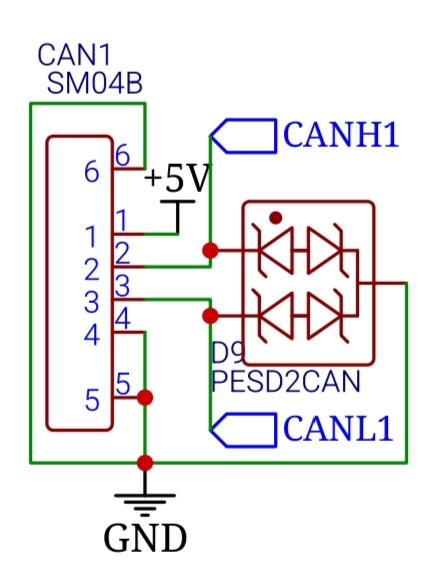
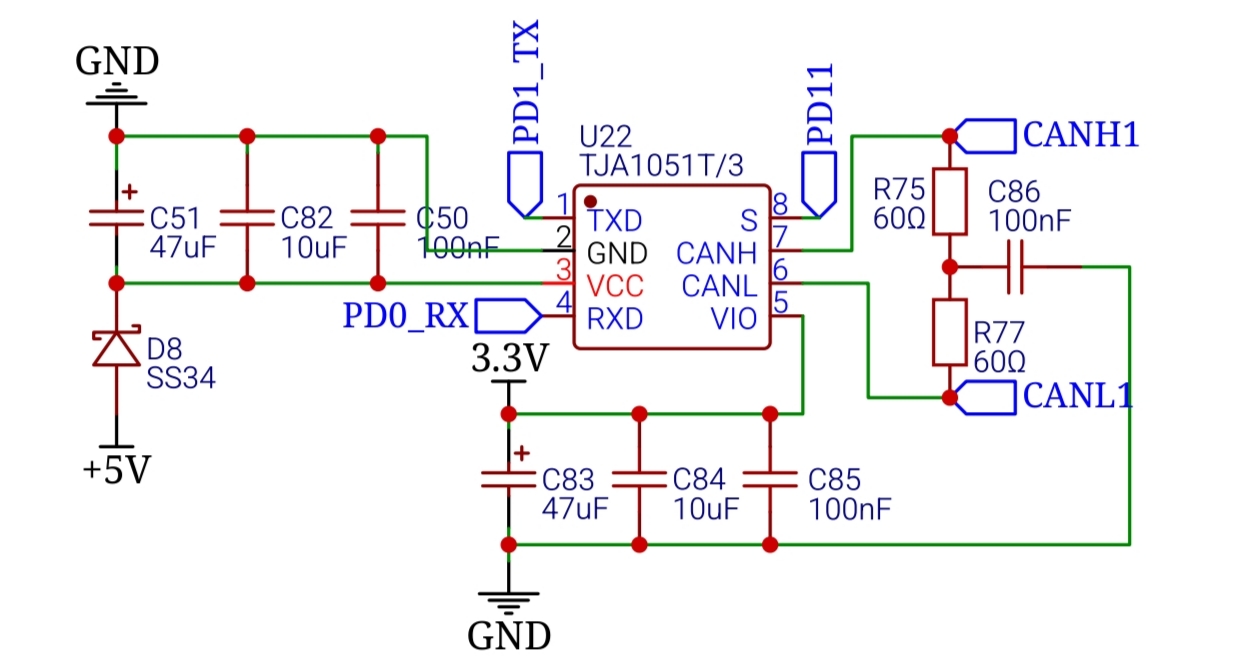
This is my schematic version, using TJA1051T

8730118926138011648

8730118926180089856

For a deep dive into why this resistance matters, check out this video on YouTube: https://youtu.be/fVy_EXkMKMg

DroneCAN: The Software Layer

Hardware is only half the battle. To make everything talk nicely, we use DroneCAN (formerly UAVCAN). It is an open-source, decentralized protocol that allows your FC to manage multiple nodes without the CPU overhead of a master-slave relationship.

Drop a comment if you want to see the specific C++ code I use to initialize the CAN peripheral on an STM32. it's a bit more involved than a standard UART setup!

Practical Implementation Tips

  1. Twisted Pairs: You should always twist your CANH and CANL wires together. This ensures that any noise that hits the wire hits both lines identically. I recommend at least 30 twists per meter.
  2. Cable Routing: Never run CAN wires perfectly parallel to your high-current battery leads. Cross them at 90-degree angles if you must.

Help Me Help You: The Layout File

To give you a truly high-quality review of your EMI performance, I need you to export your PCB Layout file (the .json or Gerber files from EasyEDA) and send it to me. While the schematic looks great, the Layout is where the "Silent Power Rails" and "CAN Integrity" live or die. If I can see your trace routing, I can give you a "Pro" checklist on:

  • Ground plane separation for the LIS3MDL.
  • Differential pair routing for your CAN lines.
  • Placement of your 22uF and 10kOhm components relative to high-speed lines.

Are you planning to run your LIS3MDL compass via the on-board I2C, or are you moving it to an external CAN node to get it further away from the motor interference?

DroneRacing
CAN Bus (Part 1)

Why CAN? (The Differential Advantage)

In many DIY builds, I2C is the default because it’s easy. However, I2C was designed for "chip-to-chip" communication on a single PCB, not for running wires across a drone frame. On a drone, long wires act like antennas, picking up massive electromagnetic interference (EMI) from your motors.
CAN (Controller Area Network) is different. It uses Differential Signaling. Instead of one signal wire, it uses two: CAN High (CANH) and CAN Low (CANL). The receiver only cares about the difference between them. If noise hits the wire, it usually hits both equally, and the difference remains the same.

CAN allows for four different message types. They are the data frame, remote frame, overload frame, and error frame. A standard CAN data frame makes use of the identifier, the data, and data length code, the cyclic redundancy check, and the acknowledgment bits. Both the RTR and IDE bits are dominant in data frames. If the recessive acknowledge bit at the receiving end is overwritten by a dominant bit, both the transmitter and receiver recognize this as a successful transmission.

A CAN remote frame looks similar to a data frame except for the fact that it does not contain any data. It is sent with the RTR bit in a recessive state; this indicates that it is a remote frame. Remote frames are used to request data from a node. When a node detects an error in a message on the CAN bus, it transmits an error frame. This results in all other nodes sending an error frame. Following this, the node where the error occurred retransmits the message. The overload frame works similarly but is used when a node is receiving frames faster than it can process them. This frame provides a time buffer so the node can catch up.

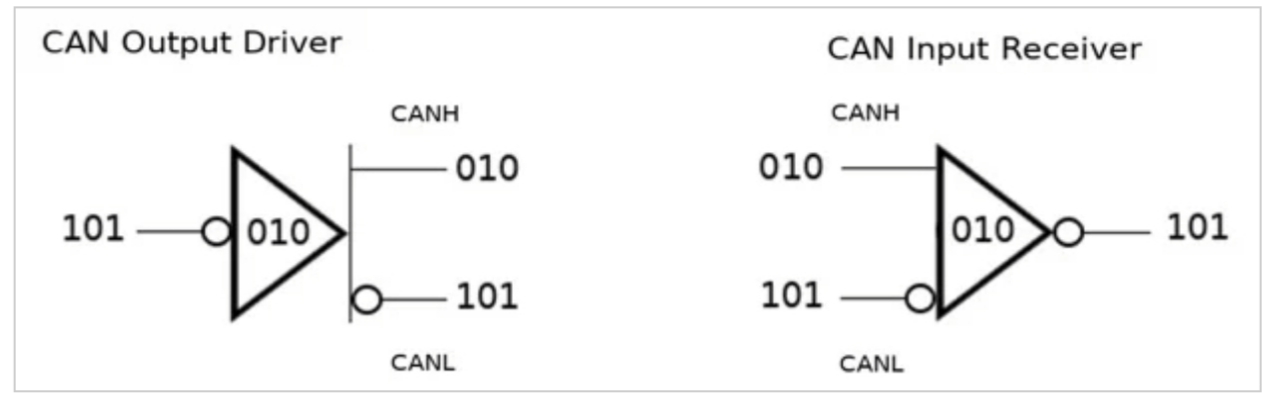
8730098139515379712

That figure shows a simplified version of a CAN transceiver's output and input. The '101' bitstream is coming from/going to a CAN controller and/or microcontroller. Notice that when the controller sends a stream of bits, these are complemented and placed on the CANH line. The CANL line is always the complement of CANH. For arbitration to work, a CAN device must monitor both what it is sending and what is currently on the bus, i.e., what it's receiving.

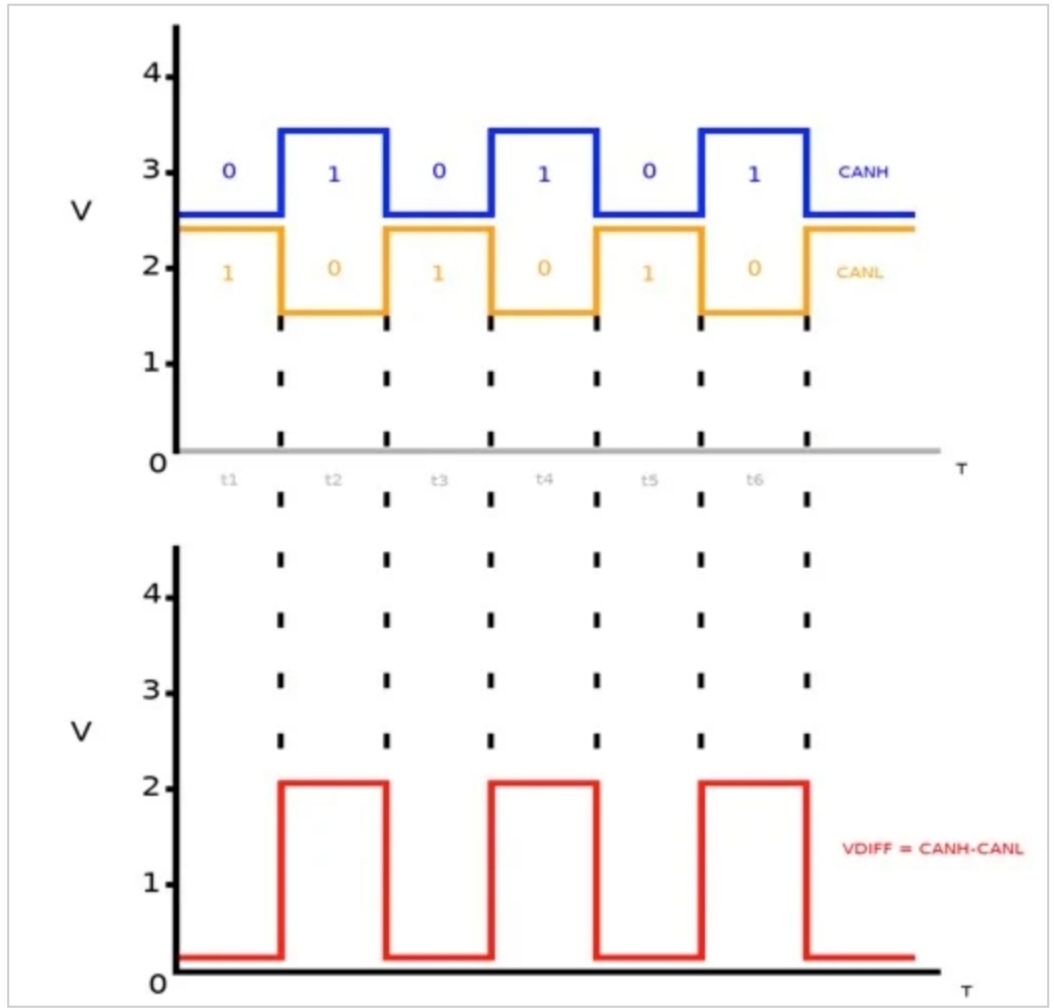
8730100183995850752

The figureshows both the CANH and CANL signals simultaneously so that you can see the CAN bus in action. Plotted below the bus signals is the differential voltage that corresponds to the dominant and recessive states of the CAN signals. The first three segments in time, t1–t3, are drawn to match up with the three bits shown above in Figure 5. We will look at this from the perspective of the output driver. The driver's input initially sees a '1' and complements this to a zero, which is placed on CANH. CANL sees the complement of CANH and goes high. This is shown as t1 in Figure 6. Notice that the CANH and CANL voltages are offset from one another. During time t1, CANH – CANL is very close to zero, since CANH and CANL are almost the same voltage. This period, where the driver is sending a logic '1' resulting in CANH and CANL being close to the same voltage, is what we call the CAN recessive state.

The next bit sent is a '0'. CANH gets its complement and CANL again gets the complement of CANH. Notice this time that the CANH and CANL voltages are not close to one another. Therefore, the differential voltage (VDIFF) is larger. This is the CAN dominant state. We say that the logic is inverted because a '1' takes the bus low and a '0' brings it high. The input receiver works in a similar fashion.

You can see the visual explanation of this noise rejection on the All About Circuits website in their Introduction to CAN Bus https://www.allaboutcircuits.com/technical-articles/introduction-to-can-controller-area-network/.

Drop a comment if you have ever had a "frozen" I2C bus mid-flight. it’s usually because of the noise.

The Hardware: Transceivers and Termination

Looking at your schematic, I see we’ve moved beyond simple logic levels. Your STM32 can't talk to the CAN bus directly; it needs a "translator" called a Transceiver.

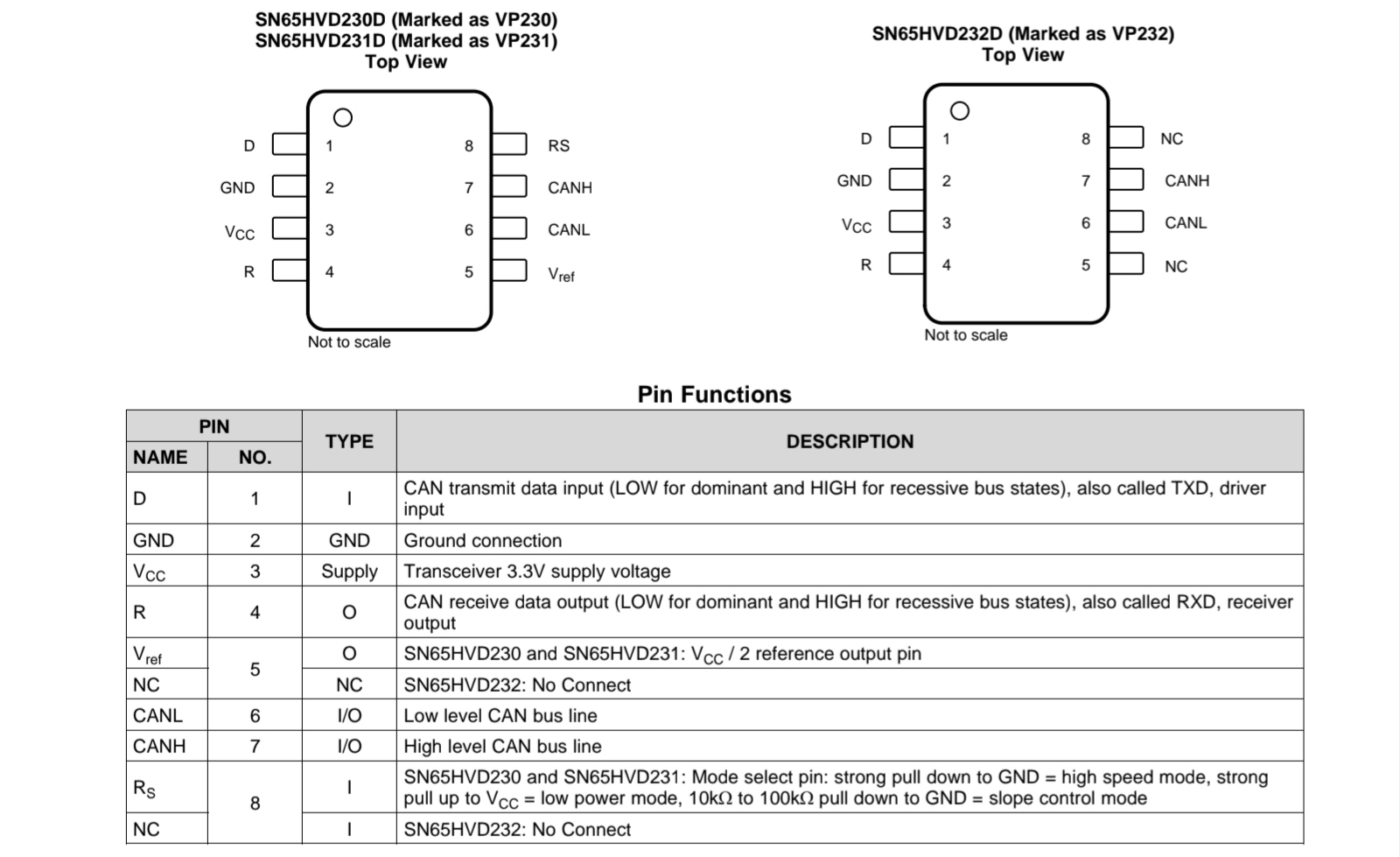
The SN65HVD230 Transceiver

8730113464139587584

This chip converts the 3.3V digital signals from your MCU into the differential voltages required for the bus.

  • Check the Datasheet: You should download the SN65HVD230 datasheet from Texas Instruments.

This diagram illustrates the typical application circuit from Reddit https://www.reddit.com/r/PrintedCircuitBoard/comments/jcgqch/sn65hvd230_can_transceiver_breakout/?rdt=61456

The 120Ohm Termination Rule

High-speed signals on a bus can "reflect" back when they hit the end of the wire, like a wave hitting a wall. This causes data corruption.

  • The Fix: You MUST place a 120Ohm (2 x 60Ohm) resistor at the two physical ends of your bus.
  • In your FC: I noticed your design includes a termination header. This is perfect.
DroneRacing