
The JavaScript HTML DOM (Document Object Model) represents the structure of an HTML document as a tree of objects. It allows JavaScript to interact with and modify the content and elements of a webpage dynamically.
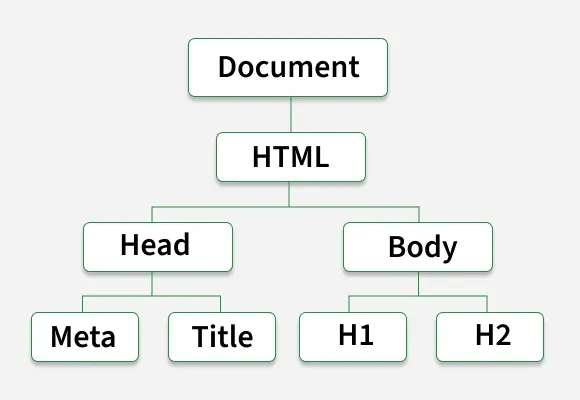
- By using the DOM, JavaScript can access and manipulate HTML elements, attributes, and styles.
- DOM manipulation enables updating the content, structure, or styling of a page without reloading the webpage.
Features of JavaScript DOM
- Tree Structure: The DOM is organized like a family tree, with elements that have parent-child relationships. It is easy to find and change things based on their positions.
- Element Access: You can use different methods like getElementById, getElementsByTagName, and querySelector to access specific elements on a webpage
Example: This example shows the accessing the JavaScript HTML DOM by id.
<html>
<head></head>

<body>
    <h1 id="demo">This is some text.</h1>
    <button onclick="changeText()">
      Change Text
      </button>

    <script>
        function changeText() {
            let element = document.getElementById("demo");
            element.textContent = "Text changed by JavaScript!";
        }
    </script>
</body>

</html>
- The HTML page contains a heading element with the id "demo" and a button.
- When the button is clicked, the changeText() function is triggered using the onclick event.
- Inside the function, document.getElementById("demo") is used to access the heading element and store it in the element variable.
- The textContent property updates the heading text to "Text changed by JavaScript!" dynamically without reloading the page.
Output:

Accessing Elements in the DOM
getElementById()
Retrieves an element by its id.
let heading = document.getElementById("title");
console.log(heading.textContent);
getElementsByClassName()
Returns a collection of elements with a specified class.
let items = document.getElementsByClassName("list-item");
console.log(items[0].textContent);
getElementsByTagName()
Selects elements by their tag name.
let paragraphs = document.getElementsByTagName("p");
console.log(paragraphs.length);
querySelector()
Returns the first element matching a CSS selector.
let firstParagraph = document.querySelector("p");
console.log(firstParagraph.textContent);
querySelectorAll()
Returns all elements matching a CSS selector.
let allParagraphs = document.querySelectorAll("p");
allParagraphs.forEach(p => console.log(p.textContent));
Modifying the DOM
Changing Content
You can modify the content of an element using textContent or innerHTML.
document.getElementById("title").textContent = "New Heading";
document.getElementById("content").innerHTML = "<b>Updated Content</b>";
Changing Attributes
You can modify attributes like src, href, alt, etc.
document.getElementById("myImage").src = "new-image.jpg";Adding and Removing Elements
Create an element:
let newPara = document.createElement("p");
newPara.textContent = "This is a new paragraph.";
document.body.appendChild(newPara);
Remove an element
let oldPara = document.getElementById("removeMe");
oldPara.remove();
Event Handling in the DOM
JavaScript allows us to handle events such as clicks, keypresses, mouse movements, etc.
Adding an Event Listener
document.getElementById("btn").addEventListener("click", function() {
   alert("Button Clicked!");
});
Removing an Event Listener
function sayHello() {
   console.log("Hello!");
}
let btn = document.getElementById("btn");
btn.addEventListener("click", sayHello);
btn.removeEventListener("click", sayHello);
Event Object
The event object provides details about the event.
document.getElementById("inputField").addEventListener("keyup", function(event) {
   console.log("Key pressed: ", event.key);
});
Traversing the DOM
JavaScript provides properties to navigate through the DOM tree.
- parentNode: Gets the parent element.
- children: Gets all child elements.
- firstChild / lastChild: Gets the first/last child.
- nextSibling / previousSibling: Gets the next/previous sibling.
Example:
let parent = document.getElementById("myDiv").parentNode;
console.log(parent.tagName);