
The break statement in Python is used to exit or "break" out of a loop (either for or while loop) prematurely, before the loop has iterated through all its items or reached its condition. When the break statement is executed, the program immediately exits the loop, and the control moves to the next line of code after the loop.
Example: Let's start with a simple example to understand how break works in a loop.
a = [1, 3, 5, 7, 9, 11]
val = 7

for i in a:
    if i == val:
        print(f"Found at {i}!")
        break
else:
    print(f"not found")
Output
Found at 7!
Explanation:
- The loop iterates through each number in the list.
- When the number 7 is found, it prints a confirmation message and executes break, exiting the loop immediately.
- If the loop completes without finding the number, the else block is executed.
Let's understand break statement with a loop using a flowchart:
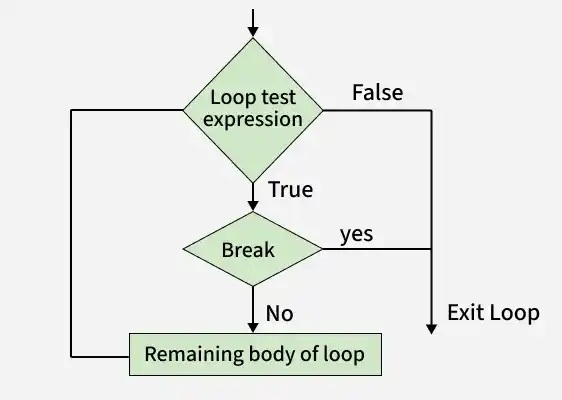
Break Statement with for Loop
A for loop in Python iterates over a sequence (like a list, tuple, string or range) and executes a block of code for each item in that sequence. The break statement can be used within a for loop to exit the loop before it has iterated over all items, based on a specified condition.
for i in range(10):
    print(i)
    if i == 6:
        break
Output
0
1
2
3
4
5
6
Break Statement with while Loop
A while loop in Python repeatedly executes a block of code as long as a specified condition is True. The break statement can be used within a while loop to exit the loop based on dynamic conditions that may not be known beforehand.
c = 5

while True:
    print(c)
    c -= 1
    if c == 0:
        print("Countdown finished!")
        break  # Exit the loop
Output
5
4
3
2
1
Countdown finished!
Using break in Nested Loops
Nested loops are loops within loops, allowing for more complex iterations, such as iterating over multi-dimensional data structures. When using the break statement within nested loops, it's essential to understand its scope:
- Innermost Loop Exit: A break statement will only exit the loop in which it is directly placed (the nearest enclosing loop).
- Exiting Multiple Loops: To exit multiple levels of nested loops, additional strategies are required, such as using flags or encapsulating loops within functions.
Suppose we have a list of lists (a 2D list) and we want to find a specific number. Once we find the number, we want to stop searching in both the inner and outer loops. Example:
matrix = [
    [1, 2, 3],
    [4, 5, 6],
    [7, 8, 9]
]
val = 5
found = False

for r in matrix:
    for n in r:
        if n == val:
            print(f"{val} found!")
            found = True
            break  # Exit the inner loop
    if found:
        break  # Exit the outer loop
Output
5 found!
In the above example, when n becomes 5, the condition n == val becomes True. The break statement exits the inner loop immediately. Since found is set to True, the outer loop also exits.
Using loops in Python automates and repeats tasks efficiently. However, sometimes there may arise a condition where you want to exit the loop completely, skip an iteration, or ignore some statements before continuing further. These actions are performed using loop control statements (jump statements). Loop control statements change the normal flow of execution.
Python supports the following control/jump statements:
