# JavaScript Tips
> Let me share with you some really handy JavaScript tips.
Author: [Marko Denic](https://markodenic.com/) | Published: 2020-04-14 | Updated: 2026-06-17 | Topics: JavaScript | Canonical: https://markodenic.com/javascript-tips/

In this post, I will share with you JavaScript tips you won’t find in most tutorials. Enjoy!
## What is JavaScript?
Javascript is a scripting language that enables you to create dynamically updating content, control multimedia, animate images, and so much more. When it talks to a server with fetch(), check response.status against the [HTTP status codes](https://markodenic.com/http-status-codes/). And if a script fails with [Cannot use import statement outside a module](https://markodenic.com/cannot-use-import-statement-outside-a-module/), the fix is one attribute. And if a variable name throws a SyntaxError, check the list of [JavaScript reserved words](https://markodenic.com/javascript-reserved-words/). Cleaning up a project? Here is how to [uninstall npm packages](https://markodenic.com/npm-uninstall-package/). Preparing for an interview? Try these [tricky JavaScript interview questions](https://javascriptquiz.com/javascript-interview-questions/).
### \* "Go back" button
Use `history.back()` to create a “Go Back” button. To read or change the query string of the current page instead, use [URLSearchParams](https://markodenic.com/urlsearchparams/). Opening a page in a new tab with window.open() instead? Pass ‘noopener’, or the new tab gets a [window.opener](https://markodenic.com/window-opener/) reference back to yours.
```html
```
### \* Numbers separators
To improve readability for numbers, you can use underscores as separators:
```javascript
const largeNumber = 1_000_000_000;
console.log(largeNumber); // 1000000000"
```
### \* Run event listener only once.
If you want to add an event listener but have it run only once, you can use the ` once` option:
```javascript
element.addEventListener('click', () => console.log('I run only once'), {
once: true
});
```
### \* console.log variables wrapping
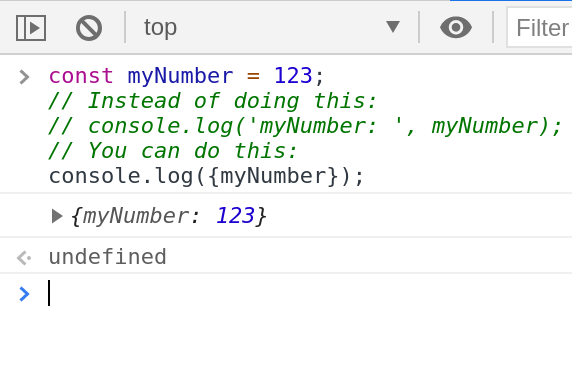
You can wrap your [`console.log()`](https://markodenic.com/use-console-log-like-a-pro/) arguments with curly brackets to see the variable names.
### \* Get min/max value from an array
You can use `Math.min()` or `Math.max()` combined with the spread operator to find the minimum or maximum value in an array.
```javascript
const numbers = [6, 8, 1, 3, 9];
console.log(Math.max(...numbers)); // 9
console.log(Math.min(...numbers)); // 1
```
### \* Check if Caps Lock is on
Use the `KeyboardEvent.getModifierState()` to detect if `Caps Lock` is on.
```javascript
const passwordInput = document.getElementById('password');
passwordInput.addEventListener('keyup', function (event) {
if (event.getModifierState('CapsLock')) {
// CapsLock is on.
}
});
```
### \* Copy to clipboard
You can use the `Clipboard` API to create the “Copy to clipboard” functionality:
```javascript
function copyToClipboard(text) {
navigator.clipboard.writeText(text);
}
```
### \* Get mouse position
Get the current position of the mouse using `MouseEvent` clientX and clientY properties. mousemove fires many times per frame, so do any drawing inside [requestAnimationFrame](https://markodenic.com/requestanimationframe/).
```javascript
document.addEventListener('mousemove', (e) => {
console.log(`Mouse X: ${e.clientX}, Mouse Y: ${e.clientY}`);
});
```
### \* Shorten an array
You can set the length property to shorten an array.
```javascript
const numbers = [1, 2, 3, 4, 5];
numbers.length = 3;
console.log(numbers); // [1, 2, 3];
```
### \* Short-circuits conditionals
If you have to execute a function only if condition is true, you can use short-circuit.
```javascript
//If you have to execute a function only if the condition is true:
if (condition) {
doSomething();
}
// You can use short-circuit:
condition && doSomething();
```
### \* Show specific console.table() columns
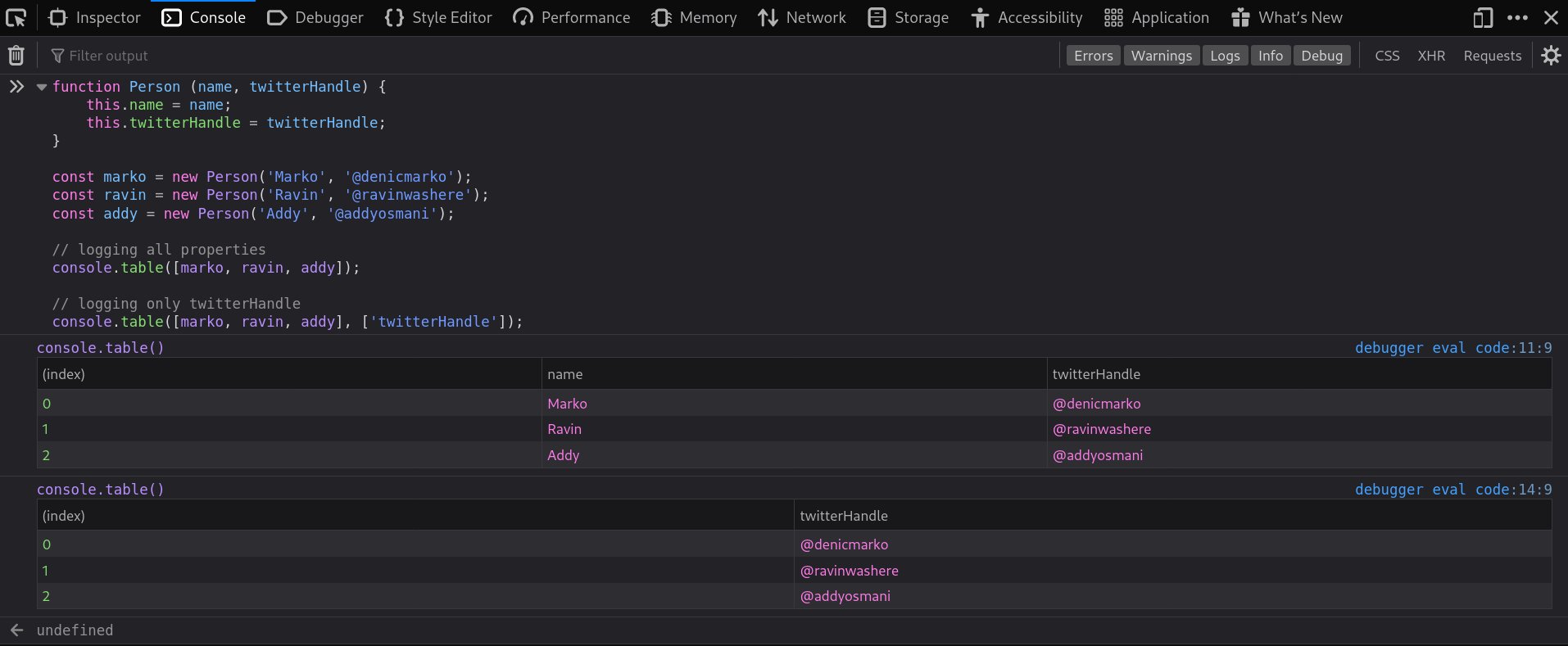
By default, `console.table()` lists all elements in each row. You can use the optional “columns” parameter to select a subset of columns to display:
### \* Remove duplicate elements from an array:
```javascript
const numbers = [2, 3, 4, 4, 2];
console.log([...new Set(numbers)]); // [2, 3, 4]
```
### \* Convert a string to number:
```javascript
const str = '404';
console.log(+str) // 404;
```
### \* Convert a number to string
Concat Empty String. Going the other way, from a string to a number, has more traps: see [how to convert a string to a number](https://markodenic.com/javascript-string-to-number/). To check which type you ended up with, use [typeof](https://markodenic.com/javascript-typeof/).
```javascript
const myNumber = 403;
console.log(myNumber + ''); // '403'
```
### \* Remove all falsy values from an array:
```javascript
const myArray = [1, undefined, NaN, 2, null, '@denicmarko', true, 3, false];
console.log(myArray.filter(Boolean)); // [1, 2, "@denicmarko", true, 3]
```
### DRY
Don’t repeat yourself.
```javascript
const myTech = 'JavaScript';
const techs = ['HTML', 'CSS', 'JavaScript'];
// Instead of:
if (myTech === 'HTML' || myTech === 'CSS' || myTech === 'JavaScript') {
// do something
}
// You can:
if (techs.includes(myTech)) {
// do something
}
```
### Sum an array
You can use the `[reduce`](https://markodenic.com/10-javascript-array-methods-to-simplify-your-code/) method to calculate the sum of all elements in an array:
```javascript
const myArray = [10, 20, 30, 40];
const reducer = (total, currentValue) => total + currentValue;
console.log(myArray.reduce(reducer)); // 100
```
### \* `console.log()` styling
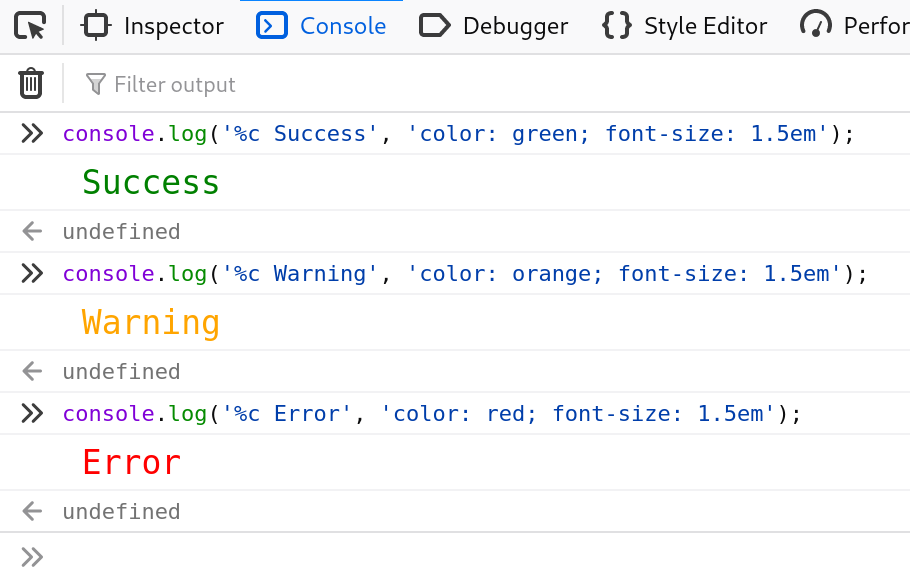
Did you know that the `console.log` output can be styled in DevTools using the CSS format specifier:
### \* Element's dataset
Use the `dataset` property to access the element’s custom data attributes (`data-*`):
```html