Assignment 4: Solutions
Problem 1: Measuring butterflies
To discover things about a butterfly population, the Natural History Museum has measured the width of several butterflies in its collection.
%matplotlib inline
import matplotlib.pyplot as plt
import numpy as np

wing_widths = [7.02, 6.84, 6.56, 6.44, 0.0, 0.0, 4.92, 6.35, 6.07, 6.68, 6.91, 7.09, 8.90, 0.0,
               9.79, 6.32, 7.24, 7.27, 8.02, 0.0, 7.76, 6.94, 5.80, 7.43, 6.85, 8.44, 5.16, 7.96,
               0.0, 6.99, 8.56, 5.20, 5.76, 6.87, 6.41, 0.0, 7.36, 5.74, 7.06, 6.44, 8.06, 7.86]
# Find the mean width of the wings:
wing_widths = np.array(wing_widths)
mean_ww = np.mean(wing_widths)

# Also find the median and the standard deviation.
median_ww = np.median(wing_widths)
std_ww = np.std(wing_widths)
# Find the width of the largest wing, and the smallest:
largest = np.argmax(wing_widths)
smallest = np.argmin(wing_widths)
# Now plot a histogram of the data:

plt.hist(wing_widths)

# Try adjusting the number of bins in the histogram:
plt.hist(wing_widths, bins=20)
(array([ 6.,  0.,  0.,  0.,  0.,  0.,  0.,  0.,  0.,  0.,  3.,  3.,  3.,
         7.,  9.,  3.,  4.,  2.,  1.,  1.]),
 array([ 0.    ,  0.4895,  0.979 ,  1.4685,  1.958 ,  2.4475,  2.937 ,
         3.4265,  3.916 ,  4.4055,  4.895 ,  5.3845,  5.874 ,  6.3635,
         6.853 ,  7.3425,  7.832 ,  8.3215,  8.811 ,  9.3005,  9.79  ]),
 <a list of 20 Patch objects>)

# Count how many wings have been given a wing width of zero:
n_zero_length = len(wing_widths[wing_widths==0])
# Create a new numpy array that only contains the wing widths greater than zero:
nonzero_ww = wing_widths[wing_widths>0]

# Now find the new mean, median and min and max:
mean_nonzero_ww = np.mean(nonzero_ww)
median_nonzero_ww = np.median(nonzero_ww)
smallest_nonzero_ww = min(nonzero_ww)
largest_nonzero_ww = max(nonzero_ww)

# Plot a histogram of this data:
winghist = plt.hist(nonzero_ww, bins=20, color='grey')

# ***additional***
# Plot a vertical line, where the mean is
plt.vlines(mean_nonzero_ww, min(winghist[0]), max(winghist[0]), 'r')

# Plot a vertical line, where the smallest & largest  values are
plt.vlines(smallest_nonzero_ww, min(winghist[0]), max(winghist[0]), 'g')
plt.vlines(largest_nonzero_ww, min(winghist[0]), max(winghist[0]), 'g')
<matplotlib.collections.LineCollection at 0x1112d4470>

Problem 2: Plotting parabolas
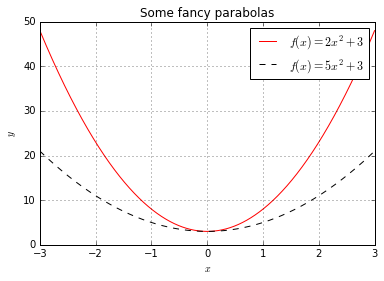
Write Python code that produces the following figure:
%pylab inline
import numpy as np
import matplotlib.pyplot as plt
Populating the interactive namespace from numpy and matplotlib
formula1 = '5*x**2+3'
formula2 = '2*x**2+3'
x = np.array(np.arange(-3, 3, 0.001))
y1 = eval(formula1)
y2 = eval(formula2)
plt.plot(x, y1, color="red", label="$f(x) = 2x^2+3$")
plt.plot(x, y2, linestyle='--', color="black", label="$f(x) = 5x^2+3$")
plt.grid()
plt.xlabel('$x$')
plt.ylabel('$y$')
plt.title('Some fancy parabolas')
plt.legend()
Problem 3: Healthy Breakfast
In this exercise we will do some simple analyses on a data set that contains information about 77 types of breakfast cereal. You can read about the data set at CMU's website. Download the files cereal.csv from the course website. Below you can find a small code snippet to get you started on reading the data set from the file.
import numpy as np
import matplotlib.pyplot as plt

def getData(filename = 'cereal.txt'):
    """
    Reads the cereal data from the given file name.
    Returns a tuple of column labels, names and data, where
    col_labels Labels of the attributes in the data set
    names      List containing the names of the cereals tested
    data       numpy.ndarray containing the numeric values of the 12 attributes for the 77 cereals
    """
    names = []
    data = []
    col_labels = ["calories (number)", "protein (g)", "fat (g)", "sodium (mg)",
                  "dietary fiber (g)", "complex carbohydrates (g)", "sugars (g)",
                  "display shelf", "potassium (mg)",
                  "vitamins and minerals",
                  "weight/serving (in ounces)", "cups per serving"]

    with open(filename) as f:
        for l in f:
          fields = l.split()
          names.append(fields[0])
          data.append([float(x) for x in fields[3:]])

    data = np.array(data)
    return col_labels, names, data

def plotFatVsCalories(col_labels, data):
    """
    Plots fat content vs calories
    """

    fat = data[:,2]
    calories = data[:,0]
    plt.plot(fat, calories ,'kx')
    plt.xlabel(col_labels[2])
    plt.ylabel(col_labels[0])
    plt.grid()

    # fit a line through the points
    coefficients = np.polyfit(fat, calories, 1)
    poly = np.poly1d(coefficients)
    plt.plot(fat,poly(fat), 'r-')

#Now execute our functions:
column_labels, productNames, data = getData('cereal.txt')
plotFatVsCalories(column_labels, data)
1. Compute the average number of calories, as well as the average amount of complex carbohydrates and sugars in the data set.
idx = {}
idx["cal"] = 0
idx["fat"] = 2
idx["carbs"] = 5
idx["sugar"] = 6
idx["shelf"] = 7
print("Average number of calories: %.2f" %np.mean(data[:,idx["cal"]]))
print("Average amount of complex carbohydrates: %.2f" %np.mean(data[:,idx["carbs"]]))
print("Average amount of sugars: %.2f" %np.mean(data[:,idx["sugar"]]))
Average number of calories: 106.88
Average amount of complex carbohydrates: 14.60
Average amount of sugars: 6.92
2. What is the name of the cereal that has the highest sugar content?
maxSugarIdx = np.argmax(data[:, idx["sugar"]])
print(productNames[maxSugarIdx])
Golden_Crisp
3. The 8th column of the data set contains the shelf at which the cereal is displayed in the supermarket (either 1, 2, or 3). Compute the mean number of calories of the cereals displayed in each shelf. If you do this correctly you should find the the cereals displayed on the middle shelf have a higher calory content on average.
def computeMeanOfShelfs():
    print(computeMeanOfShelf(1))
    print(computeMeanOfShelf(2))
    print(computeMeanOfShelf(3))

def computeMeanOfShelf(shelfNo):
    items = retrieveItemsInShelf(shelfNo)
    meanOfCal = np.mean(data[items, idx['cal']])
    return meanOfCal

def retrieveItemsInShelf(shelfNo):
    shelfs = data[:, idx['shelf']]
    return shelfs == shelfNo

def retrieveSugarInShelf(shelfNo):
    items = retrieveItemsInShelf(shelfNo)
    return data[items, idx["sugar"]]
computeMeanOfShelfs()
102.5
109.523809524
107.777777778
4. Make a box plot showing the sugar content of cereals grouped by shelf (recreating the plot that you'll find on the homepage for this data set).
def plotBoxPlotOfSugar():
    sugars = []
    for i in range(1,4):
        sugars.append(retrieveSugarInShelf(i))

    plt.boxplot(sugars)
plotBoxPlotOfSugar()

5. Explore the data set by plotting and regressing the different variables against each other.
from scipy.stats import linregress

def plotAagainstB(data, col_labels, col1Id, col2Id):
    """
    Plots col1Id content vs col2Id
    """

    col1 = data[:,col1Id]
    col2 = data[:,col2Id]
    plt.plot(col1, col2 ,'kx')
    plt.xlabel(col_labels[col1Id])
    plt.ylabel(col_labels[col2Id])
    plt.grid()

    slope, intercept, r_value, p_value, std_err = linregress(col1,col2)

    # fit a line through the points
    coefficients = np.polyfit(col1, col2, 1)
    poly = np.poly1d(coefficients)
    plt.plot(col1,poly(col1), 'r-')
    plt.show()
    print("Linear Regression with r=%.3f, p=%.2g" %(r_value, p_value))
    return p_value, r_value
import itertools
def plotAllRegressions(data, col_labels, sigBoundary):
    significant = []
    for col1Id, col2Id in itertools.combinations(range(len(col_labels)),2):
        print("%s vs %s:" %(col_labels[col1Id], col_labels[col2Id]))
        p, r  = plotAagainstB(data, col_labels, col1Id, col2Id)
        if p < sigBoundary:
            significant.append((col1Id, col2Id, p, r))
    print("Significant at %f boundary:" %sigBoundary)
    maxColLengths = max(len(x) for x in col_labels)
    for col1Id, col2Id, p, r in significant:
        print("%-*s vs %-*s: r=%6.3f, p=%.2g" %(maxColLengths, col_labels[col1Id],
                                              maxColLengths, col_labels[col2Id], r, p))
plotAllRegressions(data,column_labels, 0.05)
calories (number) vs protein (g):

Linear Regression with r=0.019, p=0.87
calories (number) vs fat (g):

Linear Regression with r=0.499, p=3.9e-06
calories (number) vs sodium (mg):

Linear Regression with r=0.301, p=0.0079
calories (number) vs dietary fiber (g):

Linear Regression with r=-0.293, p=0.0096
calories (number) vs complex carbohydrates (g):

Linear Regression with r=0.251, p=0.028
calories (number) vs sugars (g):

Linear Regression with r=0.562, p=1e-07
calories (number) vs display shelf:

Linear Regression with r=0.097, p=0.4
calories (number) vs potassium (mg):

Linear Regression with r=-0.067, p=0.56
calories (number) vs vitamins and minerals:

Linear Regression with r=0.265, p=0.02
calories (number) vs weight/serving (in ounces):

Linear Regression with r=-0.033, p=0.78
calories (number) vs cups per serving:

Linear Regression with r=0.080, p=0.49
protein (g) vs fat (g):

Linear Regression with r=0.208, p=0.069
protein (g) vs sodium (mg):

Linear Regression with r=-0.055, p=0.64
protein (g) vs dietary fiber (g):

Linear Regression with r=0.500, p=3.6e-06
protein (g) vs complex carbohydrates (g):

Linear Regression with r=-0.131, p=0.26
protein (g) vs sugars (g):

Linear Regression with r=-0.329, p=0.0035
protein (g) vs display shelf:

Linear Regression with r=0.134, p=0.25
protein (g) vs potassium (mg):

Linear Regression with r=0.549, p=2.3e-07
protein (g) vs vitamins and minerals:

Linear Regression with r=0.007, p=0.95
protein (g) vs weight/serving (in ounces):

Linear Regression with r=-0.104, p=0.37
protein (g) vs cups per serving:

Linear Regression with r=-0.211, p=0.066
fat (g) vs sodium (mg):

Linear Regression with r=-0.005, p=0.96
fat (g) vs dietary fiber (g):

Linear Regression with r=0.017, p=0.89
fat (g) vs complex carbohydrates (g):

Linear Regression with r=-0.318, p=0.0048
fat (g) vs sugars (g):

Linear Regression with r=0.271, p=0.017
fat (g) vs display shelf:

Linear Regression with r=0.264, p=0.02
fat (g) vs potassium (mg):

Linear Regression with r=0.193, p=0.092
fat (g) vs vitamins and minerals:

Linear Regression with r=-0.031, p=0.79
fat (g) vs weight/serving (in ounces):

Linear Regression with r=-0.200, p=0.081
fat (g) vs cups per serving:

Linear Regression with r=-0.229, p=0.045
sodium (mg) vs dietary fiber (g):

Linear Regression with r=-0.071, p=0.54
sodium (mg) vs complex carbohydrates (g):

Linear Regression with r=0.356, p=0.0015
sodium (mg) vs sugars (g):

Linear Regression with r=0.101, p=0.38
sodium (mg) vs display shelf:

Linear Regression with r=-0.070, p=0.55
sodium (mg) vs potassium (mg):

Linear Regression with r=-0.033, p=0.78
sodium (mg) vs vitamins and minerals:

Linear Regression with r=0.361, p=0.0012
sodium (mg) vs weight/serving (in ounces):

Linear Regression with r=0.195, p=0.09
sodium (mg) vs cups per serving:

Linear Regression with r=0.459, p=2.7e-05
dietary fiber (g) vs complex carbohydrates (g):

Linear Regression with r=-0.356, p=0.0015
dietary fiber (g) vs sugars (g):

Linear Regression with r=-0.141, p=0.22
dietary fiber (g) vs display shelf:

Linear Regression with r=0.298, p=0.0086
dietary fiber (g) vs potassium (mg):

Linear Regression with r=0.903, p=2.7e-29
dietary fiber (g) vs vitamins and minerals:

Linear Regression with r=-0.032, p=0.78
dietary fiber (g) vs weight/serving (in ounces):

Linear Regression with r=0.052, p=0.66
dietary fiber (g) vs cups per serving:

Linear Regression with r=-0.185, p=0.11
complex carbohydrates (g) vs sugars (g):

Linear Regression with r=-0.332, p=0.0032
complex carbohydrates (g) vs display shelf:

Linear Regression with r=-0.102, p=0.38
complex carbohydrates (g) vs potassium (mg):

Linear Regression with r=-0.350, p=0.0018
complex carbohydrates (g) vs vitamins and minerals:

Linear Regression with r=0.258, p=0.023
complex carbohydrates (g) vs weight/serving (in ounces):

Linear Regression with r=0.009, p=0.94
complex carbohydrates (g) vs cups per serving:

Linear Regression with r=0.130, p=0.26
sugars (g) vs display shelf:

Linear Regression with r=0.100, p=0.38
sugars (g) vs potassium (mg):

Linear Regression with r=0.022, p=0.85
sugars (g) vs vitamins and minerals:

Linear Regression with r=0.125, p=0.28
sugars (g) vs weight/serving (in ounces):

Linear Regression with r=0.055, p=0.64
sugars (g) vs cups per serving:

Linear Regression with r=0.143, p=0.22
display shelf vs potassium (mg):

Linear Regression with r=0.361, p=0.0013
display shelf vs vitamins and minerals:

Linear Regression with r=0.299, p=0.0082
display shelf vs weight/serving (in ounces):

Linear Regression with r=-0.060, p=0.61
display shelf vs cups per serving:

Linear Regression with r=-0.284, p=0.012
potassium (mg) vs vitamins and minerals:

Linear Regression with r=0.021, p=0.86
potassium (mg) vs weight/serving (in ounces):

Linear Regression with r=0.023, p=0.85
potassium (mg) vs cups per serving:

Linear Regression with r=-0.239, p=0.037
vitamins and minerals vs weight/serving (in ounces):

Linear Regression with r=0.156, p=0.18
vitamins and minerals vs cups per serving:

Linear Regression with r=0.103, p=0.37
weight/serving (in ounces) vs cups per serving:

Linear Regression with r=0.454, p=3.4e-05
Significant at 0.050000 boundary:
calories (number)          vs fat (g)                   : r= 0.499, p=3.9e-06
calories (number)          vs sodium (mg)               : r= 0.301, p=0.0079
calories (number)          vs dietary fiber (g)         : r=-0.293, p=0.0096
calories (number)          vs complex carbohydrates (g) : r= 0.251, p=0.028
calories (number)          vs sugars (g)                : r= 0.562, p=1e-07
calories (number)          vs vitamins and minerals     : r= 0.265, p=0.02
protein (g)                vs dietary fiber (g)         : r= 0.500, p=3.6e-06
protein (g)                vs sugars (g)                : r=-0.329, p=0.0035
protein (g)                vs potassium (mg)            : r= 0.549, p=2.3e-07
fat (g)                    vs complex carbohydrates (g) : r=-0.318, p=0.0048
fat (g)                    vs sugars (g)                : r= 0.271, p=0.017
fat (g)                    vs display shelf             : r= 0.264, p=0.02
fat (g)                    vs cups per serving          : r=-0.229, p=0.045
sodium (mg)                vs complex carbohydrates (g) : r= 0.356, p=0.0015
sodium (mg)                vs vitamins and minerals     : r= 0.361, p=0.0012
sodium (mg)                vs cups per serving          : r= 0.459, p=2.7e-05
dietary fiber (g)          vs complex carbohydrates (g) : r=-0.356, p=0.0015
dietary fiber (g)          vs display shelf             : r= 0.298, p=0.0086
dietary fiber (g)          vs potassium (mg)            : r= 0.903, p=2.7e-29
complex carbohydrates (g)  vs sugars (g)                : r=-0.332, p=0.0032
complex carbohydrates (g)  vs potassium (mg)            : r=-0.350, p=0.0018
complex carbohydrates (g)  vs vitamins and minerals     : r= 0.258, p=0.023
display shelf              vs potassium (mg)            : r= 0.361, p=0.0013
display shelf              vs vitamins and minerals     : r= 0.299, p=0.0082
display shelf              vs cups per serving          : r=-0.284, p=0.012
potassium (mg)             vs cups per serving          : r=-0.239, p=0.037
weight/serving (in ounces) vs cups per serving          : r= 0.454, p=3.4e-05
Problem 4: Chocolate makes you faster?
Your colleague (a psychologist) has conducted an experiment where he measured subjects' performance on a memory and a reaction time task. He claims to have found a correlation between the two, but you are sceptical, because you know your colleague is not very good at clicking buttons in SPSS. Luckily, you can convince your colleague to give you his data file so you can assess his claims.
1. He gives you the file experiment.csv. It contains one line per subject, and each line contains the values for the following variables that he measured:
height,weight,amount-chocolate,task-one-score,task-two-score. (He allowed the participants to eat chocolate during the experiment, and the third column shows the amount of chocolate they ate in grams.) Load the data into an array.
rawData = []
with open("experiment.csv") as f:
    for line in f:
        rawData += [[float(x) for x in line.split()]]
        # rawData.append(line.split())

data = np.array(rawData)

idx = {}
idx["height"] = 0
idx["weight"] = 1
idx["amount"] = 2
idx["taskA"] = 3
idx["taskB"] = 4
2. As a sanity check, create a scatter plot of height vs. weight. These two should clearly be correlated and you should see a straight line relationship.
scatter(data[:, idx['height']], data[:, idx['weight']])
<matplotlib.collections.PathCollection at 0x11151e0f0>

3. To assess your colleague's claim, first create a box plot of the scores in task 1 and task 2. Also, compute the correlation between the two (using Pearson's $r$) and check whether it is significant. Hint: Use the function
scipy.stats.pearsonr.
_ = boxplot([data[:, idx['taskA']], data[:, idx['taskB']]])

from scipy.stats.stats import pearsonr
taskA = data[:, idx['taskA']]
taskB = data[:, idx['taskB']]
pearsonr(taskA, taskB)
(0.080429442024469028, 0.072356641319798271)
4. When your colleague hears about your results, he is a bit disappointed. However, he already has a new hypothesis: maybe chocolate is acting as a promoter somehow and the amount of chocolate consumed has some effect? Create some plots and hypothesis tests to assess this new hypothesis.
_ = scatter(data[:, idx["amount"]], taskA, alpha=0.4)
ylabel("performance of task 1")
xlabel("amount of chocolate consumed")
<matplotlib.text.Text at 0x111514c18>

5. After you come back with your results, your colleague has one last idea: Maybe you need to eat more than some critical amount of chocolate (which depends on your body mass index) in order for there to be a correlation between the two tasks? He guesses that you need to eat at least six times your BMI in chocolate in order for the correlation to show up. You think your colleague is crazy, but go ahead an test his claim. What do you find? Again, produce some figures, compute correlations and test for significance.
def calculateSections(amount, maximum = 200):
    stepSize = maximum / amount
    sections = []
    stop = 0
    for i in range(amount):
        start = stop
        stop = stop + stepSize
        section = slice(start, stop)
        sections.append(section)

    return sections

def plotDataBlocks(data, chocolate, amount=20):
    sections = calculateSections(amount)
    dataBlock = []
#     chocolate = data[:, idx['amount']]

    for sec in sections:
        s = sec.start
        e = sec.stop

        rng = np.logical_and(chocolate >= s, chocolate < e)
        dataBlock.append(data[rng])

    _ = boxplot(dataBlock)
plotDataBlocks(taskA, data[:, idx['amount']], amount = 20)
plotDataBlocks(taskB, data[:, idx['amount']], amount = 20)
