The append() method of Java StringBuilder class is used to append a specified value at the end of this character sequence.
Syntax of append() Method:
//append string "hello" at the end of sb
sb.append("hello");

//append the string "xyz" at the end of sb
char[] chArray = {'x', 'y', 'z'}
sb.append(chArray);
Here, sb is an object of StringBuilder class.
append() Description
public StringBuilder append(char c): This method appends specified char c at the end of the char sequence represented by StringBuilder object. There are several variations of this method that allow various data types to be appended. These variations are:
public StringBuilder append(int i);
public StringBuilder append(long l);
public StringBuilder append(double d);
public StringBuilder append(char c);
public StringBuilder append(float f);
public StringBuilder append(String str);
public StringBuilder append(char[] str);
public StringBuilder append(boolean b);
public StringBuilder append(char[] str, int offset, int len);
public StringBuilder append(CharSequence cs);
public StringBuilder append(CharSequence cs, int start, int end);
public StringBuilder append(Object obj);
public StringBuilder append(StringBuffer sb);
append() Parameters
The append() method parameters are:
- offset: It specifies the position in the sequence.
- start: Integer index that represents the start of the subsequence that needs to be appended. (See example below)
- end: It represents the end of the subsequence that needs to be appended.
- i, l, d, f, ch, b: Represents the values of data types that needs to appended using append() method.
- str: String that is appended in the given StringBuilder character sequence.
append() Return Value
- Returns a StringBuilder instance that contains the appended value.
If specified offsets are invalid then this method throws IndexOutOfBoundsException.
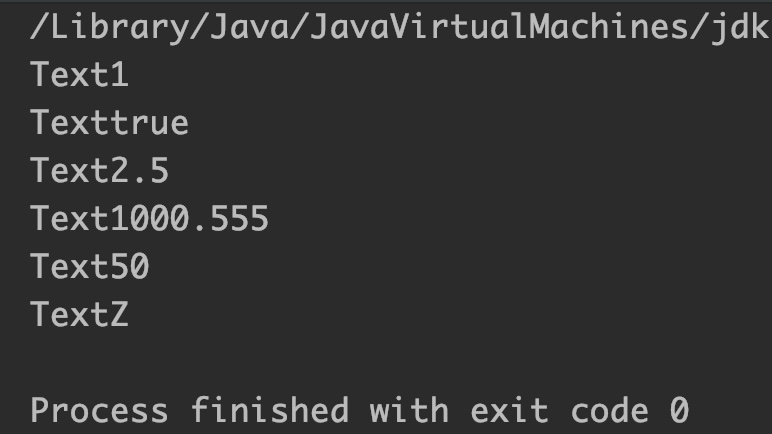
Example 1: Append int, float, long, double, char and boolean
public class JavaExample {
  public static void main(String[] args) {
    StringBuilder sb = new StringBuilder("Text");
    sb.append(1);//append int
    System.out.println(sb);

    StringBuilder sb2 = new StringBuilder("Text");
    sb2.append(true); //append boolean
    System.out.println(sb2);

    StringBuilder sb3 = new StringBuilder("Text");
    sb3.append(2.5f); //append float
    System.out.println(sb3);

    StringBuilder sb4 = new StringBuilder("Text");
    sb4.append(1000.555); //append double
    System.out.println(sb4);

    StringBuilder sb5 = new StringBuilder("Text");
    sb5.append(50L); //append long
    System.out.println(sb5);

    StringBuilder sb6 = new StringBuilder("Text");
    sb6.append('Z'); //append char
    System.out.println(sb6);
  }
}
Output:
Example 2: StringBuilder append(char[] str, int offset, int len)
public class JavaExample {
  public static void main(String[] args) {
    StringBuilder sb = new StringBuilder("BeginnersBook");
    System.out.println("Sequence :"+sb);
    char[] chArray = {'a','b','c','.','c','o','m'};

    // appending elements of char array from 4th till 7th
    sb.append(chArray, 3, 4);
    System.out.println("New Sequence: " + sb);
  }
}
Output:

Example 3: StringBuilder append(CharSequence cs, int start, int end)
public class JavaExample {
  public static void main(String[] args) {
    StringBuilder sb = new StringBuilder("BeginnersBook");
    System.out.println("Old Sequence :"+sb);
    CharSequence cs = "google.com";

    // appending chars of given char sequence from 6 to 10th
    sb.append(cs, 6, 10);
    System.out.println("New Sequence: " + sb);
  }
}
Output:

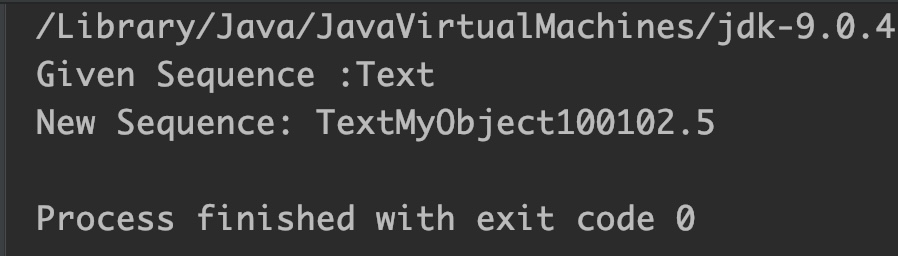
Example 4: StringBuilder append(Object obj)
public class JavaExample {
  public static void main(String[] args) {
    StringBuilder sb = new StringBuilder("Text");
    System.out.println("Given Sequence :"+sb);

    Object obj = "MyObject";//string object
    Object obj2 = 100L; //long object
    Object obj3 = 102.5f; //float object

    //appending All three objects at the end of sequence
    sb.append(obj);
    sb.append(obj2);
    sb.append(obj3);

    System.out.println("New Sequence: " + sb);
  }
}
Output:
Example 5: StringBuilder append(StringBuffer sb)
public class JavaExample {
  public static void main(String[] args) {
    StringBuilder sBuilder = new StringBuilder("Text");
    System.out.println("StringBuilder object :"+sBuilder);

    StringBuffer sBuffer =new StringBuffer("NewString");
    // appending string buffer
    sBuilder.append(sBuffer);

    // print StringBuilder
    System.out.println("StringBuilder obj after append: " + sBuilder);
  }
}
Output:


Leave a Reply