Java StringBuffer setLength() method is used to set a new length to the existing StringBuffer sequence. If the new length is greater than the current length then null characters are appended at the end of the sequence.
Syntax of setLength() Method:
sb.setLength(4); //set the length of sb to 4
Here, sb represents the object of Java StringBuffer class.
setLength() Description
public void setLength(int newLength): Changes the length of the current StringBuffer instance to the new length.
setLength() Parameters
- newLength: It is an integer value that represents the new length.
setLength() Return Value
- It has void return type as it does not return anything.
- If specified
newLengthis a negative number then It throwsIndexOutOfBoundsException.
Example 1: If specified length is less than existing length
public class JavaExample {
  public static void main(String[] args) {
    StringBuffer sb = new StringBuffer("BeginnersBook");
    System.out.println("Old Sequence: "+sb);
    System.out.println("Old length: "+sb.length());

    //Set new length for this char sequence
    sb.setLength(9);
    System.out.println("New Sequence: "+sb);
    System.out.println("New length: "+sb.length());
  }
}
Output:

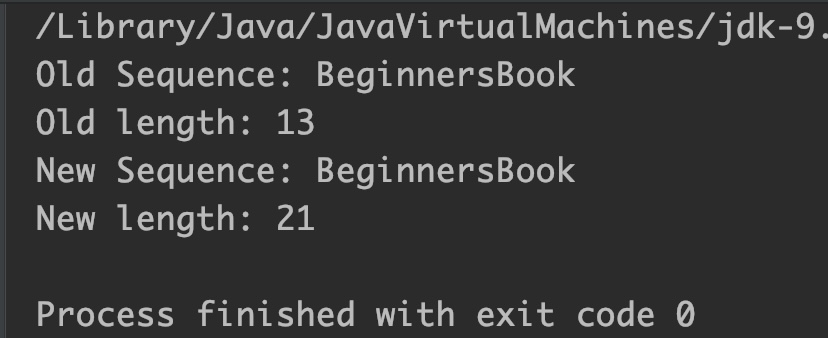
Example 2: If new length is greater than existing length
public class JavaExample {
  public static void main(String[] args) {
    StringBuffer sb = new StringBuffer("BeginnersBook");
    System.out.println("Old Sequence: "+sb);
    System.out.println("Old length: "+sb.length());

    //Set new length for this char sequence
    sb.setLength(21);

    // 8 null characters are appended at the end
    System.out.println("New Sequence: "+sb);
    System.out.println("New length: "+sb.length());
  }
}
Output:
Example 3: If specified length is negative
public class JavaExample {
  public static void main(String[] args) {
    StringBuffer sb = new StringBuffer("Hello");
    //New length is negative
    sb.setLength(-2);
    System.out.println("New String: "+sb);
    System.out.println("New length: "+sb.length());
  }
}
Output:

