
In this article we will see how you can create and write into CSV file by using Java programming language.
Java Program to Create and Write into CSV File
As per problem statement first we have to create an CSV file and then we have to write data into the file. We will do it without using any third party dependencies. Before jumping into the program let’s know what is CSV file first.
CSV file:
Comma Separated Value in short CSV, it is a file in which information is separated by commas. It can be represented in tabular format as well where each line refers to a data record.
Let’s see the program to understand it clearly.
Approach:
- Create a String 2D array and along with elements(values).
- Create object of
Fileclass and pass the CSV file name as parameter. - Create an object of
FileWriter class and pass the File class object as parameter. - Then write data into file as comma-separated values in each line by using
forloop. - Check the file has been created in the respective path and open it, you will see the data in it.
Program:
package btechgeeks;

import java.io.File;
import java.io.FileWriter;
import java.io.IOException;

public class Main
{
    //Main method
    public static void main(String[] args) throws IOException
    {
    	//try block
    	try
    	{
    	//declared a String 2D array and its values
        String[][] users = {
                {"NAME", "AGE", "GENDER", "CITY"},
                {"Satya", "22", "MALE", "Bhubaneswar"},
                {"Rakesh", "26", "MALE", "Chennai"},
                {"Preeti", "21", "FEMALE", "Bokaro"},
                {"Saurav", "25", "MALE", "Noida"},
                {"Richa", "24", "FEMALE", "Bangalore"}
        };

        //Create object of File class and pass the CSV file name as parameter
        File csvFile = new File("StudentDetails.csv");
        //Create an object of FileWriter class and pass the File class object as parameter
        FileWriter fileWriter = new FileWriter(csvFile);

        //Writing data into file
        for (String[] details : users)
        {
            StringBuilder sb= new StringBuilder();
            for (int i = 0; i < details.length; i++)
            {
                sb.append(details[i]);
                if (i != details.length - 1)
                {
                    sb.append(',');
                }
            }
            sb.append("\n");
            fileWriter.write(sb.toString());
        }
        //close the FileWriter class object
        fileWriter.close();
        System.out.println("CSV file created and data written into it successfully");
    	}
    	catch(Exception e)
    	{
    		System.out.println("Exception occured "+ e);
    	}
    }
}
Output:
In Console:
CSV file created and data written into it successfully
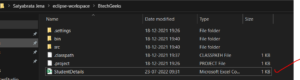
In File Explorer:
Created CSV file i.e. StudentDetails.csv
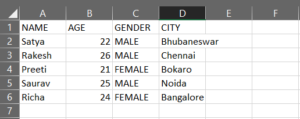
File Opened in Excel
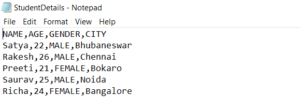
File Opened in Notepad
Have you mastered basic programming topics of java and looking forward to mastering advanced topics in a java programming language? Go with these ultimate Advanced java programs examples with output & achieve your goal in improving java coding skills.
