
 Lessons: 18Length: 2.3 hours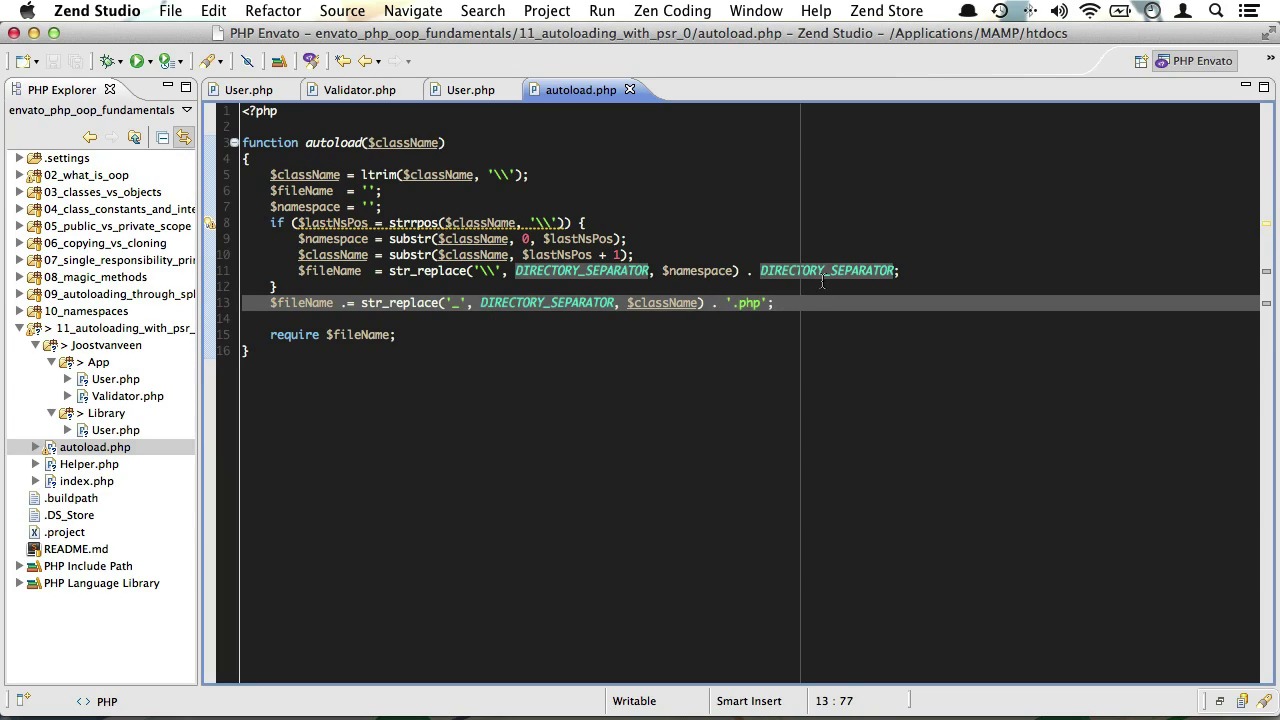
- Overview
- Transcript
3.5 Autoloading With PSR-0
In a way, PSR is a set of standards about code structure and formatting. The very first standard, PSR–0 is an autoloading standard. In this video, I’ll help you create automatic autoloading using PSR–0.
1.Welcome
1.1Welcome01:07
2.The Absolute Basics of OOP
2.1What Is OOP?04:40
2.2Classes vs Objects05:42
2.3Class Constants and Internal Reference04:19
2.4Public vs Private Scope06:05
2.5Copying vs Cloning Objects02:07
3.Digging a Little Deeper Into OOP
3.1The Single Responsibility Principle15:18
3.2Magic Methods11:16
3.3Autoloading Through SPL03:37
3.4Working With Namespaces05:14
3.5Autoloading With PSR-008:27
4.OOP inheritance
4.1Class Inheritance And Protected Scope09:22
4.2Overriding Parent Methods02:40
5.OOP Abstractions
5.1Abstract Classes05:59
5.2Interfaces14:53
5.3Static Properties And Methods06:49
5.4Traits14:44
5.5Dependency Injection17:40
3.5 Autoloading With PSR-0
Hello and welcome to PHP OOP fundamentals. Now, in the previous video we took a look at namespacing, and I promised you I'd restore our auto-loader, and it's time to keep that promise. And we'll learn some more stuff about namespacing along the way. And this is also where PSR0 comes into play. PSR what? PSR0. PSR stands for Proposed Standards Recommendation. PSR is a set of standards about code structures and formatting. You could say it's aim is to ensure better interoperability between frameworks and other software. Now the very first standard PSR0 is an auto-loading standard, its been widely adapted and its also the standard the composer uses for auto-loaning. Now PSR0 uses name spaces. It requires each namespace to have a top level namespace which should be the vendor name and then each namespace can have as many sub-namespaces as it wishes. So, in my case, I could have something like Joostvanveen\app\auth. Now, in this standard, namespace separators, so that would be backslashes, are converted to directory separators. Also, underscores are converted to directory separators. Now, I encourage you to read the entire specification, but for now, the most important thing to know is that all these name spaces, they translate to the actual folder structure for your app. So let's set up that structure right now. First of all, I'll need to create a new folder. And let's just call that Joostvanveen. That will be our vendor name. Then we'll take our app folder and our library and we'll just drag them inside of that. Now, all I want inside of those name space folders are classes. So, I'll just take the Helper file out. And just move that to the root of our application. Now by this time our application will have broken completely. But not to worry, we'll soon fix that. Okay the next thing I have to do is open up all classes, one by one, and add namespaces. So at the very top of the class I'll just add namespace here, then followed by our vendor name, which is Joostvanveen, followed by the folder we're in, which is App. I'll just close this out with a semicolon, and do the same for the validator class, right? So we'll have namespace Joostvanveen\App. Now we need to open up the user class in the library folder as well because we need to change this namespace. That should be Joostvanveen library. You see, that's because the subfolder is called library as well. Now our helper file doesn't contain an auto-loader anymore. We have removed that in the last video. So we'll just create a new one. Let's just give it its own file and call it autoload, which is, well, an appropriate name. Now, inside, we need to setup an auto loader. And as a matter of fact, I saw one on the GitHub page that has the PSR0 specification. So let's just grab that. Make sure you know where it is. It's on www.github.com/php-fig. Let's just scroll down to the bottom and there it is. I'll just copy this and bring it into my autoload file, like so. Let's just see what this does. It's pretty simple, really. Like our first autoload, it will take the class name as a parameter. Now this will include the entire namespace. So, that could be something like Joostvanveen\app\user. Then you will take that class name and remove and preceding back slashes, it does that in the first line. Secondly, it splits that string up into segments. Now the first segments will be the namespace, so that would be yo something, backslash app. And the class name will contain the actual user class name, so that would be User, for instance. Once it has that, it will construct a file to require. It will replace all the backslashes with a directory separator, and it will also replace all the underscores with a directory separator. And then last but not least, it will append it with a .php extension. So if we instantiate a new Joostvanveen app user class, then it will just remove that first backslash and replace these backslashes with forward slashes because I'm on a Mac, so my directory separator is a forward slash. And then we'll just append php. And then it will try and load this file here. Pretty straightforward, just like I told you. Okay, and then of course, we still need to register that autoload function, so let's do SPL, autoload register autoload. And then we'll just close that out with a semicolon. Okay, so we have all our namespaces in place. We have our autoloader in place. But we're still calling the wrong classes here. See, for instance, on line 14, we're calling a new validator class, while instead we should be calling a new Joostvanveen slash app slash validator class. And the same goes for our user class. That should be Joostvanveen app user. And even our library user class should be proceeded with Joostvanveen\ like so. And it would be helpful if I spelled that correctly of course. And now that we're calling all the right classes, all we need to do is require the autoload file at the top of index.php and then at the top of our autoload file, we would need to require Helper.php, like so. Now if we haven't made any mistakes, our app should be working again just fine. And, yes it does. You see we have an object Joostvanveen\App\User, and here at the bottom we have an object, Joostvanveen\Library\User. So that seems to be working just fine. Now let's conduct a little experiment, shall we? What if I wanted to call a validator class from inside of my JoostvanveenLibraryUser class? Well apart from that being a bit weird, that would also pose a bit of a problem. You see, if I try and dump our validator class here, see what kind of error we get. We'll just do new Joostvanveen\App\Validator, and we'll check that in a browser. And you'll see what it's trying to do. It's trying to require a JoostvanveenLibrary, Joostvanveen/App/Validator file, and that doesn't exist, of course. And that's because it searches relative to the name space it is currently in, which is JoostvanveenLibrary. Now there are three possible solutions for this. The first is to call the class using its full namespace. But preceded by a back slash. Now this back slash tells php it should look relative to the global name space. And this should solve our error, and it does. Now the second solution is to create a use statement right under the name space. You just do use and then Joostvanveen/App/ Validator, this acts like a sort of require statement at the top here, and I can just remove this entirely. And if I call a new validator here, PHP will know I'm actually trying to load Joostvanveen/App/Validator. You see? That works like a charm. Now a couple of things about use statements. You can either create multiple use statements on multiple lines, or you can also put them on a single line separated by a comma, like so. Now, the third solution is to create an alias for our statement. So for instance, if I did something like use Joostvanveen/Validator S and SuperValidator. And then I can just dump a new SuperValidator here.. You see and that was still load the Joostvanveen/App/Validator class. Now this particularly handy if the class I'm trying to call has the same name as our class here. So for instance, say I would try to load the Joostvanveen/App/User here and var_dump a new user and PHP would get confused of course. It wouldn't know whether to use this class or this class. But then, if I alias it, I can just call that alias. And that will work just fine. You see here, we're instanciating Joostvanveen\App\User from within Joostvanveen\Library\User. Well, that's all for PSR-0 auto loading. The next lesson in this course will be about object inheritance. I'll see you there.


