
In our big guide on how to use ApplicationSets for Argo CD applications, we explained the best practice of having a 3-level structure for all manifests with a clear distinction between Argo CD Application files and Kubernetes resource files.
In that article, we also outlined several anti-patterns that we have seen in the wild, meaning questionable practices that might seem ok at first glance but are problematic in the long run both for developers and for Argo CD operators.
In this guide we want to expand “Antipattern 2 – Working at the wrong abstraction level” and focus on the targetRevision field of the Argo CD application manifest.
apiVersion: argoproj.io/v1alpha1
kind: Application
metadata:
  ## DONT DO THIS
  name: my-ever-changing-app
  namespace: argocd
spec:
  project: default
  source:
    repoURL: https://github.com/example-org/example-repo.git
    targetRevision: dev
    ## earlier it was "targetRevision: staging" and before that it was "targetRevision: 1.0.0",
    ## and even earlier it was "targetRevision: 1.0.0-rc"
    path: my-staging-app
    ## Previously it was "path: my-qa-app"
  destination:
    server: https://kubernetes.default.svc
    namespace: my-app
Using the targetRevision field as a poor-man’s promotion mechanism is a big trap that impacts both usability and auditability for your Argo CD applications.
How the targetRevision field works
The targetRevision field is part of the Application specification, which is the central Argo CD construct for deploying your GitOps applications.
An Argo CD application describes a link between a Git repository and a Kubernetes cluster. At its most basic form you point Argo CD to the HEAD of a Git repository that contains all your Kubernetes manifests. For convenience, the targetRevision field allows you to define other values apart from HEAD and even select specific Helm versions if you point Argo CD to a Helm chart instead of a Git repository.
You can see all the possible options for tracking strategies at the official documentation page.
Our recommendation is to have “targetRevision: HEAD” in all your application sets and very sparingly use “targetRevision: v1.2.3” for Helm charts that define infrastructure applications that remain mostly static (unlike applications created by developers).
Here is a list of all the possible options and our recommendation:
| Application Target | Value | Recommended |
|---|---|---|
| Folder in Git | targetRevision: HEAD | Yes |
| Helm chart stored in Git | targetRevision: HEAD | Yes |
| Branch/environment name | targetRevision: dev | No |
| Semantic version (Git tag) | targetRevision: 3.4.* | No |
| Semantic version (Helm chart) | targetRevision: 3.4.* | No |
| Git hash of a commit | targetRevision: 8aefce | No |
| Git tag | targetRevision: v2.4 | Only in special cases |
| Helm Chart in Helm repository | targetRevision: v2.4 | Only for Infra charts |
As always, our recommendation is for production usage of Argo CD in large organizations. On a small scale (e.g. homelabs) or with a small team you can obviously get away with any approach you choose.
The main problem we see with several teams is abusing the target revision field as a promotion mechanism for developer applications. We will explain the shortcomings of this approach and the advantages of our recommendation.
Recommendation: Setting TargetRevision to Git HEAD
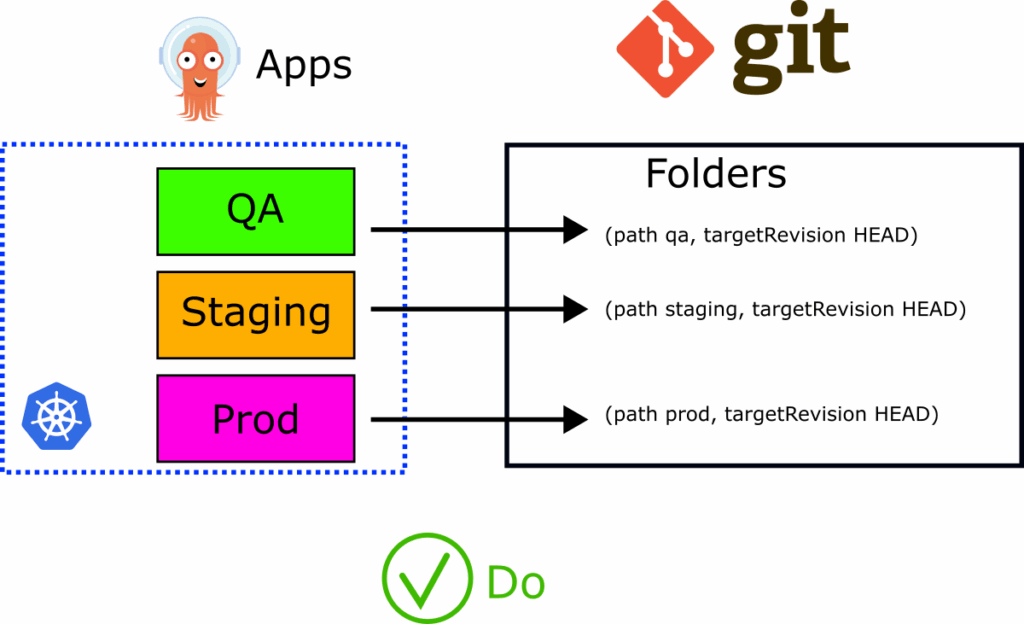
Before exploring all the alternative options let’s set the baseline and see why our recommendation of using the default HEAD value is the proper one. This scenario is where environments are based on Helm values and Kustomize overlays (or Git folders).
We will compare the following aspects of each approach:
- Direct changes to code and simplifying day-to-day operations
- Helping developers understand how and when an application is deployed
- Enable easy auditing (one of the main benefits of GitOps)
- Addressing break-glass scenarios and urgent production hotfixes
Setting the value to HEAD and instructing Argo CD to look at the latest version of the manifests/charts/overlays contained in that folder is the most direct and most straightforward approach for developers. It makes any deployment a single step. A developer can update the Kubernetes files and immediately see the change in any affected environment.

The same is true for hotfixes or rollbacks. Developers can change the status of an environment with the familiar git revert and git reset commands.
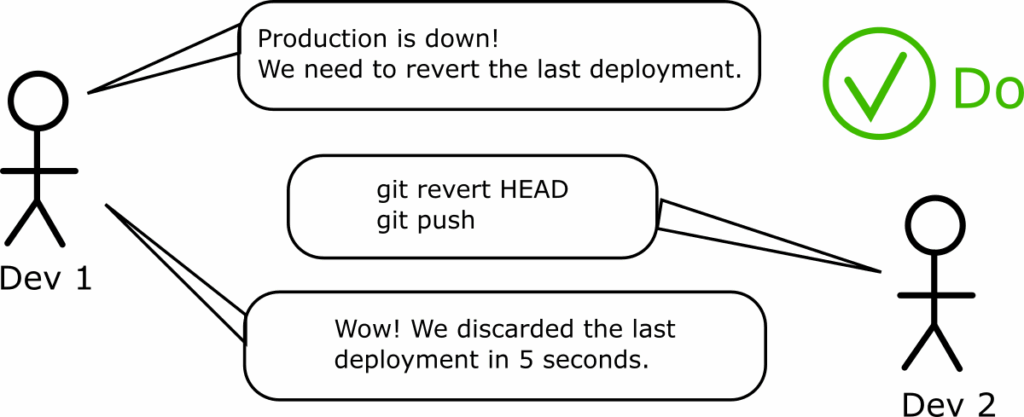
In fact this is the only setup where developers don’t need to know what Argo CD does at all. We have already explained that developers don’t really care about Argo CD manifests, and keeping them happy by allowing deployments without tampering with Argo CD manifests is the optimal process for them.
Auditing is also as simple as possible. Since Argo CD continuously tracks what is committed in the Git repository of the Kubernetes resources, the deployment history is the SAME as Git history.

The advantages of using Git history as deployment history cannot be overstated. In a large organization and with large numbers of environments, when something breaks the first questions everybody asks are always the same:
- What did we change in this environment?
- When did the change happen and who did it?
- What was the previous version that worked correctly?
Answering these questions quickly is a considerable advantage, especially during an active incident when timing is critical.
In summary, using HEAD for targetRevision is the solution that is fully GitOps compliant (as far as auditing is concerned), easy for developers to use, and flexible enough to cover any possible edge case scenarios and urgent hotfixes.
Let’s compare it with the additional tracking options that Argo CD offers.
Avoid using environment names for targetRevision
The first approach that we can dismiss right away is using branch names for environments (dev, qa, staging, prod etc).
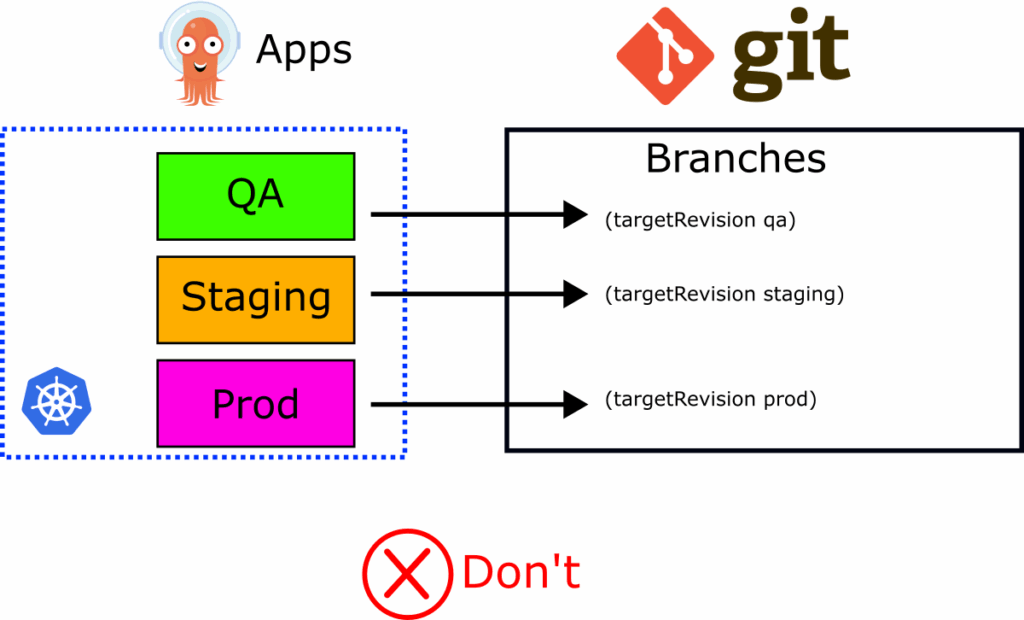
This is the practice where teams either point specific Argo CD applications to long-running Git branches or they use the targetRevision field to “mimic” promotion in the following way:
- An application is first pointed to the “dev” branch of the manifests using targetRevision
- Then the Application manifest is updated to point to the “qa” branch of manifests
- Then, finally, the targetRevision field is set to “staging” or whichever branch is the one before production.
- The cycle starts again
First, if you use the targetRevision field for long-running static branches, you have bigger problems than environment promotions. We have written a complete guide with all the details about the problems with the branch-per-environment approach.
The biggest problem with this approach, however, is that it completely misses all the benefits of auditing that come from GitOps.
If you constantly update the targetRevision field to different branch names it is tough (if not impossible) to reason about the history of your deployments.
In our baseline scenario of using HEAD, if you want to find what was running in a specific application last Thursday, you can go to your Git history and see which commit was active on the respective Git repository. This is a single-step process that anyone can complete in less than a minute.
If you use branch names in the targetRevision field, looking at history now becomes a multi-step process:
- First, you need to go to the Git repository that holds the application manifest and find the git commit that was done last Thursday
- Read the application file and see which branch was inserted in the targetRevision (let’s say it was “dev”).
- Then you need to go to the Git repository of the Kubernetes manifests and the dev branch, and see what was committed last Thursday
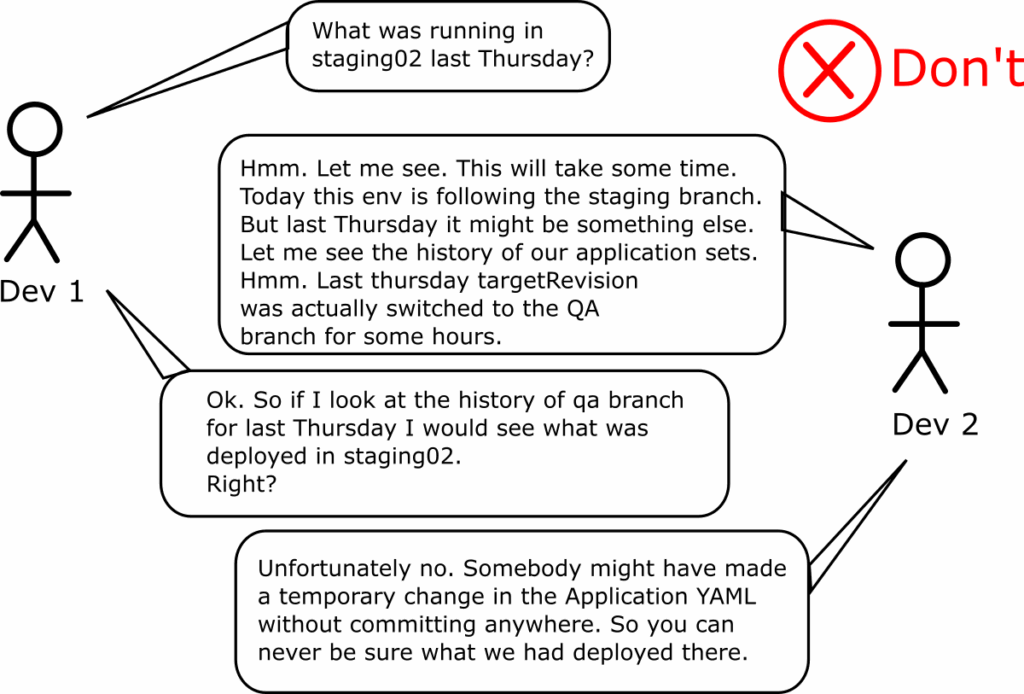
This process is more complex and prone to errors, as you manually need to correlate different git repos and commits for different functionalities (application manifests vs. Kubernetes manifests). Humans should not have to do this under pressure at 3 a.m. (when an incident often happens).
Auditing deployments becomes even more chaotic if you use Application Sets. First, you would have to checkout the Git repos (with the correct revisions) and use the argocd cli to recreate how your application set looked last Thursday before you actually reach the appropriate Kubernetes resources that existed in the cluster.
What completely breaks down this process is all the “temporary fixes” that developers will make if you allow them. A widespread pattern we see is the temporary change of the targetRevision field to another branch “just for testing purposes.”
For example, a team that deploys typically its QA environment from the “qa” branch will often point the ArgoCD application to the “staging” branch to debug an issue that occurred in staging using the resources from the QA branch.
Or, several times, teams create ad-hoc preview environments by pointing different environments to feature branches from individual developers. This is even worse as developer branches can be removed at any time.
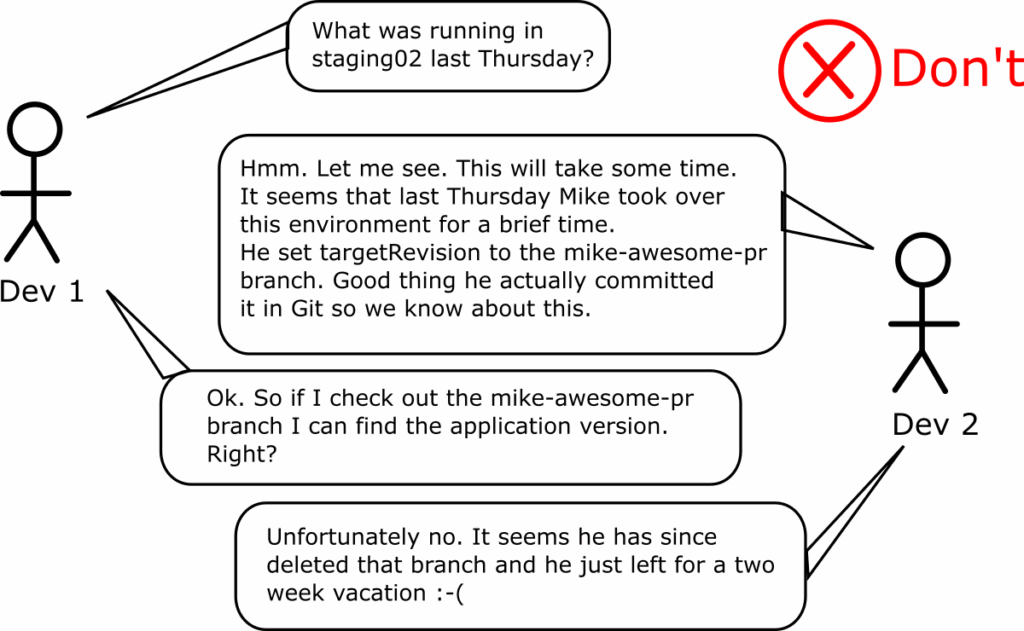
In summary, using branch names for the targetRevision field is a very complex process that presents many issues regarding auditing and deployment history. If you work in an organization that has specific financial and legal requirements, you will spend a lot of time trying to keep the auditors happy and manually reconstructing what and where was deployed in the past.
Avoid using semantic ranges in targetRevision
The targetRevision field can also work with version ranges for both Git tags and Helm versions. This sounds great in theory. You enter a value like 3.4.x and then Argo CD will automatically deploy 3.4.0, 3.4.1, 3.4.2 and so on.
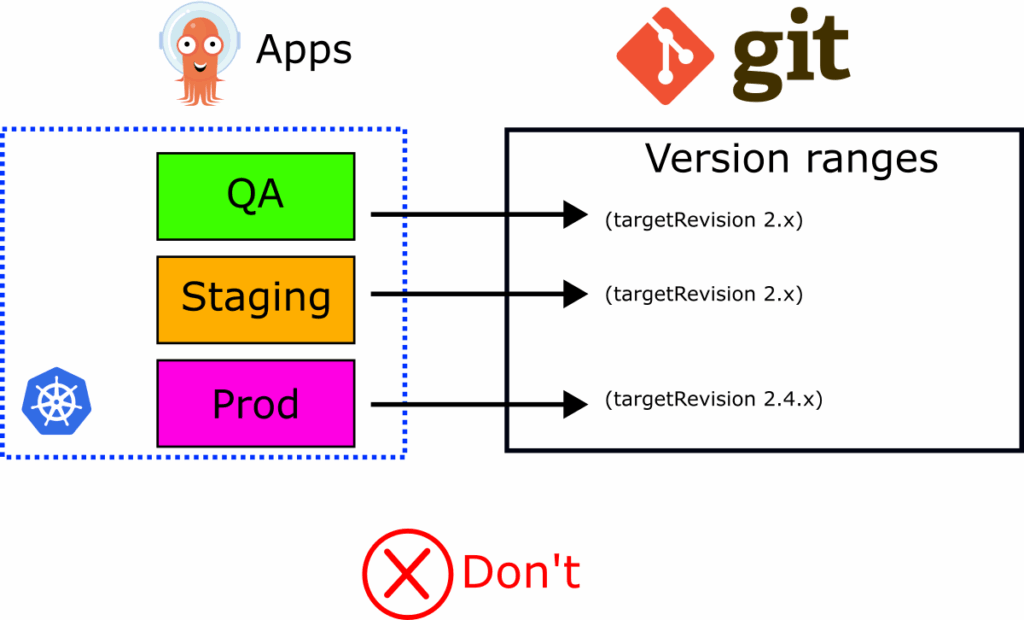
You think you have solved the promotion problem with Argo CD but in reality you just introduced two major issues that are especially important to developers.
The first problem is that you have now missed all of GitOps’s auditing capabilities. If you use this pattern, you don’t really have a deployment history in the Git repository with the Argo CD manifests.
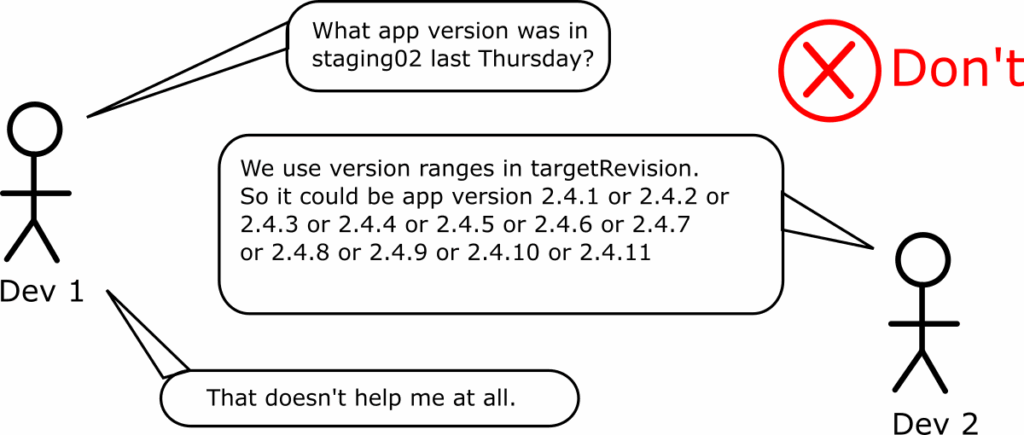
If somebody asks what you had deployed in a past moment, you cannot see this information in the Git repository anymore. You need to correlate information between versions from your artifact manager that holds Helm charts or locate the dates where each Git tag was created. This is a cumbersome process and again it is not something that you want to do during an incident.
If your organization has strict legal requirements, using version ranges in targetRevisions will complicate auditing on a magnitude of order.
But the biggest problem is that you can no longer roll back to a previous version. As Argo CD honors semantic version rules, it will only deploy newer versions of an application. This becomes a big problem when critical issues are found in production.
- You have 3.4.x as a value in targetRevision
- Version 3.4.2 is deployed right now in production
- You create a new Git tag with version 3.4.3
- Argo CD deploys it and it has a critical issue
- You cannot really go back to 3.4.2 anymore in an automated way
You would have to manually edit the application file and change the targetRevision to 3.4.2 yourself. Then, remember to switch it back to 3.4.x when the issue with 3.4.3 is fixed and 3.4.4 is released.
With this requirement you just forced 2 extra commits that humans have to do during incidents (where you usually want to avoid manual steps).
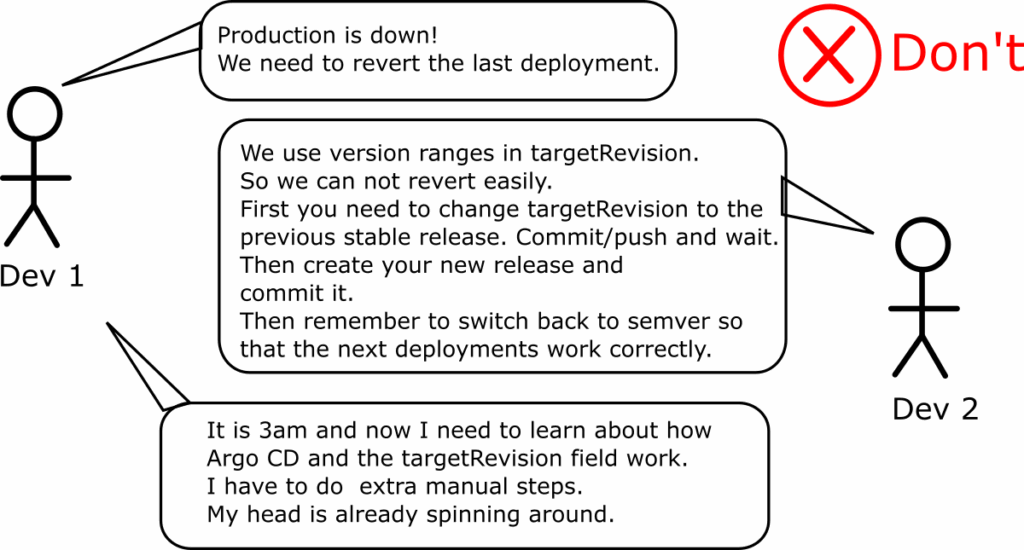
This process also leaves room for human error. People might forget to switch the targetRevision field back to semantic versioning and wonder why new releases are not getting deployed anymore.
In summary, while version ranges look like an easy way to gain “free promotions”, the problems they create are more impactful than their benefits. The same issues apply if you use semantic versioning for Helm charts.
Avoid using Git hashes in targetRevision
This is the case when an organization wants the “safest” process possible and forces all environments to point to a specific Git hash.

This is a truly locked system, as Argo CD will not deploy anything new anymore. We see this pattern often in financial companies and other companies that want to restrict developers to the greatest extent.
First of all, let’s clarify the perceived “safety” of this approach. As the Argo CD documentation clearly states, even if you set up an Argo CD application with a specific Git Hash, parameter overrides will still take effect. We don’t recommend using parameter overrides, but this means that a person can still affect this application configuration (either by mistake or on purpose).
So don’t assume that using a specific hash in the targetRevision field is a bulletproof method for “securing” your Argo CD applications.
On the other hand, you have ruined the developer experience for all your teams. Nothing gets deployed unless somebody also changes the targetRevision. Developer self-service is not possible at all. Every time developers create a new release, another human or system must update the targetRevision field.
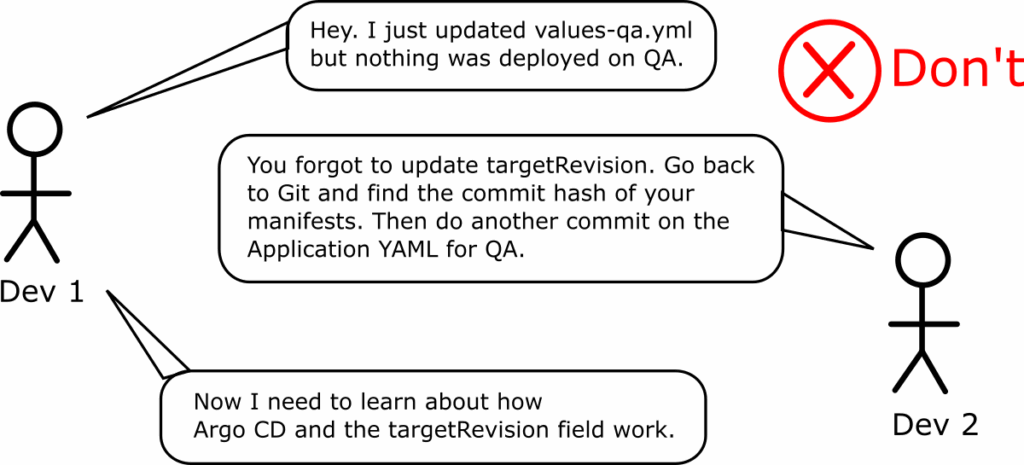
The experience is even worse during incidents. We already know that developers don’t care about Git hashes, so understanding what is deployed where becomes a lengthy and error-prone process. Rolling back is also super difficult as the only way to do it is by switching the targetRevision.
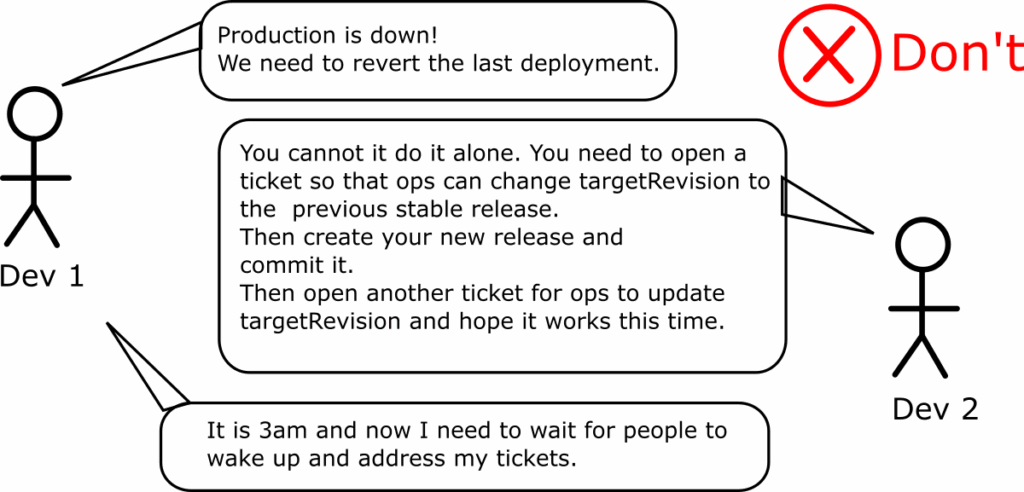
Git hashes are immutable. This means that it is impossible for an external system (e.g. CI) to make any changes to your manifests or understand what needs to be deployed next. Instead, the external system (or human) must always work in 2 steps:
- First, somebody needs to commit the new version of the manifests with application updates (i.e. bumping the container image)
- Then you also need to obtain the new Git Hash to put into targetRevision and do a separate commit
It is impossible to do both tasks in a single step as the Git hash from the first action is needed in the second one.
If you assign this responsibility to humans, you just introduced manual steps into your deployment process. If you use an external system, you just added complexity for the sake of complexity.
In summary, using Git hashes in the targetRevision field goes against all DevOps principles and significantly slows down deployments. Using this approach in non-production environments is always a sign that the organization doesn’t really trust its own developer teams.
Use (if needed) Git tags in targetRevision
The last choice for the targetRevision field is to use numbered Git Tags.
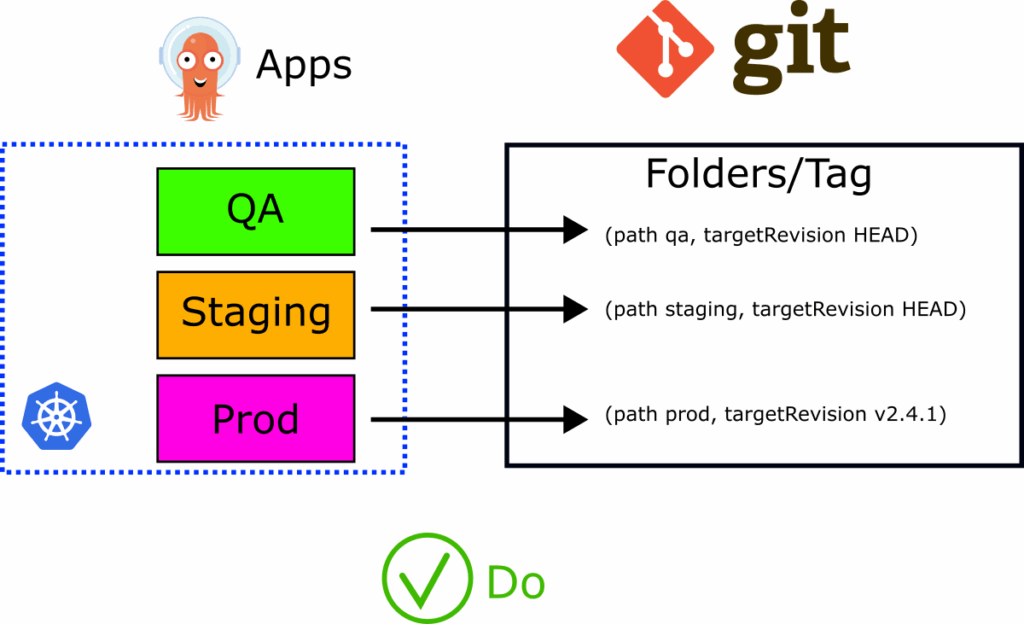
This is an acceptable practice, but we recommend it only for locking down production environments. It is better than using plain hashes, as with Git versions, developers can understand where each version is deployed. However, it still suffers from all the issues mentioned in the previous section. Developers cannot deploy or rollback on their own, and extra effort is required during incidents. Like Git hashes, Git tags are considered immutable, meaning you need special care to update them when a new release occurs.
Using Git versions as the target revision in production environments is a good practice if you want to fully control what goes into production. But don’t use this technique for non-production environments. Even if your organization is under legal restrictions, there is no point in making the lives of developers (especially for their QA/staging/dev environments) difficult.
Therefore, our recommendation is:
- Use a specific Git Tag in the targetRevision field ONLY in production environments
- Use the simple HEAD tracking method in every other environment.
This gives you the best of both worlds. Developers can deploy fast in non-production environments and can change versions at will. But when it comes to production, they need a human (or external system) to actually update the targetRevision field to a new version.
Note, however, that Git tags can be deleted and recreated with different contents. So, unless you set proper permissions in your Git repository, using a specific Git tag does not guarantee that your environment is locked down. If the same tag gets associated with a different Git hash, Argo CD will happily redeploy the application.
Use specific chart versions for Infrastructure charts
The targetRevision field can also accept specific versions for Helm charts. This is a good pattern to follow but only for infrastructure Helm charts (coreDNS, sealed-secrets, prometheus etc.). Basically you should pin your Helm charts only if all the following apply:
- The chart is stored in a Helm repository (and not in Git)
- The chart represents off-the-shelf software and not something your developers create
- You never “promote” these charts from one environment to another. They just represent infrastructure applications.
If you use Helm charts for your own applications (the ones your developers create) then follow the advice of the first section of this guide. Put them in Git and use HEAD in the targetRevision field. This will give you all the benefits of easy updating, history as auditing, and following the GitOps principles.
It is worth mentioning that Helm versions are mutable by default. Unless your artifact manager has specific support for this, a developer can push a different Helm chart with the same version and override the contents of the previous one. So even if you set targetRevision for a Helm chart to version 2.3.4 it doesn’t mean that it has the same contents of chart 2.3.4 as it was last week unless you configure Helm chart versions as immutable. Some developers prefer to bump only appVersion without also bumping the chart version if they have never changed anything in the chart itself.
Summary
We have now seen all the choices for the targetRevision field and examined the advantages and disadvantages.
The HEAD tracking method is the simplest, most direct, and flexible for developers. It makes incident response as painless as possible, as rolling back can be performed by anyone with simple Git commands. It also allows developers to self-serve their needs. It makes auditing straightforward. We recommend using HEAD as the value in the targetRevision field whenever possible.
For production environments, we understand if you are using a specific Git tag/version. However, employ this approach sparingly and only for systems where you want to “restrict” developers. Make sure you understand all the limitations of this approach. Tags are mutable by default, and you have introduced two extra steps in all your deployment processes.
We strongly recommend against using branch/environment names in the targetRevision field. It completely breaks GitOps history and makes auditing a nightmare.
We recommend against using version ranges. Again, you lose all the benefits of GitOps auditing.
We also recommend against using Git hashes. Especially in non-production environments, it slows down your developers.
Happy deployments!
