Essential Syntax in Java: A Guide to Writing Correct Code

Syntax in Java

As a Second-Year CS Student, most probably you are going to face Java Programming Language as one of the most important subjects in your academics. So, if you want to start learning Java Programming with a boom, then knowing “Syntax in Java” is your priority.

As a beginner, you should consider learning Java Syntax to be crucial. The Java Syntax is the main foundation of the Entire Java Subject. So, if you are willing to stand out from other students in the Java Course, you should pay more attention to this basic part.

In this article, we will first talk about Java Syntax and its Historical Evolution. Later, all necessary components of Java syntax will be disclosed with Java Code. So, let us start our discussion. 

Summary Or Key Highlights: 

  • Java Syntax is a set of rules that should be followed when writing any Java program.
  • If the Java Syntax is not followed, there will be a Syntax Error in the program.
  • Operators, Loops, Methods, and Classes are some of the components which syntax should be known.
  • In terms of Case Sensitivity, Typing Category, Semicolon Presence, etc. we will find differences between Java and Other Popular Programming Languages.
  • While working with Java Code, you should consider some Best Practices to avoid common mistakes.

What Is The Java Syntax? Read Below

Each Programming Language has certain Writing Rules. The code written followed by such rules is only understandable by the Compilers. So, if you want to execute any code, you should follow the Syntax. This goes the same for the Java Programming Language as well.

Java Syntax is the Rule Set that is Followed While Writing any Java Program. If these rules are followed, then only any Java Program will be Compiled and the Code Output will come in front of us. That is the reason why following Java Syntax is very important.

Historical Evolution Of Syntax In Java:

  • 1990s: Java 1.0 was introduced with an Object-Oriented Syntax that focuses on Simplicity and Portability. Later, Java 2 added the Syntax for Swing and Collections
  • 2000s: The Generics, Annotations, and Enhanced Loops were introduced with Java 5. But Java 6 only has the focus on Scripting Syntax and Performance Enhancing.
  • 2010s: Try-With-Resources, Lambdas and Streams, and Module Systems were all introduced in this decade by Java 7, Java 8, and Java 9, respectively.
  • 2020s: Pattern Matching System and Record Technique are developed that make the Java Syntax more Concise and Easy to Express.

What Are Some Java Basic Syntax Rules?

Now, before we move ahead to the Detailed Java Syntax discussion with proper Java Codes, we have to learn about Basic Java Syntax Rules. When you are going to write any Java Program on your own, you have to remember these rules to execute any code without any Errors.

Let us check the following list to know more about Java Syntax Rules.

  • Case Sensitivity: Java Syntax is Case Sensitive. The Variable “Zap” and Variable “zap” will be treated as Two Separate Variables. So, we have to be very careful.
  • Curly Braces: In Java, Code Blocks are identified with Curly Braces ({}). Whatever we want to write in Java, should be present in between the Opening and Closing Braces.
  • Semicolons: After writing Every Statement in Java, we should put Semicolons (;) there. Without the Semicolon, the Statement will not be considered as the finished one.
  • Comments: In Java, writing comments is the same as in C and C++ Programming Languages. We can do a Single Line Comment with the // Symbol and a Multi-line Comment with the /* Symbol.
  • Keywords: In Java, many words are Reserved, so we can’t use them to declare any Variable or Method. Some of the keywords are Class, Public, Static, etc.
  • String Literals: In Java, String Literals are identified with the help of the Double Quotes (“”). In between the Double Quotes, whatever we write will become the String.

What Is The Key Structure Of Any Java Program?

As we are moving ahead towards Different Components of Java Syntax where we will use different programs to find out Syntax of components, we have to first understand the Key Structure of any Java Program. For that purpose let us check the following Code Snippet.

				
					public class Name { // Entry Point Of The Program
    public static void main(String[] args) { // Main Function
           System.out.println(); // Statement To Print Values
    }
}


This is the Code Snippet that is the Key Java Program Structure. Let us find which part is working and what.

  • public class Name: This is the Main Entry Point of the Java Program. Inside this, we can develop any Constructor, Other Methods, etc. Whatever the Name we will provide here, we have to Save the Java File with the Same Name.
  • public static void main(String[] args): This is the Main Function. Whatever we write inside this Code Block will be executed first. The Java Compiler comes to the Main Function first.
  • System. out.println(): This is the function that helps to Print any Statement or Variable inside the program. Here, a New Line will be created and the output will be printed there.

What Are Different Components Of Java Syntax?

We hope whatever we have discussed till now has become clear to you. Now, we have reached the central theme of the article. Here, we will discuss the Syntax and Writing Process of Different Java Components that are essential to writing your First Java Program.

Here, we will discuss 8 Different Java Components in a detailed way. So, let us start with the Data Types in Java Programming Language.

1. Java Data Types: 

Java Data Types are the most important component with which we can write our Java Programs. In Java, we will find Data Types similar to the Other Programming Languages like C, C++, etc. Some of the Primitive Data Types are Int, Float, Boolean, Double, etc.

If you want to know more about Data Types in Java, you can check the article Java Data Types where we have discussed in a detailed Way.

2. Java Variables:

General Syntax: Datatype VariableName = Value;

Now, with the help of the Java Data Types, we can declare many Variables. Each Variable can Hold Different Values based on the Data Type mentioned. How Java Variables work with Data Types is demonstrated in the following code. So, let us check the code.

				
					Public class Main
{
	public static void main(String[] args) {
		int a = 25; // Integer Variable
                        float b = 50000.5f; // Float Variable
                        double c = 23.25; // Double Variable
                        String d = “Java”; // String Variable
                        char e = ‘J’; // Character Variable
                        System.out.print(“Values: “ + a + “ – " + b + " - " + c + " - " + d + " - " + e);
	}
}


Steps Of The Program:

  • At first, the Basic Structure of the Java Program is implemented.
  • Later, we declared 5 Variables, a, b, c, d, and e. They are the Variables for Integer, Float, Double, String, and Character Respectively.
  • Each Variable holds similar kinds of values. Variable “a” has Integer value, Variable “b” and “c” have Decimal Value, Variable “d” has String Value, and Variable “e” has Character.
  • At last, we are going to print all the variables. We will get the Same Assigned Values separated by the “-” Symbol.

Output:

Output1- Variable

3. Java Operators: 

The Operators help to perform operations between the Variables and Values or sometimes in between Two Variables as well. In Java, we will have different kinds of Operators.

Among them, 3 Operators are the most important and highly used. We are going to start with the Arithmetic Operator first. Later, we will discuss Relational and Assignment Operators.

[> Arithmetic Operators:

General Syntax: Variable1 ArithmeticOperator Variable2;

The Arithmetic Operator helps to perform the Mathematical Operations between Two Variables or Between a Variable and a Value. There are different operators like Addition (+), Subtraction (-), Multiplication (*), Division (/), and Modulus (%). 

Let us check the following code to know more.

				
					Public class Main
{
	public static void main(String[] args) {
		int a = 22, b = 25; // Initial Values
                        System.out.println(“Arithmetic Operators:”);
                        System.out.println(“Addition: “ + (a + b)); // This Will Print Result For a + b
                        System.out.println(“Subtraction: “ + (a – b)); // This Will Print Result For a - b
                        System.out.println(“Multiplication: “ + (a * b)); // This Will Print Result For a * b
                        System.out.println(“Division: “ + (a / b)); // This Will Print Result For a / b
                        System.out.println(“Modulus: “ + (a % b)); // This Will Print Result For a % b
	}
}


Steps Of The Program:

  • At first, in the Basic Java Structure, we have declared Two Integer Variables “a” and “b” with Values 22 and 25.
  • Now, we will Declare Six Print Functions and in the first one, we will write the Statement “Arithmetic Operator”.
  • Now, in the Next 5 Print Functions, we will show Addition, Subtraction, Multiplication, Division, and Modulation respectively using their symbols. This will give us the output.

Output:

Output2- Arithmatic

[> Relational Operators:

General Syntax: Variable1 RelationalOperator Variable2;

In Relational Operator, we will check out the Relation between Two Variables. Here, we will get the Boolean Result either True or False. There are operators like Comparison (= =), Greater Than (>), Less Than (<), Greater Than Equal To (>=), and Less Than Equal To (<=)

Let us check the following code to know more about it.

				
					Public class Main
{
	public static void main(String[] args) {
		int a = 22, b = 25; // Initial Values
                        System.out.println(“Relational Operators:”);
                        System.out.println(“Comparison: “ + (a == b)); //This Will Check Whether a and b Are Same
                        System.out.println(“Greater Than: “ + (a > b)); // This Will Check Whether a is Greater Than b
                        System.out.println(“Less Than:” + (a < b)); // This Will Check Whether a is Less Than b
                        // This Will Check Whether a is Greater Than Or Equal To b
                        System.out.println(“Greater Than Equal To: “ + (a >= b)); 
                        // This Will Check Whether a is Less Than Or Equal To b
                        System.out.println(“Less Than Equal To: “ + (a <= b));
	}
}


Steps Of The Program:

  • Here, we have again taken the Variable “a” and “b” with the Values 22 and 25 respectively.
  • Now, the Comparison Operator will check whether these Two Values are the Same or Not. If they are the Same, then the True Value will come, Else the False Value will come.
  • The Greater Than Operator will check whether the “a>b” Expression is correct or not. Based on that, the True or False Value will come.
  • The Less Than Operator will check the weather “a<b” Expression is correct or not. Based on that, the True or False Value will come.
  • The Greater Than Equal To Operator will check whether the “a>=b” Expression is correct or not. If “a” is Greater Than or Equal To with “b”, then it will be True.
  • Just Opposite the Greater Than Equal To, the Less Than Equal To will evaluate the “a<=b” Expression.

Output:
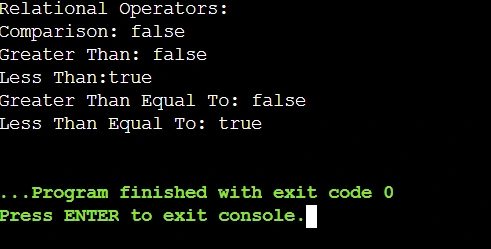
Output3- Relational

[> Assignment Operators:

Now, it is time for the Assignment Operator. You have seen in the Variable Section that a Variable is getting Values using the Equal To (=) Symbol. This Symbol is known as the Assignment Operator in Java Programming Language. It is one of the most important operators.

4. Java Conditional Statements (IF-ELSE): 

In Java, based on Conditions, we can execute some statements as well. This is done with the help of the Conditional Statements or the IF-ELSE Statement. If the Condition present after the IF is True, then the IF Code Block will be executed. Otherwise, the ELSE Code Block will be executed.

5. Java Loops: 

Another Conditional Statement will be the Java Loops. In the Loops, based on the Condition, a certain Code Block will get executed until the End Condition is matched.

In Java, we will find Two Major Loops, For Loop and While Loop. Let us first start with the For Loop in Java, then we will discuss the While Loop with Java Code.

[> For Loop:

General Syntax: for(Declaration; Condition; Updatation)

The For Loop is the compact Loop in the Java Programming. Here, in For Loop Syntax, we have to Declare a Variable, then we have to provide a Condition, and at last, we have to Update the Variable. When the Condition becomes False, the For Loop will be Ended. Until that, the Loop will execute. 

				
					public class Main
{
	public static void main(String[] args) {
		System.out.println("For Loop:");
                        for (int i = 1; i <= 5; i++)  // For Loop Running From Value 1 To Value 5
                        {
                            System.out.println(i + " Value"); // This Will Print Value In Each Iteration
                        }
	}
}


Steps Of The Program:

  • In the Basic Java Structure, we have created a For Loop where Variable Int “i” is declared with Value 1.
  • After that, we have given a Condition as “i<=5”. Also, the Variable “i” will be Increased after Each Iteration as we have written “i++” in Updatation.
  • Now, for each Iteration, the For Loop will Print the Value of “i”. After the Iteration, the Current Value of “i” will be increased by 1 as per the “i++” Updatation.
  • As the Value of “i” is increasing using the Updatation, at any moment the Condition will become False, and then the For Loop will be Ended.

Output:

Output4- For Loop

[> While Loop:

General Syntax: while(Condition)

Now, the While Loop will be moreover same just like the For Loop. But, in the While Loop, we can only declare the Condition. Till the Condition is True, the Code Snippet inside the While Loop will be Executed. We have to Declare the Variable Outside and Update it Inside the While Loop Block.

				
					public class Main
{
	public static void main(String[] args) {
		System.out.println("While Loop:");
                        int j = 1; // J Variable Has The Value 1
                        while (j <= 5) { // While Loop Running From Value 1 To Value 5
                            System.out.println("Value " + j); // This Will Print Value In Each Iteration
                            j++; // The Value Of J Will Increase By 1
        }    
	}
}


Steps Of The Program:

  • In the Basic Java Structure, we have declared a Variable “j” with the Value 1.
  • Now, the While Loop is declared with the Condition “j<=5”.
  • Inside the While Loop, we are printing the Value of “j” in each iteration, and in the end, we are Increasing the Value of “j” using the “j++”. 
  • In this way, at a certain moment, the Condition “j<=5” will become False and the Loop will be ended.

Output:

Output5- While Loop

6. Java Jump Statements: 

In Java, the Program execution goes Line by Line. But, if there is a need to change the Program Execution, then the Jump Statements will be used. In Java, we will have 3 Kinds of Jump Statements Break, Continue, and Return. Using these Jump Statements, we can alter the code execution.

7. Java Methods: 

Another important aspect will be the Java Methods. The Java Methods are nothing but Simple Functions that we used to define in different Other Programming Languages. The Java Methods should be defined Above the public static void main(String[] args) Function to become accessible.

8. Java Class And Object: 

General Syntax Of Class: Class ClassName

General Syntax Of Object: ClassName ObjectVariable = new ClassName();

The last but not the least component will be the Java Class and Object. The Class is the Real-world Entity in Java. The Object is the Instance Variable of the Java Classes. In Java, we can see the intense use of Java Classes and Objects. Let us check the following code to know more about it.

				
					Class Code { // Declaration Of Class
    String c = “Java”;
    void display() { // Function Inside Class
        System.out.println(“The Language Is: “ + c);
    }
}

public class Main {
    public static void main(String[] args) {
        Code obj = new Code(); // Creating Object Of Class
        obj.display(); // Calling The Function With Object
    }
}


Steps Of The Program:

  • At first, a Class “Code” is declared where String “c” has the value “Java”. Also, in that Class, we have declared the Function display() to print that String.
  • Now, in the Main Function, we are creating an Object “obj” of the Class “Code” using the New Keyword.
  • At last, we are calling the display() Function with the help of the Object “obj”.

Output:

Output6- Class

Different Coding Challenges To Practice Java Syntax:

Now, we hope whatever we have discussed till now has become clear to you. So, if you are Confident about the Syntax in Java, then you should not hesitate to Practice some Java Programming Problems.

That is the reason, we have brought an article Java Coding Challenges For Improving Coding Skills By CodingZap where you will find Java Problems of Different Levels.

Comparison Table Between Java And Other Languages’ Syntax:

Now, as we are approaching the end, we will make a Comparison Table between the Syntax of Java and Other Popular Programming Languages. We will make this Comparison Table based on Case Sensitivity, Typing, Semicolon, Main Function Type, Syntax Complexity, and Curly Braces.

Let us have a look at the following table to know more.

Categories

Java Syntax

C Syntax

C++ Syntax

Python Syntax

Case Sensitivity

Yes

Yes

Yes

Yes

Typing Category

Static and Strong

Static and Weak

Static and Strong

Dynamic and Strong

Semicolon Presence

Required

Required

Required

Not Required

Main Function Type

Explicit Type

Explicit Type

Explicit Type

Implicit Type

Syntax Complexity

Moderate

Complex

Complex

Simple

Curly Brace Use

Required

Required

Required

Not Required

What Are Some Best Practices While Working On Java Syntax?

Now, before we conclude our discussion, we would like to talk about some of the Best Practices on Java Syntax. It will be better if you can memorize these tips as these are the tips that will help you to write Java Programs without facing any errors.

  • While writing any Java Program, you should Provide Meaningful Names to Variables, Classes, Methods, etc.
  • You have to use the Indentation Policy properly which will increase the Code Readability.
  • You should avoid Hardcoding Values in the program. Instead, you can ask for the Values from the Users.
  • Whenever you write any Java Program, break it into Smaller and Modular Parts for easy development.
  • After writing the code, you must Execute and Test The Code to find the error and fix it.

Conclusion:

In the end, we can say, it is a necessity to know about the “Syntax in Java” to become an Expert Developer. However, you can master the fundamentals with a Java tutor and pave the way for your career.

We will advise you to clear the Concept of Java Syntax first before directly moving to Java Program Implementations. If the Java Syntax is clear to you, you can easily develop the Logic behind any program because, on the Java Syntax, the entire Java Subject is based.

Takeaways: 

  • The General Syntax of the Variables will be the [Datatype VariableName = Value;].
  • The General Syntax of the Java Operators will be [Variable1 Operator Variable2;].
  • The General Syntax of the For Loop will be [for(Declaration; Condition; Updatation)].
  • The General Syntax of the While Loop will be [while(Condition)].
  • The General Syntax Of the Class will be [Class ClassName].
  • The General Syntax Of the Object will be [ClassName ObjectVariable = new ClassName();].