In this article, we are going to create To Do List in C++ with the help of file handling. By using file handling we can persist the data even when we close the program and re-run it, which means we will be able to view the tasks even when we restart the program.
Features
- The user can add a new task
- Update the existing task
- Delete a task from the list of todo
- View all the tasks
- All the data is preserved as we use file handling
Complete Code for To Do List in C++
We will use Code::Blocks IDE to develop this application. Open the Code::Blocks IDE and create a new project with the name todo, now in the main.cpp file paste the following code and run it.
#include <iostream>
#include <fstream>
#include<string>
#include <cstdlib>

using namespace std;
int ID;
//custom type todo which has two fields id and task
struct todo {
    int id;
    string task;
};

//this method is used to add a new task to the list of tasks
void addtodo() {
    system("cls");
    cout<<"\t\t\t***********************************************************************"<<endl;
	cout<<"\t\t\t                       WELCOME TO Your ToDo List                       "<<endl;
    cout<<"\t\t\t***********************************************************************"<<endl<<endl<<endl;
    todo todo;
    cout << "\n\tEnter new task: ";
    cin.get();
    getline(cin, todo.task); //get user input
    ID++; //increment id for the current task

    //now write this task to the todo.txt file
    ofstream write;
    write.open("todo.txt", ios::app);
    write << "\n" << ID;
    write << "\n" << todo.task ;
    write.close();

    //write the id to a new file so that we can use this id later to add new task
    write.open("id.txt");
    write << ID;
    write.close();

    char ch;
    cout<<"Do you want to add more task? y/n"<<endl;
    cin>> ch;

    //if user wants to add a new task again then call the same function else return
    if(ch == 'y'){
        addtodo();
    }
    else{
        cout << "\n\tTask has been added successfully";
        return;
    }
}

// this method is used to print the task on the screen
void print(todo s) {
    cout << "\n\tID is : " << s.id;
    cout << "\n\tTask is : " << s.task;
}

//This method is used to read data from the todo.txt file and print it on screen
void readData() {
    system("cls");
     cout<<"\t\t\t***********************************************************************"<<endl;
	cout<<"\t\t\t                       WELCOME TO Your ToDo List                       "<<endl;
    cout<<"\t\t\t***********************************************************************"<<endl<<endl<<endl;
    todo todo;
    ifstream read;
    read.open("todo.txt");
    cout << "\n\t------------------Your current Tasks in the list--------------------";
    // while we dont reach the end of file keep on printing the data on screen
    while (!read.eof()) {
        read >> todo.id;
        read.ignore();
        getline(read, todo.task);
        print(todo);
    }
    read.close();
}

//this method is used to search for a specific task from the todo.txt file
int searchData() {
    system("cls");
     cout<<"\t\t\t***********************************************************************"<<endl;
	cout<<"\t\t\t                       WELCOME TO Your ToDo List                       "<<endl;
    cout<<"\t\t\t***********************************************************************"<<endl<<endl<<endl;
    int id;
    cout << "\n\tEnter task id: ";
    cin >> id;
    todo todo;
    ifstream read;
    read.open("todo.txt");
    //while we dont reach end of file keep or searching for the id to match to the user input id
    while (!read.eof()) {
        read >> todo.id;
        read.ignore();
        getline(read, todo.task);
        if (todo.id == id) {
            print(todo);
            return id;
        }
    }
}

// this method is used to delete the task from the todo.txt file
void deleteData() {
    system("cls");
    cout<<"\t\t\t***********************************************************************"<<endl;
	cout<<"\t\t\t                       WELCOME TO Your ToDo List                       "<<endl;
    cout<<"\t\t\t***********************************************************************"<<endl<<endl<<endl;
    int id = searchData();
    cout << "\n\tDo you want to delete this task (y/n) : ";
    char choice;
    cin >> choice;
    if (choice == 'y') {
        todo todo;
        ofstream tempFile;
        tempFile.open("temp.txt");
        ifstream read;
        read.open("todo.txt");
        //while we dont reach the end of file keep on searching for the id to delete the task
        while (!read.eof()) {
            read >> todo.id;
            read.ignore();
            getline(read, todo.task);
            if (todo.id != id) {
                tempFile << "\n" << todo.id;
                tempFile << "\n" << todo.task;
            }
        }
        read.close();
        tempFile.close();
        remove("todo.txt");
        rename("temp.txt", "todo.txt");
        cout << "\n\tTask deleted successfuly";
    }
    else {
        cout << "\n\tRecord not deleted";
    }
}

//this method is used to update the task
//here we create a new temp.txt file and add all the updated data to this file
//once updated we then delete the original todo.txt and then rename this file to todo.txt
void updateData() {
    system("cls");
    cout<<"\t\t\t***********************************************************************"<<endl;
	cout<<"\t\t\t                       WELCOME TO Your ToDo List                       "<<endl;
    cout<<"\t\t\t***********************************************************************"<<endl<<endl<<endl;
    int id = searchData();
    cout << "\n\tYou want to update this task (y/n) : ";
    char choice;
    cin >> choice;
    if (choice == 'y') {
        todo newData;
        cout << "\n\tEnter todo task : ";
        cin.get();
        getline(cin, newData.task);
        todo todo;
        ofstream tempFile;
        tempFile.open("temp.txt");
        ifstream read;
        read.open("todo.txt");
        //while we dont reach end of file keep on searching for the id and once found update with new data
        while (!read.eof()) {
            read >> todo.id;
            read.ignore();
            getline(read, todo.task);
            if (todo.id != id) {
                tempFile << "\n" << todo.id;
                tempFile << "\n" << todo.task;
            }
            else {
                tempFile << "\n"<< todo.id;
                tempFile << "\n"<< newData.task;
            }
        }
        read.close();
        tempFile.close();
        remove("todo.txt");
        rename("temp.txt", "todo.txt");
        cout << "\n\tTask updated successfuly";
    }
    else {
        cout << "\n\tRecord not deleted";
    }
}
int main()
{
    system("cls");
	system("Color E0"); // "Color XY", X - backgroung color, Y - text color
    system("title todoapp @copyassignment");
    cout<<"\t\t\t***********************************************************************"<<endl;
    cout<<"\t\t\t*                                                                     *"<<endl;
	cout<<"\t\t\t*                      WELCOME TO Your ToDo List                      *"<<endl;
	cout<<"\t\t\t*                                                                     *"<<endl;
    cout<<"\t\t\t***********************************************************************"<<endl<<endl<<endl<<endl;
    ifstream read;
    read.open("id.txt");
    if (!read.fail()) {
        read >> ID;
    }
    else {
        ID = 0;
    }
    read.close();

    while (true) {
        cout<<endl<<endl;
        cout << "\n\t1.Add student data";
        cout << "\n\t2.See student data";
        cout << "\n\t3.Search student data";
        cout << "\n\t4.Delete student data";
        cout << "\n\t5.Update student data";

        int choice;
        cout << "\n\tEnter choice : ";
        cin >> choice;
        switch (choice) {
        case 1:
            addtodo();
            break;
        case 2:
            readData();
            break;
        case 3:
            searchData();
            break;
        case 4:
            deleteData();
            break;
        case 5:
            updateData();
            break;
        }
    }

}
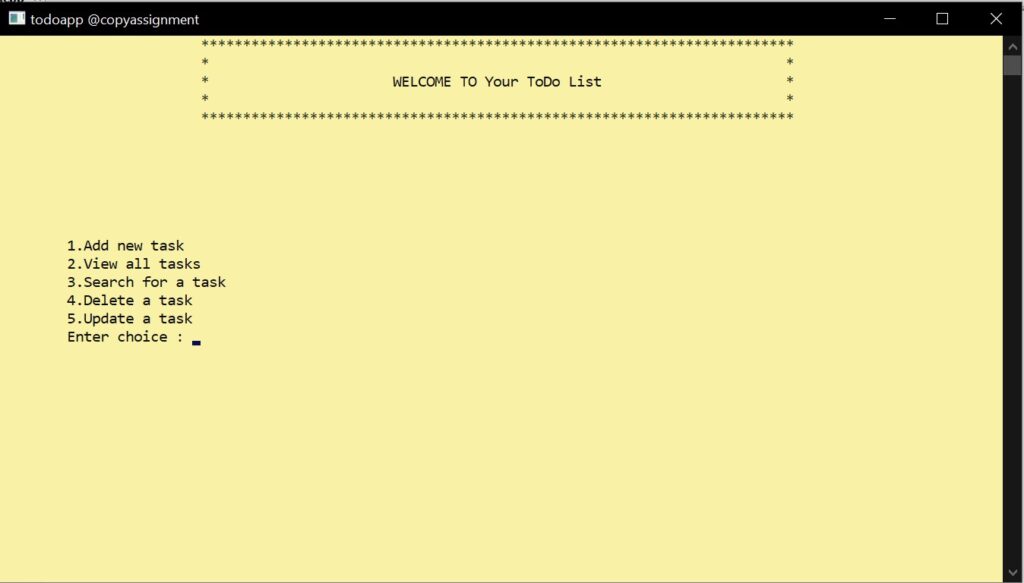
Output for To Do list in C++
Image Output:
Video Output:
Conclusion
In this article, we learned how to build a To Do List in C++ by using file handling. File handling is an important concept in any programming language and you must learn it if you are trying to learn a language. I hope this was easy to follow and you learned something valuable from this article.
Thank you for visiting our website.
Also Read:
- Aam Aadmi vs Corrupt System: How ChatGPT Helped One Guy Expose Govt Fraud, The Story: “Ravi and The Missing Light Pole”
- ChatGPT Asked a person to commit suicide to solve the problem
- Viral Moment: China’s AgiBot X2 Makes History With World’s First Webster Backflip
- Terminator Rising: Albania Hands Power to AI, Echoing a Nightmare of Human Extinction
- What Is Albania’s World-First AI-Generated Minister and How Does It Work?
- Does ChatGPT believe in God? ChatGPT’s Personal Opinion
- ChatGPT vs Human: The Breath-Holding Chat That Ends in “System Failure”
- What Is Vibe Coding? The Future of No-Code Programming and Its Impact on Software Developers
- Struggling to Generate Ghibli-Style AI Images? Here’s the Real Working Tool That Others Won’t Tell You About!
- ChatGPT vs DeepSeek: Who is the winner?
- People are becoming AI Engineer with this free course in 2025: Here is how to join this…
- Apply to Google’s Student Training in Engineering Program (STEP) Intern, 2025
- Self-Driving Car Saves Falling Pedestrian, Showcases Promise of Autonomous Technology
- Instant Karma: Employer Fires Tech Team with AI, Faces Backlash on LinkedIn While Seeking New Developers
- LinkedIn’s COO Reveals the AI Interview Question That Could Land You the Job in 2025
- Elon Musk’s xAI Raises $6 Billion, Valued at $45 Billion
- Google Unveils Veo 2 and Imagen 3: A New Era of AI-Generated Content
- Imagination to Reality, Unlocking the Future: Genesis Physics Engine for 4D Simulation
- Simple Code to compare Speed of Python, Java, and C++?
- Falling Stars Animation on Python.Hub October 2024
- Most Underrated Database Trick | Life-Saving SQL Command
- Python List Methods
- Top 5 Free HTML Resume Templates in 2024 | With Source Code
- How to See Connected Wi-Fi Passwords in Windows?
- 2023 Merry Christmas using Python Turtle
- 23 AI Tools You Won’t Believe are Free
- Write for CopyAssignment.com | Unlock Your Potential: Join CopyAssignment.com as a Blog Writer! 🚀
- Python 3.12.1 is Now Available
- Best Deepfake Apps and Websites You Can Try for Fun
- Amazon launched free Prompt Engineering course: Enroll Now