Summary: in this tutorial, you’ll learn how to create stored procedures in the database and how to execute them in EF Core.
Creating and executing a stored procedure in EF Core
To execute a stored procedure in EF core, you follow these steps:
- First, create a new migration that manages a stored procedure in the database by running the
Add-Migrationcommand in Package Console Manager. In the generated migration class, theUp()method creates a stored procedure while theDown()method drops it. - Second, execute the
Update-Databasecommand to create the stored procedure in the database. - Third, use the
FromSqlRaw()method of theDbSetto execute the stored procedure.
Notice that the result returned by the stored procedure must be materialized into the corresponding entity of the DbSet.
Executing a stored procedure in EF core example
We’ll use the EF Core Sample Project as the starting point. And we’ll use the Employees table from the HR database for the demonstration:

The following stored procedure return employees whose have salaries between a range:
CREATE PROCEDURE GetEmployeeBySalaryRange(
	@MinSalary as decimal,
	@MaxSalary as decimal)
AS
BEGIN
	SELECT * FROM Employees
	WHERE Salary BETWEEN @MinSalary AND @MaxSalary
        ORDER BY Salary DESC;
END
GOCode language: C# (cs)
To execute this stored procedure in EF core:
First, create a new migration from the Package Manager Console by executing the Add-Migration command:
Add-Migration AddGetEmployeeBySalaryRangeSPCode language: C# (cs)Second, modify the AddGetEmployeeBySalaryRangeSP.cs in the Migrations directory as follows:
using Microsoft.EntityFrameworkCore.Migrations;

#nullable disable

namespace HR.Migrations
{
    /// <inheritdoc />
    public partial class AddGetEmployeeBySalaryRangeSP : Migration
    {
        /// <inheritdoc />
        protected override void Up(MigrationBuilder migrationBuilder)
        {
            var command = @"CREATE PROCEDURE GetEmployeeBySalaryRange(
	                        @MinSalary as decimal,
	                        @MaxSalary as decimal)
                        AS
                        BEGIN
	                        SELECT * FROM Employees
	                        WHERE Salary BETWEEN @MinSalary AND @MaxSalary
                                ORDER BY Salary DESC;
                        END
                        GO";

            migrationBuilder.Sql(command);
        }

        /// <inheritdoc />
        protected override void Down(MigrationBuilder migrationBuilder)
        {
            var command = "DROP PROCEDURE GetDepartmentSalary";
            migrationBuilder.Sql(command);
        }
    }
}Code language: C# (cs)
The Up() method uses the Sql() method of the MigrationBuilder object to execute a command that creates the GetEmployeeBySalaryRange() stored procedure.
The Down() method also uses the Sql() method but executes a statement that drops the GetDepartmentSalary stored procedure.
Third, create the GetEmployeeBySalaryRange stored procedure in the database by executing the Update-Database in the Package Manager Console:
Update-DatabaseCode language: C# (cs)If you view stored procedures in the SQL Server, you’ll see the stored procedure has been created successfully as follows:
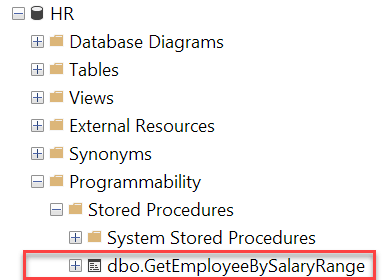
Finally, execute the GetEmployeeBySalaryRange stored procedure from the EF Core to get employees with a salary range of 100,000 and 120,000:
using static System.Console;
using HR;
using Microsoft.EntityFrameworkCore;


using var context = new HRContext();

var minSalary = 100_000;
var maxSalary = 120_000;

var employees = context.Employees
                        .FromSqlRaw("EXECUTE GetEmployeeBySalaryRange {0}, {1}",
                                    minSalary,
                                    maxSalary)
                        .ToList();

foreach (var e in employees)
{
    WriteLine($"{e.FirstName} {e.LastName} - {e.Salary:C0}");
}Code language: C# (cs)
Output:
Isabella Walker - $119,856
Luke Walker - $118,605
Charlotte King - $117,417
Carter Adams - $113,398
Liam Scott - $108,406
Daniel Lewis - $103,561Code language: C# (cs)
Behind the scenes, EF Core executes the stored procedure as shown in the log:
-- [Parameters=[p0='100000', p1='120000'], CommandType='Text', CommandTimeout='30']
EXECUTE GetEmployeeBySalaryRange @p0, @p1Code language: C# (cs)
Summary
- Use migrations to manage stored procedures.
- Use the
FromSqlRaw()method to execute the stored procedure in EF Core.


