
Java Library Management – The Backbone of Any Successful Library
Get Job-ready: Java Course with 45+ Real-time Projects! - Learn Java
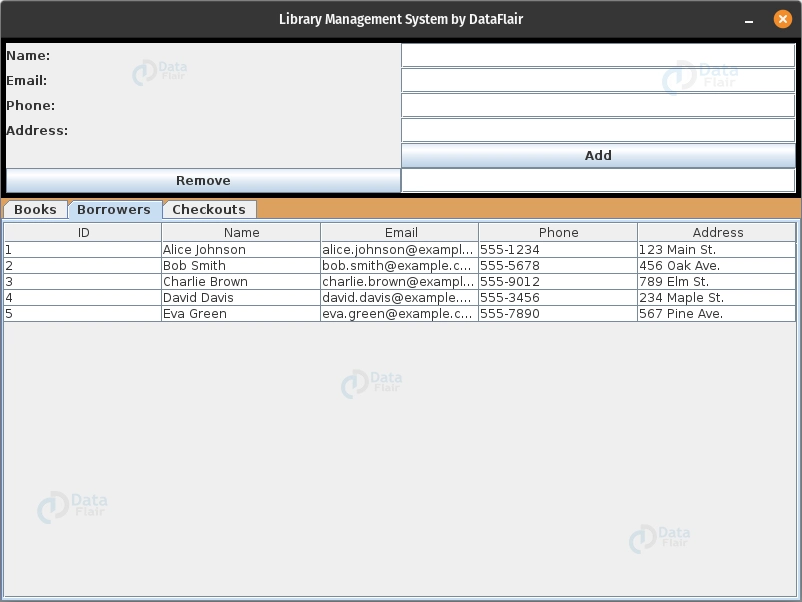
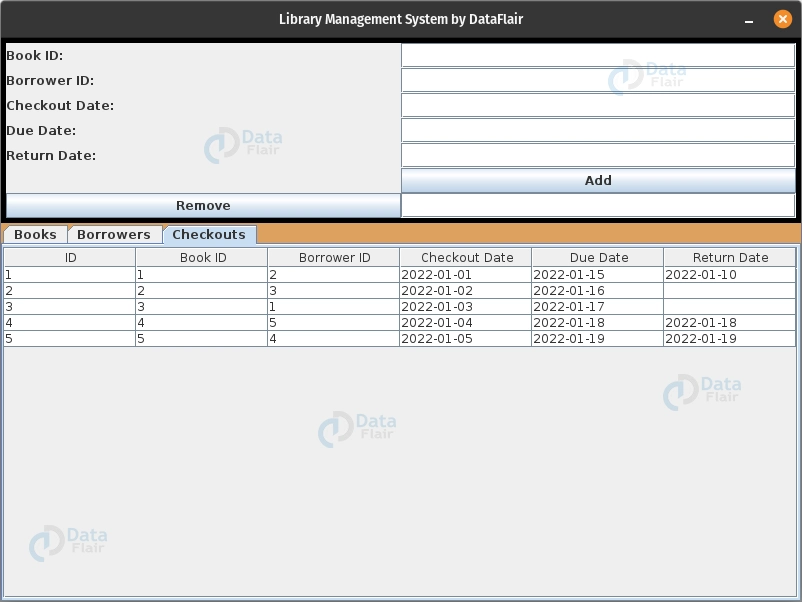
In this project, we will learn how to create a Library Management System using Java programming language and Swing GUI library for the user interface. The system comprises three main tables: Books, Borrowers, and Checkouts.
The system uses SQLite database to store and manage the data. Each table will have an input panel, which allows the user to input and update data.
With this system, users can easily manage and organize the library’s collection, track the borrowing history of books, and manage borrower information.
By the end of this project, you will have a good understanding of how to build a fully functional Library Management System using Java and SQLite databases.
About Java Library Management System
The objective of this project is to guide you through the process of developing a Library Management System using Java and Swing for the user interface. The system will consist of three tables – Books, Borrowers, and Checkouts – and will utilize SQLite as the database management system.
Additionally, the project will cover the creation of input panels for each table to facilitate data entry and manipulation within the system.
Prerequisites for Library Management System using Java
It is necessary to be familiar with Java Swing for developing graphical user interfaces (GUIs) and have knowledge of databases and SQL queries. While any Java integrated development environment (IDE) can be used, Eclipse is recommended, and utilizing the WindowBuilder plugin can simplify GUI development by allowing for drag-and-drop GUI component placement and automatic code generation.
Download Java Library Management System
Please download the source code of Java Library Management System project from the following link: Java Library Management System Project Code
Steps to Create Library Management System using Java
Following are the steps for developing the Java Library Management System Project:
Step 1: Creating the required classes in the project
- Open Eclipse and go to “File” > “New” > “Java Project”.
- Name your project,”Library Management System”.
- Right-click on the project and select “New” > “Class” to create a new class.
- Name the class “LibraryManagement” to represent the main class that will handle the system’s operations.
- Repeat step 3 and 4 to create another class named “Database” which will manage the system’s data storage and retrieval.
Step 2: Adding Sqlite into our project
Note: Before proceeding, ensure you have the SQLite JAR file downloaded and stored in a local location. If not, it can be obtained from MavenRepository
- Go to the Project Explorer in Eclipse.
- Select the project name by right-clicking on it and choose “Properties”.
- In the Properties window, navigate to “Java Build Path” and then click the “Libraries” tab.
- Hit the “Add External JARs” button, and locate the SQLite JAR file.
- Select the JAR file and press “Open”.
- Click “OK” to close the Properties window.
Step 2: Adding Sqlite
(https://mvnrepository.com/artifact/org.xerial/sqlite-jdbc).
- Select the project name by right-clicking on it and choose “Properties”.
- In the Properties window, navigate to “Java Build Path” and then click the “Libraries” tab.
- Click “Add External JARs” button, and select SQLite JAR file.
- Select JAR file and click “Open”.
- Click “OK”.
Step 3: Implementing the Database class
Here’s the complete code for the database class:
Step 3: Creating the Database class
package com.training.dataFlair;
import javax.swing.table.DefaultTableModel;
import java.sql.*;
public class Database {
//		declaring the database path
   private final static String DB_URL = "jdbc:sqlite:library.db";
//	 Method to add the book into the database
   static void addBook(String title, String author, String genre, String publicationDate, String isbn, boolean available) throws SQLException {


   String insertBookQuery = "INSERT INTO books (title, author, genre, publication_date, isbn, available) VALUES (?, ?, ?, ?, ?, ?)";
   Connection conn = DriverManager.getConnection(DB_URL);
   PreparedStatement insertBookStmt = conn.prepareStatement(insertBookQuery);
   insertBookStmt.setString(1, title);
   insertBookStmt.setString(2, author);
   insertBookStmt.setString(3, genre);
   insertBookStmt.setString(4, publicationDate);
   insertBookStmt.setString(5, isbn);
   insertBookStmt.setBoolean(6, available);
   insertBookStmt.executeUpdate();

   insertBookStmt.close();
   conn.close();

   }
//	 Method to add the borrower into the database
   static void addBorrower(String name, String email, String phone, String address)throws SQLException {


   String query = "INSERT INTO borrowers (name,email,phone,address) VALUES (?, ?, ?, ?)";
   Connection conn = DriverManager.getConnection(DB_URL);
   PreparedStatement insertBorrower = conn.prepareStatement(query);
   insertBorrower.setString(1, name);
   insertBorrower.setString(2, email);
   insertBorrower.setString(3, phone);
   insertBorrower.setString(4, address);
   insertBorrower.executeUpdate();

   insertBorrower.close();
   conn.close();

   }

//	 Method to add checkout into the database
   static void addCheckout(String bookID,String borrowerID,String coutdate,String duedate ,String returnDate)throws SQLException {


   String query = "INSERT INTO checkouts(book_id,borrower_id,checkout_date,due_date,return_date) VALUES (?, ?, ?, ?, ?)";

   Connection conn = DriverManager.getConnection(DB_URL);
   PreparedStatement insetBorrower = conn.prepareStatement(query);
   insetBorrower.setInt(1, Integer.valueOf(bookID));
   insetBorrower.setInt(2, Integer.valueOf(borrowerID));
   insetBorrower.setString(3,coutdate);
   insetBorrower.setString(4, duedate);
   insetBorrower.setString(5, returnDate);
   insetBorrower.executeUpdate();

   insetBorrower.close();
   conn.close();

   }

//	 Method to create database with the three columns books,borrowers and checkouts
static void createDatabase() {
try (Connection conn = DriverManager.getConnection(DB_URL);
Statement stmt = conn.createStatement()) {
String createBooksTable = "CREATE TABLE IF NOT EXISTS books (" +
"id INTEGER PRIMARY KEY AUTOINCREMENT, " +
"title TEXT NOT NULL, " +
"author TEXT NOT NULL, " +
"genre TEXT, " +
"publication_date TEXT, " +
"isbn TEXT, " +
"available INTEGER DEFAULT 1" +
")";
stmt.executeUpdate(createBooksTable);
String createBorrowersTable = "CREATE TABLE IF NOT EXISTS borrowers (" +
"id INTEGER PRIMARY KEY AUTOINCREMENT, " +
"name TEXT NOT NULL, " +
"email TEXT UNIQUE NOT NULL, " +
"phone TEXT, " +
"address TEXT" +
")";
stmt.executeUpdate(createBorrowersTable);
String createCheckoutsTable = "CREATE TABLE IF NOT EXISTS checkouts (" +
"id INTEGER PRIMARY KEY AUTOINCREMENT, " +
"book_id INTEGER NOT NULL, " +
"borrower_id INTEGER NOT NULL, " +
"checkout_date TEXT NOT NULL, " +
"due_date TEXT NOT NULL, " +
"return_date TEXT, " +
"FOREIGN KEY (book_id) REFERENCES books(id), " +
"FOREIGN KEY (borrower_id) REFERENCES borrowers(id)" +
")";
stmt.executeUpdate(createCheckoutsTable);
stmt.close();
conn.close();
} catch (SQLException e) {
e.printStackTrace();
}
}
// Method to delete the entry from the database given the id and the table name
static void delete(String tableName,String id) throws SQLException {
  String query = "DELETE FROM "+tableName+" WHERE id = "+id+";";
Connection conn = DriverManager.getConnection(DB_URL);
Statement delete = conn.createStatement();
delete.execute(query);
delete.close();
conn.close();
  }
// Method to refresh the tables with the updated data from the database
static void refreshTables(DefaultTableModel bookModel, DefaultTableModel borrowerModel, DefaultTableModel checkoutModel) {
bookModel.setRowCount(0);
borrowerModel.setRowCount(0);
checkoutModel.setRowCount(0);
try (Connection conn = DriverManager.getConnection(DB_URL)) {
String selectBooksQuery = "SELECT id, title, author, genre, publication_date, isbn, available FROM books";
PreparedStatement selectBooksStmt = conn.prepareStatement(selectBooksQuery);
ResultSet bookResults = selectBooksStmt.executeQuery();
while (bookResults.next()) {
Object[] bookData = {
bookResults.getInt("id"),
bookResults.getString("title"),
bookResults.getString("author"),
bookResults.getString("genre"),
bookResults.getString("publication_date"),
bookResults.getString("isbn"),
bookResults.getBoolean("available")
};
bookModel.addRow(bookData);
}
String selectBorrowersQuery = "SELECT id, name, email, phone, address FROM borrowers";
PreparedStatement selectBorrowersStmt = conn.prepareStatement(selectBorrowersQuery);
ResultSet borrowerResults = selectBorrowersStmt.executeQuery();
while (borrowerResults.next()) {
Object[] borrowerData = {
borrowerResults.getInt("id"),
borrowerResults.getString("name"),
borrowerResults.getString("email"),
borrowerResults.getString("phone"),
borrowerResults.getString("address")
};
borrowerModel.addRow(borrowerData);
}
String selectCheckoutsQuery = "SELECT id, book_id, borrower_id, checkout_date, due_date, return_date FROM checkouts";
PreparedStatement selectCheckoutsStmt = conn.prepareStatement(selectCheckoutsQuery);
ResultSet checkoutResults = selectCheckoutsStmt.executeQuery();
while (checkoutResults.next()) {
Object[] checkoutData = {
checkoutResults.getInt("id"),
checkoutResults.getInt("book_id"),
checkoutResults.getInt("borrower_id"),
checkoutResults.getString("checkout_date"),
checkoutResults.getString("due_date"),
checkoutResults.getString("return_date")
};
checkoutModel.addRow(checkoutData);
}
} catch (SQLException e) {
e.printStackTrace();
}
}
}- addBook(String title, String author, String genre, String publicationDate, String isbn, boolean available) – This method takes book information as input parameters and adds a new book to the database table ‘books’. It uses a prepared statement to avoid SQL injection.
- addBorrower(String name, String email, String phone, String address) – This method takes borrower information as input parameters and adds a new borrower to the database table ‘borrowers’. It uses a prepared statement.
- addCheckout(String bookID, String borrowerID, String coutdate, String duedate, String returnDate) – This method takes checkout information as input parameters and adds a new checkout to the database table ‘checkouts’. It uses a prepared statement .
- createDatabase() – This method creates the database if it doesn’t exist and creates three tables, ‘books’, ‘borrowers’, and ‘checkouts’, if they don’t exist. The ‘books’ table contains information about the books, the ‘borrowers’ table contains information about the borrowers, and the ‘checkouts’ table contains information about the book checkouts.
- delete(String tableName, String id) – This method takes table name and id as input parameters and deletes the corresponding entry from the table.
- refreshTables(DefaultTableModel bookModel, DefaultTableModel borrowerModel, DefaultTableModel checkoutModel) – This method refreshes the book, borrower, and checkout tables with the updated data from the database. It first clears the existing data from the tables and then fetches the updated data from the database using SQL queries. It then adds the fetched data to the corresponding tables.
Step 4:Implementing the LibraryManagement class
Here’s the complete code for the LibraryManagement class:
package com.training.dataFlair;
import java.awt.BorderLayout;
import java.awt.Color;
import java.awt.GridLayout;
import java.awt.TextField;
import java.awt.event.ActionEvent;
import java.awt.event.ActionListener;
import java.sql.SQLException;
import java.text.DateFormat;
import java.text.SimpleDateFormat;

import javax.swing.JButton;
import javax.swing.JCheckBox;
import javax.swing.JFormattedTextField;
import javax.swing.JFrame;
import javax.swing.JLabel;
import javax.swing.JOptionPane;
import javax.swing.JPanel;
import javax.swing.JScrollPane;
import javax.swing.JTabbedPane;
import javax.swing.JTable;
import javax.swing.JTextField;
import javax.swing.RepaintManager;
import javax.swing.event.ChangeEvent;
import javax.swing.event.ChangeListener;
import javax.swing.table.DefaultTableModel;
import javax.swing.border.MatteBorder;

public class LibraryManagement extends JFrame {
   	private final String[] bookColumns = {"ID", "Title", "Author", "Genre", "Publication Date", "ISBN", "Available"};
      private final String[] borrowerColumns = {"ID", "Name", "Email", "Phone", "Address"};
      private final String[] checkoutColumns = {"ID", "Book ID", "Borrower ID", "Checkout Date", "Due Date", "Return Date"};

      private JTabbedPane tabbedPane;
      private JTable bookTable;
      private JTable borrowerTable;
      private JTable checkoutTable;

      // Add UI components
      private JTextField booktitleField;
      private JTextField nameField;
      private JTextField emailField;
      private JTextField phoneField;
      private JTextField addresssField;
      private JTextField authorField;
      private JTextField genreField;
      private JTextField pubDateField;
      private JTextField isbnField;
      private JCheckBox availableField;
    private JTextField bookIDField;
    private JTextField borrowerIDField;
    private JTextField checkoutDateField;
    private JTextField dueDateField;
    private JTextField returnDateField;
    private JTextField deleteBookField;
    private JTextField deleteBorrowerField;
    private JTextField deletecheckoutField;
      public LibraryManagement() {
      	getContentPane().setBackground(new Color(221, 161, 94));

          Database.createDatabase();

          DefaultTableModel bookModel = new DefaultTableModel(bookColumns, 0);
          bookTable = new JTable(bookModel);

          DefaultTableModel borrowerModel = new DefaultTableModel(borrowerColumns, 0);
          borrowerTable = new JTable(borrowerModel);

          DefaultTableModel checkoutModel = new DefaultTableModel(checkoutColumns, 0);
          checkoutTable = new JTable(checkoutModel);

          Database.refreshTables(bookModel,borrowerModel,checkoutModel);

          tabbedPane = new JTabbedPane();
          tabbedPane.addTab("Books", new JScrollPane(bookTable));
          tabbedPane.addTab("Borrowers", new JScrollPane(borrowerTable));
          tabbedPane.addTab("Checkouts", new JScrollPane(checkoutTable));

          // Book input Panel
          booktitleField = new JTextField(20);
          authorField = new JTextField(20);
          genreField = new JTextField(20);
          pubDateField = new JTextField(10);
          isbnField = new JTextField(13);
          availableField = new JCheckBox("Available");
          deleteBookField = new JTextField();
          JButton addBookButton = new JButton("Add Book");
          addBookButton.addActionListener(new ActionListener() {
              @Override
              public void actionPerformed(ActionEvent e) {
                 try {
              	Database.addBook(booktitleField.getText(),
                  				authorField.getText(),
                  				genreField.getText(),
                  				pubDateField.getText(),
                  				isbnField.getText(),
                  				availableField.isSelected()
                  		);
              	Database.refreshTables(bookModel, borrowerModel, checkoutModel);
                  JOptionPane.showMessageDialog(addBookButton, "Book added successfully.");
            } catch (SQLException e1) {
                e1.printStackTrace();
                JOptionPane.showMessageDialog(addBookButton, "Error adding book. Please try again.");
            }
              }


          });

          JButton remBookButton = new JButton("Remove Book");
          remBookButton.addActionListener(new ActionListener() {
          	public void actionPerformed(ActionEvent e) {

          		try {
            Database.delete("books", deleteBookField.getText());
                  JOptionPane.showMessageDialog(remBookButton, "Book deleted successfully");
                	Database.refreshTables(bookModel, borrowerModel, checkoutModel);

          } catch (SQLException e1) {
                  JOptionPane.showMessageDialog(remBookButton, "Error deleting book. Please try again.");

            e1.printStackTrace();
          }
          	}
          });

          JPanel bookPanel = new JPanel(new GridLayout(0,2));
          bookPanel.setBorder(new MatteBorder(5, 5, 5, 5, (Color) new Color(0, 0, 0)));
          bookPanel.add(new JLabel("Title:"));
          bookPanel.add(booktitleField);
          bookPanel.add(new JLabel("Author:"));
          bookPanel.add(authorField);
          bookPanel.add(new JLabel("Genre:"));
          bookPanel.add(genreField);
          bookPanel.add(new JLabel("Publication Date (YYYY-MM-DD):"));
          bookPanel.add(pubDateField);
          bookPanel.add(new JLabel("ISBN:"));
          bookPanel.add(isbnField);
          bookPanel.add(new JLabel("Available:"));
          bookPanel.add(availableField);
          bookPanel.add(new JLabel(""));
          bookPanel.add(addBookButton);
          bookPanel.add(remBookButton);
          bookPanel.add(deleteBookField);

//	        Borrower input Panel
          JButton btnAddBorrower = new JButton("Add");
          JButton btnRemBorrower = new JButton("Remove");
          nameField = new JTextField();
          emailField = new JTextField();
          phoneField = new JTextField();
          addresssField = new JTextField();
          deleteBorrowerField = new JTextField();
          JPanel borrowerPanel= new JPanel(new GridLayout(0,2));
          borrowerPanel.setBorder(new MatteBorder(5, 5, 5, 5, (Color) new Color(0, 0, 0)));
          borrowerPanel.add(new JLabel("Name:"));
          borrowerPanel.add(nameField);
          borrowerPanel.add(new JLabel("Email:"));
          borrowerPanel.add(emailField);
          borrowerPanel.add(new JLabel("Phone:"));
          borrowerPanel.add(phoneField);
          borrowerPanel.add(new JLabel("Address:"));
          borrowerPanel.add(addresssField);
          borrowerPanel.add(new JLabel(""));
          borrowerPanel.add(btnAddBorrower);
          borrowerPanel.add(btnRemBorrower);
          borrowerPanel.add(deleteBorrowerField);
          btnAddBorrower.addActionListener(new ActionListener() {

        @Override
        public void actionPerformed(ActionEvent e) {
          try {
            Database.addBorrower(nameField.getText(),
                      emailField.getText(),
                      phoneField.getText(),
                      addresssField.getText());
                    JOptionPane.showMessageDialog(btnAddBorrower, "Borrower added successfully.");
                	Database.refreshTables(bookModel, borrowerModel, checkoutModel);

          } catch (SQLException e1) {
                  JOptionPane.showMessageDialog(btnAddBorrower, "Error adding borrower. Please try again.");
            e1.printStackTrace();

          }

        }
      });
          btnRemBorrower.addActionListener(new ActionListener() {

        @Override
        public void actionPerformed(ActionEvent e) {
          try {
            Database.delete("borrowers", deleteBorrowerField.getText());
                    JOptionPane.showMessageDialog(btnRemBorrower, "Borrower deleted successfully.");
                	Database.refreshTables(bookModel, borrowerModel, checkoutModel);

          } catch (SQLException e1) {
                    JOptionPane.showMessageDialog(btnRemBorrower, "Error deleting Borrower.Please try again");
            e1.printStackTrace();
          }

        }
      });

//	        checkout input Panel
          DateFormat df = new SimpleDateFormat("yyyy-mm-dd");
          JButton btnAddcheckout = new JButton("Add");
          JButton btnRemcheckout = new JButton("Remove");
          bookIDField = new JTextField();
          borrowerIDField = new JTextField();
          checkoutDateField =new JFormattedTextField(df);
          dueDateField = new JFormattedTextField(df);
          returnDateField = new JFormattedTextField(df);
          deletecheckoutField = new JTextField();
          JPanel checkoutPanel= new JPanel(new GridLayout(0,2));
          checkoutPanel.setBorder(new MatteBorder(5, 5, 5, 5, (Color) new Color(0, 0, 0)));
          checkoutPanel.add(new JLabel("Book ID:"));
          checkoutPanel.add(bookIDField);
          checkoutPanel.add(new JLabel("Borrower ID:"));
          checkoutPanel.add(borrowerIDField);
          checkoutPanel.add(new JLabel("Checkout Date:"));
          checkoutPanel.add(checkoutDateField);
          checkoutPanel.add(new JLabel("Due Date:"));
          checkoutPanel.add(dueDateField);
          checkoutPanel.add(new JLabel("Return Date:"));
          checkoutPanel.add(returnDateField);
          checkoutPanel.add(new JLabel(""));
          checkoutPanel.add(btnAddcheckout);
          checkoutPanel.add(btnRemcheckout);
          checkoutPanel.add(deletecheckoutField);
          btnAddcheckout.addActionListener(new ActionListener() {

        @Override
        public void actionPerformed(ActionEvent e) {
          try {
            Database.addCheckout(bookIDField.getText(),
                      borrowerIDField.getText(),
                      checkoutDateField.getText(),
                      dueDateField.getText(),
                      returnDateField.getText());
            Database.refreshTables(bookModel, borrowerModel, checkoutModel);
          } catch (SQLException e1) {
                  JOptionPane.showMessageDialog(addBookButton, "Error adding checkouts. Please try again.");
            e1.printStackTrace();
          }

        }
      });
          btnRemcheckout.addActionListener(new ActionListener() {

        @Override
        public void actionPerformed(ActionEvent e) {
          try {
            Database.delete("checkouts", deletecheckoutField.getText());
                    JOptionPane.showMessageDialog(btnRemcheckout, "Checkout deleted successfully.");
                	Database.refreshTables(bookModel, borrowerModel, checkoutModel);

          } catch (SQLException e1) {
                    JOptionPane.showMessageDialog(btnRemcheckout, "Error deleting Checkout.Please try again");
            e1.printStackTrace();
          }

        }
      });

       // add a change listener to the tabbed pane to change the input panel accordingly
          tabbedPane.addChangeListener(new ChangeListener() {
              public void stateChanged(ChangeEvent e) {
                  // get the index of the selected tab
                  int selectedIndex = tabbedPane.getSelectedIndex();
                  if(tabbedPane.getTitleAt(selectedIndex) == "Books") {
                  	getContentPane().removeAll();
                  	getContentPane().add(bookPanel, BorderLayout.NORTH);
           	        getContentPane().add(tabbedPane, BorderLayout.CENTER);

                  }
                  if(tabbedPane.getTitleAt(selectedIndex) == "Borrowers") {
                  	getContentPane().removeAll();
                  	getContentPane().add(borrowerPanel, BorderLayout.NORTH);
           	        getContentPane().add(tabbedPane, BorderLayout.CENTER);

                  }
                  if(tabbedPane.getTitleAt(selectedIndex) == "Checkouts") {
                  	getContentPane().removeAll();
                  	getContentPane().add(checkoutPanel, BorderLayout.NORTH);
           	        getContentPane().add(tabbedPane, BorderLayout.CENTER);
                  }
                  repaint();
              }

          });

          // Add components to JFrame
          getContentPane().add(bookPanel, BorderLayout.NORTH);
          getContentPane().add(tabbedPane, BorderLayout.CENTER);

          setDefaultCloseOperation(JFrame.EXIT_ON_CLOSE);
          setSize(800, 600);
          setLocationRelativeTo(null);
          setTitle("Library Management System by DataFlair");
          setVisible(true);
      }
public static void main(String[] args) {
  new LibraryManagement();
}

}
Java Library Management System Output
Summary
Throughout this project, we have learned how to create a Library Management System using Java and Swing for the UI of the application. The system includes three main tables: Books, Borrowers, and Checkouts, all of which are stored in an SQLite database.
We have also learned how to design input panels for each of these tables, allowing us to easily add, edit, and delete entries in the database. By following this project, we now have the skills to create a fully functional Library Management System.
You give me 15 seconds I promise you best tutorials
Please share your happy experience on Google






