


Machine Learning courses with 110+ Real-time projects Start Now!!
Welcome to the exciting world of recognizing multiple objects in images, where technology and our ability to understand visuals come together.
In today’s digital age filled with countless images, quickly identifying objects has become incredibly important. This skill is at the heart of various modern advancements, like self-driving cars and medical diagnostics. In this OpenCV project, we will recognize the multiple objects from the image.
What is YOLO?
YOLO (You Only Look Once) is a powerful computer vision algorithm that quickly detects and identifies objects in images or videos. It can be used in various applications, such as self-driving cars to detect pedestrians and other vehicles, surveillance systems for identifying people and objects, medical imaging for spotting anomalies, and even in retail for inventory tracking and facial recognition. Its speed and accuracy make it suitable for real-time tasks involving object detection.
Architecture of YOLO
YOLO’s architecture is a smart grid that dissects images. It divides the image into a grid, and each cell becomes a mini-investigator. Instead of just guessing here and there, YOLO assigns these cells the task of finding out if an object exists inside them. These cells not only figure out what’s in their space but also how confident they are. Then, YOLO combines all these cell findings to create a complete picture with boxes around objects and their labels.
What is Object Recognition?
Object recognition is like teaching computers to see and understand things in pictures. There are three main steps.
1. Image Classification: It’s like telling the computer what’s in the picture. You give it an image, and it says, “This is a cat!” or “This is a dog!”.
2. Object Localization: This step not only names what’s in the picture but also draws a box around it. It deals with region of interest (ROI).
3. Object Detection: It names things, draws boxes around them, and says how confident it is. So, it’s like saying, “There is a cat with 90% confidence!.”
What is ultralytics?
Ultralytics is a toolkit or software package used to simplify and enhance the process of working with deep learning models for tasks like object detection and image segmentation. It assists developers in efficiently training and deploying these models, thereby making it easier to create advanced computer vision applications.
COCO Dataset
The COCO dataset is a widely used benchmark in the field of computer vision and object detection. It is renowned for its large-scale and diverse collection of images, each annotated with object instances and their corresponding labels.
How to train the model?
Data Collection: It’s essential to start by collecting a sufficient number of images that showcase the objects you aim to detect. A recommended range is between 200 and 300 images fro each object category.
Labeling: For accurate annotations, employ tools such as makesense.ai to label collected images. This process involves marking the object of interest with bounding boxes and assigning corresponding class labels. Once this labeling phase is completed, download the annotated images file.
Model selection: Choose a suitable YOLO variant for your task, such as Yolov4tiny, etc. Here, we used yolov8, which is the latest one.
Preprocessing: Resize and normalize the images, and encode the class labels numerically.
Training: Train the model using the annotated dataset, monitoring loss metrics.
Evaluation: Evaluate the trained model on test data and see the results.
Once the evaluation part is done, you have to download this model in the form of wights. This is the training part of the model. You can perform object detection by importing this weight file into your program.
In this, we are using yolov8s.pt which is pretrained on COCO dataset and has the ability to detect 80 classes.
Prerequisites For Multiple Object Recognition using OpenCV
Solid understanding of Python programming language, Image concept and OpenCV library. Apart from this, the following system requirements are needed.
- Python 3.7 (64-bit) and above
- Any Python editor (VS code, Pycharm)
- Graphics (Min 4 GB for greater FPS)
Download OpenCV Multiple Object Recognition Project
Please download the source code of OpenCV Multiple Object Recognition Project: OpenCV Multiple Object Recognition Project Code.
Installation
Open windows cmd as administrator
1. Run the following command from the cmd.
pip install opencv-python
2. To install the ultralytics library run the command from the cmd.
pip install ultralytics
Let’s Implement
Follow the below steps to implement it.
1. The initial step involves importing all the required packages for the implementation.
import cv2
import pandas as pd
import numpy as np
from ultralytics import YOLO
2. Let’s load the pre-trained YOLO object detection model, namely “yolov8s.pt”.
model = YOLO('yolov8s.pt')
3. From the “coco.names” file, the class names are being imported and subsequently stored in the list, namely “class_list”.
with open("coco.names","r") as my_file:
    data = my_file.read()
class_list = data.split("\n")
4. Read the input image, followed by a resizing operation to dimension of (612,612).
input_img = "test.jpg"
frame = cv2.imread(input_img)
frame = cv2.resize(frame,(612,612))
5. Within this segment of code, the output from an object detection model undergoes processing to extract essential bounding box information. Subsequently, this information is transformed into a Pandas Dataframe enabling easier data manipulation.
results = model.predict(frame)
a = results[0].boxes.boxes
px = pd.DataFrame(a).astype("float")
6. This block of code is for handling detected objects within an image. This entails the addition of annotations, namely bounding boxes, labels, and associated confidence levels.
for index, row in px.iterrows():
    x1 = int(row[0])
    x2 = int(row[2])
    y1 = int(row[1])
    y2 = int(row[3])
    d = int(row[5])
    c = class_list[d]
    confidence = float(row[4])
    cv2.rectangle(frame, (x1,y1), (x2,y2), (0,0,255), 2)
    label = str(c)
    (lable_w, label_h), _ = cv2.getTextSize(label,    cv2.FONT_HERSHEY_COMPLEX, 0.5, 1)
    text_x = x1
    text_y = y1 - 5 if y1 - 5 > label_h else y1 + 20
    cv2.putText(frame, label, (text_x+30, text_y+30), cv2.FONT_HERSHEY_COMPLEX, 1, (0, 255, 0), 1)
    conf_label = str(confidence * 100)
    cv2.putText(frame, conf_label, (x1 + 30, y1 + 80), cv2.FONT_HERSHEY_COMPLEX, 1, (255, 120, 0), 1)
7. At this point, the visualization of object recognition is shown within the “DataFlair” window.
cv2.imshow("DataFlair", frame)
cv2.waitKey(0)
cv2.destroyAllWindows()
OpenCV Multiple Object Recognition Output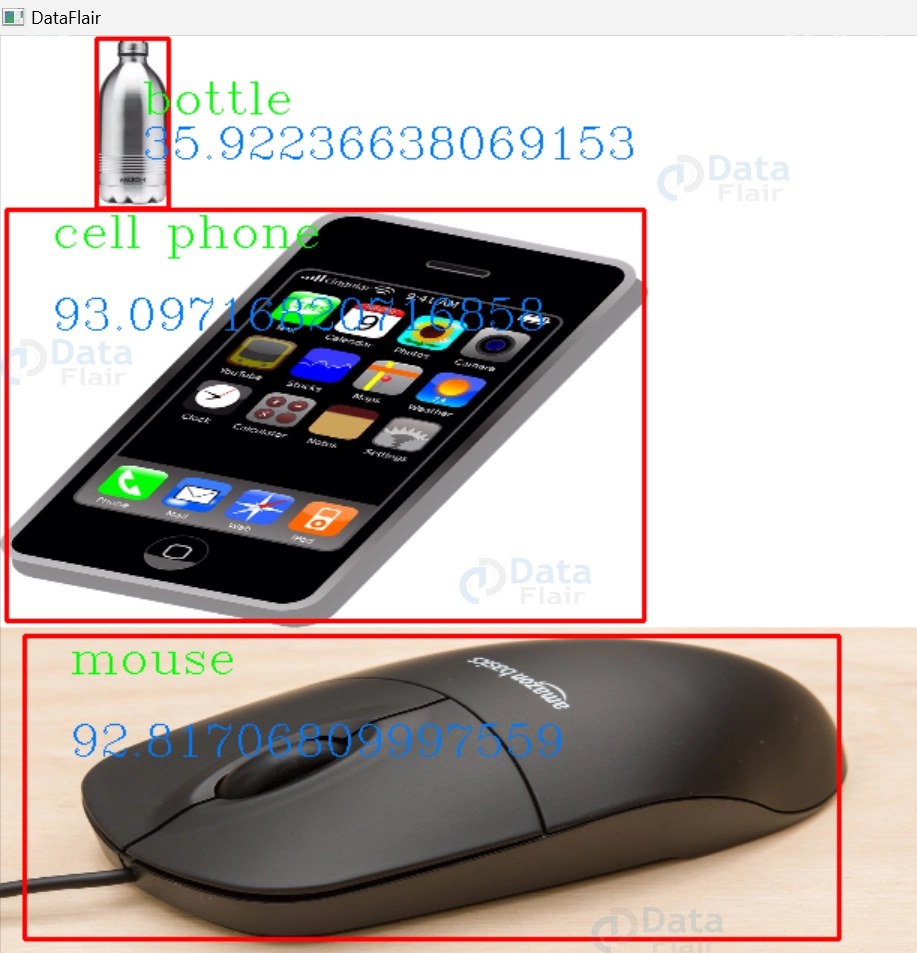


Confusion Matrix


Conclusion
In summary, multiple object recognition, technology and human perception unite in remarkable ways. As images flood our digital age, swiftly identifying and categorizing objects becomes essential. As we venture forward, multiple forward, multiple object recognition becomes a cornerstone, driving us toward a new era of visual understanding, offering insights and efficiencies that reshape industries and enrich our knowledge.
