Detect Supported Video Formats with JavaScript
 Over the past few years we've been seeing new audio, video, and image formats take shape to challenge the legacy formats that we've used since the web's inception. This is a great development as we have more processing power and better compression algorithms have been developed, leading to faster load times and rendering. Hooray for speed!
The problem: as with every other features added to the browser, some browsers get media format support faster than others, and some browsers refuse to support given formats. Simply put: we now need to do feature detection on media, something we've not traditionally had to do. A while back I posted about how you can detect WEBP support in the browser and now I'd like to show you how to detect supported video formats -- it's easier than you think!
Over the past few years we've been seeing new audio, video, and image formats take shape to challenge the legacy formats that we've used since the web's inception. This is a great development as we have more processing power and better compression algorithms have been developed, leading to faster load times and rendering. Hooray for speed!
The problem: as with every other features added to the browser, some browsers get media format support faster than others, and some browsers refuse to support given formats. Simply put: we now need to do feature detection on media, something we've not traditionally had to do. A while back I posted about how you can detect WEBP support in the browser and now I'd like to show you how to detect supported video formats -- it's easier than you think!
HTMLVideoElement.prototype.canPlayType
canPlayType is the secret to detecting video format support in the browser. To use this method you must first create a <video> element instance:
const video = document.createElement('video');
You then call canPlayType, passing in the format's MIME type and additional details as needed:
video.canPlayType('video/webm; codecs="vp8, vorbis"'); // "probably"
There are three possible results from canPlayType:
"probably" : The media type appears to be playable"maybe": Cannot tell if the media type is playable without playing it"": The media type is not playable
Format Detection Function
Modernizr includes a small function to detect video format support; I've taken a moment to take that logic and create my own function for general purpose use without Modernizr:
function supportsVideoType(type) {
  // Allow user to create shortcuts, i.e. just "webm"
  const formats = {
    ogg: 'video/ogg; codecs="theora"',
    h264: 'video/mp4; codecs="avc1.42E01E"',
    webm: 'video/webm; codecs="vp8, vorbis"',
    vp9: 'video/webm; codecs="vp9"',
    hls: 'application/x-mpegURL; codecs="avc1.42E01E"'
  };

  const video = document.createElement('video');
  return video.canPlayType(formats[type] || type);
}

// Usage
if(supportsVideoType('webm') === "probably") {
  // Set the video to webm
}
else {
  // Set the video to mpeg or mp4
}
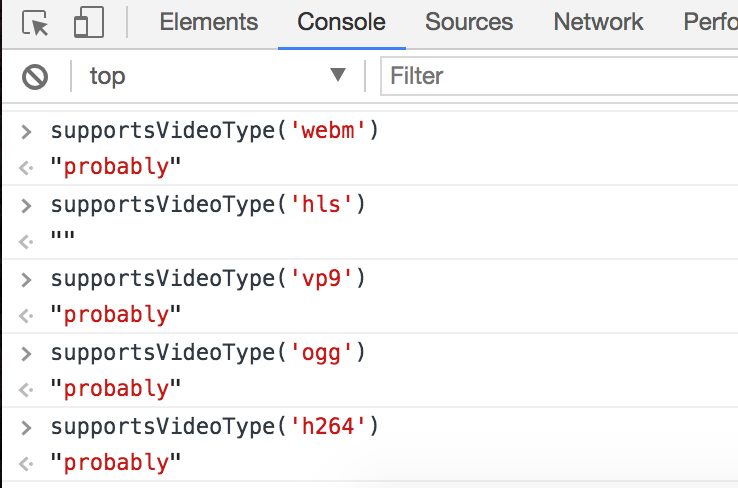
I use feature detection function efficiency to only create one element and simply return the result if called more than once. Using this function today, Chrome reports the following:
The canPlayType method allowed you to feature detect the best compression and supported formats and server them to your users, thus making the most of your browser capabilities. Get aggressive with your media formats to make your site as quick as possible!
![Vibration API]()
Many of the new APIs provided to us by browser vendors are more targeted toward the mobile user than the desktop user. One of those simple APIs the Vibration API. The Vibration API allows developers to direct the device, using JavaScript, to vibrate in...
![Chris Coyier’s Favorite CodePen Demos]()
David asked me if I'd be up for a guest post picking out some of my favorite Pens from CodePen. A daunting task! There are so many! I managed to pick a few though that have blown me away over the past few months. If you...
![Create an Animated Sliding Button Using MooTools]()
Buttons (or links) are usually the elements on our sites that we want to draw a lot of attention to. Unfortunately many times they end up looking the most boring. You don't have to let that happen though! I recently found a...
![Introducing MooTools LinkAlert]()
One of my favorite Firefox plugins is called LinkAlert. LinkAlert shows the user an icon when they hover over a special link, like a link to a Microsoft Word DOC or a PDF file. I love that warning because I hate the surprise...








Thank you for this article and info, but I am sorry, this is insane. WTF MAYBE, PROBABLY means??? Why not TRUE, FALSE, null or whatever similar?
hls returns false everywhere, except Edge. But works everywhere except IE…
This is a great tip! Does anyone know what the proper MIME type would be for a .mov file with HEVC/h.265 encoding for safari?
Am I missing something?
function supportsVideoType(type) { let video; // <-- this is a local variable // Allow user to create shortcuts, i.e. just "webm" let formats = { ogg: 'video/ogg; codecs="theora"', h264: 'video/mp4; codecs="avc1.42E01E"', webm: 'video/webm; codecs="vp8, vorbis"', vp9: 'video/webm; codecs="vp9"', hls: 'application/x-mpegURL; codecs="avc1.42E01E"' }; if(!video) { // <--videowill always beundefined, so!videowill always be true video = document.createElement('video') } return video.canPlayType(formats[type] || type); }