

Beschreibung
Mit Polylang, das vollständig in WordPress integriert ist und nur die eingebauten Kernfunktionen (Taxonomien) verwendet, kannst du die Leistung deiner Website konstant halten und eine mehrsprachige Website mit nur einer zusätzlichen Sprache oder mehr als 10 Sprachen erstellen, je nach Bedarf. Die Anzahl der hinzugefügten Sprachen ist nicht begrenzt und die Sprachpakete von WordPress werden automatisch heruntergeladen, sobald sie verfügbar sind.
Funktionen
Abhängig davon, welche Art von Website du erstellt hast oder erstellen möchtest, könnte eine Kombination von Plugins aus der Liste unten für dich interessant sein.
Alle Plugins enthalten einen Assistenten, mit dem du sie mit nur wenigen Klicks einrichten kannst.
Polylang
Polylang und Polylang Pro haben die gleichen Kernfunktionen wie:
- Übersetzen von Beiträgen, Seiten, Medien, Kategorien, Beitrags-Schlagwörtern, individuellen Inhaltstypen und Taxonomien, RSS-Feeds; RTL-Skripte werden unterstützt.
- Die Sprache wird entweder durch den Sprachcode in der URL festgelegt, oder du verwendest für jede Sprache eine andere (Sub-)domain.
- Automatisches Kopieren von Kategorien, Beitrags-Schlagwörtern und anderen Metadaten beim Erstellen einer Übersetzung eines neuen Beitrags oder einer Seite.
- Übersetzen von klassischen Menüs und klassischen Widgets. Auch zugänglich mit Site-Editor-Classic-Funktionen in Block-Themes.
- Anpassbare Sprachumschalter, verfügbar als klassisches Widget oder klassisches Navigationsmenüelement.
- Kompatibilität mit Yoast SEO.
Polylang Pro
Optimiert den Zeitaufwand für die Übersetzung deiner Website mit einigen sehr nützlichen Zusatzfunktionen wie:
- Bessere Integration in den neuen Block-Editor.
- Sprachumschalter ist als Block verfügbar.
- Sprachoptionen sind im Widget-Block-Editor verfügbar.
- Im Website-Editor (FSE) übersetzbare Template-Teile.
- Dupliziere und/oder synchronisiere Inhalte über Beitrags-Übersetzungen hinweg.
- Verbesserte Kompatibilität mit anderen Plugins wie ACF Pro.
- Nutze dieselbe URL-Titelform für Beiträge oder Begriffe in verschiedenen Sprachen.
- Übersetzen von URL-Titelformen für Kategorien, Autorenbasen, individuelle Inhaltstypen und mehr …
- Maschinelle Übersetzung mit DeepL.
- Export und Import von Inhalten im XLIFF-Format für ausgelagerte professionelle Übersetzungen.
- Zugang zum Premium-Support für persönliche Unterstützung.
Polylang for WooCommerce
Add-on für die Kompatibilität mit WooCommerce, das Funktionen bietet wie:
- Übersetzen von WooCommerce-Seiten (Shop, Kasse, Warenkorb, Mein Konto), Produktkategorien und globalen Attributbegriffen direkt in der WooCommerce-Oberfläche.
- Übersetzen von WooCommerce-E-Mails und Versenden an Kunden in deren Sprache.
- Synchronisierung von Produkt-Metadaten.
- Kompatibilität mit dem nativen WooCommerce CSV-Import und -Export-Tool.
- Kompatibilität mit beliebten Plugins wie WooCommerce Subscriptions, Product Bundles, WooCommerce Bookings, Shipment Tracking und mehr.
- Die Fähigkeit, die WooCommerce-REST-API zu verwenden (verfügbar mit Polylang Pro).
- Zugang zum Premium-Support für persönliche Unterstützung.
Unsere anderen kostenlosen Plugins
- WPML to Polylang ermöglicht die Migration von WPML zu Polylang.
- Site Editor Classic Features ermöglicht die Verwendung der klassischen Widgets (einschließlich des Polylang-Sprachumschalters) und Menüs im Website-Editor (FSE).
Danksagungen
Vielen Dank an alle Übersetzer, die bei der Übersetzung von Polylang helfen. Vielen Dank an Alex Lopez für das Design von Banner und Logo. Die meisten in Polylang enthaltenen Flaggen kommen von famfamfam und sind Public Domain. Wo Code Dritter verwendet wurde, enthält der Code im Kommentar eine Namensnennung.
Screenshots

Die Polylang Sprachen-Administration 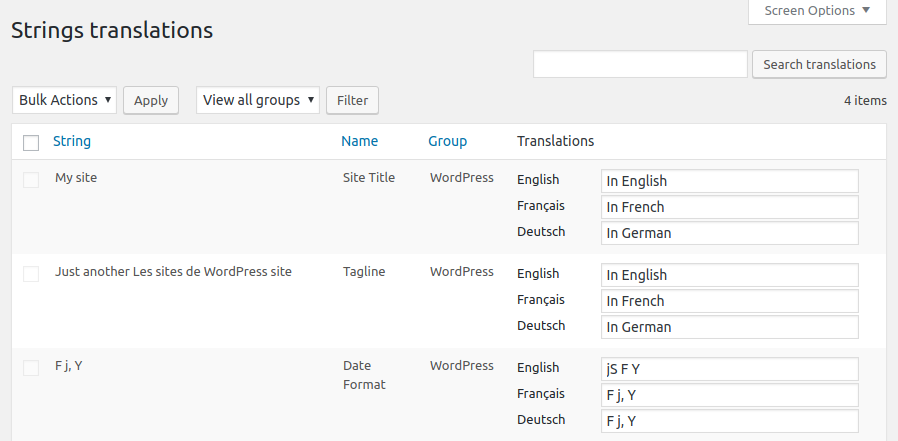
Administration der Zeichenfolgen-Übersetzungen 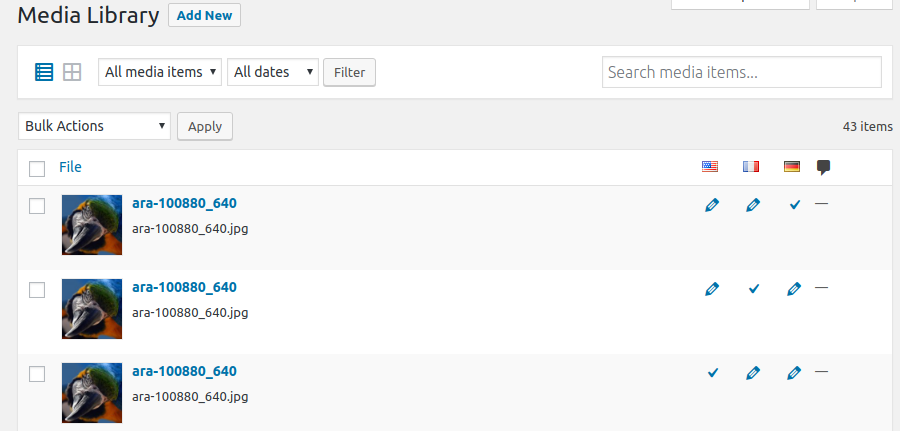
Mehrsprachige Mediathek 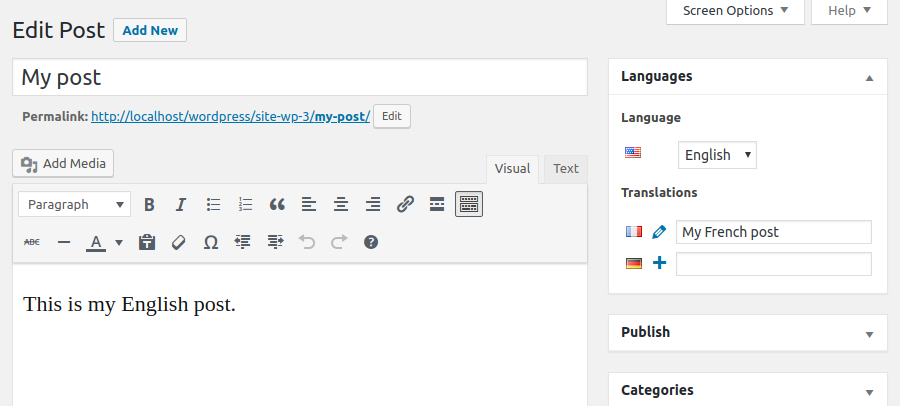
Der Beitragseditor mit Sprach-Metaboxen


Installation
- Stelle sicher, dass du WordPress 6.2 oder höher verwendest und dass auf deinem Server PHP 7.2 oder höher läuft (dieselbe Anforderung wie WordPress selbst).
- Wenn du andere Plugins zur Mehrsprachigkeit ausprobiert hast, deaktiviere sie, bevor du Polylang aktivierst, da es sonst zu unerwarteten Ergebnissen kommen kann.
- Installiere und aktiviere das Plugin wie üblich in WordPress über das Menü „Plugins“.
- The setup wizard is automatically launched to help you get started more easily with Polylang by configuring the main features.
FAQ
-
Wo finde ich Hilfe?
-
- First time users should read Polylang – Getting started, which explains the basics and includes a lot of screenshots.
- Read the documentation. It includes a FAQ and the documentation for developers.
- Suche im Community-Supportforum. Du findest höchstwahrscheinlich deine Antwort dort.
- Lies den oben gehaltenen Beitrag im Support Forum.
- Wenn du immer noch ein Problem hast, öffne einen neuen Thread im Support Forum.
- Nutzer von Polylang Pro und Polylang for WooCommerce haben Zugang zu unserem Premium-Support über Helpdesk.
-
Ist Polylang kompatibel mit WooCommerce?
-
- You need Polylang for WooCommerce, premium addon described above, which will make both plugins work together.
-
Where do I report security bugs found in this plugin?
-
- Please report security bugs found in the source code of the Polylang plugin through the Patchstack Vulnerability Disclosure Program. The Patchstack team will assist you with verification, CVE assignment, and notify the developers of this plugin.
Rezensionen


Mitwirkende und Entwickler
„Polylang“ ist Open-Source-Software. Folgende Menschen haben an diesem Plugin mitgewirkt:
Mitwirkende


„Polylang“ wurde in 54 Sprachen übersetzt. Danke an die Übersetzenden für ihre Mitwirkung.
Übersetze „Polylang“ in deine Sprache.
Interessiert an der Entwicklung?
Durchstöbere den Code, sieh dir das SVN Repository an oder abonniere das Entwicklungsprotokoll per RSS.
Änderungsprotokoll
= 3.7.5 (2025-11-10)
- Pro: Updated DeepL supported languages list
- Pro: Fix a regression in cross domain login
- Pro: Fix post object field not correctly translated
- Pro: Fix a fatal error in EDD plugin updater when the request to the server fails
- Pro: Fix locale fallback in WP 6.8+
- Pro: Add
pll_enable_acf_labels_translationfilter allowing to disable the translation of ACF labels - Pro: Fix ACF image field not correctly translated when media translation is active
- Pro: Fix ACF image field in reapeater not copied
- Pro: Fix ACF ajax request unexpectedly filtered by language when editing a field group
- Pro: Fix ACF blocks not translated when included inside a non-ACF block
- Pro: Add compatibility of the duplicate tool with Divi
- Fix Undefined array key „terms“ in canonical.php #1691
- Fix some regressions in the WPML API used by YITH WooCommerce Wishlist #1684
- Fix LinkedIn site title preview with Yoast SEO #1686
- Fix HTML language attribute on login page #1601
- Fix conflict with WP Job Manager Application #1749
3.7.4 (2025-10-28)
- Pro: Security: Fix a ReDoS vulnerability reported by Janine Moreira.
- Security: Fix deserialization of untrusted data reported by Phat RiO – BlueRock via Patchstack.
3.7.3 (2025-06-16)
- Pro: Always display ACF translation settings for field groups formerly translated in versions older than 3.7
- Pro: Fix translation displayed in child fields of ACF layout fields when they should not
- Pro: Fix translation of the ACF field „Choice“ when the translation is set to „Copy once“ or „Synchronize“
- Pro: Fix a PHP warning when translating some blocks
- Pro: Fix impossibility to change the language of an empty post in the block editor
- Fix duplicate values in options #1672
- Fix JS error in media library (grid view) #1674
- Fix language dropdown not present in the media modal accessible from the media library grid view #1675
- Fix DB error introduce by WooCommerce 9.9 #1681
3.7.2 (2025-05-27)
- Pro: Require ACF 6.0+ to activate the integration to avoid fatal errors with older versions
- Pro: Add a new ACF field group setting to decide if translations instructions must be displayed
- Pro: Fix a fatal error when using ACF blocks with ACF < 6.3.0
- Pro: Fix regression preventing to translate Oembed, URL and Email ACF fields
- Pro: Fix ACF fields not translated when they have a default value
- Pro: Fix empty ACF fields values not copied when the field has a default value
- Pro: Fix ACF field default values not translated when copying a post
- Pro: Fix possible fatal error if invalid types of data are sent for machine translation
- Pro: Fix term meta removed when a term is machine translated
- Fix nav menu locations not saved if invalid data are stored in database #1659
- Fix parent relationship removed when a new translated term is created without parent #1671
3.7.1 (2025-05-05)
- Pro: Do not display ACF fields translations settings when language location is set.
- Pro: Fix ACF taxonomy field terms not synchronized when „Save Terms“ and „load terms“ settings are activated.
- Pro: Fix duplicate options when using numeric keys for ACF choice fields.
3.7 (2025-04-22)
- Erfordert PHP 7.2 als Mindestversion
- Pro: Add DeepL machine translation for strings
- Pro: Consider Polylang Pro as equivalent to Polylang for plugin dependencies
- Pro: Add the details block and several labels in other blocks to XLIFF files and machine translation
- Pro: Allow to translate metas stored as objects
- Pro: Enhanced multilingual support of archive template hierarchy
- Pro: Wrap the language switcher block in a nav tag
- Pro: Support automatic IDs translation in blocks with new filters
pll_sync_block_rules_for_attributesandpll_sync_blocks_xpath_rules - Pro: Complete rewrite of ACF integration
- Pro: Add support for ACF blocks, post types and taxonomies.
- Pro: Remove the possibility to translate ACF field groups
- Pro: Add languages in ACF locations
- Pro: Add translation of ACF labels in the strings translations page
- Pro: Fix incorrect count of translated strings when importing strings translations
- Pro: Fix incorrect translation when an XLIFF import updates a term sharing its slug
- Pro: Fix term hierarchy with machine translation
- Pro: Fix indented items of a list block not translated with machine translation
- Pro: Fix navigation block inserted in the wrong language
- Plugin-Updater auf 1.9.4 aktualisiert
- Add translation of widgets custom html in strings translations #1423
- Refactor core to manage the plugin options in an object #1451
- Refactor core to give access to languages management in all contexts #1503
- Remove the language set from the content option for new installs #1517
- Allow numbers in language codes #1546
- Display empty fields in the translations table for untranslated strings (instead of duplicating the original) #1574
- Add REST API endpoints to manage options and languages #1505 #1569
- Improve performance by registering the language taxonomy only once #1359
- Add new API functions to insert and update posts and terms in a given language #1500 #1520
- Add compatibility with jQuery 4 (planned in core for WP 6.8) #1612
- Fix translations not loaded when the language is set from the content #1395
- Fix possible term duplication #1490
- Fix sanitization of translated options that may impact other strings #1571
- Fix home link block not translated #1647
- Fix a conflict with WooCommerce Price Based on Country #1638
See changelog.txt for older changelog
