
C++ Team Blog
The latest in C++, Visual Studio, VS Code, and vcpkg from the MSFT C++ team
Latest posts
OpenMP improvements in Visual Studio C/C++ compiler: triangular loop collapse

Our previous blog post about OpenMP support in Visual Studio announced support for the loop feature in version 17.8. In the meantime, we have continued working on improving the feature and, in Visual Studio 2022 17.10, we have added a new, more efficient algorithm for partitioning work of certain types of collapsed triangular loops supported by the OpenMP Standard 5.2. All this work continues to be accessible if you are using the switch (see the Improved OpenMP Support for C++ in Visual Studio blogpost for details about this switch). In this blog we will describe this algorithm in some detail: Triangular ...
Pure Virtual C++ 2024 is Now Live!

Pure Virtual C++, our free one-day virtual conference for the whole C++ community, is now live! Check it out on YouTube: The sessions are:
Pure Virtual C++ 2024 is Tomorrow
Pure Virtual C++ is our free one-day virtual conference for the whole C++ community. This year it will run on April 30th 15:00 UTC. Sign-up for free to get access to our five sessions on the day. The sessions are: We've added a host of new pre-conference content which you can check out in the meantime. In the last week we've released:
Usability Improvements in the Visual Studio Connection Manager

In Visual Studio 2022 17.10 Preview 2, we’ve introduced some UX updates and usability improvements to the Connection Manager. With these updates we provide a more seamless experience when connecting to remote systems and/or debugging failed connections. Please install the latest Preview to try it out. Read on to learn what the Connection Manager does, and which issues that we resolved. What is the Connection Manager? The Connection Manager is a tool in Visual Studio that allows users to manage and store SSH connections to remote systems. You can add new connections, edit existing connections, and set the defa...
Visual Studio features for C++ Header Files and Modules

In the field of C++ programming, the management of header files and modules can often seem challenging. However, there are numerous tools and features available that can simplify this process, enhancing efficiency and reducing the likelihood of errors. Here’s a walkthrough for several tools that we provide for C++ headers and modules. Run Build Insights Start by running Build Insights, through navigating to Build > Run Build Insights. This tool provides insights into the Include File and Include Tree views to analyze and optimize your #include usage. For instance, in the bullet3 sample repository, run...

Pure Virtual C++ Pre-Conference Videos – Linux Development, Modules, Containers and more!
Pure Virtual C++ is our free one-day virtual conference for the whole C++ community. This year it will run on April 30th 15:00 UTC. Sign-up for free to get access to our five sessions on the day. Half of the pre-conference content for the conference is now available. We have videos on a host of topics: Keep your eye out for more in the run up to the conference!
VS Code C++ Extension 1.19 Release: 3.6x faster Go To Symbol & 1.5x faster colorization

With our recent 1.19 release, performance was our biggest focus for the C++ Extension in Visual Studio Code. This included features like progressive population of IntelliSense results and faster symbol searching. With these enhancements, you can begin writing C++ code when opening a file quicker than ever before. Additionally, we also added support for fuzzy results when searching for symbols. Faster Go To Symbol Search Searching for symbols using the “Go to Symbol in Workspace” command now uses a new algorithm which returns relevant results in a fraction of the time it took previously. This new algorith...
Templates View for Build Insights in Visual Studio


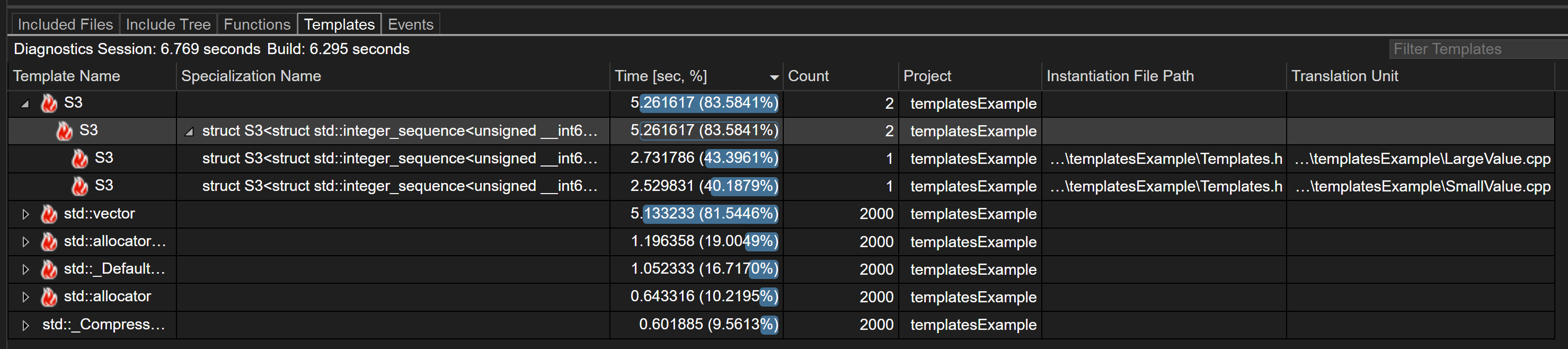
Introduction Introducing the new Templates View feature of Build Insights! Templates View now allows you to capture data about how templates in your codebase are contributing to your build time. This feature is available in Visual Studio 2022 17.10 and later. Download Visual Studio 2022 Getting Started with Templates View To use Build Insights in Visual Studio you will need to ensure you’ve installed the “C++ Build Insights” component. This is installed by default if you’ve installed either the “Desktop development with C++” or “Game development with C++” workloads. By default, Templates View is tur...
MSVC Address Sanitizer adoption in .NET’s CoreCLR

Collaboration to improve the reliability and security of .NET, from the perspective of an MSVC Address Sanitizer Developer Introduction .NET (on GitHub) is a cross-platform, open-source, and general-purpose development platform with widespread adoption. A core component of .NET is the Core Common Language Runtime (CoreCLR), which provides services such as memory management, exception handling, threading, and interoperability with native code. It is used by millions of developers across multiple platforms, including Windows, Linux, and Mac OSx. The CoreCLR is implemented in native code, C and C++, and is a co...
